
1. Introduction
Thank you for choosing the Faber Drip Coffee Machine Model 131.0695.374. This manual provides essential information for the safe and effective use, maintenance, and troubleshooting of your new coffee machine. Please read these instructions carefully before first use and retain them for future reference.
2. Important Safety Instructions
When using electrical appliances, basic safety precautions should always be followed to reduce the risk of fire, electric shock, and injury to persons. These include:
- Read all instructions before operating the appliance.
- Do not touch hot surfaces. Use handles or knobs.
- To protect against fire, electric shock, and injury to persons, do not immerse cord, plugs, or the appliance in water or other liquid.
- Close supervision is necessary when any appliance is used by or near children.
- Unplug from outlet when not in use and before cleaning. Allow to cool before putting on or taking off parts, and before cleaning the appliance.
- Do not operate any appliance with a damaged cord or plug or after the appliance malfunctions or has been damaged in any manner.
- The use of accessory attachments not recommended by the appliance manufacturer may result in fire, electric shock, or injury to persons.
- Do not use outdoors.
- Do not let cord hang over edge of table or counter, or touch hot surfaces.
- Do not place on or near a hot gas or electric burner, or in a heated oven.
- Always attach plug to appliance first, then plug cord into the wall outlet. To disconnect, turn any control to “off,” then remove plug from wall outlet.
- Do not use appliance for other than intended use.
- Exercise extreme caution when disposing of hot steam.
- The appliance features dry heat protection for safe usage during accidental dry operation.
3. Product Overview
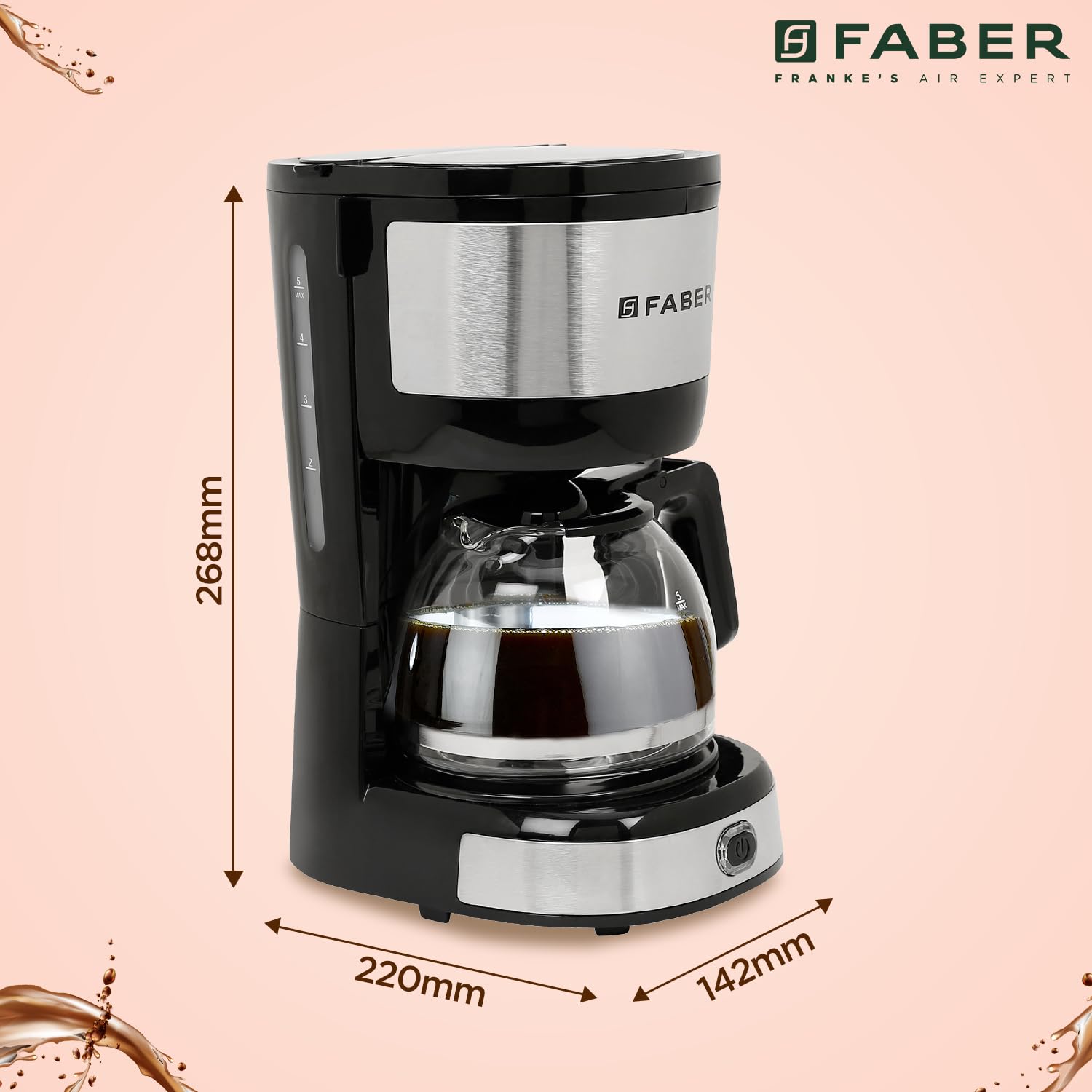
Familiarize yourself with the components of your Faber Drip Coffee Machine.

- Top Cover: Protects the water reservoir and filter area.
- Water Gauge: Indicates the water level in the reservoir.
- Warming Plate: Keeps the brewed coffee warm for up to 30 minutes.
- Coffee Filter Basket: Holds the ground coffee during brewing. This component is removable for cleaning.
- Handle: Ergonomically designed for safe handling of the carafe.
- Glass Carafe: Collects the brewed coffee. Capacity is 0.6 liters (approximately 4 big cups).
- Power Switch: To turn the machine on and off.
4. Setup and First Use
4.1 Unpacking
Carefully remove all packaging materials and check that all parts are present and undamaged. Dispose of packaging responsibly.
4.2 Initial Cleaning
Before first use, clean all removable parts (carafe, filter basket) with warm, soapy water. Wipe the exterior of the machine with a damp cloth. Do not immerse the main unit in water.
4.3 First Brew Cycle (Cleaning)
To clean the internal components, perform a brew cycle with only water:
- Fill the water reservoir with clean water up to the maximum level indicated by the water gauge.
- Place the empty filter basket into its position. Do not add coffee.
- Place the empty glass carafe on the warming plate.
- Plug the machine into a power outlet and press the power switch to start the brewing cycle.
- Allow the cycle to complete. Discard the hot water from the carafe.
- Repeat this process once or twice to ensure thorough cleaning.

5. Operating Instructions
5.1 Brewing Coffee
Follow these steps to brew coffee:
- Ensure the machine is unplugged and cooled if previously used.
- Open the top cover and fill the water reservoir with fresh, cold water using the glass carafe. Refer to the water gauge for desired cup markings. Do not exceed the maximum fill line.
- Place the removable filter basket into its designated slot.
- Add ground coffee into the filter basket. Use approximately one level scoop (provided) per cup, adjusting to your taste.
- Close the top cover securely.
- Place the empty glass carafe onto the warming plate. Ensure it is correctly positioned to activate the drip-stop mechanism.
- Plug the power cord into a suitable electrical outlet.
- Press the power switch to begin brewing. The indicator light will illuminate.
- Brewing typically takes less than 6 minutes. Once brewing is complete, the machine will automatically switch to the warming function.
- The warming plate will keep the coffee warm for approximately 30 minutes. After this period, the machine will automatically shut off.


6. Maintenance and Cleaning
Regular cleaning ensures optimal performance and extends the life of your coffee machine.
6.1 Daily Cleaning
- Carafe and Filter Basket: After each use, remove the glass carafe and filter basket. Wash them in warm, soapy water. Rinse thoroughly and dry. These parts are not dishwasher safe.
- Exterior: Wipe the exterior surfaces of the coffee machine with a soft, damp cloth. Do not use abrasive cleaners or scouring pads.
- Warming Plate: Wipe the warming plate with a damp cloth. Do not use abrasive materials.

6.2 Descaling
Mineral deposits from water can build up in your coffee machine over time, affecting performance. Descale your machine every 2-3 months, or more frequently if you have hard water.
- Prepare a descaling solution according to the manufacturer's instructions (e.g., white vinegar and water, or a commercial descaling agent).
- Pour the solution into the water reservoir.
- Place the empty filter basket and carafe.
- Run a brewing cycle.
- After the cycle, let the machine sit for 15-30 minutes.
- Run several cycles with clean water to rinse out any remaining descaling solution.
7. Troubleshooting
Refer to the table below for common issues and their solutions.
| Problem | Possible Cause | Solution |
|---|---|---|
| Coffee does not brew. | Machine not plugged in; Power switch off; No water in reservoir. | Ensure power cord is securely plugged in; Turn power switch on; Fill water reservoir. |
| Coffee is too weak. | Insufficient coffee grounds; Coarse grind; Too much water. | Add more coffee grounds; Use a finer grind; Use less water. |
| Coffee overflows from filter basket. | Too much coffee grounds; Filter basket not seated correctly; Clogged filter. | Reduce coffee grounds; Ensure filter basket is properly seated; Clean or replace filter. |
| Machine leaks. | Carafe not positioned correctly; Water reservoir overfilled. | Ensure carafe is centered on warming plate; Do not exceed max fill line in water reservoir. |
| Coffee is not hot enough. | Warming plate not active; Descaling needed. | Ensure machine is on and warming plate is active; Descale the machine. |
8. Specifications
Key technical specifications for the Faber Drip Coffee Machine Model 131.0695.374:
| Feature | Specification |
|---|---|
| Brand | Faber |
| Model Number | 131.0695.374 |
| Capacity | 0.6 Liters (approx. 4 big cups) |
| Power | 800 Watts |
| Color | Black |
| Coffee Maker Type | Drip Coffee Machine |
| Material | Plastic, Stainless Steel |
| Operation Mode | Fully Automatic |
| Human Interface Input | Buttons |
| Item Weight | 1.27 Kilograms |
| Item Dimensions (LxWxH) | 22 x 14.2 x 26.8 Centimeters |
| Dishwasher Safe | No |
| Special Features | Warming Plate, Removable Filter, Water Level Indicator, Dry Heat Protection |
9. Warranty and Support
9.1 Warranty Information
This Faber Drip Coffee Machine comes with a 1-year warranty from the date of purchase, covering manufacturing defects. Please retain your purchase receipt as proof of purchase for warranty claims. The warranty does not cover damage caused by misuse, accident, unauthorized modifications, or normal wear and tear.
9.2 Customer Support
For technical assistance, warranty claims, or any questions regarding your product, please contact Faber customer service. Refer to the contact information provided with your product packaging or visit the official Faber website for support details.
10. Product Overview Video
Watch this video for a visual overview of the Faber Drip Coffee Machine's features and benefits.
This video provides a concise overview of the Faber Drip Coffee Machine, highlighting its key features such as the 800W power, 0.6L capacity, warming plate, removable filter, water level indicator, and dry heat protection. It demonstrates the product's design and functionality.