
Lemorele TC96L
Lemorele USB C Hub TC96L User Manual
Model: TC96L
1. Introduction
Thank you for choosing the Lemorele USB C Hub TC96L. This 13-in-1 docking station is designed to expand the connectivity of your USB-C or Thunderbolt 3 enabled laptop, providing a wide range of ports for various peripherals and external displays. This manual will guide you through the setup, operation, and maintenance of your device to ensure optimal performance and longevity.

Image 1.1: The Lemorele USB C Hub TC96L, showcasing its compact design and multiple connectivity options including USB-A, USB-C, HDMI, and Ethernet ports.
2. Product Features
The Lemorele TC96L USB C Hub offers a comprehensive solution for expanding your laptop's capabilities. Key features include:
- 13-in-1 Connectivity: Expands a single USB-C/Thunderbolt 3 port into 13 versatile ports.
- Dual 4K HDMI Output: Connect up to two 4K displays at 30Hz.
- 1080P VGA Output: Connect an additional display via VGA at 60Hz.
- High-Speed USB Data Transfer: Two USB 3.1 (10Gbps) ports and two USB 2.0 ports for peripherals.
- SD/TF Card Reader: Integrated slots for convenient memory card access.
- Gigabit Ethernet: Provides a stable and fast wired network connection (1000Mbps).
- Audio Jack: 3.5mm microphone/audio jack for headphones or speakers.
- Power Delivery (PD) 100W: Supports up to 100W input and 87W safe output for laptop charging.
- USB-C Data Transfer: Dedicated USB-C port for 10Gbps data transfer.
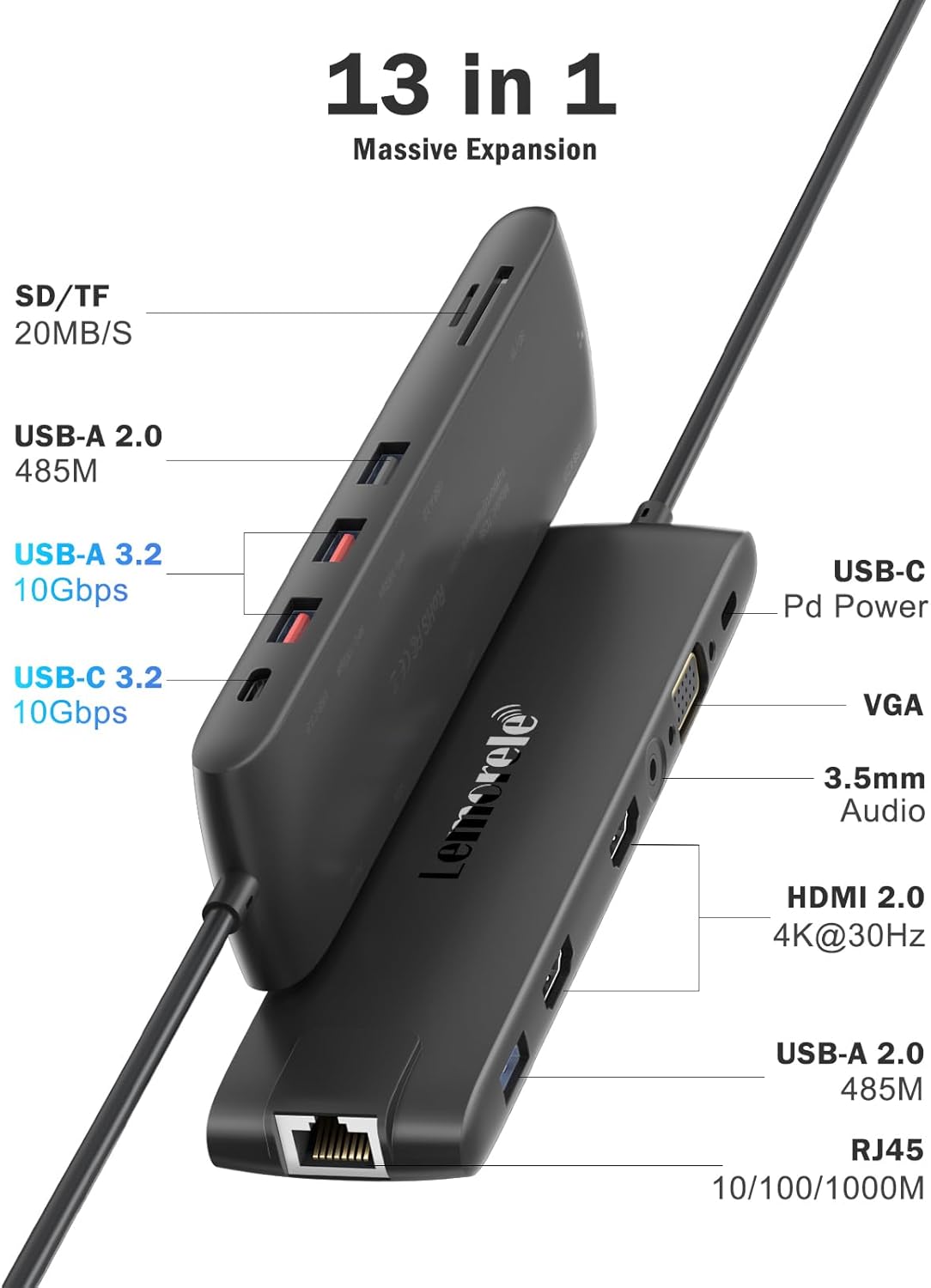
Image 2.1: Detailed diagram illustrating all 13 ports available on the Lemorele USB C Hub TC96L, including SD/TF card slots, USB-A, USB-C, VGA, HDMI, 3.5mm audio, and RJ45 Ethernet.

Image 2.2: Visual representation of the Super-Speed USB 3.2 Gen2 capabilities of the hub, highlighting 10Gbps transfer rates for USB-C 3.2 and USB 3.2 ports, significantly faster than USB 2.0.
3. Setup Instructions
The Lemorele TC96L is a plug-and-play device, requiring no driver installation for basic functionality. Follow these steps to set up your hub:
- Connect to Host Device: Plug the integrated USB-C cable from the TC96L hub into a compatible USB-C or Thunderbolt 3 port on your laptop or host device.
- Power Connection (Optional but Recommended): For stable operation, especially when connecting multiple power-consuming devices or charging your laptop, connect a USB-C power adapter (not included, at least 65W recommended) to the PD 100W USB-C input port on the hub.
- Connect Peripherals:
- Displays: Connect your HDMI monitors to the 4K HDMI ports and/or your VGA monitor to the 1080P VGA port.
- USB Devices: Plug in your USB-A devices (e.g., keyboard, mouse, external hard drive) into the USB 3.1 or USB 2.0 ports.
- Network: Connect an Ethernet cable to the RJ45 Gigabit Ethernet port for a wired internet connection.
- Audio: Connect headphones or speakers to the 3.5mm audio jack.
- Memory Cards: Insert SD or TF cards into the respective slots.
Note: Ensure your laptop's USB-C port supports video output (DisplayPort Alternate Mode) and Power Delivery for full functionality. Incompatible laptops may not utilize HDMI/VGA ports.
4. Operating Instructions
4.1 Display Modes
The hub supports various display configurations for external monitors:
- Extended Mode (Windows): Allows you to extend your desktop across multiple external monitors, providing more working space. You can use 2*HDMI (Max 4K@30Hz) and 1*VGA (Max 1080@60Hz) simultaneously. When using 2 HDMI, VGA, and the laptop screen simultaneously on Windows, one screen will typically go black.
- Mirror Mode (Windows/macOS): Duplicates your laptop's display onto all connected external monitors. For macOS laptops, due to system limitations, only mirror mode (SST Mode) is supported, meaning all external screens will display the same content (A-AAA). Extended mode for macOS will show the same image on external monitors (A-BBB).

Image 4.1: Illustration of display modes, showing a tablet in "Transmission Mode" connected to the hub, and a laptop in "Mirror Mode" connected to two external monitors, demonstrating how content is displayed.
4.2 Power Delivery
The USB-C PD port supports up to 100W power input. When connected to a compatible power adapter, it can deliver up to 87W (safe output) to charge your laptop while simultaneously powering the hub and connected peripherals. Ensure your laptop's USB-C port supports Power Delivery protocol for this feature to function.

Image 4.2: The Lemorele USB C Hub TC96L connected to a power source, demonstrating its 100W Power Delivery capability to charge a laptop and a smartphone simultaneously.
4.3 Network Connection
Utilize the RJ45 Gigabit Ethernet port for a stable and high-speed internet connection, offering up to 1000Mbps, which is significantly faster and more reliable than typical Wi-Fi connections.

Image 4.3: The Lemorele USB C Hub TC96L providing a stable 1000Mbps wired network connection to a laptop via its RJ45 Gigabit Ethernet port, contrasting with slower Wi-Fi speeds.
5. Compatibility
The Lemorele TC96L is compatible with most Thunderbolt 3 and USB-C devices that support DisplayPort Alternate Mode and Power Delivery. This includes, but is not limited to:
- MacBook Pro (2016 and later)
- MacBook Air (2018 and later)
- Dell XPS 13/15
- Lenovo Yoga 720/910/920/930
- Microsoft Surface Book 2/Surface Go/Surface Laptop 3
- Dell Latitude 13 7000/Latitude 13 E7370
- Dell Precision 3510
Important: Please verify that your device's USB-C port supports video output (DisplayPort Alt Mode) and Power Delivery for full functionality of the hub's HDMI, VGA, and charging features.
6. Maintenance
To ensure the longevity and optimal performance of your Lemorele USB C Hub TC96L, follow these maintenance guidelines:
- Cleaning: Use a soft, dry cloth to clean the hub. Avoid liquid cleaners or abrasive materials.
- Storage: Store the hub in a cool, dry place away from direct sunlight and extreme temperatures.
- Handling: Avoid dropping the device or subjecting it to strong impacts. Do not bend or pull the integrated USB-C cable excessively.
- Ventilation: Ensure the hub has adequate ventilation during use to prevent overheating.
7. Troubleshooting
If you encounter issues with your Lemorele USB C Hub TC96L, please refer to the following common solutions:
- No Display Output:
- Ensure your laptop's USB-C port supports DisplayPort Alternate Mode.
- Check all cable connections (USB-C to laptop, HDMI/VGA to monitor).
- Try connecting a power adapter to the hub's PD port.
- Test with a different monitor or cable if available.
- For macOS, remember only mirror mode is fully supported for external displays.
- No Power Delivery/Charging:
- Verify your laptop's USB-C port supports Power Delivery.
- Ensure the power adapter connected to the hub is at least 65W.
- Check the connection of the power adapter to the hub.
- USB Devices Not Recognized:
- Reconnect the USB device to a different port on the hub.
- Ensure the hub is properly connected to your laptop.
- Try connecting the USB device directly to your laptop to rule out device issues.
- Ethernet Connection Issues:
- Check the Ethernet cable connection to both the hub and your router/modem.
- Verify network settings on your computer.
- Ensure the Ethernet cable is functional by testing with another device.
8. Specifications
| Feature | Detail |
|---|---|
| Model Number | TC96L |
| Product Dimensions | 6.77 x 1.57 x 0.63 inches |
| Item Weight | 1.94 ounces |
| Color | Black |
| Hardware Interface | Ethernet, HDMI, MicroSD, Thunderbolt, USB, USB Type C, VGA |
| USB-C PD Input | Up to 100W |
| USB-C PD Output | Up to 87W (safe) |
| HDMI Output | 2 x 4K@30Hz |
| VGA Output | 1 x 1080P@60Hz |
| USB Data Ports | 2 x USB 3.1 (10Gbps), 2 x USB 2.0 |
| Ethernet | 10/100/1000Mbps Gigabit RJ45 |
| Card Reader | SD/TF |
| Audio Jack | 3.5mm Microphone/Audio |

Image 8.1: Diagram showing the physical dimensions of the Lemorele USB C Hub TC96L, indicating its length, width, and thickness.
9. Support and Warranty
For technical assistance or any inquiries regarding your Lemorele USB C Hub TC96L, please contact our support team.
Email: support@lemorele.com
While specific warranty details are not provided in this manual, please refer to the product packaging or the official Lemorele website for the most up-to-date warranty information.

Image 9.1: The back of the Lemorele USB C Hub TC96L product packaging, displaying contact information for technical assistance, including the support email address.
Related documentsTC96L


Ask a question about this manual
Ask about setup, troubleshooting, compatibility, parts, safety, or missing instructions. Manuals+ will review the question and use this page’s manual context to help answer it.