
CooSpo HW9
Contents
COOSPO HW9 Heart Rate Monitor Armband User Manual
Model: HW9
Your companion for accurate fitness tracking.
Introduction
The COOSPO HW9 is an advanced optical heart rate monitor armband designed to provide precise heart rate and calorie burn data for various fitness activities. Its comfortable design, versatile connectivity, and intelligent features make it an ideal tool for optimizing your workouts and achieving your fitness goals.
What's Included
Your COOSPO HW9 package includes the following components:
- Heart rate monitor sensor (1)
- Arm Strap (2)
- User Manual (1)
- Charge cable (1)
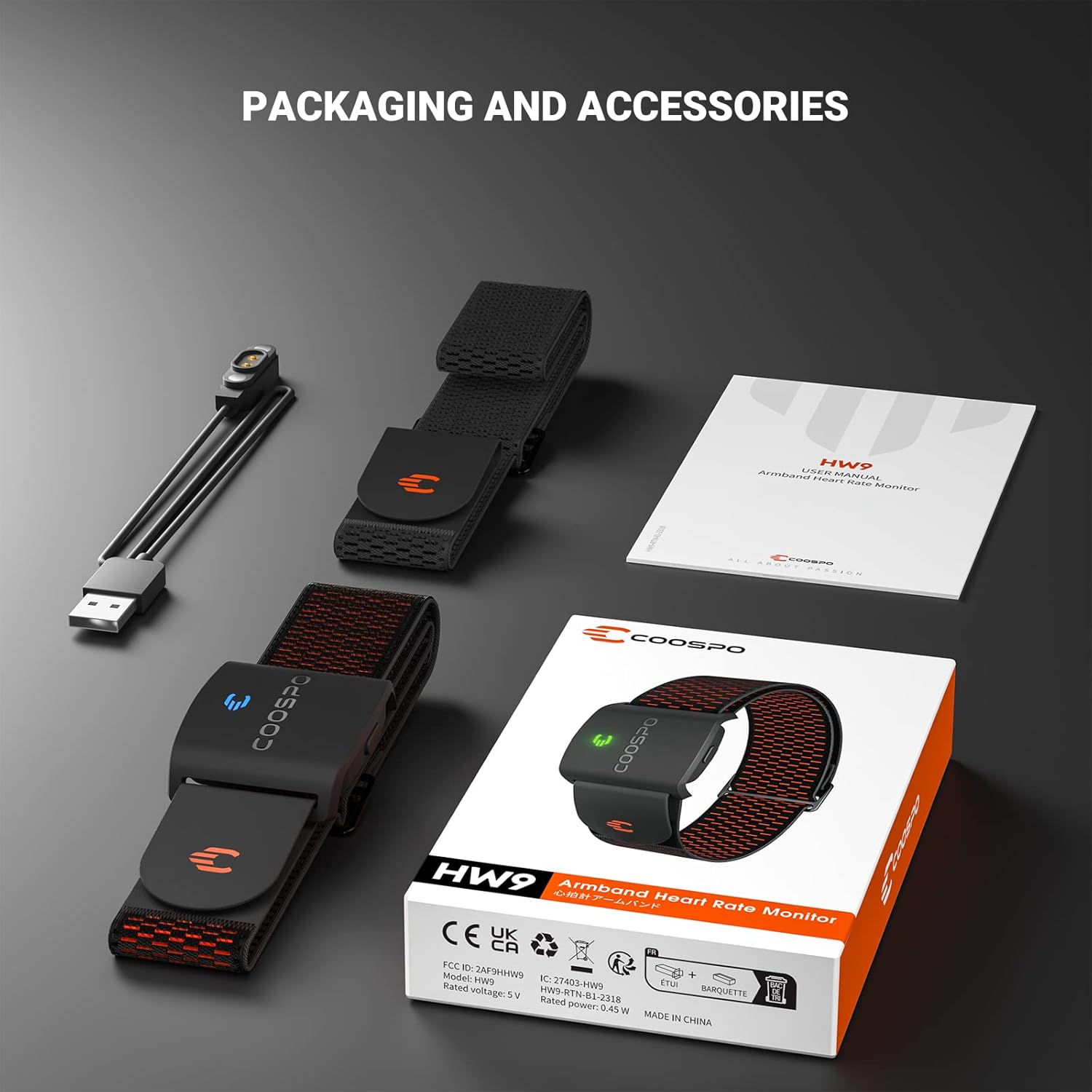
Figure 1: Packaging and Accessories
Setup
Wearing the Armband
For optimal heart rate tracking, wear the armband on your forearm or upper arm. Ensure the sensor is snug but comfortable, allowing the optical sensor to maintain consistent contact with your skin.
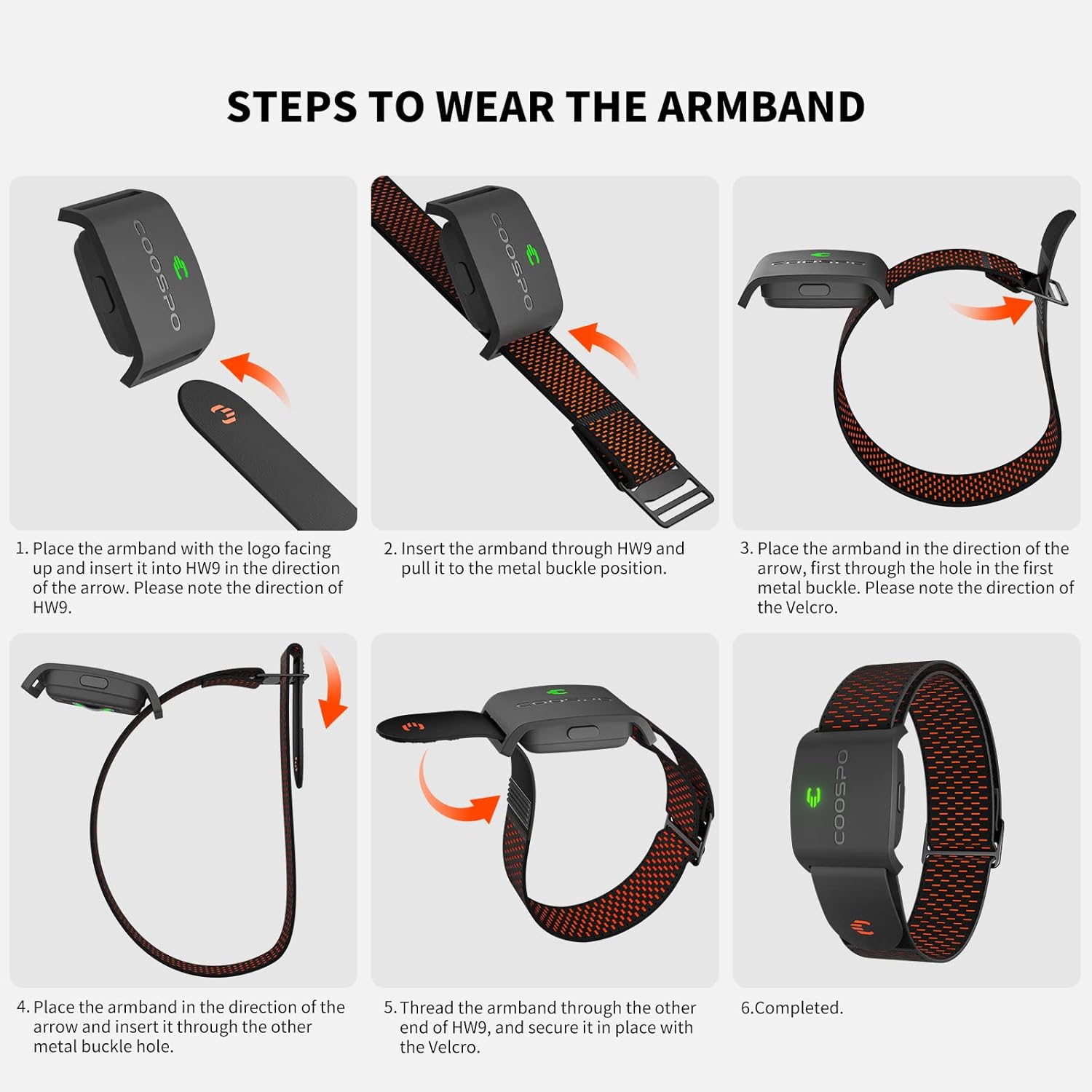
Figure 2: Steps to Wear the Armband
Powering On/Off
- To Power On: Short press the button on the device.
- To Power Off: Long press the button on the device.
Charging the Device
The COOSPO HW9 features a rechargeable battery that provides up to 35 hours of use. Use the provided magnetic charger to connect the device to a DC 5V power adapter or a computer USB port for charging. This helps extend battery life.

Figure 3: Battery Life and Charging
Operating Instructions
Accurate Heart Rate Tracking
The HW9 utilizes optical heart rate technology to deliver precise heart rate and calorie burn data, with a monitoring error of ±1BPM.

Figure 4: Accurate Real-Time Heart Rate Tracking
Heart Rate Zone Monitoring & HRV Function
The HW9 features a 5-color LED indicator light for Heart Rate Zone Training. This allows you to quickly see your current heart rate zone and optimize your intensity levels. The device also supports Heart Rate Variability (HRV) function.

Figure 5: Heart Rate Zone Feature
Connectivity
Equipped with Bluetooth 5.0 and ANT+ technology, the COOSPO HW9 can connect to a wide range of devices including GPS bike computers, fitness apps, fitness devices, and running watches. It supports two simultaneous Bluetooth connections.

Figure 6: Bluetooth 5.0 and ANT+ Technology
App Compatibility
The COOSPO HW9 is compatible with over 200 popular fitness applications, including Wahoo Fitness, Strava, Polar Beat, DDP Yoga, HR monitor, CooSporide, and Elite HRV.

Figure 7: Compatible Training Apps
Max Heart Rate Customization & Vibration
Using the Heartool/Coosporide App, you can customize your real maximum heart rate value with the HW9. This allows for more personalized heart rate zone optimization. When your heart rate exceeds the set maximum value, the HW9 armband will provide a vibration warning to help guard your training safety.
Maintenance
Water Resistance
The COOSPO HW9 is IP67 waterproof. This means it is protected from dust and can withstand immersion in water up to 1 meter for up to 30 minutes. Note: Do not use the device for swimming.
Cleaning and Care
After workouts, it is recommended to wipe the sensor and strap clean with a damp cloth. Ensure the device is dry before storing or charging. The strap material (Acrylonitrile Butadiene Styrene (ABS), Nylon) is designed to be soft, breathable, and adjustable for comfort during exercise.

Figure 8: Comfortable Wearing Design and Dimensions
Troubleshooting
If you encounter any issues with your COOSPO HW9, please consider the following:
- Connectivity Issues: Ensure Bluetooth and ANT+ are enabled on your receiving device. Try restarting both the HW9 and your device.
- Inaccurate Readings: Check that the armband is worn snugly on your arm and the optical sensor is clean and in direct contact with your skin.
- Battery Not Charging: Verify the magnetic charging cable is properly connected and the power source (DC 5V adapter or USB port) is functional.
- App Compatibility: Ensure you are using one of the recommended apps and that the app is updated to its latest version.
For further assistance, refer to the official COOSPO support resources or contact customer service.
Specifications
| Feature | Detail |
|---|---|
| Brand | CooSpo |
| Model Name | COOSPO Real-Zone HW9 Armband Heart Rate Monitor |
| Material | Acrylonitrile Butadiene Styrene (ABS), Nylon |
| Color | COOSPO Heart Rate Monitor Armband HW9 |
| Compatible Devices | Smartphones |
| Screen Size | 0.4 Inches |
| Product Dimensions | 4"L x 4"W x 1.4"H |
| Item Weight | 10 Grams |
| Battery Life | 35 Hours |
| Sensor Type | Optical |
| Battery Description | Lithium-Ion |
| Waterproof Rating | IP67 |
Warranty
The COOSPO HW9 Heart Rate Monitor Armband comes with a 12-month exchange warranty. Please retain your proof of purchase for warranty claims.
Support
For detailed information and additional support, you can refer to the official User Guide PDF available online. The COOSPO Bluetooth 5.0 heart rate armband is compatible with over 200 apps, including Wahoo Fitness, Strava, Polar Beat, DDP Yoga, HR monitor, CooSporide, and Elite HRV. For the best experience, download and utilize the Heartool/Coosporide App to customize settings and view your workout data.
Official User Guide: Download PDF
Ask a question about this manual
Ask about setup, troubleshooting, compatibility, parts, safety, or missing instructions. Manuals+ will review the question and use this page’s manual context to help answer it.