1. Introduction
The Sondery MetroTune is a versatile 3-in-1 device combining a digital metronome, a chromatic tuner, and a tone generator. Designed for musicians of all levels, it features a clear color screen, LED indicators, and intuitive controls for various instruments.

Image: The Sondery MetroTune device, displaying its screen, control buttons, and the central jog dial.
2. Device Overview
The MetroTune features a color screen, three LED indicators, a speaker, a microphone, an input jack, an earphone output, a volume wheel, and a folding kickstand.

Image: Rear view of the MetroTune, highlighting the folding kickstand and the input jack.
3. Setup and Charging
3.1. Charging the Device
To charge the MetroTune, use the included Type-C USB charging cable. Connect it to a 5V USB power source such as a USB adapter, power bank, or computer. The internal 600mAh Li-battery provides approximately 5 hours of continuous use after a 1-hour charge.
Important: Only use a USB-A to USB-C charging cable (like the one provided) or a similar cable. Do not use a USB-C to USB-C cable for charging.

Image: Illustration demonstrating how to charge the MetroTune using a USB-C cable connected to a power adapter, power bank, or laptop.
4. Operating Instructions
4.1. Metronome Mode
The metronome function provides a broad tempo range and various beat and rhythm options, including an English vocal counting feature.
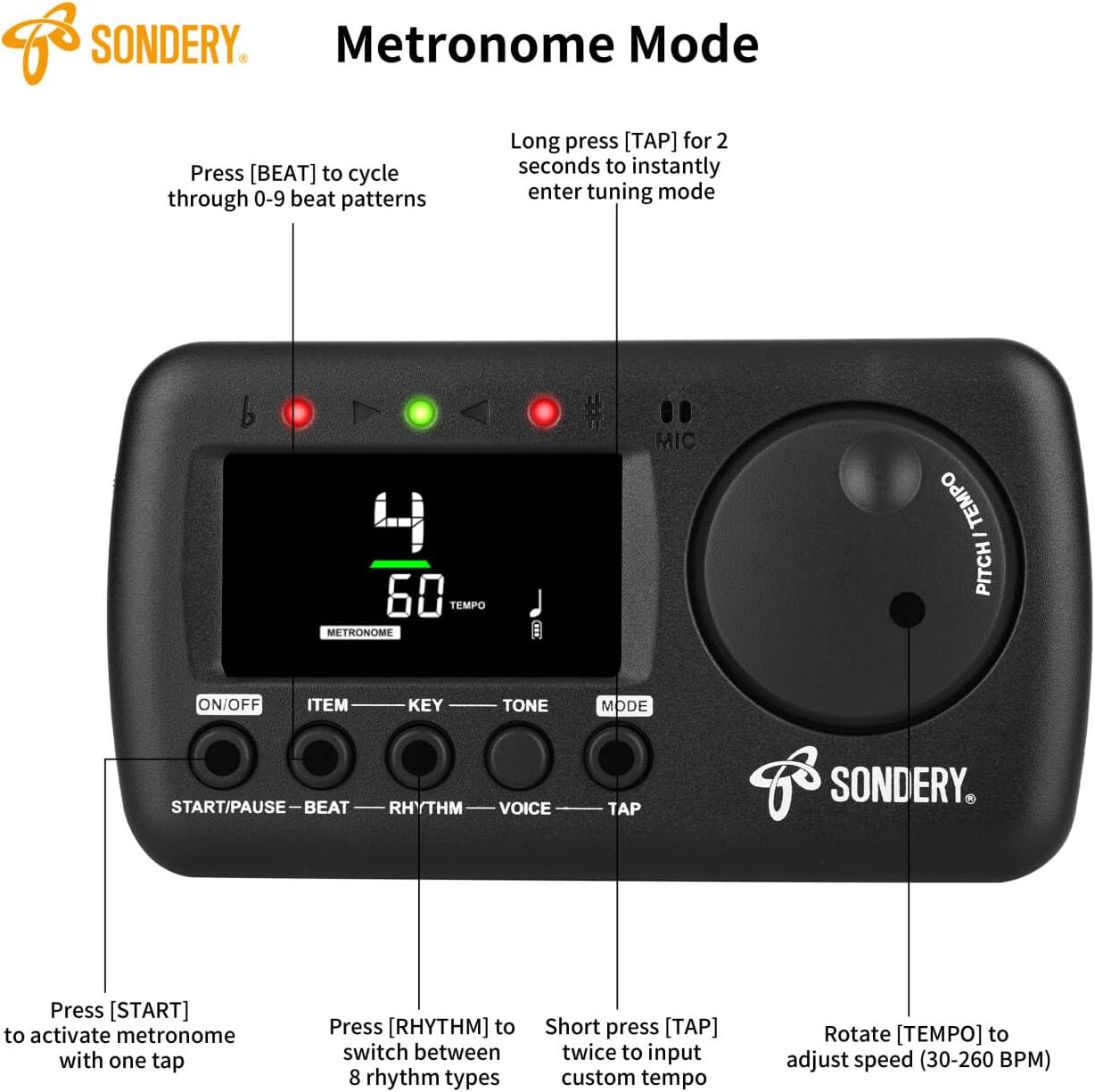
Image: The MetroTune displaying metronome settings, with labels for each control button and the jog dial.
- Start/Pause: Press the 'START/PAUSE' button to begin the metronome. Press it again to pause. When active, the center green meters and three LED indicators will flash. One green indicator and two red indicators light up for the accent beat, while only one green indicator lights for weak beats.
- Tempo Adjustment: Rotate the 'TEMPO' jog dial clockwise or counter-clockwise to select a tempo between 30 and 260 beats per minute (BPM).
- Beat Selection: Press the 'BEAT' button to cycle through beat options: 0, 1, 2, 3, 4, 5, 6, 7, 8, 9.
- Rhythm Selection: Press the 'RHYTHM' button to choose from 8 different time values (rhythms).
- Voice Counting: Press the 'VOICE' button to activate the woman's voice counting function.
- Tap Tempo: To input a custom tempo, continuously press the 'TAP' button. The device records your tempo based on every two presses.
4.2. Tuner Mode
The tuner offers fast and accurate tuning for various instruments and features multiple tuning items and keys.

Image: The MetroTune screen illustrating the visual feedback for flat (left yellow meters), in-tune (center green meters), and sharp (right red meters) conditions.
- Signal Input:
- Internal Microphone: For acoustic instruments, ensure no cable is plugged into the INPUT jack. Place your instrument close to the device to minimize external noise.
- External Cable/Pickup: Use the enclosed piezo pickup cable by inserting it into the INPUT jack and clipping it onto your instrument. Alternatively, a 6.35mm (1/4 inch) mono instrument cable can be used to connect your instrument directly.
- Tuning Process: When a signal is detected, the screen displays the note name and the cent deviation from the target pitch.
- Visual Indicators:
- Flat: Left yellow meters show, and the left red LED indicator lights up.
- In Tune: Center green meters show, and the center green LED indicator lights up (cent ranging from -3 to 3).
- Sharp: Right red meters show, and the right red LED indicator lights up.
- Tuning Items: The tuner supports Chromatic (C), Guitar (G), Bass (B), Ukulele (U), and other instruments like violin, mandolin, piano, saxophone, and trumpet.
- Tuning Keys: Available keys include C, C#, D, Eb, E, F, F#, G, G#, A, Bb, B.
- Pitch Calibration: Adjust the pitch from 410Hz to 450Hz.

Image: The MetroTune in use, connected to an acoustic guitar, showing the tuning display.
4.3. Tone Generator Mode
The MetroTune also functions as a tone generator. Use the jog dial to swiftly select a desired pitch.
4.4. Jog Dial and Kickstand
The jog dial provides easy and quick adjustment of metronome tempo and tone generator pitch. The folding kickstand allows for hands-free use on a flat surface.
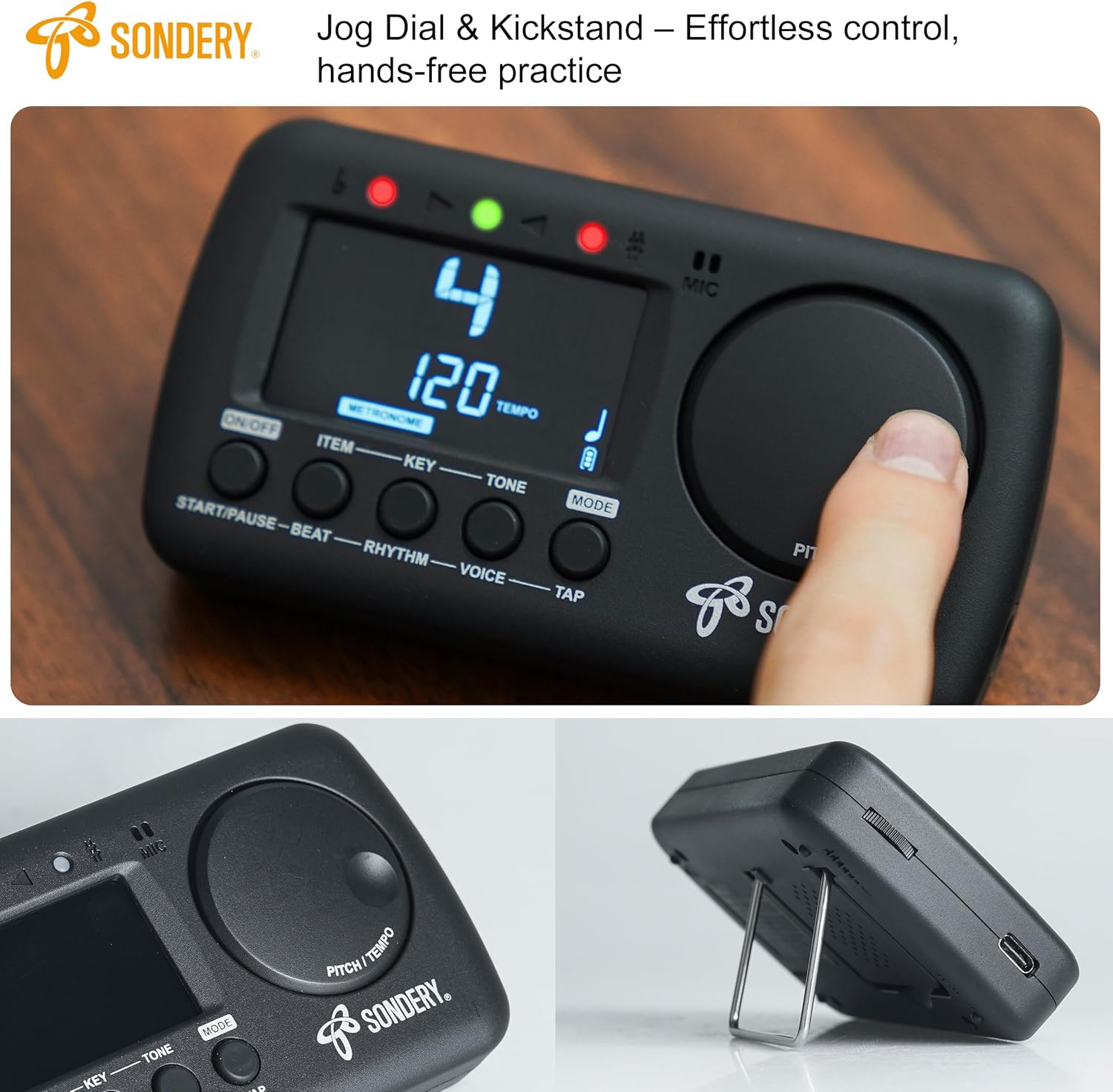
Image: A hand rotating the jog dial on the MetroTune, with an inset showing the device supported by its kickstand.
5. Troubleshooting
5.1. Charging Issues
If the device is not charging, ensure you are using a standard 5V USB-A to USB-C charging cable. High-current fast chargers may not be compatible and can prevent proper charging. Try using a lower-wattage charger if issues persist.
5.2. Metronome Tap Function
The 'TAP' button for metronome tempo input activates upon release, not upon initial press. This design requires a specific timing for accurate tempo detection.
6. Specifications
- Model Number: MetroTune
- Item Weight: 4.3 ounces
- Product Dimensions: 3.35 x 1.14 x 4.96 inches
- Battery: 1 Lithium Polymer battery (included)
- Charging Input: 5V USB (Type-C)
- Tempo Range: 30-260 BPM
- Pitch Calibration: 410Hz-450Hz
7. Warranty and Support
Information regarding product warranty and customer support is not available in the provided documentation. Please refer to the product packaging or the manufacturer's official website for details.