
Introduction
This user manual provides essential information for the safe and effective operation of your HETP 5200mAh Portable USB-C Power Bank. Please read this manual thoroughly before using the device and retain it for future reference.
The HETP 5200mAh Portable USB-C Power Bank is a compact and lightweight external battery designed for on-the-go charging of USB-C compatible devices, including iPhone 15 series, Samsung Galaxy, Motorola, and Google Pixel phones. It features a built-in USB-C connector for direct plug-in charging, an LCD display for battery status, and supports PD fast recharging.
Package Contents
- 1 x HETP 5200mAh USB-C Portable Charger
- 1 x USB-C Charging Cable
- 1 x User Manual
Product Overview
The HETP 5200mAh Portable USB-C Power Bank is designed for convenience and portability. It features a direct plug-in USB-C connector, eliminating the need for extra cables when charging compatible devices. The integrated LCD display provides real-time battery percentage.

Image: The HETP 5200mAh Portable USB-C Power Bank in light purple, directly plugged into the bottom of a smartphone, displaying "100%" on its digital screen. This illustrates the compact, cable-free charging design.

Image: A hand holding the HETP 5200mAh Portable USB-C Power Bank, with a lipstick and a smartphone blurred in the background. This image highlights the extremely mini, pocket-sized design of the power bank, making it easy to carry without a cable.
Setup
Initial Charging of the Power Bank
Before first use, fully charge your HETP Portable USB-C Power Bank. Use the provided USB-C cable to connect the power bank's USB-C input/output port to a compatible USB wall adapter (not included).
- Connect the small end of the USB-C cable to the USB-C port on the left side of the power bank.
- Connect the other end of the USB-C cable to a USB wall charger.
- The LCD display will show the charging progress, indicating the battery percentage.
- Once the display shows "100%", the power bank is fully charged and ready for use.
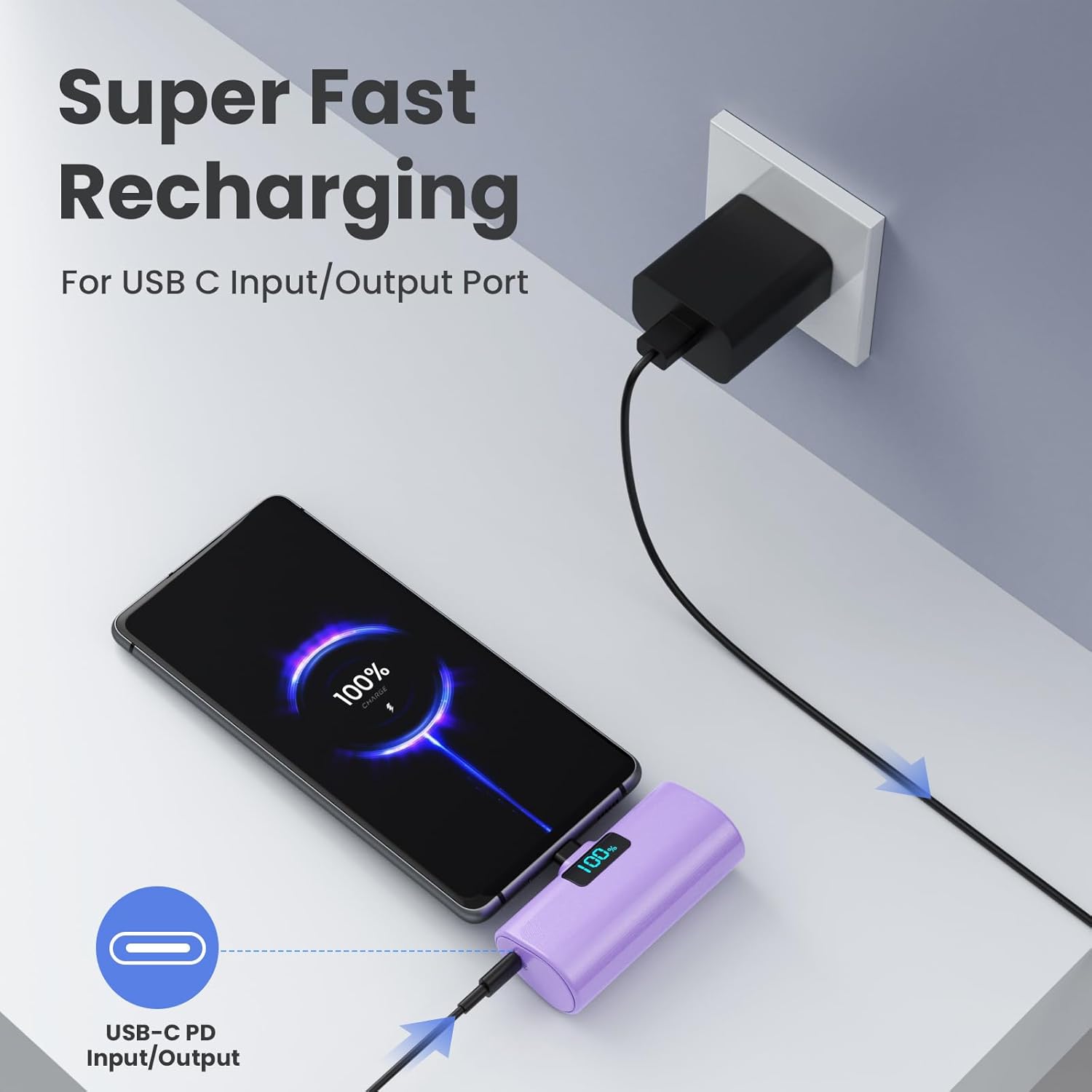
Image: The HETP 5200mAh Portable USB-C Power Bank is shown connected to a wall charger via its USB-C input/output port, indicating "Super Fast Recharging." A smartphone is also connected to the power bank, demonstrating its ability to charge devices while being recharged itself (pass-through charging).
Operating Instructions
Charging Your Device
The HETP Portable USB-C Power Bank is designed for direct plug-in charging of USB-C compatible devices.
- Ensure your device has a USB-C charging port. This power bank is compatible with iPhone 15 series (iPhone 15/15 Plus/15 Pro/15 Pro Max), Samsung Galaxy, Motorola, Google Pixel, LG Android phones, and other USB-C devices.
- Directly plug the built-in USB-C connector of the power bank into your phone's USB-C charging port.
- The power bank will automatically begin charging your device. The LCD display on the power bank will show its remaining battery percentage.
- For optimal connection, ensure your phone case thickness is less than 4mm.

Image: A visual guide displaying the compatibility of the HETP 5200mAh Portable USB-C Power Bank with various USB-C devices, including Samsung (S22/S21/S20, Note 22/21, Z Flip/Fold), LG (G6/G7, V30/V40), Google (Pixel), and the iPhone 15 series (15/15P, 15 Pro/15 Pro Max).
Pass-Through Charging
The power bank supports pass-through charging, allowing you to charge your phone while simultaneously recharging the power bank itself.
- Plug your phone into the power bank using its built-in USB-C connector.
- Connect the power bank to a wall charger using the provided USB-C cable.
- Both your phone and the power bank will charge concurrently.

Image: The HETP 5200mAh Portable USB-C Power Bank is shown plugged into a smartphone, which is then connected to a wall charger. This setup illustrates the pass-through charging capability, allowing both the phone and the power bank to charge simultaneously.
Maintenance
- Keep the power bank dry. Do not expose it to moisture or liquids.
- Avoid extreme temperatures. Do not store in very hot or cold environments.
- Clean the device with a soft, dry cloth. Do not use harsh chemicals or abrasive cleaners.
- Store the power bank with a partial charge (around 50%) if not used for extended periods to preserve battery life.
- Avoid dropping or subjecting the power bank to strong impacts.
Troubleshooting
| Problem | Possible Cause | Solution |
|---|---|---|
| Power bank not charging device. | Low battery on power bank; incorrect connection; device not compatible. | Recharge the power bank; ensure the USB-C connector is fully inserted; verify device compatibility (USB-C port). |
| Power bank not recharging. | Faulty USB-C cable or wall adapter; power bank port issue. | Try a different USB-C cable and wall adapter; ensure the cable is fully inserted into the power bank's input/output port. |
| LCD display not working. | Power bank is completely drained or damaged. | Attempt to recharge the power bank. If it remains unresponsive, contact customer support. |
| Phone case prevents proper connection. | Phone case is too thick. | Remove the phone case before plugging in the power bank, or use a case with a thinner bottom edge (less than 4mm). |
Specifications
- Model: HX45X9
- Battery Capacity: 5200 Milliamp Hours (mAh)
- Battery Type: Lithium Polymer
- Connector Type: Built-in USB Type-C, USB Type-C Input/Output Port
- Dimensions: 3.9 x 3.5 x 1 inches
- Weight: 5 ounces (approx. 98g)
- Special Features: Plug-in USB-C Portable Charger, Lipstick Size, Case-friendly (for cases < 4mm), LCD Digital Display, PD Fast Recharging, Pass-Through Charging.
Warranty and Support
Your HETP 5200mAh Portable USB-C Power Bank comes with a 365-day warranty guarantee from the date of purchase.
For any product inquiries, technical support, or warranty claims, please contact HETP customer service. Our team is available for 24-hour friendly customer service.
Please refer to your purchase documentation or the retailer's website for specific contact information.


