
JEKCA ST19BD28
JEKCA Puffin 01S Building Blocks User Manual
Model: ST19BD28
Introduction and Overview
The JEKCA Puffin 01S is a unique 3D animal installation kit designed for enthusiasts aged 14 and above. Unlike traditional building blocks, JEKCA utilizes a patented interlocking technology that ensures robust and sturdy construction without the need for glue. This manual provides detailed instructions and essential information to help you assemble, care for, and enjoy your JEKCA Puffin model.
Key Features:
- Designed for individuals 14 years old and above.
- Features a patented interlocking brick-through system for sturdy construction.
- Over 990 pieces included for a detailed and engaging build.
- Provides a rewarding experience of craftsmanship and accomplishment.
- Assembly manual included for straightforward, step-by-step guidance.
Safety Information
WARNING: This product contains small parts. It is recommended for individuals aged 14 years and above. Keep out of reach of young children to prevent choking hazards.
Package Contents
Upon opening your JEKCA Puffin 01S package, please ensure all the following items are present:
- Instruction Manual
- JEKCA Building Blocks (over 990 pieces)
- Pins (for interlocking system)
- Pin Screwdriver
Setup and Assembly
The JEKCA building system is designed for stability and ease of assembly. Follow the detailed step-by-step instructions provided in the included instruction manual. The core of the JEKCA system is its unique interlocking mechanism, which uses pins and a screwdriver to secure the blocks firmly.
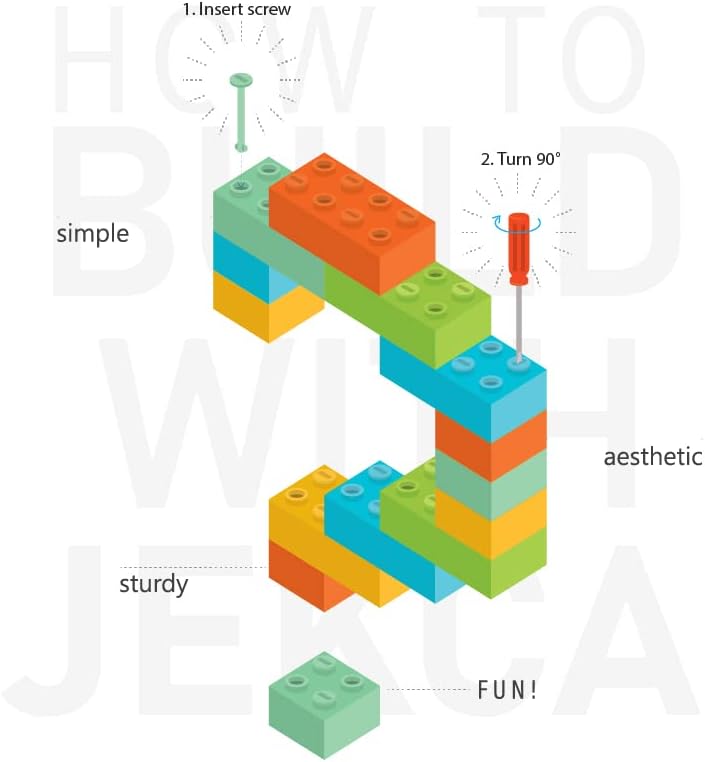
This diagram visually explains the unique JEKCA building method, demonstrating how to use the provided screw and screwdriver to firmly connect the building blocks.
Basic Interlocking Steps:
- Insert Pin: Place the JEKCA pin into the designated hole on the top of a block, ensuring it aligns with the corresponding hole on the block below.
- Turn 90 Degrees: Use the provided pin screwdriver to turn the pin 90 degrees clockwise. This action expands the pin within the blocks, creating a secure and sturdy connection.
- Repeat: Continue this process for all connections as indicated in your assembly manual. Ensure each pin is fully turned for maximum stability.
Always refer to the comprehensive instruction manual included in your package for specific model assembly sequences and detailed diagrams.
Operating (Building Your Model)
Building your JEKCA Puffin model is a rewarding experience. Take your time and follow the step-by-step instructions carefully. Each step in the included manual is designed to guide you through the construction process, ensuring a successful and sturdy final product.
- Organize Pieces: Before starting, sort your blocks by color and shape to make the assembly process smoother.
- Follow Instructions: Adhere strictly to the sequence and placement shown in the instruction manual. Do not skip steps.
- Secure Connections: Ensure every pin is properly inserted and turned 90 degrees. A firm connection is key to the model's stability.
- Patience is Key: Some sections may require more precision. If a connection feels loose, re-check the pin insertion and rotation.

This image displays the completed JEKCA Puffin 01S model, showcasing its intricate block construction and vibrant colors.
Care and Maintenance
To ensure the longevity and appearance of your JEKCA Puffin model, follow these simple care guidelines:
- Cleaning: Dust your model regularly with a soft, dry cloth or a soft brush. For deeper cleaning, gently wipe with a damp cloth and mild soap, then dry immediately. Avoid harsh chemicals or abrasive cleaners.
- Storage: Store your assembled model in a stable location away from direct sunlight and extreme temperatures to prevent discoloration or material degradation.
- Handling: While JEKCA models are sturdy, avoid dropping or applying excessive force, which could dislodge blocks or pins.
Troubleshooting
If you encounter any issues during assembly, consider the following common solutions:
- Loose Connections: Ensure the pin is fully inserted and turned 90 degrees with the screwdriver. Sometimes, a slight wiggle can help the pin seat correctly before turning.
- Missing Pieces: Double-check the packaging and surrounding area. If pieces are genuinely missing, refer to the Warranty and Customer Support section.
- Difficulty Aligning Blocks: Ensure you are using the correct blocks for the step. Refer to the instruction manual's diagrams closely. Sometimes, slight pressure is needed to align the pin holes.
- Disassembly: To disassemble, use the screwdriver to turn the pins 90 degrees counter-clockwise, then gently pull the blocks apart. Do not force them.
Product Specifications
| Specification | Detail |
|---|---|
| Model Number | ST19BD28 |
| Product Dimensions | 6.42 x 4.17 x 10.51 inches (16.3 x 10.6 x 26.7 cm) |
| Item Weight | 1.76 pounds (0.8 kg) |
| Number of Pieces | Over 990 |
| Recommended Age | 14 years and up |
| Manufacturer | JEKCA Limited |

This image provides a size comparison of the JEKCA Puffin 01S model against a 13-inch iPad Pro, highlighting its exact dimensions and piece count.
Warranty and Customer Support
JEKCA products are manufactured with high standards of quality. While specific warranty details are typically provided with your purchase documentation, JEKCA Limited stands behind its products. For any inquiries regarding missing parts, assembly difficulties, or product defects, please contact JEKCA customer support directly.
You can often find contact information on the JEKCA official website or through the retailer where the product was purchased. Please have your model number (ST19BD28) and purchase details ready when contacting support.
For general information about JEKCA, you may visit the official JEKCA Store on Amazon: JEKCA Store
Related documentsST19BD28


Ask a question about this manual
Ask about setup, troubleshooting, compatibility, parts, safety, or missing instructions. Manuals+ will review the question and use this page’s manual context to help answer it.