
Introduction
Thank you for choosing the Rayh Smart Light Bulb. This manual provides detailed instructions for the safe and efficient use of your new smart light bulbs. These Bluetooth-connected LED bulbs offer tunable warm white to daylight color temperatures, dimming capabilities, and can be controlled via the BRmesh APP or Amazon Alexa devices.
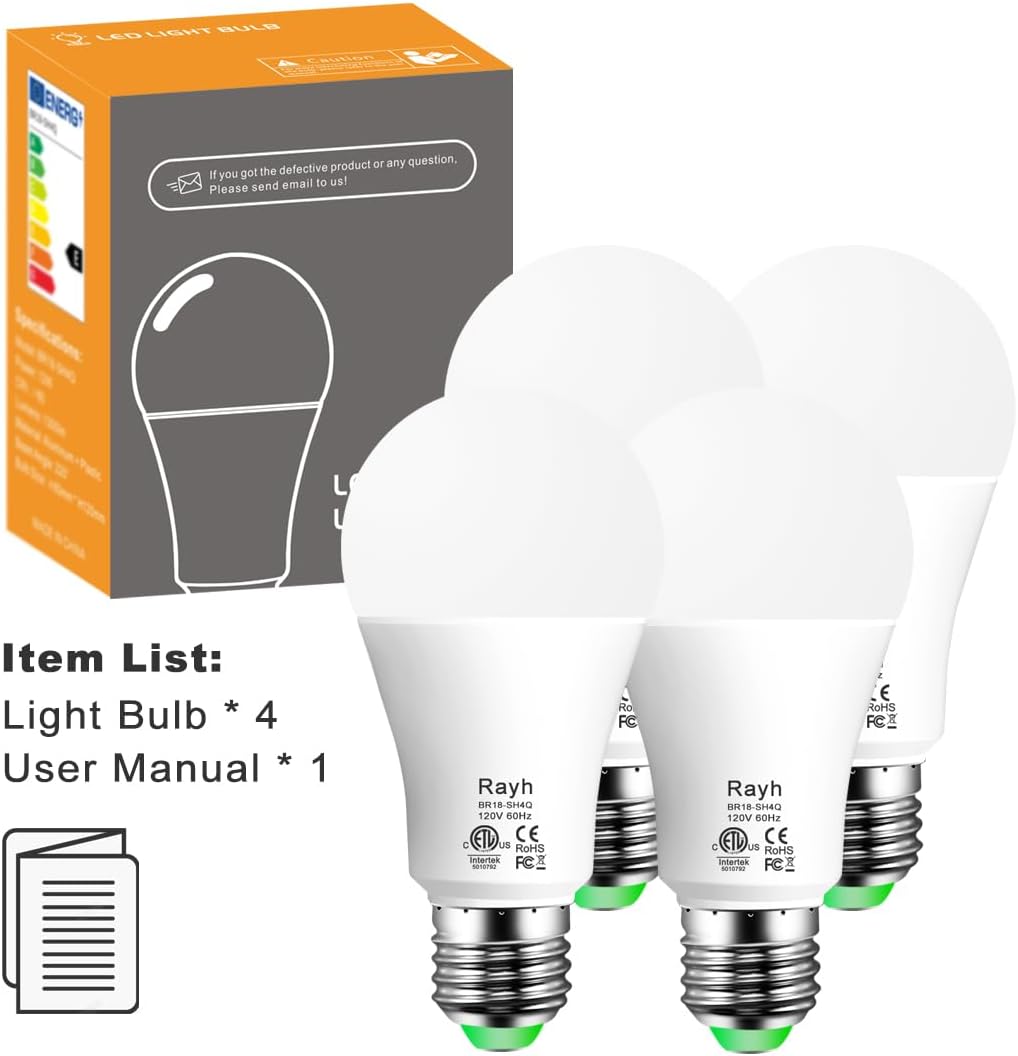
Image: Rayh Smart Light Bulb packaging and four individual bulbs. The package includes 4 smart light bulbs and 1 user manual.
Product Overview
Key Features:
- Smart Control: Bluetooth connectivity for control via BRmesh APP and Amazon Alexa.
- High Brightness: 12W LED, equivalent to 130W (1300 Lumens).
- Tunable White: Adjustable color temperature from 2700K (warm white) to 6000K (daylight white).
- Dimmable: Brightness adjustable from 1% to 100% via BRmesh APP or Alexa.
- High Color Rendering Index (CRI): CRI > 90 for accurate color representation.
- Flicker-Free Technology: Utilizes "PWM to Analog" technology for stable light output, suitable for photography and eye comfort.
- Mesh Function: Equipped with Bluetooth 5.0 chip for auto-interactions between multiple bulbs, extending control distance and supporting more devices.
- APP Functions: Timing function, Group control, Single control, Scene function, Device Sharing.
- No Hub Required: Operates without a separate smart home hub.
- No Registration Required: Simplifies initial setup.
Compatibility:
These smart light bulbs are compatible with the following Amazon Alexa speakers:
- Echo Plus (all models)
- Echo Show (all models)
- Echo (all models except 1st Generation)
- Echo Dot (all models except 1st Generation)
Note: These bulbs work with Alexa only and are not compatible with Google Home or Apple HomePod. For Google Home or Apple HomePod compatibility, please purchase Wi-Fi bulbs.
Setup Instructions
Follow these steps to set up your Rayh Smart Light Bulbs with the BRmesh APP and Amazon Alexa.
Step 1: Install the Light Bulb
- Carefully screw the Rayh Smart Light Bulb into a standard E26 light socket.
- Ensure the power switch for the light fixture is in the "ON" position.
Step 2: Download the BRmesh APP
- Download the "BRmesh" APP from the Apple App Store (for iOS) or Google Play Store (for Android).
Step 3: Add Lights to BRmesh APP
- Open the BRmesh APP.
- Follow the in-app instructions to add your Rayh Smart Light Bulbs. The app will guide you through the pairing process.
Step 4: Activate Alexa Pairing State
- Within the BRmesh APP, tap "Activate Alexa" to enable the Alexa pairing state for your lights.
Step 5: Pair with Amazon Alexa
- Say to your Alexa-enabled speaker: "Alexa, find device." or "Echo, find device."
- Alexa will then discover and connect to your Rayh Smart Light Bulbs.
Important Note: If the BRmesh APP is no longer needed after pairing with Alexa, it can be deleted without affecting the use of the lights with Alexa.

Image: An illustration showing a person using an Alexa device to control bedroom lights, demonstrating the voice control feature. The light bulb has a Mesh function for controlling multiple bulbs.
Operating Instructions
Control your Rayh Smart Light Bulbs using either the BRmesh APP or Amazon Alexa voice commands.
Controlling with Amazon Alexa:
Once paired, you can use the following voice commands with your Alexa-enabled device:
- Turn On/Off: "Alexa, turn on [Light Name]" / "Alexa, turn off [Light Name]"
- Adjust Brightness: "Alexa, set [Light Name] to [1-100]%." (e.g., "Alexa, set First light to 50%.")
- Adjust Color Temperature: "Alexa, set [Light Name] to warm white." (Other options: soft white, white, daylight white, cool white)
Note: Replace "[Light Name]" with the name you assigned to your bulb in the Alexa app (e.g., "First light", "Bedroom light").
Controlling with BRmesh APP:
The BRmesh APP offers advanced control features:
- Fine-tune Color Temperature: Adjust precisely between 2700K and 6000K.
- Timing Function: Set schedules for your lights to turn on or off automatically.
- Group Control: Control multiple bulbs simultaneously by grouping them in the app.
- Single Control: Adjust individual bulbs as needed.
- Scene Function: Create custom lighting scenes for different moods or activities (e.g., "Reading," "Dinner," "Relax").
- Device Sharing: Share control of your lights with family members.

Image: Four panels showing different room settings (Living room, Children's room, Dinner, Read) with varying light conditions, illustrating the "DIY Scene" feature where users can set brightness for unique scenes.

Image: A living room scene with a slider indicating adjustable color temperature from 2700K to 5700K, highlighting features like "Work with Alexa only," "2700K to 6000K (Adjustable)," "130W Equivalent (1300LM)," and "DIY Scene."
Maintenance
To ensure the longevity and optimal performance of your Rayh Smart Light Bulbs, follow these simple maintenance guidelines:
- Cleaning: Disconnect power before cleaning. Wipe the bulb with a soft, dry cloth. Do not use liquid cleaners or abrasive materials.
- Environment: Use the bulbs in dry, indoor environments only. Avoid exposure to water or high humidity.
- Temperature: Operate within normal room temperatures. Extreme heat or cold can affect performance and lifespan.
- Power Cycles: Avoid frequent power cycling (turning the physical switch on and off rapidly) as this can reduce the bulb's lifespan. Use the app or Alexa for control.
- Firmware Updates: Periodically check the BRmesh APP for any available firmware updates for your bulbs to ensure the latest features and performance improvements.
Troubleshooting
If you encounter issues with your Rayh Smart Light Bulbs, refer to the following common problems and solutions:
Problem: Bulb does not turn on.
- Solution: Ensure the light fixture's power switch is on. Check if the bulb is screwed in correctly and securely. Test the socket with a known working bulb.
Problem: Bulb is not discoverable by BRmesh APP or Alexa.
- Solution:
- Ensure Bluetooth is enabled on your smartphone/tablet.
- Make sure the bulb is powered on and within Bluetooth range of your device or Alexa speaker.
- Try power cycling the bulb (turn off the physical switch for 10 seconds, then turn it back on).
- Re-open the BRmesh APP and attempt to add the device again.
- For Alexa, ensure you have activated the Alexa pairing state in the BRmesh APP before asking Alexa to "find device."
Problem: Bulb frequently loses connection with Alexa.
- Solution:
- Ensure your Alexa device is within optimal Bluetooth range of the smart bulb.
- Minimize interference from other Bluetooth devices or Wi-Fi networks.
- Try re-pairing the bulb with Alexa. Remove the device from the Alexa app, then follow the setup instructions again.
- Ensure your Alexa device's firmware is up to date.
Problem: Cannot adjust color temperature or brightness.
- Solution:
- Verify the bulb is connected and responsive in the BRmesh APP or Alexa app.
- Ensure you are using the correct voice commands for Alexa.
- Check the BRmesh APP for full functionality, as it offers more precise control options.

Image: A close-up view of a smart light bulb illuminating a book, with a smartphone screen showing the same scene, emphasizing the flicker-free technology (CRI > 85) for eye comfort and photography.
Specifications
Detailed technical specifications for the Rayh Smart Light Bulb BR18-SH4Q:
| Feature | Specification |
|---|---|
| Model Number | BR18-SH4Q |
| Input Voltage | 120V AC |
| Power Consumption | 12W |
| Luminous Flux | 1300 Lumens (130W Equivalent) |
| Color Temperature | 2700K - 6000K (Adjustable) |
| Color Rendering Index (CRI) | >90 |
| Bulb Shape Size | A19 |
| Bulb Base | E26 |
| Connectivity | Bluetooth 5.0 |
| Control Method | BRmesh APP, Amazon Alexa |
| Dimmable | Yes (1% - 100%) |
| Indoor/Outdoor Usage | Indoor |
| Product Dimensions | 6 x 6 x 12.2 cm |
| Item Weight | 0.25 kg |
| Material | Aluminum, Plastic |

Image: A diagram illustrating the standard specifications of an A19 E26 LED bulb, including its diameter (60mm / 2.36 inches) and height (122mm / 4.80 inches), shown alongside a traditional household tungsten light bulb for comparison.
Warranty and Support
Warranty Information:
Rayh Smart Light Bulbs come with a 2-year warranty from the date of purchase. Additionally, a 90-day refund guarantee is provided.
This warranty covers defects in materials and workmanship under normal use. It does not cover damage caused by misuse, accidents, unauthorized modifications, or improper installation.
Customer Support:
For any queries, technical assistance, or warranty claims, please contact Rayh customer service. Our professional customer service team is available 24/7 to assist you.
Please refer to the contact information provided in your product packaging or on the official Rayh website for the most up-to-date support channels.
If you received a defective product or have any questions, please do not hesitate to send an email to us.