1. Introduction
This manual provides essential information for the proper use and maintenance of your ATsafepro 1/4 Inch Drive Click Torque Wrench. Designed for precision, this tool ensures components are tightened to the correct torque, preventing damage from over-tightening or under-tightening. Please read this manual thoroughly before operation.

Image: The ATsafepro 1/4 Inch Drive Click Torque Wrench, red and black, shown in its protective case.
2. Safety Information
Adhering to safety guidelines is crucial for preventing injury and tool damage.
- Always wear appropriate personal protective equipment, such as safety glasses, when using the torque wrench.
- Do not exceed the maximum specified torque setting of 25 Nm (221.3 in.lb).
- Never use the torque wrench as a breaker bar or for loosening fasteners. It is designed for tightening only.
- Ensure the socket or bit is correctly seated on the fastener before applying torque.
- Keep the tool clean and free from oil or grease to maintain a secure grip.
- Store the torque wrench in its protective case in a dry, clean environment, away from direct sunlight and extreme temperatures.
- Keep out of reach of children.
3. Product Overview
Key Features
- High Accuracy: Features precise dual scales of 3-25 Nm (26.6-221.3 lbf.in) with an accuracy of ±3% to industry standards.
- Professional Quality: Each wrench is fully calibrated and tested for accuracy according to ISO and ASME calibration certificates. Constructed from durable, rust-resistant chrome vanadium steel.
- Easy to Use: Simple lock knob mechanism for torque setting, audible 'click' when preset torque is reached, and a quick-release button for easy socket installation and removal.
- Dual-Direction with 72-Tooth Ratchet: Allows torque application in both clockwise and counter-clockwise directions. The 72-tooth design provides finer adjustments, ideal for tight spaces.
- Wide Application: Suitable for various nuts and bolts on bicycles (stems, seat clamps, chain sets, rotors, headsets) and motorcycles.
Components
The ATsafepro torque wrench consists of the following main parts:
- Ratchet Head with Quick Release Button
- Bidirectional Switching Paddle (for CW/CCW)
- Main Body (Aluminum Alloy Material)
- Torque Value Scale (Nm and lbf.in)
- Torque Locking Ring
- Non-slip Handle

Image: Detailed view of the torque wrench with labels for its main components, including the ratchet head, main body, torque scale, locking ring, and non-slip handle.
4. Setup
Setting the Torque Value
- Unlock: Pull down the red lock knob located at the base of the handle. Hold it in the unlocked position.
- Adjust: Rotate the handle to adjust the torque value. Align the desired torque value on the main scale with the corresponding mark on the handle's micro-scale. The wrench features a 360-degree swivel for easy adjustment.
- Lock: Release the lock knob. It will automatically rebound and lock the set value, preventing accidental changes during use. Ensure it is fully locked before applying torque.
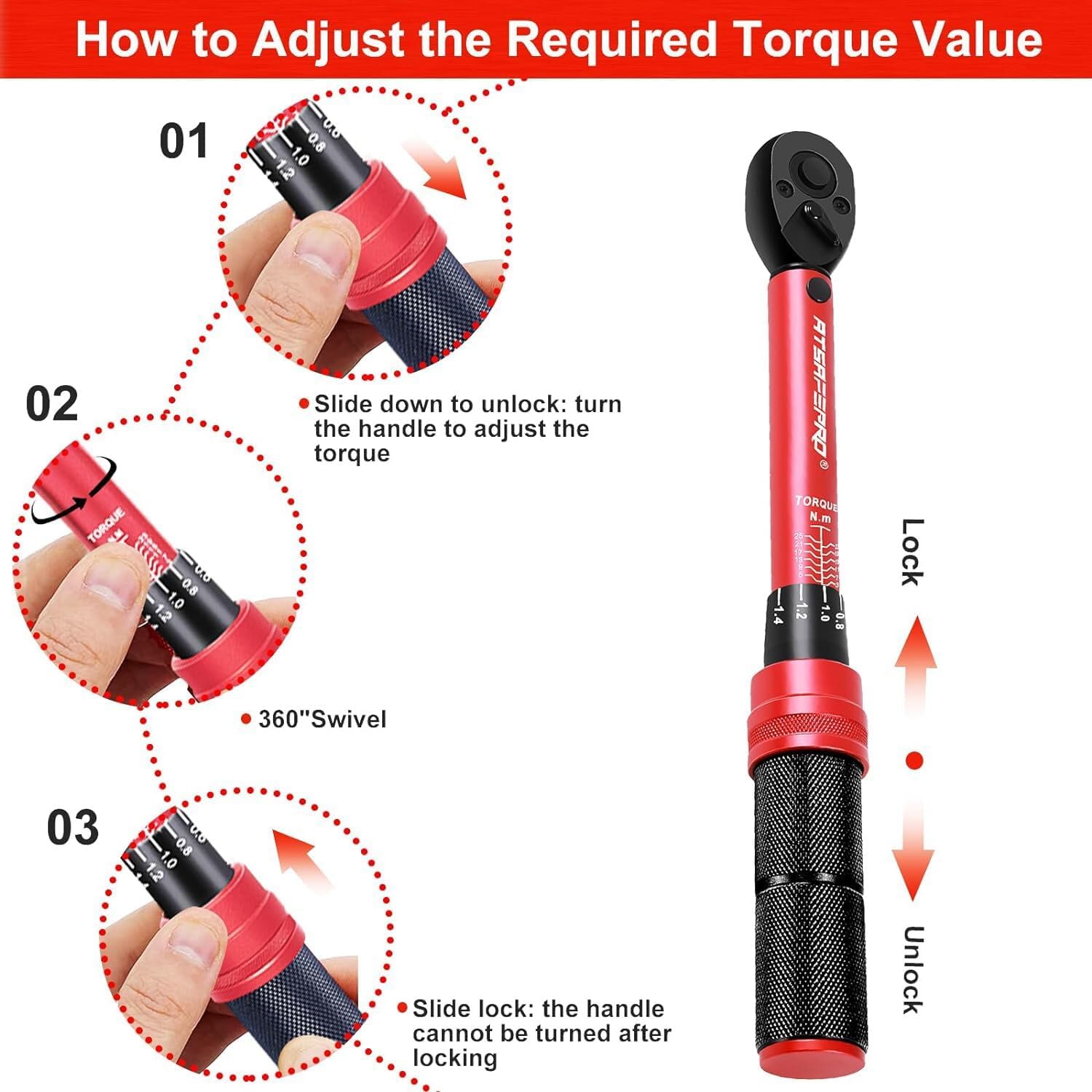
Image: Visual guide demonstrating the steps to unlock, adjust, and lock the torque setting on the wrench handle.
Attaching/Removing Sockets
- To attach a socket, press the quick-release button on the ratchet head and firmly push the socket onto the square drive. Release the button to secure the socket.
- To remove a socket, press the quick-release button and pull the socket off.
5. Operating Instructions
- Select Direction: Use the bidirectional switching paddle on the ratchet head to select the desired tightening direction (clockwise or counter-clockwise).
- Apply Torque: Place the attached socket onto the fastener. Apply a slow, steady, and continuous force to the handle. Do not jerk or apply sudden force.
- Listen for the 'Click': Continue applying force until you hear and feel a distinct 'click' from the wrench. This indicates that the preset torque value has been reached.
- Stop Applying Force: Immediately stop applying force once the 'click' is heard. Over-torquing can damage the fastener or the component.
- Repeat: For multiple fasteners, repeat the process for each one.

Image: A visual representation of the torque wrench producing an audible 'click' when the target torque is achieved.
Application Examples
The ATsafepro torque wrench is versatile for various tasks requiring precise torque.


6. Maintenance
- Storage: After each use, it is recommended to adjust the torque wrench to its minimum torque setting. This allows the internal force-measuring spring to fully relax, which helps extend its lifespan and ensures accurate torque measurements over time.
- Cleaning: Wipe the wrench clean with a soft, dry cloth after each use. Do not use harsh chemicals or solvents that could damage the finish or internal components.
- Calibration: Torque wrenches are precision instruments and may require periodic re-calibration to maintain accuracy. Refer to professional calibration services if you suspect accuracy issues or after prolonged use.
- Inspection: Regularly inspect the wrench for any signs of damage, wear, or loose parts. Do not use a damaged wrench.
7. Troubleshooting
If you encounter issues with your torque wrench, consider the following common solutions:
- Inaccurate Readings: Ensure the torque setting is correctly aligned. Avoid dropping the wrench, as this can affect calibration. If accuracy is critical and suspected, professional re-calibration may be necessary.
- Wrench Not Clicking: Verify that the torque setting is above the minimum value. Ensure you are applying a steady, continuous force. A faint click might occur at lower torque settings.
- Difficulty Adjusting Torque: Make sure the lock knob is fully pulled down and disengaged before attempting to rotate the handle.
- Socket Not Securing: Check if the quick-release button is fully depressed when inserting the socket and fully released to lock it in place. Ensure the socket is the correct drive size for the wrench.
For persistent issues, contact ATsafepro customer support.
8. Specifications
| Specification | Detail |
|---|---|
| Model Number | AS25NM |
| Drive Size | 1/4 inch |
| Torque Range | 3-25 Nm / 26.6-221.3 in.lb |
| Accuracy | ±3% |
| Ratchet Teeth | 72-Tooth |
| Direction | Dual-Direction (Clockwise & Counter-Clockwise) |
| Material | Chrome Vanadium Steel, Metal |
| Color | Black and Red |
| Item Weight | 410 g |
| Parcel Dimensions | 27.2 x 4.2 x 4 cm |
9. Warranty and Support
For warranty information, product support, or to inquire about replacement parts, please refer to the official ATsafepro website or contact their customer service department. Keep your purchase receipt as proof of purchase for any warranty claims.
Contact information can typically be found on the product packaging or the manufacturer's official website.
10. Product Videos
No official product videos with specified creator type and preview status were available in the provided data to embed directly into this manual.
