
Lemorele R100Plus
Lemorele R100Plus Wireless HDMI Video Transmission System
User Manual
1. Product Overview
The Lemorele R100Plus is a high-performance wireless HDMI video transmission system designed for professional photography, videography, and cinematography. It offers reliable 1080P Full HD transmission up to 656 feet (200 meters) with low latency, making it ideal for various applications including outdoor shooting, weddings, advertising, short films, and live broadcasts.
Key features include dual-band 2.4/5.8GHz technology for stable signal, HDMI input and loop-out ports, IR remote control functionality, and support for connecting one transmitter to up to four receivers. The system is powered by two 4400mAh batteries, providing approximately 4.5 hours of continuous use, and features an efficient built-in fan for heat dissipation.
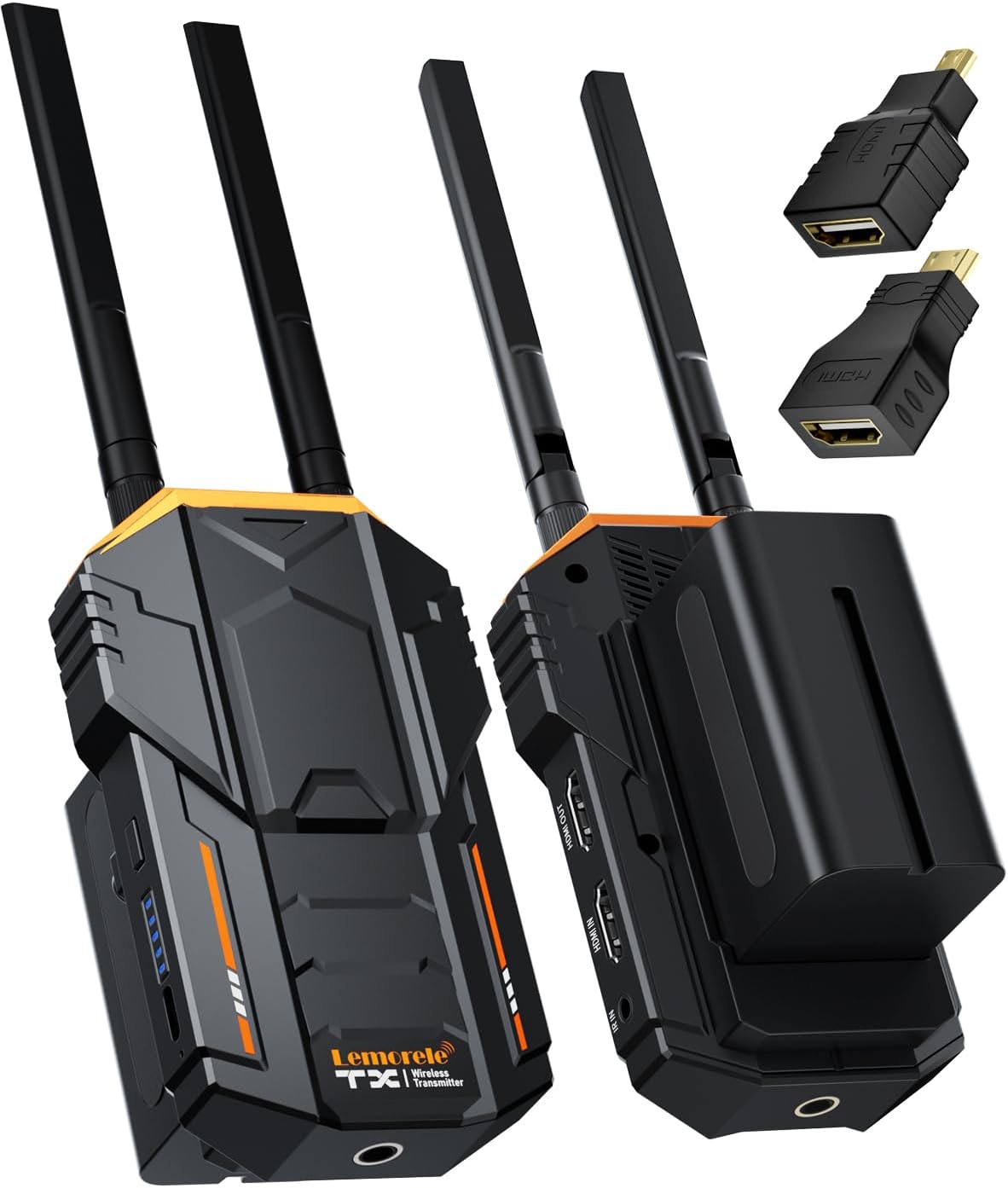
Figure 1: Lemorele R100Plus Transmitter (TX) and Receiver (RX) Units.
2. Package Contents
Please verify that all items listed below are included in your package:
- 1 x HDMI Video Transmitter (TX)
- 1 x HDMI Video Receiver (RX)
- 4 x Antennas
- 2 x 4400mAh Batteries
- 2 x HDMI Cables
- 2 x USB-C Cables
- 2 x Power Adapters (US, UK, EU plugs included)
- 2 x IR Cables
- 1 x Cold Shoe Mount
- 1 x Micro-HDMI Adapter
- 1 x Mini-HDMI Adapter
- 1 x User Manual

Figure 2: Detailed view of the package contents.
3. Setup Guide
3.1 Component Identification
Familiarize yourself with the ports and buttons on both the Transmitter (TX) and Receiver (RX) units:
- Power Button: Turns the unit on/off.
- USB-C Charger Port: For charging the internal battery or powering the unit.
- HDMI IN (TX): Connects to the video source (e.g., camera, laptop).
- HDMI OUT (TX/RX): Connects to a monitor for loop-out (TX) or display (RX).
- IR IN/OUT: For connecting the IR remote control cables.
- Battery Slot: For NP-F series batteries (NP-F970/750/550).
- Antenna Ports: For attaching the external antennas.

Figure 3: Connection diagram illustrating ports and connections.
3.2 Initial Setup Steps
- Install Antennas: Screw the four provided antennas firmly into the antenna ports on both the Transmitter (TX) and Receiver (RX) units. Ensure they are securely tightened for optimal signal strength.
- Install Batteries: Insert the fully charged 4400mAh batteries into the battery slots on both the TX and RX units. Ensure they click into place. Alternatively, you can power the units using the provided USB-C cables and power adapters.
- Connect Transmitter (TX):
- Connect your video source (e.g., camera, camcorder, laptop) to the HDMI IN port on the TX unit using one of the provided HDMI cables. Use the Micro-HDMI or Mini-HDMI adapters if necessary.
- If you wish to monitor the transmitted content locally, connect an external monitor to the HDMI OUT (loop-out) port on the TX unit.
- Attach the TX unit to your camera rig using the cold shoe mount for stable positioning.
- Connect Receiver (RX):
- Connect your display device (e.g., TV, projector, monitor) to the HDMI OUT port on the RX unit using an HDMI cable.
- Power On: Press and hold the power button on both the TX and RX units until the power indicators light up. The units will automatically attempt to pair.

Figure 4: Battery installation and built-in fan for effective cooling.
Video 1: Official product video demonstrating the setup and features of the Lemorele R100Plus system.
4. Operating Instructions
4.1 Power On/Off
To power on the units, press and hold the 'ON/OFF' button until the indicator lights illuminate. To power off, press and hold the same button until the lights turn off.
4.2 Connection and Pairing
Once both the TX and RX units are powered on and within range, they will automatically establish a wireless connection. The status indicators on the units will confirm a successful connection.

Figure 5: Real-time monitoring with low latency 1080P 60Hz transmission.
4.3 HDMI Loop Out Function
The Transmitter (TX) unit features an HDMI loop-out port. This allows you to connect a local monitor directly to the TX unit to view the video feed in real-time while simultaneously transmitting the signal wirelessly to the Receiver (RX) unit.
4.4 IR Remote Control Function
The system supports 20Hz~60Hz IR return functionality. Connect the provided IR cables to the IR IN/OUT ports on the units. This enables remote control of your source device (e.g., DVD player, set-top box) from the location of your display device, enhancing convenience.

Figure 6: Using the IR remote control feature.
4.5 Multi-Receiver Connection
The Lemorele R100Plus system supports connecting one Transmitter (TX) to up to four Receivers (RX). This allows for simultaneous display of the video feed on multiple screens. Additional receivers (ASIN: B0CZNTLT2H) can be purchased separately. Note that increasing the number of receivers may slightly shorten the maximum transmission distance.

Figure 7: One Transmitter (TX) connected to multiple Receivers (RX).
5. Maintenance
5.1 Battery Care
- Fully charge batteries before first use.
- Recharge batteries regularly, even if not in use, to maintain battery health.
- Avoid fully discharging the batteries to prolong their lifespan.
- Store batteries in a cool, dry place away from direct sunlight and extreme temperatures.
5.2 Cleaning
- Use a soft, dry cloth to clean the exterior of the units.
- Do not use liquid cleaners or aerosols, as they may damage the internal components.
- Ensure all ports are free of dust and debris.
5.3 Storage
When not in use for extended periods, store the units and accessories in their original packaging or a protective case to prevent damage. Remove batteries if storing for very long durations.
6. Troubleshooting
| Issue | Possible Cause | Solution |
|---|---|---|
| No video signal on receiver. | Units not paired; out of range; loose HDMI cables; low battery. | Ensure both units are powered on and within 656ft range. Check HDMI cable connections. Recharge or replace batteries. |
| Video signal is intermittent or poor quality. | Obstructions between units; interference; units too far apart. | Reduce distance between TX and RX. Ensure clear line of sight. Avoid strong interference sources (e.g., Wi-Fi routers, microwaves). |
| IR remote control not working. | IR cables incorrectly connected; IR sensor blocked. | Ensure IR cables are correctly plugged into the IR IN/OUT ports. Verify the IR sensor on the cable is facing the source device's IR receiver. |
| Units overheating. | Prolonged use; blocked ventilation. | Ensure the built-in fan is not obstructed. Allow units to cool down if excessively hot. |
7. Technical Specifications
| Feature | Specification |
|---|---|
| Model Name | R100Plus |
| Product Dimensions | 4.6 x 2.78 x 0.98 inches |
| Item Weight | 11.4 ounces |
| Connectivity Technology | Wireless, HDMI |
| Connector Type | HDMI, Micro HDMI, Mini HDMI |
| Resolution | 1080p (Full HD) |
| Transmission Range | Up to 656 feet (200 meters) in open space |
| Frequency Bands | 2.4GHz / 5.8GHz Dual-frequency |
| Battery Type | 2 x 4400mAh Lithium Ion (included) |
| Battery Life | Approx. 4.5 hours (per full charge) |
| Charging Input | 5V/2A Type-C |
| IR Function | 20Hz~60Hz IR return function |
| Multi-Receiver Support | 1 Transmitter to up to 4 Receivers |
| Manufacturer | Lemorele |
| Country of Origin | China |
8. Warranty and Support
The Lemorele R100Plus Wireless HDMI Video Transmission System comes with a 1-year warranty. We offer hassle-free returns or exchanges and 24/7 customer service to ensure your satisfaction.
For further assistance or inquiries, please visit the Lemorele Store on Amazon or contact our customer support team.
Ask a question about this manual
Ask about setup, troubleshooting, compatibility, parts, safety, or missing instructions. Manuals+ will review the question and use this page’s manual context to help answer it.