
1. Introduction
This manual provides detailed instructions for the safe and efficient use of your ORICO AP3-4A2U1C Travel Power Strip. Please read this manual thoroughly before operating the device and retain it for future reference.
The ORICO AP3-4A2U1C is a compact power solution designed for travel, offering multiple charging options in a portable form factor. It includes AC outlets and USB ports for various electronic devices.
2. Product Overview
The ORICO AP3-4A2U1C Travel Power Strip is equipped with the following features:
- 4 AC Power Outlets: For connecting standard electrical devices.
- 2 USB-A Ports: For charging USB-A compatible devices.
- 1 USB-C Port: For charging USB-C compatible devices.
- 4-Foot Wrapped Short Extension Cord: Integrated cord management for portability.
- Compact Design: Smaller than a typical mobile phone for easy packing.
- Flat Plug: 45-degree angled flat plug design to avoid blocking adjacent outlets.
- No Surge Protector: Suitable for use on cruise ships (check specific cruise line policies).
- Multi-Safety Protection: Includes overvoltage, overcurrent, overcharge, short circuit, and overheating protection.

Figure 2.1: Front view of the ORICO AP3-4A2U1C Travel Power Strip, showing the AC outlets and USB ports.

Figure 2.2: Diagram illustrating the various ports available on the ORICO AP3-4A2U1C Travel Power Strip.
3. Setup Instructions
3.1 Initial Connection
- Unwrap the 4-foot extension cord from around the power strip body.
- Locate a standard 125V AC wall outlet.
- Insert the flat plug of the power strip into the wall outlet. The 45-degree angle of the plug is designed to minimize obstruction of adjacent outlets.

Figure 3.1: The 4-foot extension cord and flat plug design, ideal for use in tight spaces like behind furniture.
3.2 Mounting Options
The power strip offers two methods for semi-permanent installation:
- Wall Mounting Holes: Use screws (not included) to secure the power strip to a wall or desk surface.
- Adhesive Sticker Pads: Apply the provided adhesive pads to the back of the power strip for temporary or non-damaging attachment to smooth surfaces.
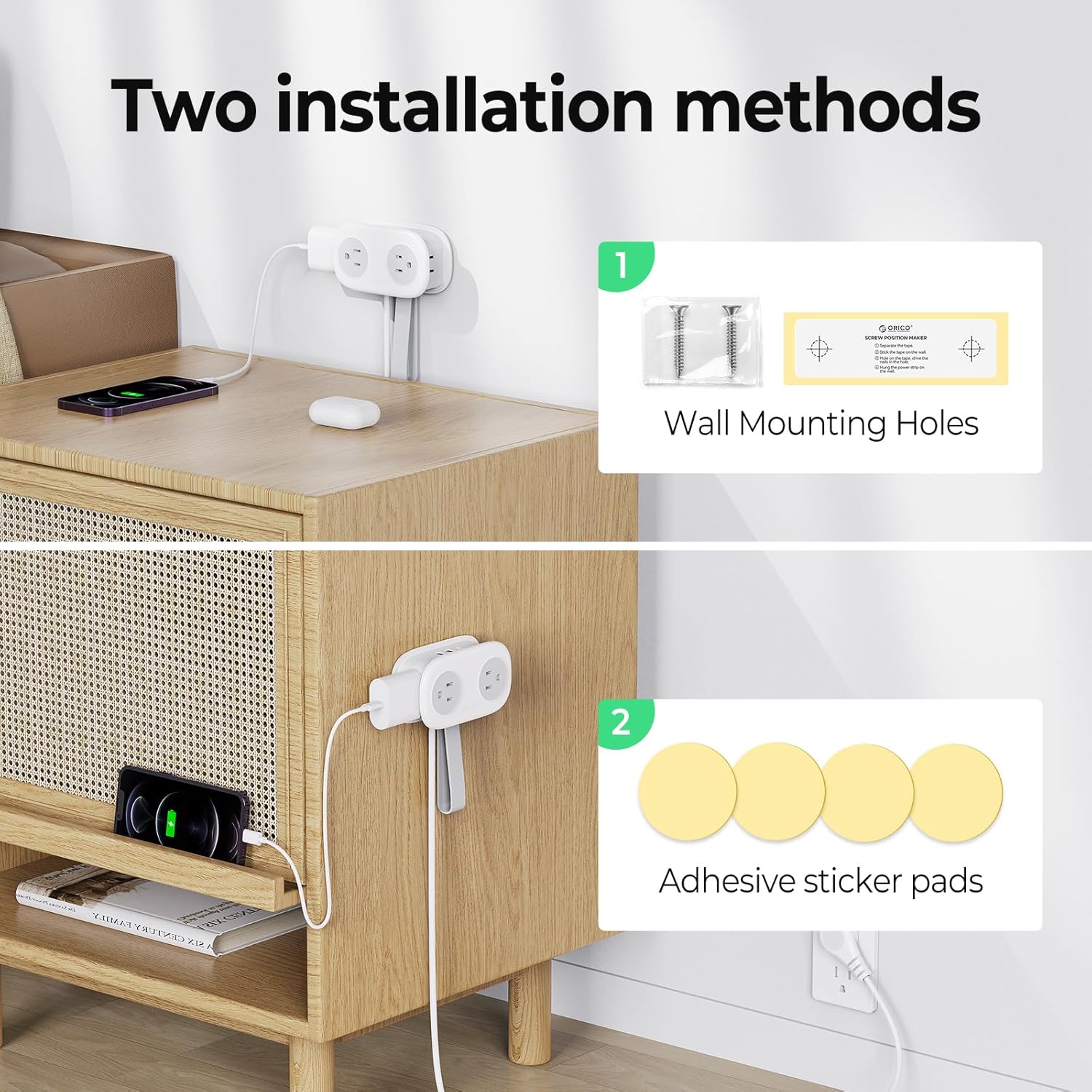
Figure 3.2: Illustration of the two available installation methods for the power strip.
4. Operating Instructions
4.1 Connecting Devices
Once the power strip is plugged into a wall outlet, you can connect your electronic devices:
- For devices requiring AC power, plug them into any of the 4 AC outlets.
- For devices charging via USB-A, connect them to the 2 USB-A ports.
- For devices charging via USB-C, connect them to the 1 USB-C port.
The power strip supports simultaneous charging of up to 7 devices (4 AC, 2 USB-A, 1 USB-C).

Figure 4.1: The power strip in use, charging multiple devices simultaneously.
4.2 Travel and Portability
The compact design and integrated cord management make this power strip suitable for various travel scenarios:
- Hotels: Provides additional outlets where wall outlets may be limited or inconveniently placed.
- Cruise Ships: Designed without a surge protector, making it generally approved for cruise ship use. Always verify with your specific cruise line's policies.
- General Travel: Easily fits into luggage or carry-on bags due to its small size and wrap-around cord feature.

Figure 4.2: The power strip's design allows for neat cord storage, making it easy to pack.

Figure 4.3: The power strip is designed for use on cruise ships due to its lack of a surge protector.
5. Safety Information
To ensure safe operation and prevent damage to the device or connected electronics, please observe the following safety guidelines:
- Do not exceed the maximum rated power of the power strip (refer to specifications).
- This device is designed for indoor use only. Do not expose to moisture or extreme temperatures.
- Do not disassemble or modify the power strip.
- Keep out of reach of children.
- The power strip features multiple safety protections including overvoltage, overcurrent, overcharge, short circuit, and overheating protection.
- The flame-retardant PC shell has a flame retardant temperature of 1382°F (750°C).
- This power strip does not include a surge protector. While this makes it suitable for cruise ships, it does not offer surge protection for connected devices.
6. Maintenance
Proper maintenance ensures the longevity and optimal performance of your power strip:
- Cleaning: Disconnect the power strip from the wall outlet before cleaning. Use a dry, soft cloth to wipe the surface. Do not use liquid cleaners or aerosols.
- Storage: When not in use, wrap the cord neatly around the power strip and secure it with the integrated elastic band. Store in a cool, dry place away from direct sunlight.
- Inspection: Periodically inspect the cord and plug for any signs of damage. If damage is found, discontinue use and replace the unit.
7. Troubleshooting
If you encounter issues with your ORICO AP3-4A2U1C Travel Power Strip, refer to the following common problems and solutions:
| Problem | Possible Cause | Solution |
|---|---|---|
| No power to connected devices. | Power strip not plugged in correctly. Wall outlet is not active. | Ensure the power strip is fully inserted into a working wall outlet. Test the wall outlet with another device. |
| Devices not charging via USB ports. | USB cable is faulty. Device is not compatible or requires more power than available. | Try a different USB cable. Ensure your device is compatible with the USB port's output. |
| Power strip feels warm. | Normal operation under load. Overload condition. | Slight warmth is normal. If it feels excessively hot, disconnect devices immediately and reduce the load. Refer to specifications for maximum power. |
| Power strip is damaged. | Physical damage. | Discontinue use immediately. Do not attempt to repair. Contact customer support. |
8. Specifications
| Feature | Detail |
|---|---|
| Model Number | AP3-4A2U1C |
| Product Dimensions | 4 x 2.4 x 0.04 inches (approx. 10.99 x 6.35 x 4.06 cm) |
| Item Weight | 9.5 ounces (approx. 269 grams) |
| AC Outlets | 4 |
| USB-A Ports | 2 |
| USB-C Ports | 1 |
| Total Power Outlets | 7 (4 AC + 3 USB) |
| Voltage | 125.0V |
| Cord Length | 4 feet |
| Special Features | Cruise Ship Approved (No Surge Protector), USB Slot, Flat Plug |
| Manufacturer | SHENZHEN ORICO TECHNOLOGIES CO.,LTD |
9. Warranty and Support
For warranty information or technical support, please contact ORICO customer service. Details can typically be found on the official ORICO website or through your purchase platform.
Manufacturer: SHENZHEN ORICO TECHNOLOGIES CO.,LTD
Brand: ORICO
For further assistance, please visit the ORICO Store on Amazon.