
MekedeTech M6Pro
MekedeTech M6 Pro Android Car Stereo User Manual
Model: M6Pro (M6pro-10inch-8+256G)
Introduction
The MekedeTech M6 Pro is an advanced universal double DIN Android car stereo system designed to enhance your in-car entertainment and navigation experience. It features a 10-inch 1280x720 QLED IPS touch screen, an 8-core processor, 8GB RAM, and 256GB internal storage. Key functionalities include wireless CarPlay and Android Auto, Bluetooth 5.1, a 36-band DSP equalizer, DTS 4.1/5.1 channel surround sound, voice control, and 4G LTE support. This manual provides essential information for setup, operation, maintenance, and troubleshooting to ensure optimal performance of your device.

Package Contents
Verify that all items listed below are included in your package:
- 1 x MekedeTech M6 Pro Head Unit (Tablet)
- 1 x Instruction Manual
- 1 x RCA Cable Set
- 1 x Reversing Camera Input Cable
- 1 x Fakra GPS Antenna
- 1 x Fakra 4G Antenna
- 1 x External Microphone (MIC)
- 3 x USB Plugs
- Necessary Wiring Harnesses (Power, Speaker, etc.)

Setup
Installation Overview
Installation of the MekedeTech M6 Pro should ideally be performed by a qualified professional. Ensure the vehicle's battery is disconnected before beginning any wiring. The unit is designed for universal double DIN slots, but specific vehicle fascia kits and wiring adapters may be required for a seamless fit and integration with your car's existing systems. For vehicles requiring CANBUS integration (e.g., for climate control, door status, steering wheel controls), an appropriate CANBUS module specific to your vehicle model may be necessary and should be acquired separately.
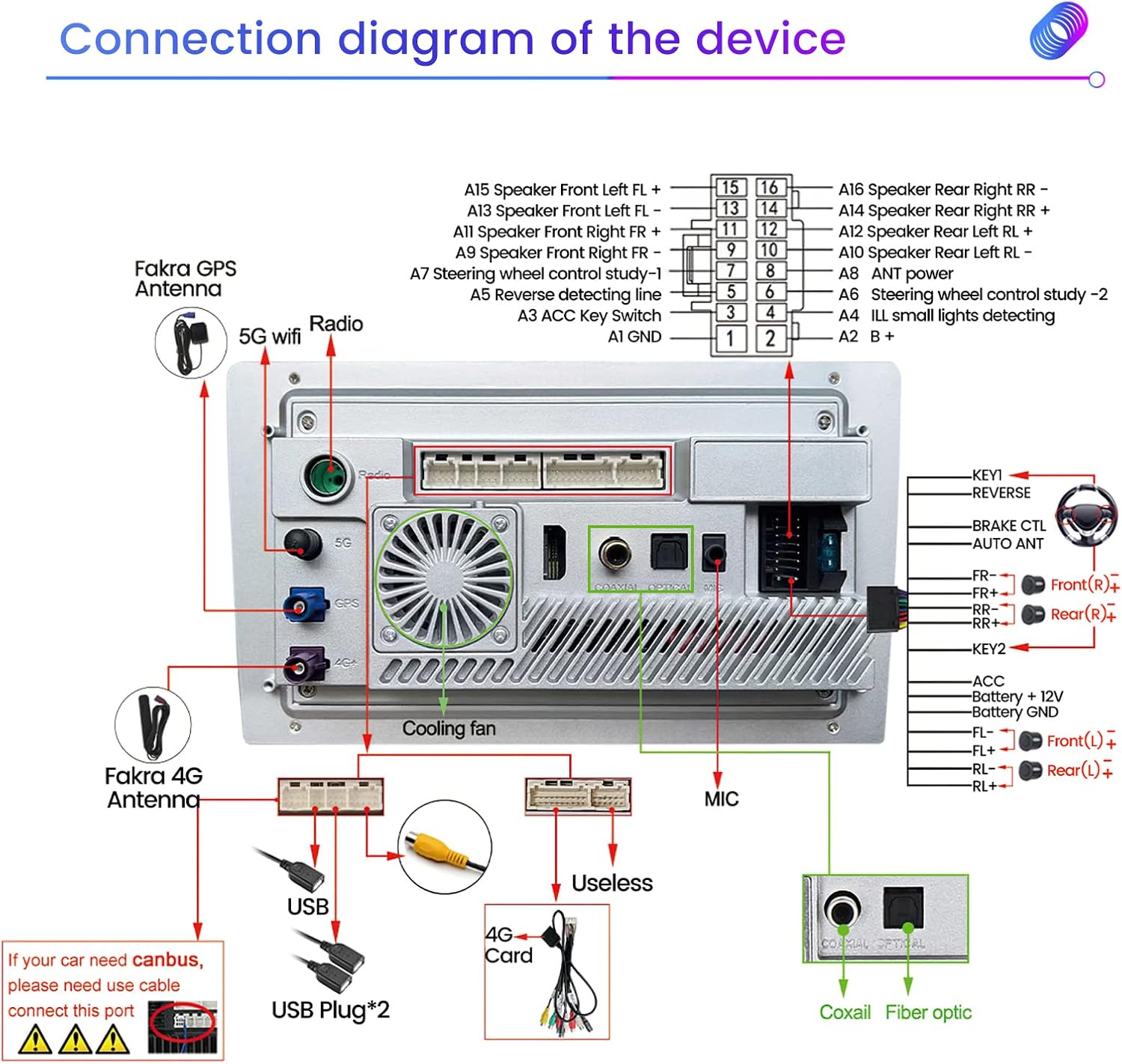
Wiring Diagram
Refer to the following diagram for proper connection of the head unit to your vehicle's electrical system and peripherals. Pay close attention to power, ground, speaker outputs, and accessory inputs.
Operating Instructions
Basic Operation and Interface Customization
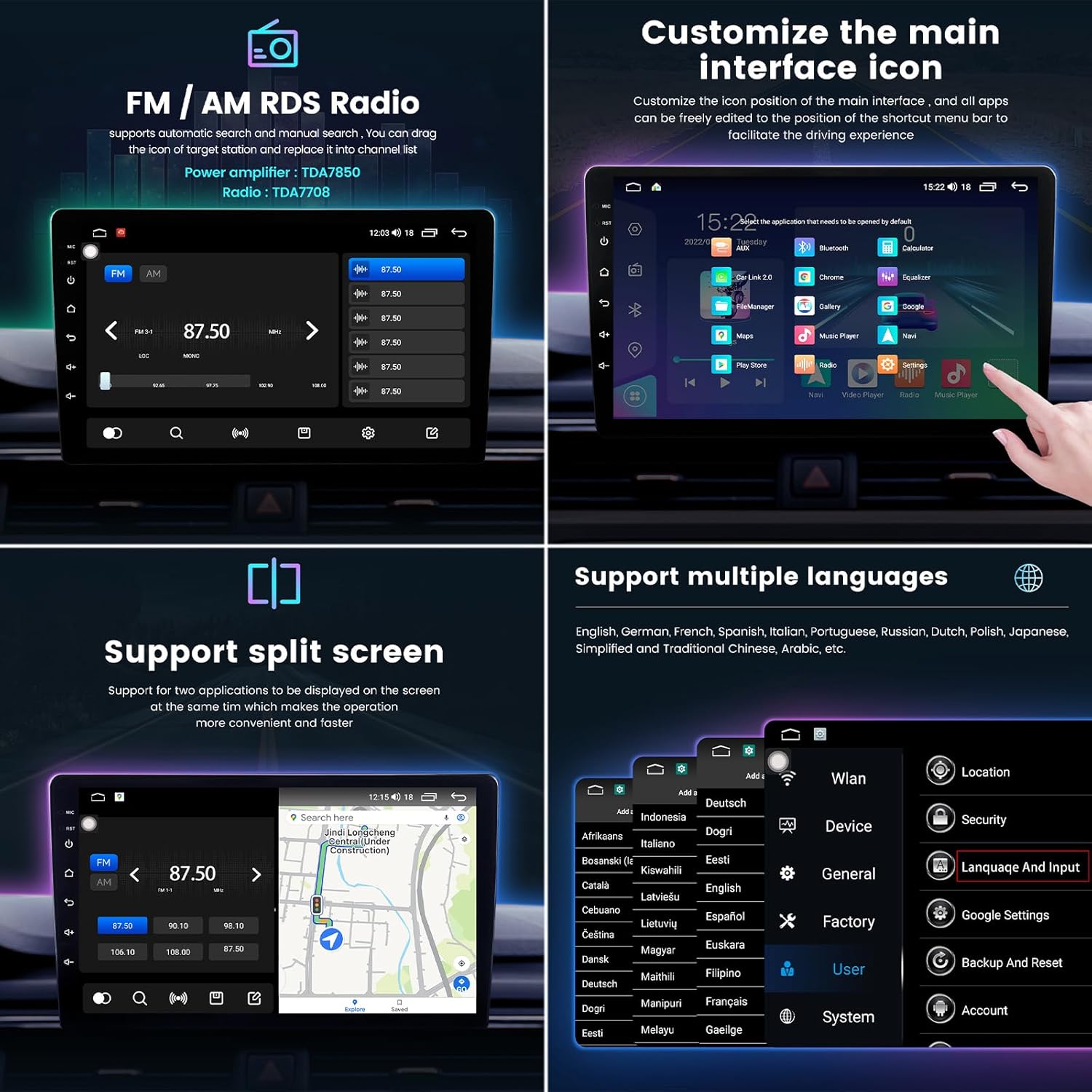
The MekedeTech M6 Pro features a responsive QLED IPS touch screen for intuitive control. Navigate through menus by swiping and tapping. You can customize the main interface icons and their positions to suit your preferences, allowing for quick access to frequently used applications and features.
Wireless CarPlay & Android Auto
The unit supports both wireless CarPlay and wired/wireless Android Auto, allowing seamless integration with your smartphone for navigation, music, calls, and messages. This feature eliminates the need for constant phone interaction while driving.


Voice Control
The M6 Pro supports intelligent voice control, enabling hands-free operation for safer and more convenient driving. You can issue commands for navigation, music playback, calls, and more, similar to interacting with Siri or other voice assistants.

Audio Features: DSP 36-Band EQ & DTS Surround Sound
Experience superior audio quality with the integrated Digital Signal Processor (DSP) and its 36-band equalizer. This allows for precise audio tuning, creating a customized sound profile. The system also supports DTS 4.1/5.1 channel surround sound, providing a dynamic and immersive audio experience within your vehicle.


GPS Navigation
The built-in global positioning system (GPS) provides accurate, omni-directional map display and real-time traffic condition updates, ensuring efficient navigation to your destination.

4G Connectivity
With 4G LTE support, you can enjoy high-speed internet access directly from your head unit. This enables online streaming, real-time data updates, and access to various online applications without relying on your phone's hotspot.

Split Screen Functionality
The split-screen feature allows you to run two applications simultaneously on the display, such as navigation and music playback, enhancing multitasking convenience.
FM/AM RDS Radio
The integrated FM/AM RDS radio allows you to listen to your favorite stations. The RDS (Radio Data System) provides additional information such as station names and song titles where available.
Maintenance
To ensure the longevity and optimal performance of your MekedeTech M6 Pro, follow these maintenance guidelines:
- Screen Cleaning: Use a soft, lint-free cloth specifically designed for electronic screens. Do not use abrasive cleaners or solvents. Gently wipe the screen to remove dust and fingerprints.
- General Cleaning: Wipe the exterior of the unit with a soft, dry cloth. Avoid spraying liquids directly onto the device.
- Software Updates: Periodically check for software updates provided by MekedeTech to ensure you have the latest features and bug fixes. Follow the manufacturer's instructions for updating the firmware.
- Temperature Control: The unit has a built-in fan for heat dissipation. Ensure proper ventilation around the unit to prevent overheating, especially during prolonged use or in hot climates.
Troubleshooting
This section addresses common issues you might encounter with your MekedeTech M6 Pro. If the problem persists after attempting these solutions, please contact customer support.
| Problem | Possible Cause | Solution |
|---|---|---|
| Unit does not power on. | Incorrect wiring; Blown fuse; Vehicle battery issue. | Check power connections (ACC, B+, GND). Inspect vehicle fuses. Ensure vehicle battery is charged. |
| No sound or distorted sound. | Speaker wiring issue; Volume too low; EQ settings. | Verify speaker connections. Increase volume. Reset DSP/EQ settings to default. |
| Touch screen unresponsive or requires multiple touches. | Software glitch; Screen calibration needed; Physical damage. | Restart the unit. Check for firmware updates. If persistent, contact support. |
| Wireless CarPlay/Android Auto not connecting. | Bluetooth not paired; "Car Link" app not launched; Phone settings. | Ensure Bluetooth is on and paired. Open "Car Link" app on head unit. Check phone's CarPlay/Android Auto settings. |
| GPS signal weak or inaccurate. | GPS antenna placement; Obstruction. | Ensure GPS antenna is mounted in a clear location with an unobstructed view of the sky. |
| Unit occasionally shuts off or reboots. | Overheating; Power supply instability; Software issue. | Ensure proper ventilation. Check power connections for stability. Update firmware. |
Specifications
Detailed technical specifications for the MekedeTech M6 Pro Android Car Stereo:
| Feature | Detail |
|---|---|
| Model Name | M6Pro (10inch-8+256G) |
| Operating System | Android 12 |
| Processor | 8-core (2 cores ARM Cortex A75 + 6 cores ARM Cortex A55) |
| Memory (RAM) | 8GB |
| Storage (ROM) | 256GB |
| Display Size | 10 Inches |
| Display Resolution | 1280x720 QLED IPS Touch Screen |
| Bluetooth | Qualcomm 3031 chip Bluetooth 5.1 |
| CarPlay / Android Auto | Wireless CarPlay, Wired Android Auto |
| Audio Processing | DSP 36-Band EQ, DTS 4.1/5.1 Channel Surround System |
| Connectivity | 4G LTE, Wi-Fi, USB |
| Voice Control | Supported |
| Radio | FM/AM RDS Radio |
| Manufacturer | Shenzhen Mekede Technology Co.,Ltd |
Warranty and Support
MekedeTech products are manufactured with high quality standards. For specific warranty information, please refer to the documentation provided with your purchase or contact MekedeTech directly. For technical support, product inquiries, or to inquire about additional features like HDMI input or 360-degree camera modules, it is recommended to contact MekedeTech customer service. They can provide direct assistance and guidance on product capabilities and potential upgrades.
Manufacturer: Shenzhen Mekede Technology Co.,Ltd
For the most up-to-date support information, please visit the official MekedeTech website or contact their support channels.
Related documentsM6Pro

Ask a question about this manual
Ask about setup, troubleshooting, compatibility, parts, safety, or missing instructions. Manuals+ will review the question and use this page’s manual context to help answer it.