
INIU P64-E1
INIU 140W 25000mAh Portable Charger User Manual
Model: P64-E1
1. Safety Information
Please read all safety instructions carefully before using this product. Failure to follow these instructions may result in electric shock, fire, or other hazards.
- Do not expose the power bank to extreme temperatures (hot or cold), direct sunlight, or humid environments.
- Do not disassemble, modify, or repair the device yourself. Refer to qualified service personnel.
- Keep the power bank away from water and other liquids.
- Avoid dropping, hitting, or subjecting the device to strong impacts.
- Use only original or certified cables for charging the power bank and your devices.
- Keep out of reach of children.
- Dispose of the power bank responsibly according to local regulations. Do not dispose of it in household waste.
2. Product Overview
The INIU 140W 25000mAh Portable Charger (Model: P64-E1) is a high-capacity power bank designed for fast and efficient charging of various electronic devices, including laptops, tablets, and smartphones. It features multiple output ports and a smart digital display for real-time information.

Figure 2.1: Front view of the INIU 140W 25000mAh Portable Charger, showcasing its sleek design, digital display, and various charging ports.
2.1. Ports and Interface
- USB-C1 (IN/OUT): This port supports up to 140W Power Delivery (PD) for both input (charging the power bank) and output (charging devices).
- USB-C2 (OUT): This port provides up to 45W output for charging compatible devices.
- USB-A (OUT): This port provides up to 18W output for charging compatible devices.
- Smart Digital Display: An LED screen that shows real-time charging status, remaining battery percentage, output power, and estimated remaining battery hours.

Figure 2.2: Detailed view of the smart digital display, indicating output power (W), active USB port, remaining battery percentage (%), and estimated remaining battery hours.
3. Setup
3.1. Initial Charging of the Power Bank
Before first use, it is recommended to fully charge your INIU power bank. Use a USB-C to USB-C cable (the included 240W cable is recommended) and connect it to the USB-C1 (IN/OUT) port of the power bank. Connect the other end to a compatible USB-C wall charger (not included) with Power Delivery (PD) capabilities for fastest charging.
- The digital display will show the charging input wattage and the increasing battery percentage.
- The power bank is fully charged when the display shows 100%.
3.2. Connecting Devices for Charging
To charge your electronic devices, connect them to the appropriate output ports on the power bank using compatible charging cables.
- For laptops and other high-power devices, use the USB-C1 (IN/OUT) port with a USB-C to USB-C cable for up to 140W fast charging.
- For tablets and some smartphones, use the USB-C2 (OUT) port for up to 45W charging.
- For most smartphones and other standard devices, use the USB-A (OUT) port for up to 18W charging.
4. Operating Instructions
4.1. Charging Your Devices
The INIU power bank is designed to deliver optimal charging speeds for a wide range of devices.
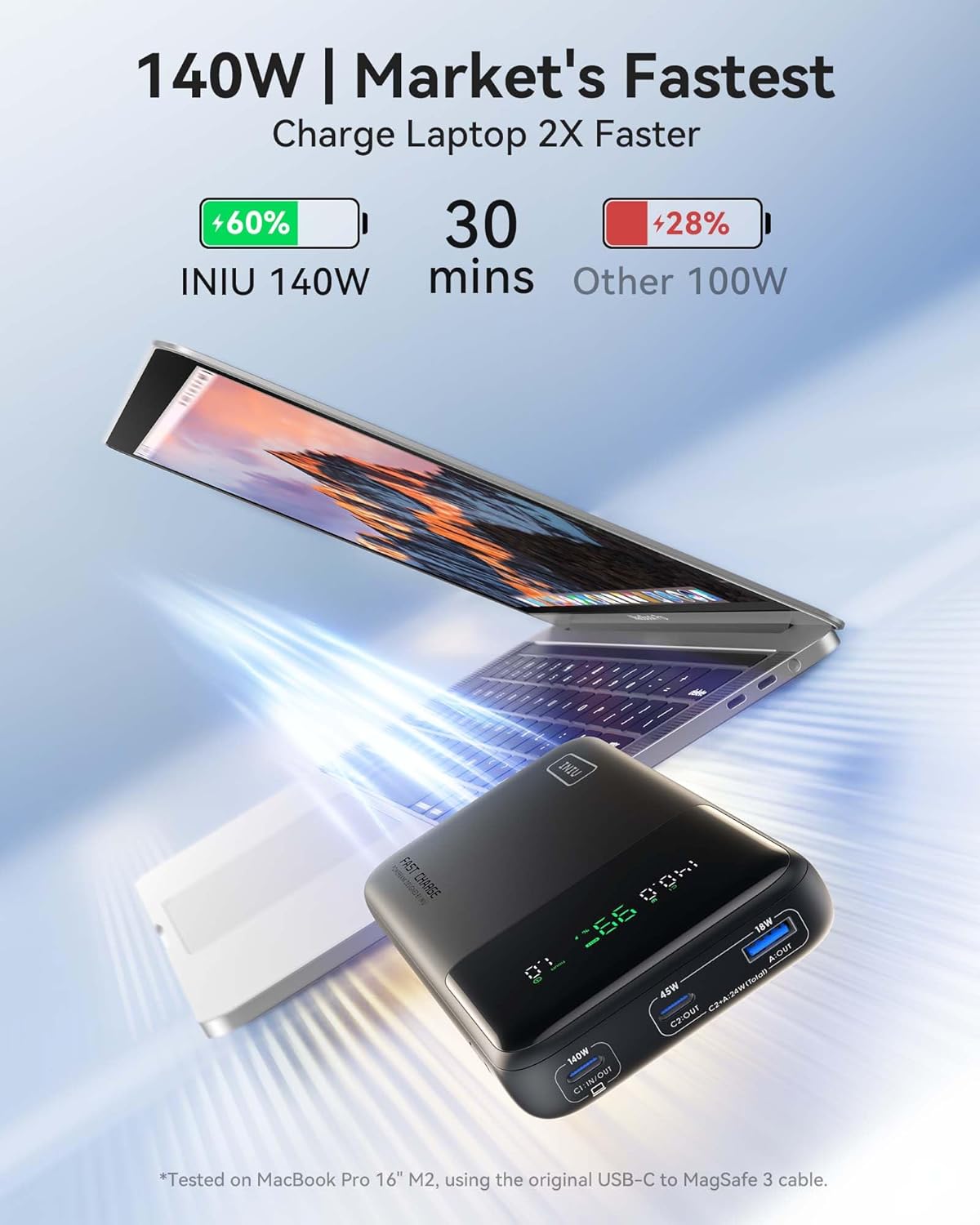
Figure 4.1: The INIU 140W power bank's superior charging speed, capable of charging a MacBook Pro 16" to 60% in just 30 minutes.
- 140W Fast Charging: The USB-C1 port can deliver up to 140W, ideal for charging high-power devices like MacBook Pro 16" (M2) and other compatible laptops.
- Simultaneous Charging: You can charge multiple devices at once. For example, charge a MacBook Pro 14" and an iPhone 15 Pro Max simultaneously.

Figure 4.2: Illustrates the power bank's ability to charge two devices concurrently, such as a MacBook Pro 14" and an iPhone 15 Pro Max, achieving significant charge levels in 30 minutes.
4.2. Device Compatibility
The power bank offers wide compatibility across various power requirements:

Figure 4.3: A visual guide to the power bank's broad compatibility, detailing power outputs for various devices from laptops to earbuds.
- 140W: MacBook Pro 16", Dell XPS 17, Surface Go, Vision Pro, and more.
- 100W: MacBook Pro 14", Razer Blade 15, Asus ROG, and more.
- 65W: MacBook Air, ThinkPad X1, Dell XPS 13, HP Spectre, Nintendo Switch, and more.
- 45W: iPhone, Samsung, Google, LG, iPad, Steam Deck, Earbuds, Smartwatches, and more.
Note: MacBook Pro 16" M2 can only achieve 140W fast charging with the original USB-C to MagSafe 3 cable.
4.3. Airline Travel Compliance
With a 25,000 mAh capacity, this power bank is approved for airline travel, allowing you to carry it in your carry-on luggage. Always check with your specific airline's regulations before flying.

Figure 4.4: The power bank's suitability for air travel, demonstrating its use on a plane and highlighting its TSA-compliant capacity.
5. Maintenance
- Cleaning: Use a soft, dry cloth to clean the surface of the power bank. Do not use liquid cleaners or aerosols.
- Storage: Store the power bank in a cool, dry place away from direct sunlight and extreme temperatures. For long-term storage, it is recommended to keep the battery charged to around 50-70%.
- Battery Care: To prolong battery life, avoid fully discharging the power bank frequently. Recharge it when the battery level is low.
6. Troubleshooting
| Problem | Possible Cause | Solution |
|---|---|---|
| Power bank not charging | Cable or adapter issue; power bank fully discharged; faulty port. | Try a different USB-C cable and wall adapter. Ensure the adapter supports Power Delivery. Allow a few minutes for the display to activate if fully discharged. Try another input port if available. |
| Device not charging from power bank | Power bank is empty; incompatible cable; device not supported; faulty port. | Ensure the power bank is charged. Use the correct cable for your device. Check device compatibility with the power bank's output ports (140W, 45W, 18W). Try a different output port. |
| Slow charging speed | Using a non-fast charging cable/adapter; device not supporting fast charging; multiple devices connected. | Use a high-quality, fast-charging compatible cable (e.g., the included 240W USB-C cable). Ensure your device supports the fast charging protocol (PD, QC). Disconnect other devices to maximize output to a single device. |
| Digital display not working | Power bank is off; internal error. | Press the power button to activate the display. If it remains unresponsive, contact customer support. |
7. Specifications
| Feature | Description |
|---|---|
| Brand | INIU |
| Model | P64-E1 |
| Battery Capacity | 25000 mAh |
| Battery Composition | Lithium Polymer |
| Connector Type | USB Type C, USB Type A |
| Input (USB-C1) | Up to 140W Power Delivery |
| Output (USB-C1) | Up to 140W Power Delivery |
| Output (USB-C2) | Up to 45W |
| Output (USB-A) | Up to 18W |
| Special Features | Smart Digital Display, 140W Fast Charging, Mini Size, Ultra-Compact Design, Airline Approved |
| Color | Black |
| Product Dimensions | 6.3L x 1W x 3.2H centimeters |
| Number of Ports | 3 (2x USB-C, 1x USB-A) |
| Recommended Uses | Laptops (MacBook, Chromebook, Dell XPS, HP Spectre), Smartphones (iPhone, Samsung, Google Pixel), Tablets (iPad), Gaming Consoles (Steam Deck, Rog Ally), Smartwatches, Earbuds, etc. |
8. Warranty and Support
INIU stands behind the quality of its products. This power bank comes with comprehensive warranty and support services:
- 3-Year iNiu Care Service: Enjoy peace of mind with a 3-year warranty covering any quality issues. If you encounter any problems within this period, INIU will send you a new replacement.
- Lifetime Technical Support: Access dedicated technical support for the lifetime of the product.
For warranty claims or technical assistance, please contact INIU customer support through their official website or the contact information provided in the product packaging.

Figure 8.1: Contents of the product package, including the power bank, user guide, cable, and travel pouch, emphasizing the 3-year product care.
Related documentsP64-E1


Ask a question about this manual
Ask about setup, troubleshooting, compatibility, parts, safety, or missing instructions. Manuals+ will review the question and use this page’s manual context to help answer it.