
1. Introduction
Thank you for choosing the INIU Portable Power Bank 10000mAh. This device is designed to provide reliable and fast charging for your electronic devices on the go. With its high-density battery and multiple charging ports, it offers convenience and efficiency for various devices, including smartphones, tablets, and even some laptops. Please read this manual carefully to ensure proper use and maintenance of your power bank.
2. Product Overview
2.1 Key Features
- 10000mAh High Capacity: Provides multiple charges for smartphones and other small devices.
- Fast Charging: Equipped with a 22.5W integrated chip, capable of charging an iPhone 15 to 60% in approximately 25 minutes.
- Compact & Lightweight: Features industry-first high-density TinyCell technology, making it 30% smaller and 15% lighter than comparable power banks.
- Versatile Ports: Includes two USB-C ports (input/output) and one USB-A port (output), allowing simultaneous charging of up to three devices.
- USB-C In & Out: Both USB-C ports support both input and output, offering greater flexibility.
- Paw Print LED Indicator: Intuitive LED display shows remaining battery level.
- Built-in USB-C Cable: Features a convenient integrated USB-C cable for easy portability and use.
2.2 Package Contents
- 1 x INIU Portable Power Bank 10000mAh
- 1 x 0.3m USB-A to USB-C Charging Cable
- 1 x Travel Pouch
- 1 x User Manual
2.3 Product Diagram

Figure 1: Front view of the INIU Portable Power Bank 10000mAh, highlighting its compact size and paw print LED indicator.

Figure 2: Illustration of the integrated USB-C cable and the paw print LED battery level indicator, showing 20% to 100% charge levels.
3. Setup
Before first use, it is recommended to fully charge your INIU Portable Power Bank. This ensures optimal battery performance and longevity.
- Connect the provided USB-A to USB-C cable (or your own USB-C to USB-C cable) to one of the power bank's USB-C ports.
- Connect the other end of the cable to a compatible USB wall charger (not included).
- The paw print LED indicator will illuminate and flash, indicating that the power bank is charging. It will remain solid when fully charged.
4. Operating Instructions
4.1 Charging Your Devices
The INIU Power Bank can charge a wide range of devices, including smartphones, tablets, and other USB-powered gadgets. It supports fast charging for compatible devices.
- Connect your device to the power bank using a compatible charging cable. You can use the integrated USB-C cable, or connect to one of the USB-C or USB-A ports.
- The power bank will automatically begin charging your device. The paw print LED indicator will light up to show the power bank's remaining charge.
- To stop charging, simply disconnect your device.
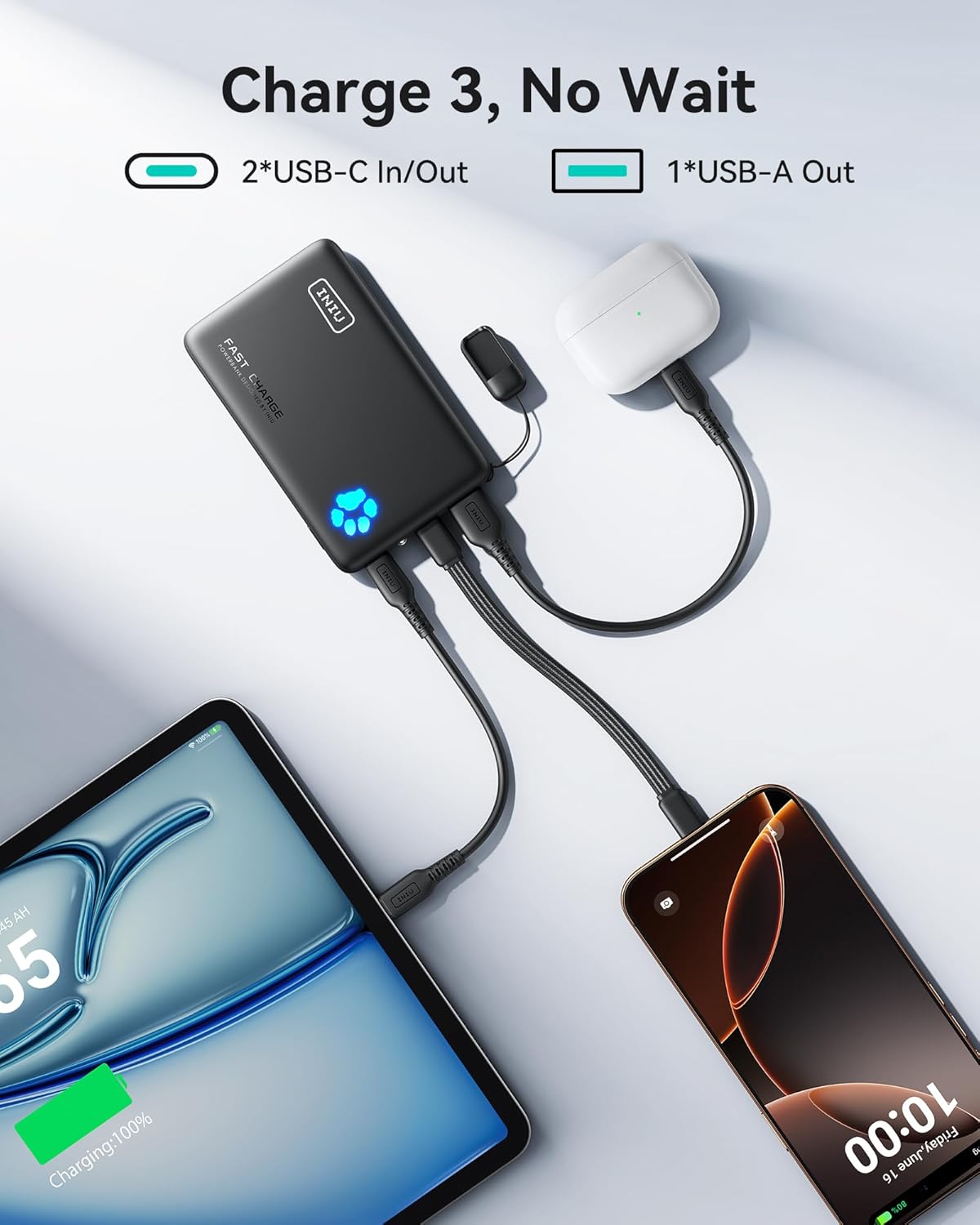
Figure 3: The power bank simultaneously charging a tablet via USB-C, a smartphone via USB-A, and wireless earbuds via the integrated USB-C cable.

Figure 4: The power bank connected to and charging a MacBook Air 13.6" and an iPad Air, illustrating its capability to power larger devices.

Figure 5: Device compatibility overview, showing the power bank's ability to charge a wide range of devices via USB-A and USB-C cables.
4.2 Recharging the Power Bank
To recharge your INIU Power Bank:
- Use a USB-C to USB-C cable or the provided USB-A to USB-C cable.
- Connect one end of the cable to either of the power bank's USB-C ports.
- Connect the other end to a USB wall charger (e.g., your phone charger) or a computer's USB port.
- The paw print LED indicator will flash during charging and become solid when fully charged.
4.3 Paw Print LED Battery Indicator
The illuminated paw print on the power bank indicates the remaining battery level:
- One paw segment lit: 0-20% charge remaining
- Two paw segments lit: 20-40% charge remaining
- Three paw segments lit: 40-60% charge remaining
- Four paw segments lit: 60-80% charge remaining
- All five paw segments lit: 80-100% charge remaining
When charging, the segments will flash sequentially until fully charged.
5. Maintenance
- Keep the power bank away from extreme temperatures (hot or cold), direct sunlight, and humid environments.
- Do not expose the power bank to water or other liquids.
- Clean the power bank with a dry, soft cloth. Do not use abrasive cleaners or solvents.
- Store the power bank in a cool, dry place when not in use. For long-term storage, it is recommended to charge it to about 50% every 3 months to preserve battery life.
- Avoid dropping or subjecting the power bank to strong impacts.
6. Troubleshooting
| Problem | Possible Cause | Solution |
|---|---|---|
| Power bank not charging devices. | Low battery on power bank; incorrect cable; device not compatible; power bank in standby. | Recharge the power bank; ensure cable is fully inserted and functional; check device compatibility; press power button (if applicable) to activate. |
| Power bank not recharging. | Faulty charging cable or adapter; power bank port issue. | Try a different USB-C cable and wall adapter; ensure connections are secure. |
| Slow charging. | Cable not supporting fast charge; device not supporting fast charge; multiple devices charging simultaneously. | Use a high-quality fast-charging cable; ensure your device supports fast charging; disconnect other devices for faster charging of a single device. |
| Paw print LED not lighting up. | Power bank completely discharged; internal fault. | Attempt to recharge the power bank for an extended period; if issue persists, contact customer support. |
7. Specifications
| Brand | INIU |
| Model | 10000mAh Fast Charge Power Bank |
| Battery Capacity | 10000mAh |
| Battery Composition | Lithium-Polymer |
| Input (USB-C) | Up to 22.5W (e.g., 5V/3A, 9V/2.5A, 12V/1.87A) |
| Output (USB-C) | Up to 22.5W (e.g., 5V/3A, 9V/2.5A, 12V/1.87A) |
| Output (USB-A) | Up to 22.5W (e.g., 5V/3A, 9V/2.5A, 12V/1.87A) |
| Total Output | Max 22.5W (shared across ports) |
| Dimensions (L x W x H) | 11 cm x 6.7 cm x 1.8 cm (approx. 4.3 x 2.6 x 0.7 inches) |
| Weight | Approx. 182g (6.4 oz) |
| Number of Ports | 3 (2x USB-C, 1x USB-A) |
| Compatible Devices | Smartphones (iPhone, Android), Tablets (iPad), Laptops (select models), Earbuds, Smartwatches, etc. |
8. Safety Information
- Do not disassemble, open, or shred the power bank.
- Do not expose the power bank to heat or fire. Avoid storage in direct sunlight.
- Do not short-circuit the power bank. Do not store it haphazardly in a box or drawer where other metal objects may short-circuit it.
- Do not subject the power bank to mechanical shock such as impact or dropping.
- In the event of a leak, do not allow the liquid to come into contact with the skin or eyes. If contact has been made, wash the affected area with copious amounts of water and seek medical advice.
- Keep the power bank clean and dry.
- Do not leave a fully charged power bank connected to a charger, as overcharging may shorten its lifespan.
- Use only the charging cables and adapters recommended by INIU or reputable brands.
- This power bank is not a toy. Keep out of reach of children.
- Dispose of the power bank responsibly according to local regulations. Do not dispose of it with household waste.
9. Warranty and Support
INIU stands behind the quality of its products. Your INIU Portable Power Bank 10000mAh comes with:
- 30-Day Money-Back Guarantee: If you are not satisfied with your purchase, you may return it within 30 days for a full refund.
- 3-Year INIU Warranty: Enjoy peace of mind with a comprehensive 3-year warranty covering manufacturing defects.
- Lifetime Technical Support: Our dedicated support team is available to assist you with any questions or issues you may encounter throughout the product's lifespan.
For warranty claims or technical assistance, please contact INIU customer support through the contact information provided on the official INIU website or your purchase platform.


