
Bmax B4 Plus
Bmax B4 Plus Mini PC User Manual
Model: B4 Plus
1. Introduction
This manual provides essential information for setting up, operating, and maintaining your Bmax B4 Plus Mini PC. Please read this guide thoroughly before using the device to ensure optimal performance and longevity.
1.1 Product Overview
The Bmax B4 Plus is a compact and powerful Mini PC designed for various applications, including office work, streaming, web browsing, and home entertainment. It features a 12th Generation Intel N100 Processor, 16GB DDR4 memory, and a 512GB SSD, providing fast boot times and efficient application performance. Its Intel UHD Graphics support 4K 60Hz triple-display output, making it versatile for multi-monitor setups.

Image: The Bmax B4 Plus Mini PC, showcasing its compact design and front ports. The device is dark grey with the BMAX logo prominently displayed.
1.2 What's in the Box
- 1 x B4 Plus MINI PC
- 1 x Power Adapter
- 1 x User Guide
- 1 x HDMI cable
- 1 x Metal Bracket
2. Setup
Follow these steps to set up your Bmax B4 Plus Mini PC for the first time.
2.1 Connecting Peripherals
- Connect Display: Connect your monitor(s) to the Mini PC using the HDMI ports or the Type-C port. The device supports up to three 4K displays simultaneously.
- Connect Keyboard and Mouse: Plug your USB keyboard and mouse into the available USB 3.0 or USB 2.0 ports.
- Connect Audio: If using external speakers or headphones, connect them to the 3.5-mm Stereo Headset Jack.
- Connect Network (Optional): For a wired internet connection, connect an Ethernet cable to the RJ45 port. Wireless connectivity (Wi-Fi) is also available.
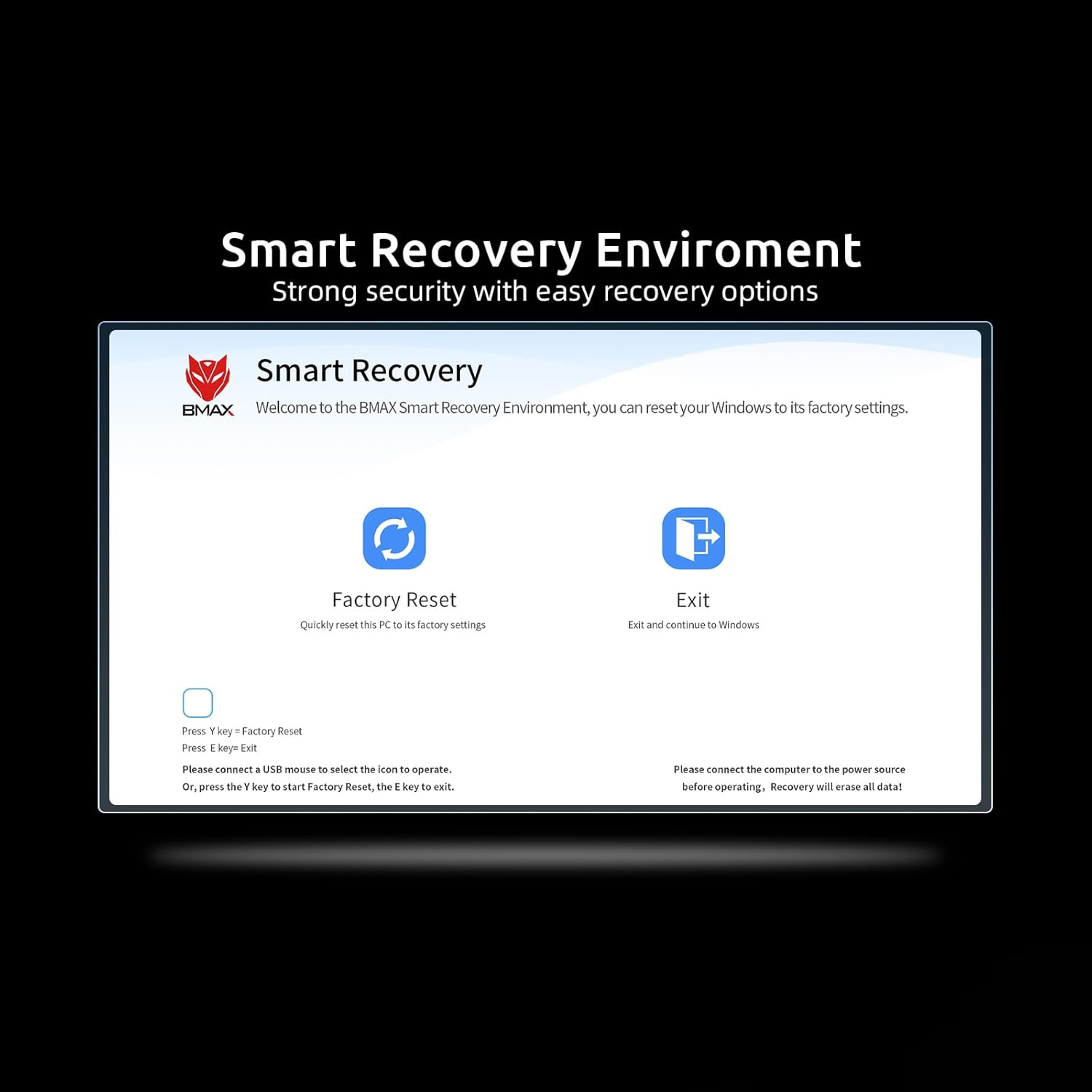
Image: Detailed view of the Bmax B4 Plus Mini PC's front and rear interfaces, including USB 3.0, USB 2.0, HDMI, Type-C, 3.5mm audio jack, Ethernet, and power input.
2.2 Powering On
- Connect Power Adapter: Plug the power adapter into the DC Jack on the Mini PC, then plug the other end into a power outlet.
- Press Power Button: Press the power button located on the front of the Mini PC. The power indicator light will illuminate, and the system will begin to boot.
3. Operating Instructions
3.1 Display Configuration
The Bmax B4 Plus supports triple-display output at 4K 60Hz resolution, allowing for extended desktop or mirrored display configurations. You can connect displays via the two HDMI ports and one Type-C port.

Image: Illustration of the Bmax B4 Plus Mini PC's triple-display capability, demonstrating connection to multiple monitors via HDMI and Type-C for extended desktop use.
3.2 Network and Bluetooth Connectivity
- Wi-Fi: The Mini PC features 802.11a/b/g/n/ac wireless connectivity, offering speeds up to 433Mbps. To connect to a Wi-Fi network, navigate to your operating system's network settings, select your desired network, and enter the password.
- Bluetooth: Built-in Bluetooth 4.2 allows you to connect various wireless devices such as keyboards, mice, and audio peripherals. Enable Bluetooth in your operating system settings and pair with your devices.
3.3 Performance and Storage
Equipped with an Intel N100 Processor, 16GB DDR4 RAM, and a 512GB SSD, the B4 Plus delivers efficient performance for daily computing tasks. The SSD ensures rapid boot times and quick application loading. The system also supports expansion with a 2.5-inch laptop hard drive slot for additional storage.

Image: Internal view of the Bmax B4 Plus Mini PC, highlighting the 16GB DDR4 SO-DIMM memory and the 512GB M.2 SATA SSD, illustrating its high-speed storage and memory configuration.
4. Maintenance
Proper maintenance ensures the longevity and optimal performance of your Mini PC.
- Cleaning: Regularly clean the exterior of the Mini PC with a soft, dry cloth. Avoid using liquid cleaners directly on the device.
- Ventilation: Ensure that the ventilation openings are not obstructed. Proper airflow is crucial to prevent overheating. Do not place the Mini PC in enclosed spaces without adequate air circulation.
- Software Updates: Keep your operating system and drivers updated to ensure system stability and security.
- Data Backup: Regularly back up important data to an external drive or cloud storage to prevent data loss.
5. Troubleshooting
This section addresses common issues you might encounter with your Bmax B4 Plus Mini PC.
5.1 Common Issues and Solutions
- No Power:
- Ensure the power adapter is securely connected to both the Mini PC and a working power outlet.
- Verify the power outlet is functional by plugging in another device.
- No Display:
- Check that the HDMI or Type-C cable is firmly connected to both the Mini PC and the monitor.
- Ensure the monitor is powered on and set to the correct input source.
- Try connecting to a different display or using a different cable.
- Slow Performance:
- Close unnecessary applications running in the background.
- Check for sufficient free space on the SSD.
- Ensure the Mini PC has adequate ventilation to prevent thermal throttling.
- Run system diagnostics or antivirus scans.
5.2 Smart Recovery Environment
The Bmax B4 Plus includes a Smart Recovery Environment, which can help resolve issues like OS crashes, slow response, or incorrect operation during OS upgrades. This feature allows you to reset the system to its factory settings, providing a thorough reinstall option.
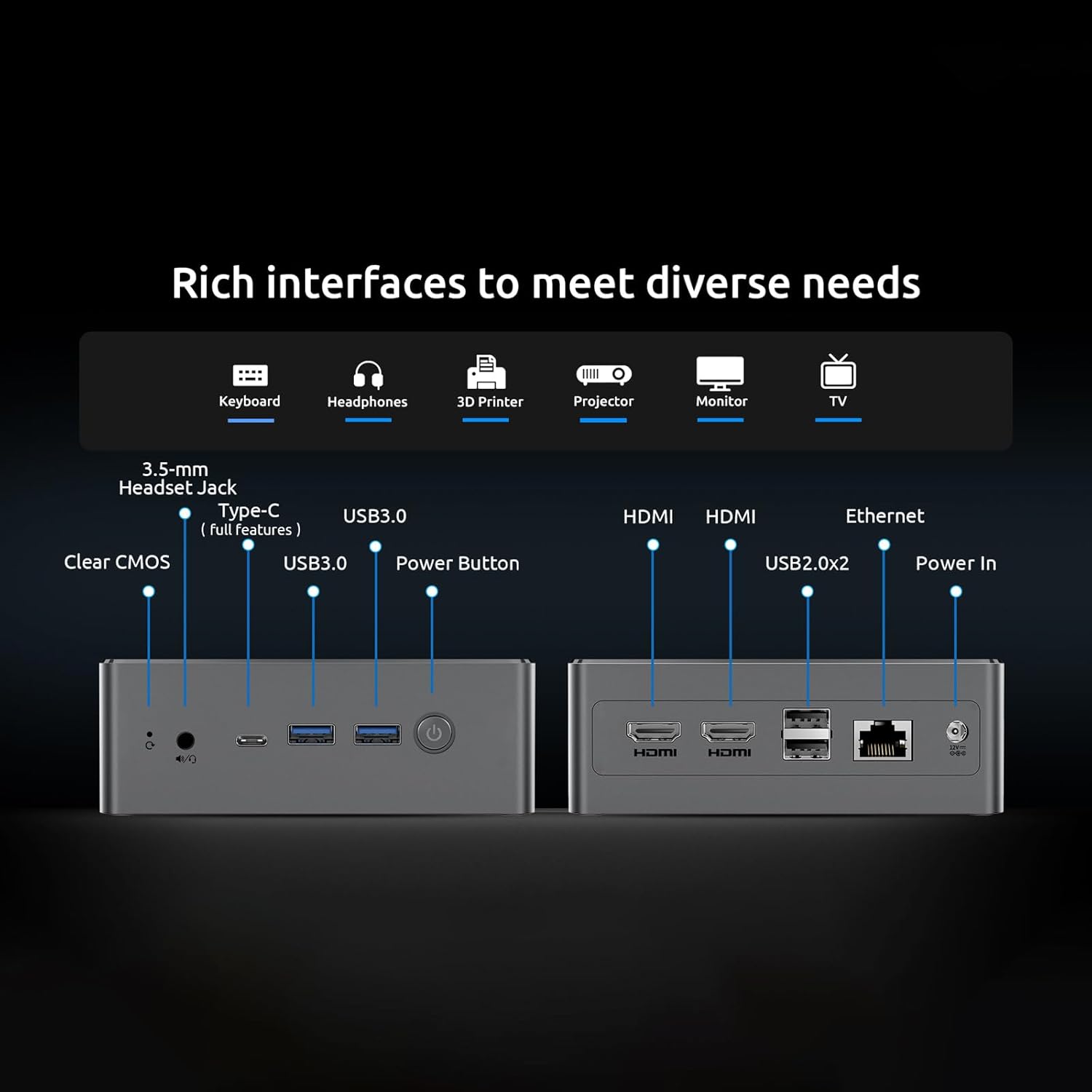
Image: Screenshot of the BMAX Smart Recovery Environment, showing options for Factory Reset and Exit. This utility helps restore the system to its original state.
To use Smart Recovery:
- Connect a USB mouse to select the icon to operate.
- Alternatively, press 'Y' key to start Factory Reset or 'E' key to exit.
- Warning: Please connect the computer to the power source before operating. Recovery will erase all data on the system drive.
6. Specifications
| Feature | Specification |
|---|---|
| Processor | Intel 12th Gen Alder Lake N100 Processor (up to 3.4 GHz) |
| Graphics | Intel UHD Graphics (supports 4K 60Hz) |
| RAM | 16 GB DDR4 |
| Storage | 512 GB SSD (M.2 SATA 2280) |
| Operating System | OS (Pre-installed) |
| Wireless Connectivity | Wi-Fi 802.11a/b/g/n/ac, Bluetooth 4.2 |
| Ports | 2x USB 3.0, 2x USB 2.0, 2x HDMI 2.0, 1x Type-C (full features), 1x 3.5-mm Stereo Headset Jack, 1x DC Jack, 1x Ethernet (RJ45) |
| Max Screen Resolution | 3840 x 2160 pixels |
| Item Weight | 1.61 pounds (approx. 0.73 kg) |
| Product Dimensions | 10.51 x 6.14 x 2.91 inches (approx. 26.7 x 15.6 x 7.4 cm) |
7. Warranty and Support
For warranty information and technical support, please refer to the documentation provided with your purchase or visit the official Bmax website. You can also contact Bmax customer service for assistance with product inquiries, troubleshooting, and service requests.
For more information, visit the Bmax Store on Amazon.
Ask a question about this manual
Ask about setup, troubleshooting, compatibility, parts, safety, or missing instructions. Manuals+ will review the question and use this page’s manual context to help answer it.