
radtel rt-470x
Radtel RT-470X Dual Band Ham Radio User Manual
Model: RT-470X
1. Introduction
This user manual provides comprehensive instructions for the operation and maintenance of your Radtel RT-470X Dual Band Ham Radio. Please read this manual thoroughly before using the device to ensure proper function and to prevent damage. The RT-470X is a versatile 5W dual-band radio designed for amateur radio use, featuring a color LCD, aviation band reception, and FM radio scanning capabilities.
2. What's in the Box
Upon unboxing, please verify that all the following items are included:
- Radtel RT-470X Radio Unit
- Rechargeable Lithium-ion Battery (2800mAh)
- Antenna
- Belt Clip
- USB Type-C Charging Cable
- Power Adapter (Charger)
- User Manual (this document)

Image: The Radtel RT-470X radio unit, its 2800mAh battery, antenna, USB Type-C charging cable, and power adapter, all neatly arranged as included components.
3. Product Overview
The Radtel RT-470X features a robust design with a clear color LCD for easy operation and monitoring of frequencies and settings.
3.1 Key Features
- Dual Band Operation: Supports 144-146MHz and 430-440MHz for transmitting and receiving.
- Full Band Scan Reception: Capable of receiving across a wide frequency range, including AM 108-136MHz for aviation band.
- Frequency Measurement Function: Allows for quick identification and copying of nearby radio frequencies.
- Type-C Charging: Convenient charging via USB Type-C port from various power sources.
- Color LCD Display: Large, clear display for easy viewing of operational status.
- Dual Display, Dual Standby: Monitor two frequencies simultaneously.
- Dual PTT Button: Separate Push-To-Talk buttons for main and sub-frequencies.
- NOAA Weather Alerts: Receive severe weather alerts.
- Emergency SOS Function: For signaling in urgent situations.
- Scrambler Function: Enhances communication privacy.
- Updatable Firmware: Allows for future feature additions and performance improvements.

Image: Visual representation of the Radtel RT-470X's key features, including NOAA weather alerts, AM reception, multi-band transmit/receive, frequency scanning, fast frequency copy, scrambler, Type-C charging, and emergency SOS.
4. Setup
4.1 Battery Installation
- Align the battery pack with the grooves on the back of the radio unit.
- Slide the battery upwards until it clicks securely into place.
- To remove, press the battery release latch (if present) and slide the battery downwards.
4.2 Antenna Attachment
Screw the antenna clockwise into the connector on the top of the radio until it is finger-tight. Do not overtighten.
4.3 Initial Charging
Before first use, fully charge the battery. Connect the USB Type-C charging cable to the radio's Type-C port and the other end to the provided power adapter. Plug the adapter into a standard wall outlet. The charging indicator on the radio will show charging status. A full charge typically takes several hours.

Image: The Radtel RT-470X supports Type-C charging directly on the battery, allowing for flexible charging from various sources like car chargers, power banks, and wall chargers.
5. Operating Instructions
5.1 Power On/Off and Volume
To power on the radio, rotate the power/volume knob clockwise. Continue rotating to adjust the volume. To power off, rotate the knob counter-clockwise until it clicks.
5.2 Frequency Range and Bands
The RT-470X operates on the following frequency ranges:
- TX/RX: 144-146MHz (VHF), 430-440MHz (UHF)
- RX Only: AM 108-136MHz (Aviation Band), FM 66-108MHz (Broadcast FM)
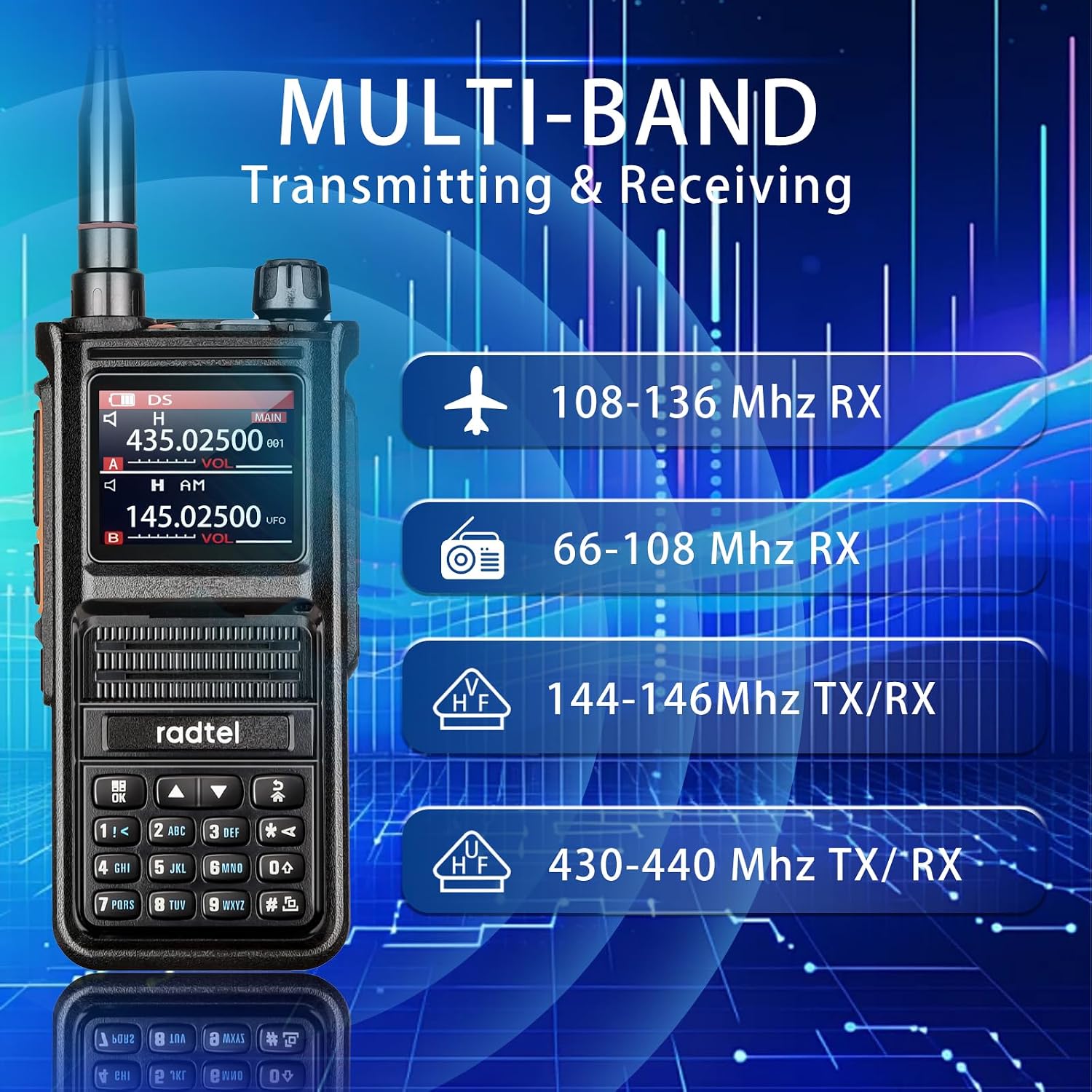
Image: The Radtel RT-470X supports multi-band transmitting and receiving, covering amateur VHF/UHF bands and receiving aviation and broadcast FM bands.

Image: The Radtel RT-470X is capable of receiving aviation band frequencies, allowing users to monitor air traffic communications.
5.3 Frequency Measurement / Wireless Copy
The frequency measurement function allows the radio to quickly scan and identify the frequency and sub-tone (CTCSS/DCS) of another nearby radio (within approximately one meter). This enables immediate communication by copying their frequency settings.

Image: The wireless frequency copy feature allows the RT-470X to quickly seek and replicate frequencies and CTCSS/DCS tones from other walkie-talkies for instant communication.
5.4 Dual PTT Function
The RT-470X is equipped with two Push-To-Talk (PTT) buttons. If the PF2 key is configured as PTTB, pressing the main PTT button will transmit on the upper frequency displayed, while pressing the PF2 key will initiate transmission on the lower frequency.

Image: The dual PTT function allows for independent transmission on two different frequencies, enhancing operational flexibility.
5.5 Programming Modes
The Radtel RT-470X can be programmed using three methods:
- CPS Programming: Using the manufacturer's Computer Programming Software (CPS) connected via a data cable.
- Chirp Programming: Compatible with the open-source Chirp software for advanced configuration.
- Keypad Programming: Direct programming of frequencies and settings via the radio's keypad.

Image: The Radtel RT-470X offers flexible programming options, including CPS software, Chirp software, and direct keypad programming.
5.6 NOAA Weather Alerts
The radio can receive NOAA weather alerts, providing timely information on severe weather conditions. This feature is particularly useful for outdoor activities.

Image: The NOAA weather alert feature allows the RT-470X to receive important weather broadcasts, enhancing safety during outdoor use.
5.7 Emergency SOS
The radio includes an Emergency SOS function. Refer to the detailed menu settings in the full manual for activation and configuration of this feature.
5.8 Scrambler Function
The scrambler function provides basic voice encryption for enhanced privacy during communications. This feature can be enabled or disabled via the radio's menu.
5.9 Flashlight
A built-in flashlight is available for illumination in low-light conditions, useful for camping or navigating dark environments.

Image: The strong flashlight feature of the RT-470X is practical for use in dark conditions, such as during camping or in basements.
5.10 ID Code Display
The radio supports displaying an ID code, which can be transmitted and received, allowing for identification between users.

Image: The ID code display feature allows the radio to send and receive identification codes, facilitating user recognition.
6. Maintenance
6.1 Battery Care
- Avoid fully discharging the battery frequently to prolong its lifespan.
- Store the radio and battery in a cool, dry place when not in use for extended periods.
- Do not expose the battery to extreme temperatures or direct sunlight.
6.2 Cleaning
Wipe the radio's surface with a soft, damp cloth. Do not use harsh chemicals or abrasive cleaners. Ensure the Type-C port cover is properly sealed to prevent dust and moisture ingress.
7. Troubleshooting
| Problem | Possible Cause | Solution |
|---|---|---|
| Radio does not power on. | Battery is low or not installed correctly. | Charge the battery or re-install it securely. |
| Cannot transmit. | Incorrect frequency/channel, out of range, or low battery. | Verify frequency settings, move closer to the other radio, or charge the battery. |
| Poor reception quality. | Weak signal, antenna not properly attached, or interference. | Check antenna connection, move to an open area, or identify sources of interference. |
| Display is blank or frozen. | Software glitch or battery issue. | Remove and re-insert the battery to reset the device. If problem persists, contact support. |
| Cannot receive AM/PMR frequencies (as per some reviews). | Firmware issue or specific settings not enabled. | Perform a factory reset via the menu. For PMR446, try the specific key combination: Power off, then hold PTT + '8' while powering on. Consider firmware update if available. |
8. Specifications
| Feature | Detail |
|---|---|
| Brand | Radtel |
| Model Number | RT-470X |
| Color | Black |
| Frequency Range | TX/RX: 144-146 MHz, 430-440 MHz; RX: AM 108-136 MHz, FM 66-108 MHz |
| Max Power Output | 5W |
| Number of Channels | 256 |
| Battery Type | Lithium-ion |
| Battery Capacity | 2800mAh (19.24Wh) |
| Voltage | 7.4 Volts |
| Charging Port | USB Type-C |
| Special Features | Scanning, VOX, Voice Prompt, DTMF, Dual Standby, Firmware Update, Roger Beep, Frequency Measurement, Scrambler, Emergency SOS, Flashlight |
| Water Resistance Level | Not waterproof |
| Display | 1.77" Color LCD |
9. Warranty and Support
Radtel products are designed for reliability and performance. For warranty information and technical support, please refer to the official Radtel website or contact your local distributor. Keep your purchase receipt as proof of purchase for warranty claims.
For common issues, please refer to the troubleshooting section of this manual. For further assistance, please visit the Radtel Brand Store on Amazon or contact customer service.
Related documentsrt-470x


Ask a question about this manual
Ask about setup, troubleshooting, compatibility, parts, safety, or missing instructions. Manuals+ will review the question and use this page’s manual context to help answer it.