
1. Introduction and Overview
The ORCATORCH D710V MK2 is an advanced underwater video light designed for dive photography and fluorescent night diving. This upgraded model features 2300 lumens of white light, along with red and UV tri-color light sources, offering versatile lighting options for various underwater scenes. Its 120-degree wide beam ensures broad and even illumination, crucial for capturing detailed underwater photographs and videos. The compact and robust design, coupled with a smart switch locking mechanism and real-time battery indicator, makes it a reliable tool for underwater enthusiasts.
This manual provides essential information for the proper setup, operation, maintenance, and troubleshooting of your D710V MK2 light.
2. Package Contents
Please verify that all items listed below are included in your package:
- 1 x D710V MK2 Underwater Photography Light
- 1 x USB Type-C Charging Cable
- 1 x ZJ18 Ball Joint Bracket
- 3 x Spare O-rings
- 1 x Lanyard
- 1 x User Manual
- 1 x Portable Zipper Box

Figure 1: ORCATORCH D710V MK2 Package Contents
3. Product Features
Enhanced Brightness & UV Light Source
The D710V MK2 is an upgraded version of the D710V, featuring improved brightness and the addition of two UV light sources for enhanced lighting experiences. The flashlight barrel has also been shortened for improved portability and ease of use.

Figure 2: D710V vs D710V MK2 Comparison Chart
Tri-color Light Sources
This dive photography fill light combines white, red, and UV light sources into a single flashlight, eliminating the need for multiple lights. This design saves time, effort, and space in your diving gear.

Figure 3: Multiple Light Sources (White + Red + UV)
Bright Light & Wide 120-Degree Beam
The D710V MK2 delivers a maximum of 2300 lumens with a wide 120-degree beam angle, ideal for capturing stunning underwater photographs. This broad coverage ensures even lighting across a large area, enhancing detail and immersion in images.

Figure 4: 120-Degree Wide Beam Floodlighting
4 Lighting Modes
The light offers four modes: White Light-High, White Light-Low, Red Light, and UV Light. These modes cater to diverse underwater lighting needs, from bright illumination for night diving to vibrant color capture in photography.
Figure 5: Multiple Application Scenarios with Different Light Modes
Power Status Display
A built-in battery indicator provides real-time power level information. Green light indicates over 40% battery, red light indicates 10% to 40%, and a flashing red light indicates less than 10% power, allowing for planned diving and photography activities.

Figure 6: Power Status Display
Smart Switch Locking Design
The switch features a locking function to prevent accidental operation and extend the light's lifespan. Long press the side switch for 5 seconds to lock the torch in shutdown mode. Double-click to unlock. The light blinks twice to confirm lock/unlock, and the battery indicator shows green when the button is pressed in lock mode.

Figure 7: Smart Switch Locking Design
IP68 Waterproof & Robust Construction
Constructed from premium aluminum alloy, the D710V MK2 is anti-corrosive and built for harsh underwater conditions. With triple waterproof O-rings and two-sided tempered glass, it resists water infiltration up to 150 meters, making it suitable for various underwater activities.
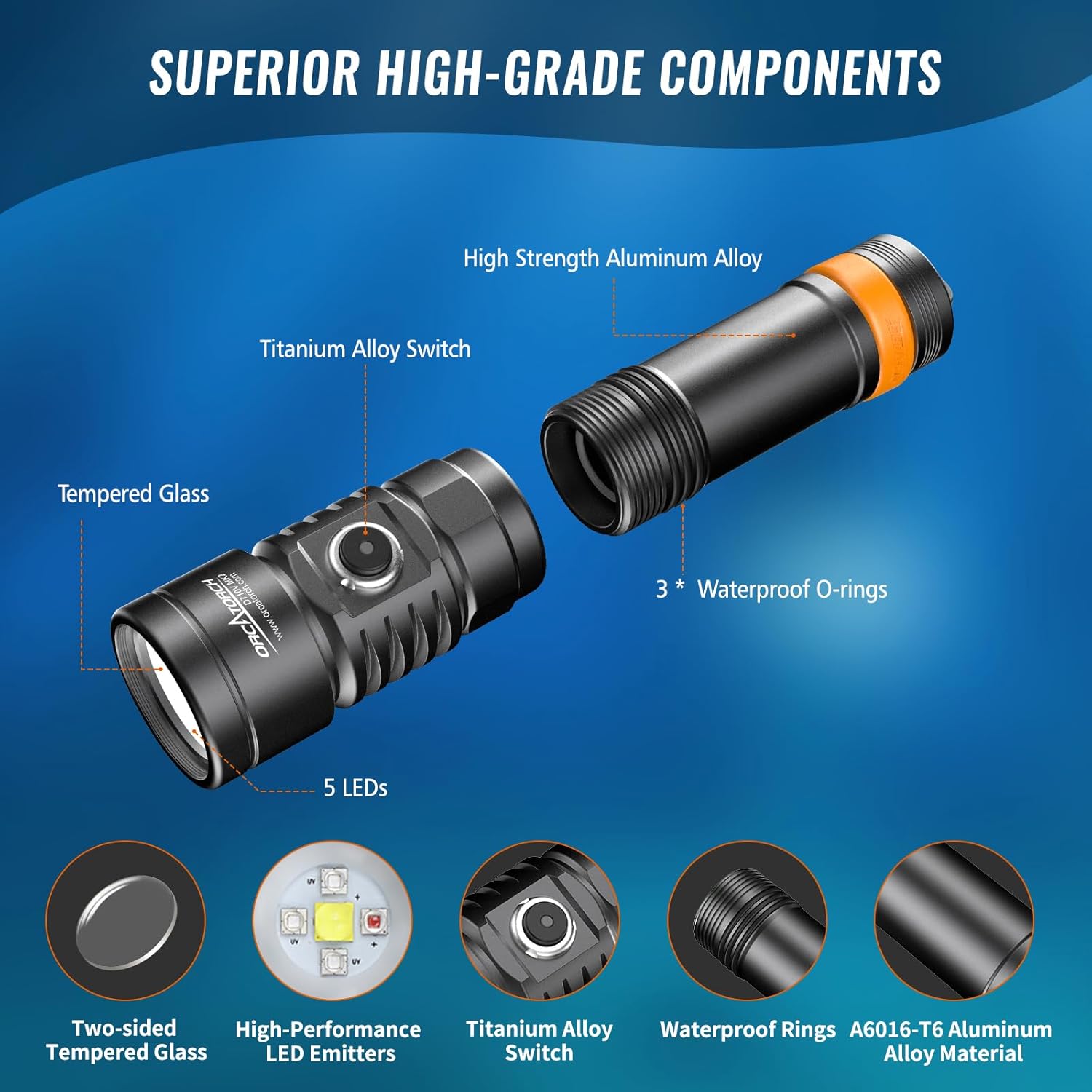
Figure 8: Superior High-Grade Components
Convenient and Compact Design
The ORCATORCH D710V MK2 is designed to be compact and lightweight, facilitating easy carrying and travel. It includes premium accessories like the ZJ18 ball joint bracket for versatile camera mounting.

Figure 9: Compact Design & Comfortable Grip

Figure 10: Convenient Ball Joint Bracket
4. Setup
Battery Installation and Charging
- Unscrew the tail cap of the flashlight counter-clockwise.
- Insert the included rechargeable Li-ion battery with the positive (+) terminal facing towards the light head.
- Screw the tail cap back on clockwise until it is securely tightened.
- To charge the battery, connect the USB Type-C charging cable to the battery directly or use an external charger. The battery indicator will show charging status.
O-Ring Lubrication
Before first use and periodically thereafter, apply a thin layer of silicone grease to the O-rings to ensure a watertight seal. Inspect O-rings for any damage or debris and replace if necessary using the spare O-rings provided.
Attaching Lanyard and Ball Joint Bracket
- Attach the lanyard to the designated loop on the tail cap for secure handling.
- The ZJ18 ball joint bracket can be attached to the light for mounting on various camera rigs. Ensure it is securely fastened before diving.
5. Operating Instructions
Power On/Off
- To Turn On: Press and hold the side switch for approximately 0.5 seconds.
- To Turn Off: Press and hold the side switch for approximately 0.5 seconds.
Mode Switching
With the light on, short press the side switch to cycle through the modes in the following order:
White Light-High → White Light-Low → Red Light → UV Light → White Light-High...
Smart Switch Locking
- To Lock: In shutdown mode, long press the side switch for 5 seconds. The light will blink twice to indicate it is locked.
- To Unlock: Quickly double-click the side switch. The light will blink twice to indicate it is unlocked.
Battery Indicator
The LED indicator on the side switch displays the battery level:
- Green Light On: Battery level over 40%.
- Red Light On: Battery level between 10% and 40%.
- Red Light Flashing: Battery level less than 10%.
6. Maintenance
General Care
- Rinse the light thoroughly with fresh water after every dive to remove salt and debris.
- Wipe the light dry with a soft cloth.
- Avoid exposing the light to direct sunlight or high temperatures for extended periods.
O-Ring Maintenance
- Regularly inspect the O-rings for cuts, cracks, or any signs of wear.
- Clean the O-rings and their grooves, removing any sand, dirt, or foreign particles.
- Apply a thin, even layer of silicone grease to the O-rings to maintain their elasticity and sealing properties.
- Replace damaged O-rings immediately to prevent water leakage.
Battery Storage
If storing the light for an extended period, remove the battery and store it separately in a cool, dry place. Recharge the battery every 3-6 months to maintain its lifespan.
7. Troubleshooting
Light Not Turning On
- Check if the battery is correctly installed with the positive (+) terminal facing the light head.
- Ensure the battery is charged. Refer to the Power Status Display section.
- Verify that the tail cap is fully tightened.
- Check if the smart switch locking function is active. Unlock the switch if necessary.
Dim Light or Short Runtime
- The battery may be low. Recharge the battery fully.
- Ensure the battery is not old or damaged. Replace if performance has significantly degraded.
Water Leakage
- Immediately rinse the light with fresh water and dry it.
- Inspect all O-rings for damage, dirt, or improper seating. Clean and lubricate or replace O-rings as needed.
- Ensure the tail cap is securely tightened.
8. Specifications
The following table outlines the technical specifications of the ORCATORCH D710V MK2:
| Feature | Specification |
|---|---|
| Max Output (White Light-High) | 2300 Lumens |
| Max Output (White Light-Low) | 750 Lumens |
| Max Output (Red Light) | 150 Lumens |
| Max Output (UV Light) | 10 Lumens |
| Runtime (White Light-High) | 1h 20mins |
| Runtime (White Light-Low) | 2h 40mins |
| Runtime (Red Light) | 4h 10mins |
| Runtime (UV Light) | 2h 30mins |
| Beam Angle | 120-Degree Wide Beam |
| Waterproof Rating | IP68 (up to 150 meters) |
| Impact Resistance | 1.5m |
| Dimensions | 145.8mm (Length) x 27mm (Tube Dia.) x 36mm (Head Dia.) |
| Weight (excluding battery) | 145g |
| Power Source | Rechargeable Li-ion Battery (included) |
Note: The above parameters were tested according to ANSI/NEMA FL1 standards at an ambient temperature of 21 ± 4°C and humidity of 50 ± 40%. Parameters may vary between flashlights, batteries, and environments.

Figure 11: Product Parameters
9. Official Product Video
Video 1: Official product video showcasing the ORCATORCH D710V MK2 underwater video light, highlighting its 2300 lumens, tri-color light, and features.
10. Warranty and Support
ORCATORCH provides responsive customer service for any inquiries regarding the product before or after purchase. For assistance, please reach out to the seller "Odepro Outdoor" on Amazon. Your satisfaction is important, and the dedicated customer service team is ready to assist you.