Introduction
Thank you for choosing the Coolfiqu 5.2L Cool & Warm Mist Humidifier, Model LP-2113. This manual provides important information regarding the setup, operation, maintenance, and troubleshooting of your new humidifier. Please read it thoroughly before use and retain it for future reference.
This humidifier is designed to improve air quality and comfort in your home or office by adding moisture to the air. It features a large 5.2-liter capacity, both cool and warm mist options, an essential oil diffuser, and a convenient top-fill design.
Setup Instructions
Follow these steps to set up your humidifier for first use:
- Unpack the Humidifier: Carefully remove all components from the packaging.
- Remove Protective Materials:
Locate and tear off any protective tape from the humidifier unit. Remove the foam packaging from the base of the humidifier.

Image: Step-by-step guide for removing protective tape and foam from the humidifier's base.
- Assemble the Nozzle Cap:
Align the nozzle cap with the humidifier cup lid and press them together to assemble. Ensure correct alignment as shown in the image.
Image: Illustration of correctly assembling the nozzle cap onto the lid, contrasting with an incorrect assembly.
- Place Assembled Lid: After assembling, place the lid onto the water tank.
- Install Filters and Purification Device:
Ensure the filtering component (for impurities) and the water purification device (to inhibit bacterial growth) are correctly placed in the top water tank. Refer to the diagram for proper placement.

Image: Detailed view of the top water tank components, including the filter and water purification device.
- Fill the Water Tank:
Open the top lid and pour clean, cool tap water directly into the water tank. Do not exceed the maximum water level indicated on the tank. Do not pour water into the mist outlet.

Image: Visual guide on how to fill the humidifier from the top and observe the maximum water level.
- Connect Power: Plug the power cord into a suitable electrical outlet.
Operating Instructions
Your Coolfiqu humidifier offers various features for optimal comfort:
- Power On/Off: Press the power button on the control panel to turn the humidifier on or off.
- Mist Mode Selection (Cool/Warm): Use the dedicated button on the control panel to switch between cool mist and warm mist modes.
- Adjust Mist Level: Adjust the mist output intensity using the control panel buttons. The 360° rotatable nozzle allows you to direct the mist as desired.
- Sleep Mode: Activate sleep mode for quiet operation and dimmed display lights, ideal for nighttime use. The humidifier operates at approximately 28 dB in this mode.
- Essential Oil Diffuser:
Locate the essential oil tray, typically a small compartment separate from the water tank. Add a few drops of your preferred essential oil to the pad in this tray. Do not add essential oils directly into the water tank.
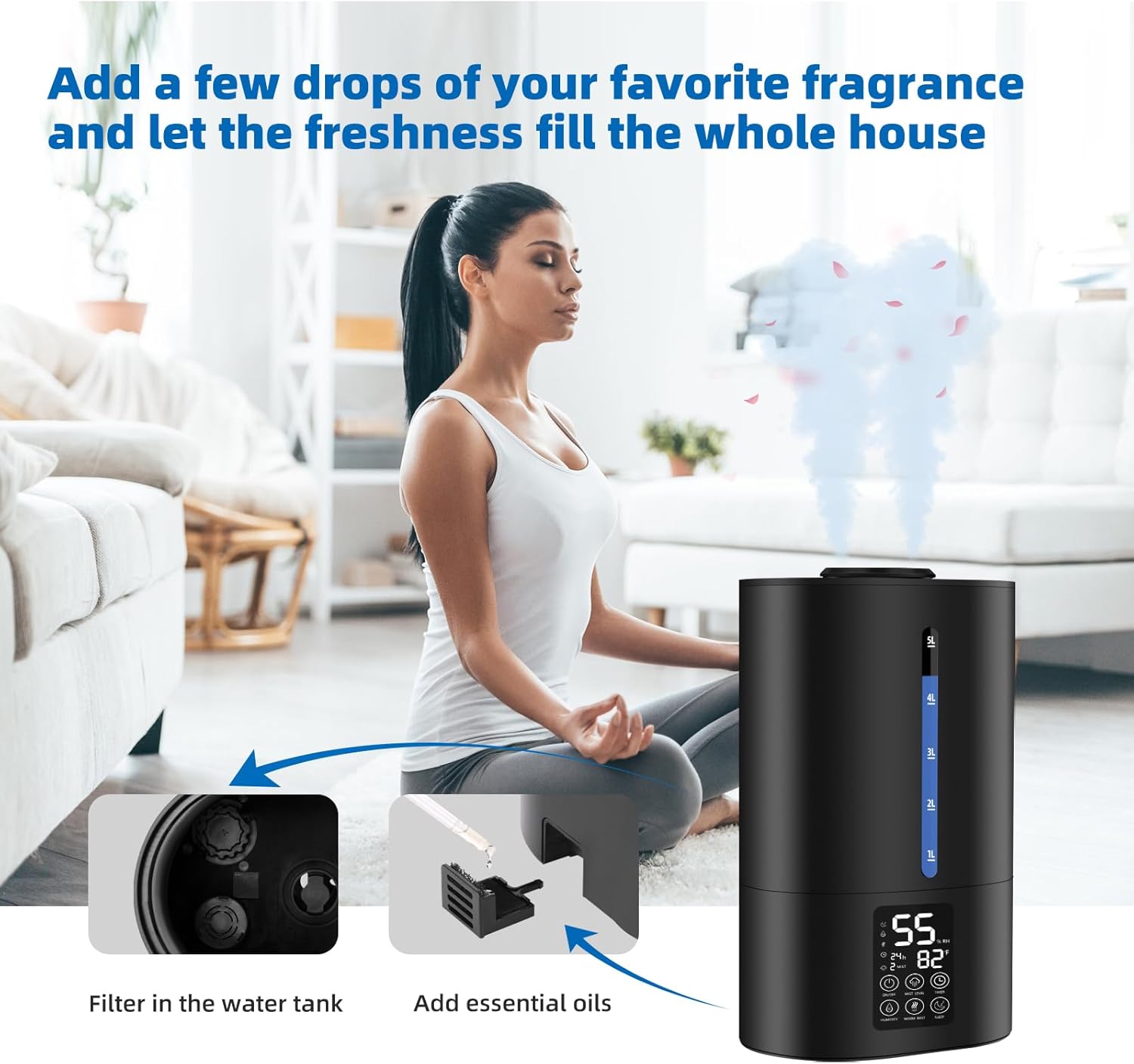
Image: Instructions for adding essential oils to the humidifier's aroma tray.
- Water Shortage Warning: The humidifier is equipped with an anti-dry burn feature and will indicate when the water level is low, automatically shutting off to prevent damage.
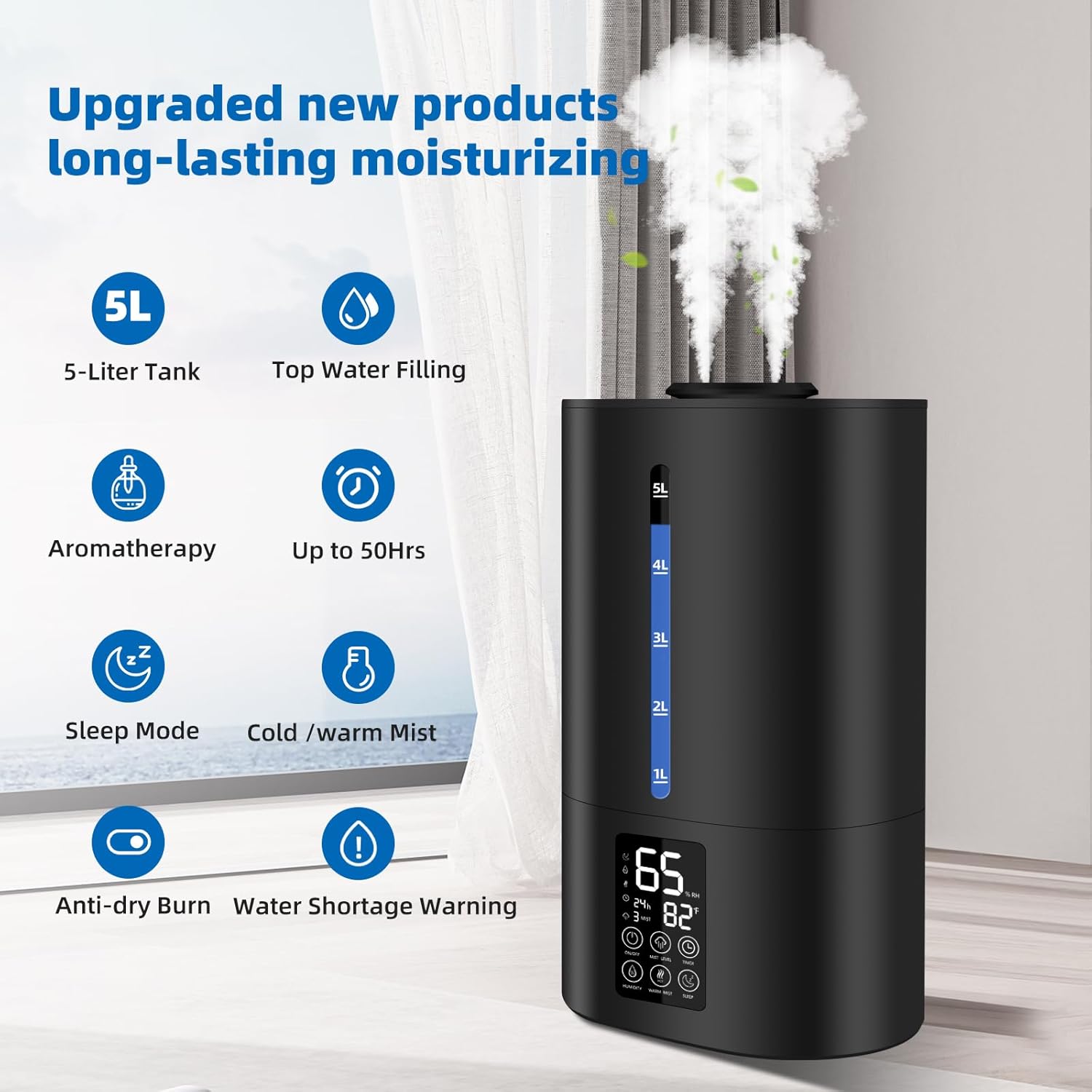
Image: Summary of key features of the Coolfiqu 5.2L Humidifier.
Maintenance
Regular cleaning and maintenance ensure optimal performance and longevity of your humidifier:
- Daily Cleaning:
Empty and rinse the water tank and base daily. Wipe down all surfaces with a clean cloth. Allow to air dry before refilling.
- Weekly Cleaning (Filters and Nebulizer):
To prevent issues like reduced mist output or leaking due to clogged filters, clean the water filters once a week. Use a soft brush to gently wipe the nebulizer tablets in the lower base to prevent damage to the atomization function.
Image: Instructions for cleaning filters and important water level precautions.

Image: Detailed view of the lower base, highlighting the nebulizer tablets and sponge foam for cleaning.
- Descaling:
If mineral deposits accumulate, fill the base with a mixture of equal parts white vinegar and water. Let it soak for 30 minutes, then scrub with a soft brush and rinse thoroughly. Do not immerse the electrical components in water.
- Storage:
When not in use for an extended period, clean and dry the humidifier completely. Store it in a cool, dry place.
Troubleshooting
If you encounter issues with your humidifier, please refer to the following common problems and solutions:
| Problem | Possible Cause | Solution |
|---|---|---|
| No mist or low mist output |
|
|
| Water leaking from the base |
|
|
| Unusual noise |
|
|
| Humidifier does not turn on |
|
|
Product Specifications
| Brand | Coolfiqu |
| Model Name | LP-2113 |
| Capacity | 5.2 Liters |
| Voltage | 120 Volts |
| Product Dimensions | 7 x 7 x 7 inches |
| Item Weight | 4.36 pounds |
| Special Feature | Aroma Diffuser, Top Fill Design, Adjustable Mist, Sleep Mode |
| Operation Mode | Ultrasonic (Cool & Warm Mist) |
| Color | Midnight Black |
Warranty and Support
Specific warranty information is not provided in this manual. For details regarding warranty coverage, technical support, or replacement parts, please refer to the product packaging or contact Coolfiqu customer service directly.
You may also visit the Coolfiqu Store on Amazon for additional product information and support resources.


