
1. Introduction and Overview
Welcome to the world of Super Mario with your new Accutime Kids LED Watch. This timepiece is designed for young fans aged 6-12, featuring an iconic Mario design and a clear red LED display. It combines durability with a fun aesthetic, making time-telling an engaging experience. This manual provides essential information for setting up, operating, and maintaining your watch to ensure long-lasting enjoyment.
2. Product Features
- Bold Super Mario Artwork: Features vibrant screen-printed artwork of Mario and game elements on the strap.
- Red LED Display: Provides a clear and easy-to-read digital time display.
- Durable Construction: Built with a silver plastic case and a soft silicone strap for active use.
- Adjustable Strap: Designed to fit various wrist sizes securely with an alloy buckle.
- Lightweight Design: Comfortable for all-day wear.

Figure 2.1: Front view of the Accutime Super Mario LED Watch, showcasing the red LED display and the detailed Super Mario themed strap.

Figure 2.2: The watch laid flat, illustrating the full length of the strap with its vibrant Super Mario artwork and the watch face.
3. Setup
Your Accutime Super Mario LED Watch is designed for immediate use.
- Initial Activation: Upon first use, the watch display may be off to conserve battery. Press the button on the right side of the watch case to activate the LED display and show the current time.
- Strap Adjustment: Adjust the strap to a comfortable fit on the wrist using the alloy buckle. Ensure it is snug but not too tight.
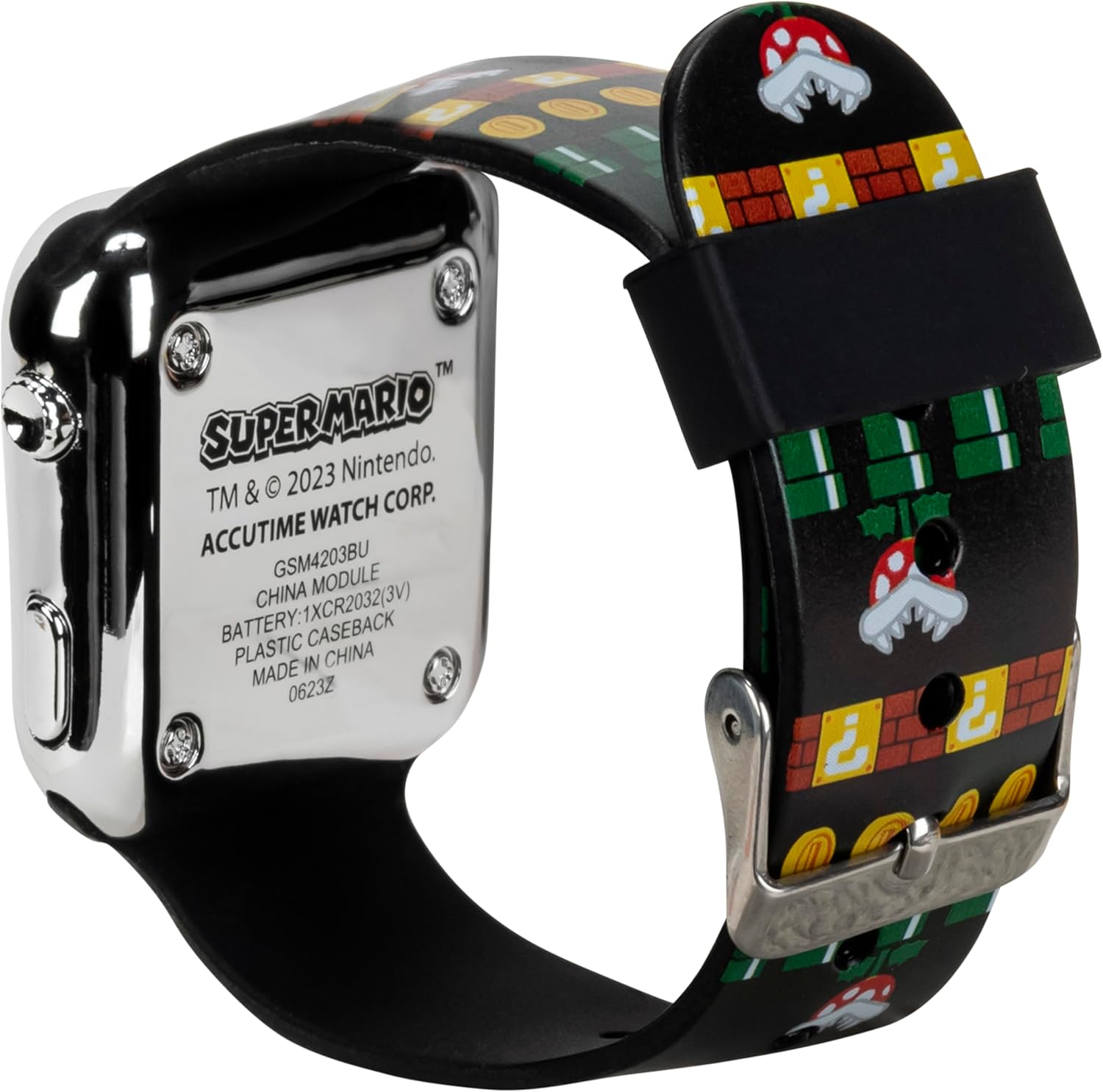
Figure 3.1: A child wearing the watch, demonstrating a comfortable fit.
4. Operating Instructions
The Accutime Super Mario LED Watch features a simple one-button operation for displaying and setting the time.
4.1. Displaying the Time
- To view the time, simply press the button located on the right side of the watch case. The red LED display will illuminate, showing the current time for a few seconds before turning off to conserve battery.
4.2. Setting the Time
To set the time on your watch:
- Press the button once to display the time.
- While the time is displayed, press and hold the button for approximately 3 seconds until the hour digits begin to flash.
- Press the button repeatedly to advance the hour. The hour will cycle from 1 to 12 (or 0 to 23 for 24-hour format, depending on the watch's default setting).
- Once the correct hour is set, press and hold the button again for approximately 3 seconds until the minute digits begin to flash.
- Press the button repeatedly to advance the minutes.
- After setting the minutes, press and hold the button one last time for approximately 3 seconds to confirm the setting and exit time-setting mode. The display will stop flashing.
Note: Some models may also allow setting the date or AM/PM indicator. If your watch has these features, continue pressing and holding the button after setting minutes to cycle through additional settings.
5. Maintenance
5.1. Cleaning
- To clean the watch, gently wipe the case and strap with a soft, damp cloth.
- Avoid using harsh chemicals or abrasive materials, as these can damage the watch's finish or artwork.
5.2. Battery Replacement
The watch is powered by one CR2032 (3V) button cell battery. When the display becomes dim or stops working, it's time to replace the battery.
- Carefully remove the four small screws on the back of the watch case using a small Phillips head screwdriver.
- Gently lift the back cover.
- Locate the battery and carefully remove it. Note its orientation (+/-).
- Insert a new CR2032 (3V) battery with the correct polarity.
- Replace the back cover and secure it with the four screws. Do not overtighten.

Figure 5.1: Rear view of the watch, indicating the location of the screws for battery access.
5.3. Water Resistance
This watch is designed for everyday wear and can withstand minor splashes. It is not recommended for swimming, showering, or submersion in water. Avoid exposing the watch to excessive moisture to prevent damage.
6. Troubleshooting
| Problem | Possible Cause | Solution |
|---|---|---|
| Display is blank or dim. | Low or dead battery. | Replace the battery (CR2032, 3V). Refer to Section 5.2. |
| Time is incorrect. | Time needs to be set. | Set the time according to Section 4.2. |
| Button does not respond. | Battery issue or internal malfunction. | Check battery. If problem persists, contact customer support. |
7. Specifications
- Model Number: GSM4203AZ
- Display Type: Red LED Digital
- Case Material: Plastic (Silver-colored)
- Strap Material: Silicone
- Battery Type: 1 x CR2032 (3V) Button Cell
- Recommended Age: 6-12 years
- Manufacturer: Accutime Watch Corp.
- ASIN: B0C9R83TCB
- Package Dimensions: 4.76 x 2.95 x 2.87 inches
- Item Weight: 1 ounce
8. Warranty and Support
For warranty information and customer support, please refer to the packaging or contact Accutime Watch Corp. directly. Keep your purchase receipt as proof of purchase.
You can typically find contact information on the manufacturer's official website or through the retailer where the product was purchased.
Accutime Watch Corp.
Visit the Accutime Store on Amazon