1. Introduction
Welcome to the user manual for your Optoma HD30LV 1080p Full HD Home Projector. This document provides essential information for the safe and efficient operation of your device. Please read these instructions carefully before using the projector and retain them for future reference.
2. Product Overview
The Optoma HD30LV is designed to deliver a high-quality visual experience for home theater and gaming. It features 1080p Full HD resolution, 4K HDR input compatibility, and a compact design for versatile placement.
Key Features:
- 4,500 Lumens: Provides bright images suitable for various lighting conditions.
- 4K UHD and HDR Compatible: Supports high-resolution and high dynamic range content for enhanced detail and color.
- Portable and Lightweight: Designed for easy transport and flexible installation.
- Enhanced Gaming Mode: Offers lightning-fast response times for a smooth gaming experience.
- Dual HDMI Connectors: Allows connection to multiple devices simultaneously.
What's in the Box:
- Optoma HD30LV Projector
- Power Cable
- Remote Control
- User Manual (this document)
Product Visuals:

Front view of the Optoma HD30LV projector, showcasing the lens and ventilation.

Top view of the Optoma HD30LV projector, showing the control panel and focus/zoom adjustments.
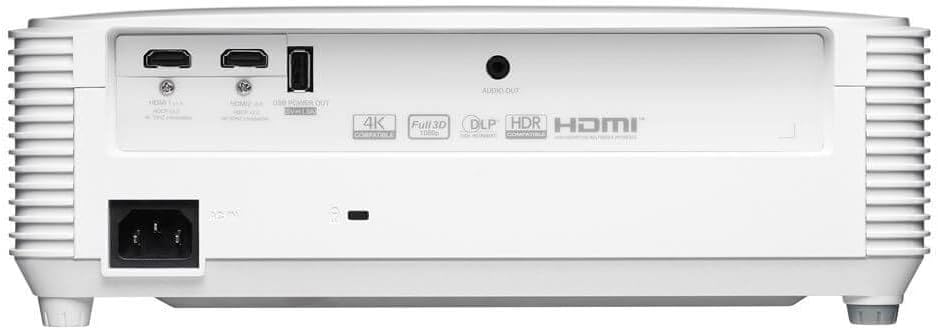
Rear view of the Optoma HD30LV projector, detailing the input and output ports.
Product Video:
An official product overview video demonstrating the features and design of the Optoma HD30LV projector.
3. Setup
3.1 Unpacking and Placement
- Carefully remove the projector and all accessories from the packaging.
- Place the projector on a stable, flat surface or mount it securely according to the manufacturer's guidelines. Ensure adequate ventilation around the unit.
- Consider the throw distance for your desired screen size. The HD30LV can project a 120-inch image from approximately 13 feet 10 inches (4.22 meters) away.

Diagram illustrating recommended throw distances for 100-inch and 120-inch screen sizes for the HD30LV projector.
3.2 Connecting Devices
The HD30LV features multiple connectivity options. Refer to the diagram below for port locations.

Detailed view of the Optoma HD30LV projector's dimensions and labeled connectivity ports, including HDMI and USB.
- Power: Connect the power cable to the projector and a suitable power outlet.
- HDMI: Use an HDMI cable to connect your video source (e.g., Blu-ray player, gaming console, streaming device) to one of the two HDMI 2.0 ports.
- USB Power Out: A USB port (5V/1.5A) is available for powering compatible devices.
- Audio Out: Connect external audio systems via the 3.5mm stereo audio jack if desired.
- Kensington Lock: For security, a Kensington lock slot is provided.
4. Operating Instructions
4.1 Powering On/Off
- Press the power button on the projector or the remote control to turn the unit on.
- To power off, press the power button again. Confirm shutdown if prompted.
4.2 Adjusting the Image
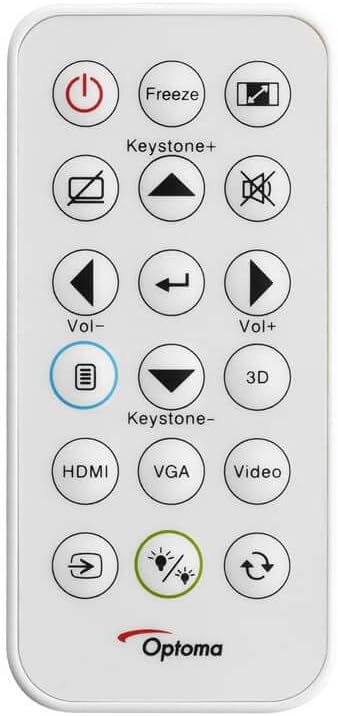
The remote control for the Optoma HD30LV projector, showing buttons for power, input, keystone, volume, and 3D functions.
- Focus: Rotate the focus ring on the lens until the image is sharp and clear.
- Zoom: Adjust the zoom ring on the lens to change the image size without moving the projector.
- Keystone Correction: Use the 'Keystone+' and 'Keystone-' buttons on the remote control or the projector's control panel to correct trapezoidal image distortion.
- Input Source: Press the 'HDMI' button on the remote or the 'Source' button on the projector to cycle through available input sources.
4.3 Enhanced Features
- 4K HDR Input: The projector is compatible with 4K HDR signals, providing enhanced contrast and color. Ensure your source device is configured to output HDR.
- Enhanced Gaming Mode: Activate this mode through the projector's menu for reduced input lag, optimizing your gaming experience.
- Full 3D: The projector supports Full 3D content from compatible sources. Active DLP Link 3D glasses (sold separately) are required for 3D viewing.

Visual comparison of different resolutions (SD, HD, Full HD 1080p) to demonstrate the clarity of the HD30LV's native 1080p output.
5. Maintenance
Regular maintenance ensures optimal performance and extends the lifespan of your projector.
- Cleaning the Lens: Use a soft, lint-free cloth specifically designed for optical lenses. Avoid abrasive materials or harsh chemicals.
- Cleaning the Projector Casing: Wipe the exterior with a soft, damp cloth. Do not use abrasive cleaners or solvents.
- Ventilation: Ensure the projector's ventilation openings are clear and unobstructed to prevent overheating. Do not block air vents.
- Storage: When not in use for extended periods, store the projector in a cool, dry place, protected from dust and extreme temperatures.
6. Troubleshooting
If you encounter issues with your Optoma HD30LV projector, refer to the following common problems and solutions:
| Problem | Possible Solution |
|---|---|
| No image displayed | Check power connections. Ensure the correct input source is selected. Verify the video cable is securely connected. |
| Image is blurry | Adjust the focus ring on the lens. Ensure the projection surface is flat and the projector is stable. |
| Image is trapezoidal | Use the keystone correction function on the remote or projector control panel. Position the projector perpendicular to the screen if possible. |
| No sound | Check volume settings on the projector and source device. Ensure external audio systems are correctly connected and powered on. |
| Projector overheats or shuts down | Ensure ventilation openings are clear. Operate the projector in a well-ventilated area. |
For more detailed troubleshooting or issues not listed here, please refer to the comprehensive support section on the Optoma website or contact customer support.
7. Specifications
| Feature | Detail |
|---|---|
| Model Number | HD30LV |
| Display Resolution | 1920 x 1080 (1080p Full HD) |
| Brightness | 4,500 Lumens |
| Connectivity Technology | HDMI, USB |
| Special Features | 4K HDR Input, Compact Size, Full 3D, High Brightness, Low Input Lag |
| Product Dimensions | 9.61 x 12.44 x 4.25 inches (244 x 316 x 108 mm) |
| Item Weight | 6.35 pounds (2.88 kg) |
| Manufacturer | Optoma Technology Inc |
| Batteries | 1 Lithium Metal battery required (included for remote) |
8. Warranty and Support
For information regarding your product's warranty, please refer to the warranty card included with your projector or visit the official Optoma website. Optoma provides customer support for technical assistance, service, and parts.
Online Support: Visit the Optoma Support Page for FAQs, downloads, and contact information.
Contact Information: Refer to your product packaging or the Optoma website for the most current customer service contact details.


