Introduction
This manual provides detailed instructions for the operation and maintenance of your SKMEI Model 1049 Military Digital Sports Watch. Please read this manual thoroughly to ensure proper use and to maximize the watch's features.
Product Features
- Solar Power: Utilizes solar energy for extended battery life and environmental efficiency.
- Digital Display: Clear, large digital display with LED backlight for visibility in low light.
- Dual Time Zone: Allows setting and viewing of two different time zones.
- 50M Water Resistance: Suitable for daily use, including hand washing, rain, and cold showers. Not intended for diving or hot water exposure.
- Stopwatch Function: For measuring elapsed time.
- Countdown Timer: For tracking specific time intervals.
- Alarm Function: Daily alarm setting.
- Durable Construction: Features a robust PU material strap and stainless steel buckle.

Image: Overview of the SKMEI 1049 watch highlighting its main functions and features.
Components and Controls

Image: Front view of the SKMEI 1049 watch, indicating the location and labels of its control buttons.
- LIGHT Button (Top Left): Activates the LED backlight for illumination of the digital display.
- MODE Button (Bottom Left): Cycles through the watch's various modes: Time Display, Stopwatch, Countdown Timer, Alarm, and Dual Time.
- START Button (Top Right): Used to start/stop functions in Stopwatch and Countdown modes, and to adjust values during setting procedures.
- RESET Button (Bottom Right): Used to reset functions in Stopwatch and Countdown modes, and to select items during setting procedures.
Setup
Initial Power and Solar Charging
The SKMEI 1049 watch is equipped with solar charging capabilities. For optimal performance, ensure the watch is regularly exposed to light. Direct sunlight is most effective for charging. Even if the internal battery is low, solar power can sustain basic functions.
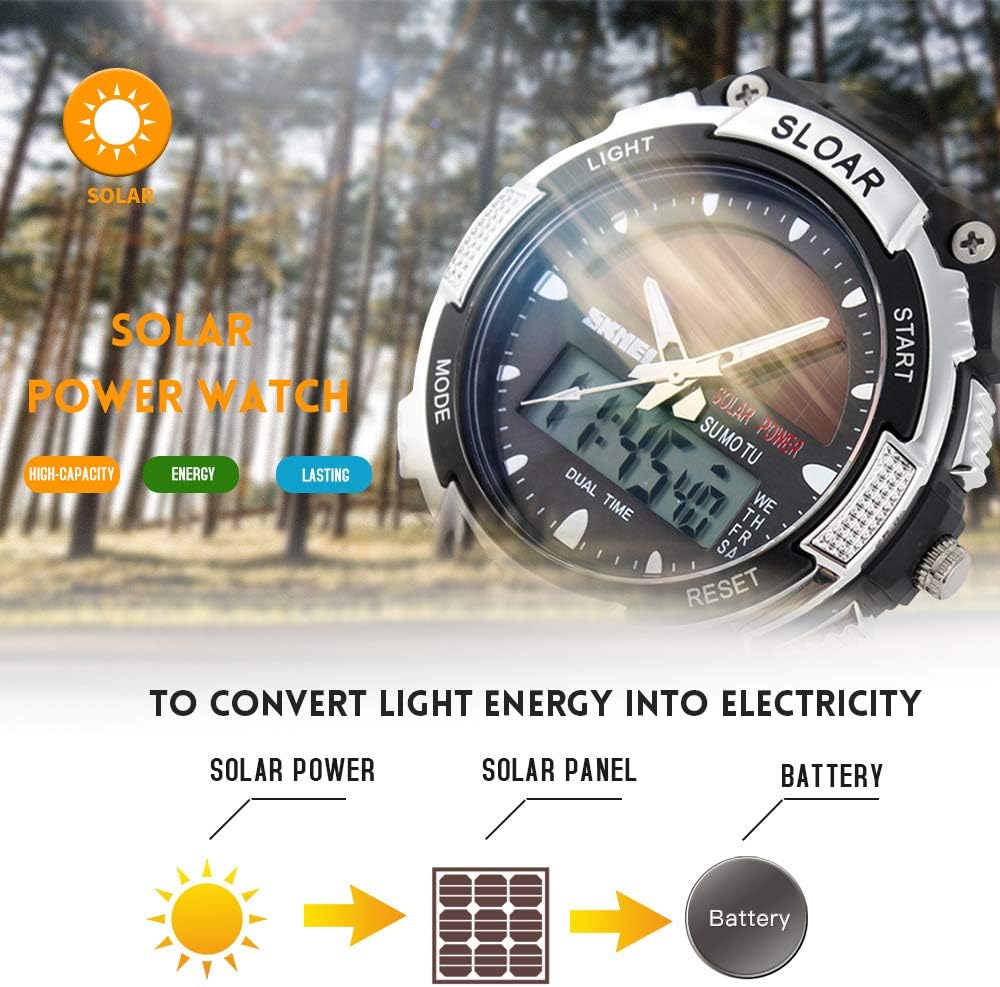
Image: Illustration of the solar power conversion process, from light to battery charge.
Setting the Time and Date
- In Time Display mode, press and hold the MODE button until the seconds begin to flash, indicating setting mode.
- Press the RESET button to cycle through the settings: Seconds → Hour → Minute → Month → Date → Day of Week.
- Use the START button to adjust the flashing value.
- Once all settings are correct, press the MODE button again to exit setting mode.
- To switch between 12-hour and 24-hour format, press the START button while the hour is flashing during time setting.
Operating Instructions
Mode Navigation
Press the MODE button repeatedly to cycle through the following modes:
- Time Display (main screen)
- Stopwatch (STW)
- Countdown Timer (TMR)
- Alarm (ALM)
- Dual Time (DT)
Stopwatch Function
- Press MODE until "STW" or Stopwatch mode is displayed.
- Press START to begin timing.
- Press START again to pause timing.
- Press RESET to clear the stopwatch to zero.
- To record split times, press RESET while the stopwatch is running. The split time will display briefly, and the stopwatch will continue timing in the background. Press RESET again to return to the running time.
Countdown Timer Function
- Press MODE until "TMR" or Countdown Timer mode is displayed.
- Press and hold RESET until the hour digits flash.
- Press MODE to select hours, minutes, or seconds.
- Use START to adjust the flashing value.
- Press RESET to confirm the setting and exit setting mode.
- Press START to begin the countdown.
- Press START again to pause/resume the countdown.
- When the countdown reaches zero, an alarm will sound. Press any button to stop the alarm.
Alarm Function
- Press MODE until "ALM" or Alarm mode is displayed.
- Press and hold RESET until the hour digits flash.
- Press MODE to select hours or minutes.
- Use START to adjust the flashing value.
- Press RESET to confirm the alarm time.
- In Alarm mode, press START to toggle the alarm ON/OFF. An alarm icon will appear/disappear on the display.
Dual Time Function
The Dual Time function allows you to keep track of a second time zone.
- Press MODE until "DT" or Dual Time mode is displayed.
- Press and hold RESET until the hour digits flash.
- Press MODE to select hours or minutes.
- Use START to adjust the flashing value.
- Press RESET to confirm the dual time setting.

Image: The SKMEI 1049 watch showcasing its dual time display capability.
Backlight
Press the LIGHT button (top left) to illuminate the digital display for a few seconds.
Maintenance
Water Resistance (50M)
The watch is rated for 50 meters (5 ATM) water resistance. This means it is suitable for:
- Daily use
- Washing hands
- Rain exposure
- Cold showers
Important: Do not press any buttons while the watch is wet or submerged. Avoid exposure to hot water, steam, or diving, as this can compromise the water resistance seals.

Image: Details of the watch's durable components and water resistance marking on the back.
Solar Charging Care
To maintain optimal battery life, regularly expose the watch face to light. Avoid prolonged storage in dark places. While solar power is efficient, extreme temperatures can affect battery performance.
Cleaning
Wipe the watch case and strap with a soft, dry cloth. For stubborn dirt, a slightly damp cloth can be used, followed by drying. Avoid using chemical cleaners, which can damage the watch materials.
Troubleshooting
- Display is blank or dim: Ensure the watch is exposed to sufficient light for solar charging. The battery may be low.
- Time is incorrect: Follow the "Setting the Time and Date" instructions to reset the time.
- Alarm does not sound: Check if the alarm function is activated (alarm icon visible). Ensure the alarm time is set correctly.
- Water inside the watch: If moisture appears inside the watch, stop using it immediately and contact customer support. This indicates a compromised seal.
Specifications
| Feature | Detail |
|---|---|
| Brand | SKMEI |
| Model Number | 1049 |
| Movement | Digital |
| Case Diameter | 44 mm |
| Case Thickness | 17 mm |
| Band Width | 22 mm |
| Watch Length | 220 mm (approx. 8.7 inches) |
| Strap Material | PU Resin |
| Clasp Type | Buckle |
| Water Resistance | 50M (5 ATM) |
| Battery Type | 1 Lithium Ion (included) |

Image: Detailed dimensions of the SKMEI 1049 watch.
Warranty and Support
For warranty information or technical support, please refer to the documentation provided with your purchase or contact SKMEI customer service directly. Keep your proof of purchase for warranty claims.
For further assistance, you may visit the official SKMEI store or contact their support channels.
Visit the SKMEI Store on Amazon


