
Dreyoo Dreyoo-Switch-38
Contents
Dreyoo 120/230V Paddle Switch for Table Saw - Instruction Manual
Model: Dreyoo-Switch-38
1. Introduction
The Dreyoo 120/230V Paddle Switch is designed to enhance safety and convenience when operating power tools such as table saws, router tables, and drill presses. This switch features a large, easily accessible red 'OFF' paddle for emergency stops and a recessed green 'ON' button to prevent accidental starts. It is rated for 16A and comes with a 5.5 ft power cord, housed in a durable, waterproof ABS casing.
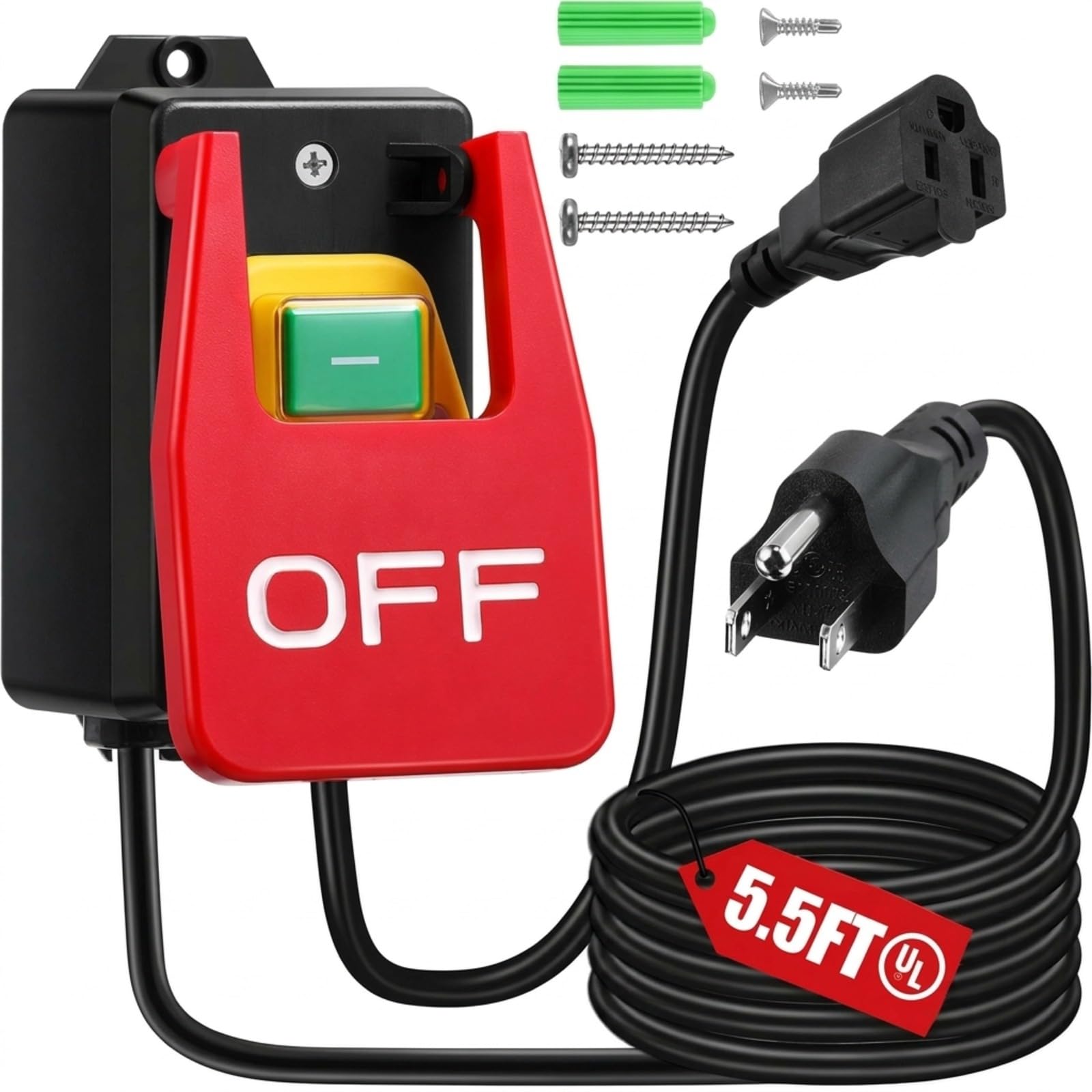
Image: Dreyoo 120/230V Paddle Switch, showing its compact design and integrated cords.
2. Safety Information
Always prioritize safety when working with power tools. This switch is designed to improve safety, but proper usage and adherence to safety guidelines are crucial.
- Voltage and Current Rating: This switch is designed for 110-120V single-phase tools with a maximum current of 16A. For 230V, the maximum current is 20A. Do not use with equipment that exceeds these ratings. Always check your tool's voltage, running current, startup current, and plug type before purchase and use.
- Emergency Stop: The large red 'OFF' paddle provides a quick and hands-free emergency stop mechanism. It can be activated with a knee, thigh, or hip, allowing your hands to remain on the workpiece.
- Accidental Start Prevention: The green 'ON' button is recessed to safeguard against unintentional activation.
- Certified Safety: This switch is CE certified and meets TUV standards. The power supply cords are UL certified.
- Waterproof Housing: The ABS housing provides IP54 international protection rating, offering protection against dust and splashing water.

Image: Demonstrates the 'Fast Power Off' feature, showing a user activating the large red paddle with their knee while keeping hands on the workpiece.

Image: A 'Before and After' comparison illustrating the improved safety and ease of use with the paddle switch compared to reaching for a small switch under a table.
3. Setup and Installation
The Dreyoo Paddle Switch is designed for easy, plug-and-play installation without complicated wiring.
3.1 Package Contents
- 1 x Dreyoo Paddle Switch
- 2 x Mounting Screws
3.2 Installation Steps
- Mount the Switch: Position the switch in a convenient and safe location on your workbench, table saw stand, or router table. Use the included screws to securely mount the switch. Ensure it is mounted firmly to prevent movement during operation.
- Connect Power Tool: Plug the power cord of your power tool (e.g., table saw, router) into the 5.5 ft female cord of the paddle switch.
- Connect to Wall Outlet: Plug the male cord of the paddle switch into a standard 110-120V or 230V wall outlet, depending on your tool's requirements and the switch's rating.

Image: Step-by-step visual guide for mounting the switch and connecting the power cords.
For a visual demonstration of the installation and operation, please refer to the video below:
Video: Demonstrates the Dreyoo 110V to 120V Single Phase On/Off Switch in operation, showing how to turn it on and off.
4. Operating Instructions
Operating the Dreyoo Paddle Switch is straightforward and designed for maximum safety.
4.1 Turning ON the Power Tool
- To turn on your power tool, press the recessed green 'ON' button located on the switch. The tool will start.
4.2 Turning OFF the Power Tool (Emergency Stop)
- To turn off your power tool, firmly press the large red 'OFF' paddle. This can be done with your hand, knee, thigh, or hip, allowing for a quick and safe shutdown without removing your hands from the workpiece.

Image: Close-up view of the switch, highlighting the large red 'OFF' paddle for quick shutdown and the recessed green 'ON' button to prevent accidental starts.
Observe the switch in action for a better understanding of its operation:
Video: Shows the emergency stop paddle switch in use, demonstrating its functionality and safety benefits.
5. Specifications
| Feature | Detail |
|---|---|
| Brand | Dreyoo |
| Model | Dreyoo-Switch-38 |
| Operation Mode | ON-OFF |
| Current Rating | 16 A |
| Operating Voltage | 120 volts (110-120V) / 230 volts |
| Contact Type | Normally Open |
| Connector Type | Plug In |
| Switch Type | Paddle Switch |
| Material | Metal, Plastic (ABS fireproof material) |
| Item Dimensions (L x W x H) | 2.6 x 2.4 x 4.3 inches |
| Circuit Type | 1-way |
| Mounting Type | Wall, Cabinet, Stand (Surface Mount) |
| Power Cord Length (Male) | 5.5 ft |
| Power Cord Length (Female) | 1.5 ft |
| Wattage | 1920 watts (at 120V) |
| International Protection Rating | IP54 |
| Certifications | CE, TUV, UL (for cords) |

Image: Detailed view of the switch with dimensions, voltage, current, and certification information.

Image: Table showing phase, voltage, horsepower (HP), and current (Ie) ratings for the switch.
6. Compatibility
The Dreyoo Paddle Switch is compatible with a wide range of power tools and workshop equipment, including but not limited to:
- Table Saws
- Router Tables
- Drill Presses
- Other electrical workshop equipment within the specified voltage and current ratings.
Note: Not suitable for power tools with higher current than 16 amps (for 120V) or 20 amps (for 230V).

Image: Illustrates the paddle switch being used with a table saw, drill press, and router table, demonstrating its versatility.
7. Maintenance
To ensure the longevity and safe operation of your Dreyoo Paddle Switch, follow these simple maintenance guidelines:
- Regular Cleaning: Periodically wipe down the switch and cords with a dry cloth to remove dust and debris. Avoid using harsh chemicals or abrasive cleaners.
- Inspect Cords: Regularly check the power cords for any signs of damage, fraying, or exposed wires. If any damage is found, discontinue use immediately and replace the switch.
- Secure Mounting: Ensure the switch remains securely mounted. Tighten screws if necessary.
- Storage: When not in use for extended periods, store the switch in a clean, dry environment away from extreme temperatures.
8. Troubleshooting
If you encounter issues with your Dreyoo Paddle Switch, consider the following troubleshooting steps:
- Tool Not Turning On:
- Ensure the male plug of the switch is securely inserted into a working wall outlet.
- Verify that your power tool's plug is fully inserted into the female cord of the switch.
- Check if the wall outlet is providing power (test with another device).
- Confirm that your power tool itself is functioning correctly by plugging it directly into a wall outlet (if safe to do so).
- Switch Feels Loose:
- Check the mounting screws and tighten them if they have become loose.
- Overheating:
- If the switch or cords feel excessively hot, immediately disconnect power. This may indicate an overload. Ensure the connected tool's current draw does not exceed the switch's 16A rating.
If problems persist after attempting these steps, contact Dreyoo customer support for further assistance.
9. Warranty and Support
Dreyoo products are manufactured to high-quality standards. For information regarding warranty coverage, technical support, or replacement parts, please refer to the contact information provided with your product packaging or visit the official Dreyoo website. Keep your purchase receipt as proof of purchase for warranty claims.
For more information, visit the Dreyoo Store on Amazon.
Ask a question about this manual
Ask about setup, troubleshooting, compatibility, parts, safety, or missing instructions. Manuals+ will review the question and use this page’s manual context to help answer it.