
1. Introduction
This manual provides essential information for the safe and effective use of your PULADU MC621 3V Rechargeable Battery. This battery is designed for specific applications such as mobile phones, cameras, and motherboard memory backup, offering a reliable 3V power source. Please read this manual thoroughly before installation and operation.
2. Important Safety Information
To prevent damage, injury, or malfunction, observe the following safety precautions:
- Do not disassemble, crush, puncture, or short-circuit the battery.
- Do not expose the battery to high temperatures (above 60°C / 140°F) or direct sunlight.
- Do not expose the battery to water or other liquids.
- Keep the battery away from children and pets.
- Use only chargers and devices compatible with 3V rechargeable Lithium Ion batteries.
- Dispose of batteries according to local regulations. Do not dispose of in household waste.
- If the battery leaks, avoid contact with skin and eyes. Seek medical attention if contact occurs.
3. Product Overview
The PULADU MC621 is a compact 3V rechargeable Lithium Ion coin-cell battery, typically featuring solder tabs for secure integration into electronic circuits. It is designed for applications requiring a stable and long-lasting memory backup or primary power source in small electronic devices.
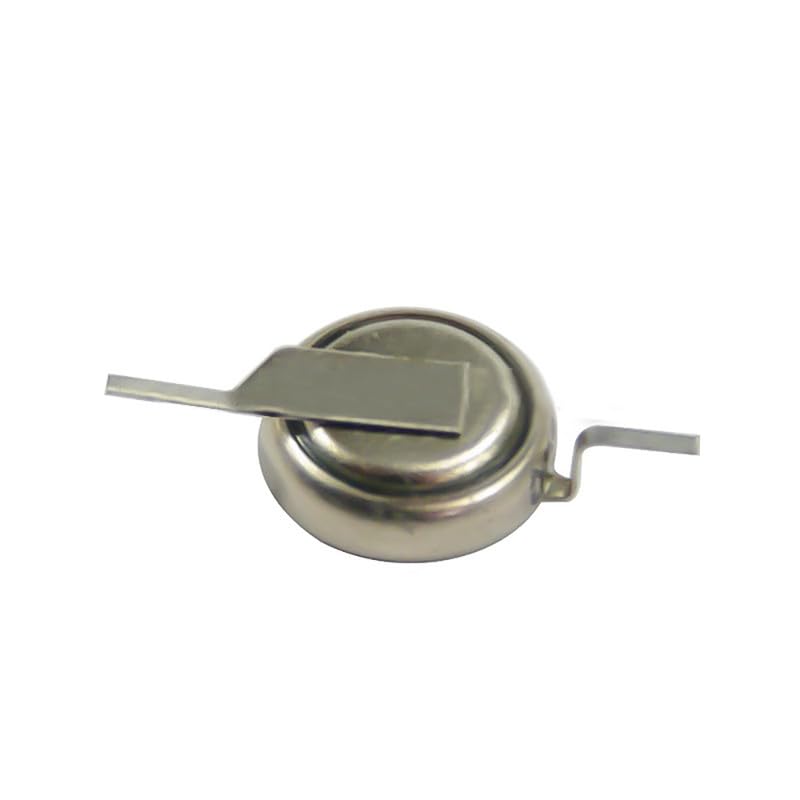
An image showing the PULADU MC621 3V rechargeable battery, a small coin-cell type battery with two solder tabs extending from its sides, designed for integration into electronic circuits.

A close-up view of the PULADU MC621 rechargeable battery, highlighting its metallic casing and the two integrated solder tabs for secure connection.

An image of the PULADU MC621 battery, clearly displaying the 'VARTA MC621' marking on its surface, indicating its model and potentially its origin or design.
4. Setup and Installation
The PULADU MC621 battery is typically installed by soldering its tabs onto a circuit board. This process requires precision and appropriate soldering equipment. If you are not experienced with soldering, it is recommended to seek professional assistance to avoid damaging the battery or the device.
- Preparation: Ensure the device is powered off and disconnected from any power source. Identify the correct polarity (+/-) on the circuit board and the battery.
- Soldering: Carefully align the battery tabs with the designated solder pads on the circuit board. Use a low-wattage soldering iron and fine-gauge solder. Apply heat briefly to each tab and pad, ensuring a strong, clean connection. Avoid excessive heat, which can damage the battery.
- Inspection: After soldering, visually inspect the connections to ensure they are secure and free from short circuits.
- Initial Charge: If the battery is not fully charged, connect the device to its power source to allow the battery to charge. Refer to your device's manual for specific charging instructions.
5. Operation
Once properly installed and charged, the PULADU MC621 battery operates automatically within your device. It provides a stable 3V power supply for its intended function, such as maintaining memory settings or powering low-drain components. The battery will recharge when the device is connected to its primary power source, if the device supports this function.
- Monitoring: Some devices may provide an indication of battery charge status. Consult your device's manual for details.
- Discharge: The battery will discharge over time when the device is not connected to an external power source. The discharge rate depends on the device's power consumption.
- Recharge: Ensure the device is regularly connected to its power source to keep the battery charged, especially if it serves a memory backup function.
6. Care and Maintenance
Proper care extends the lifespan of your PULADU MC621 battery:
- Storage: If storing a device with the battery for an extended period, ensure the battery is partially charged (around 50%) and stored in a cool, dry place. Avoid extreme temperatures.
- Cleaning: Keep the battery and its contacts clean and dry. Use a soft, dry cloth if cleaning is necessary.
- Regular Use: For optimal performance, avoid prolonged periods of complete discharge or continuous overcharging.
- Replacement: If the battery's performance significantly degrades (e.g., shorter backup time), it may need replacement. Replacement should be performed by a qualified technician due to the soldering requirement.
7. Troubleshooting
If you encounter issues with your PULADU MC621 battery, consider the following:
| Problem | Possible Cause | Solution |
|---|---|---|
| Battery not charging / Device not retaining memory | Loose or faulty solder connection; Battery fully discharged; Battery reached end of life. | Check solder connections. Ensure device is connected to power. If issues persist, battery may need replacement. |
| Device not powering on (if battery is primary source) | Battery fully discharged; Faulty battery; Incorrect installation. | Ensure battery is charged. Verify correct installation and polarity. If battery is old, consider replacement. |
| Battery overheating | Short circuit; Overcharging; Internal battery fault. | Immediately disconnect power. Cease use. Seek professional inspection or replacement. |
For complex issues, consult a qualified technician or the device manufacturer.
8. Specifications
Key technical specifications for the PULADU MC621 battery:
| Feature | Detail |
|---|---|
| Brand | PULADU |
| Model | MC621 |
| Battery Cell Composition | Lithium Ion |
| Voltage | 3V |
| Battery Capacity | 3 Milliamp Hours (mAh) |
| Recommended Uses | Camera, Mobile Phone, Motherboard Memory Backup |
| Item Weight | 0.018 ounces |
9. Warranty and Support
For specific warranty information regarding your PULADU MC621 battery, please refer to the documentation provided with your purchase or contact PULADU customer support directly. Support for installation or troubleshooting within a specific device should first be directed to the manufacturer of that device.
For further assistance, please visit the official PULADU website or contact their customer service department.