
ANNKE N44WET0-72GK-V2-OP
Contents
ANNKE Wireless Security Camera System User Manual
Model: N44WET0-72GK-V2-OP
Introduction
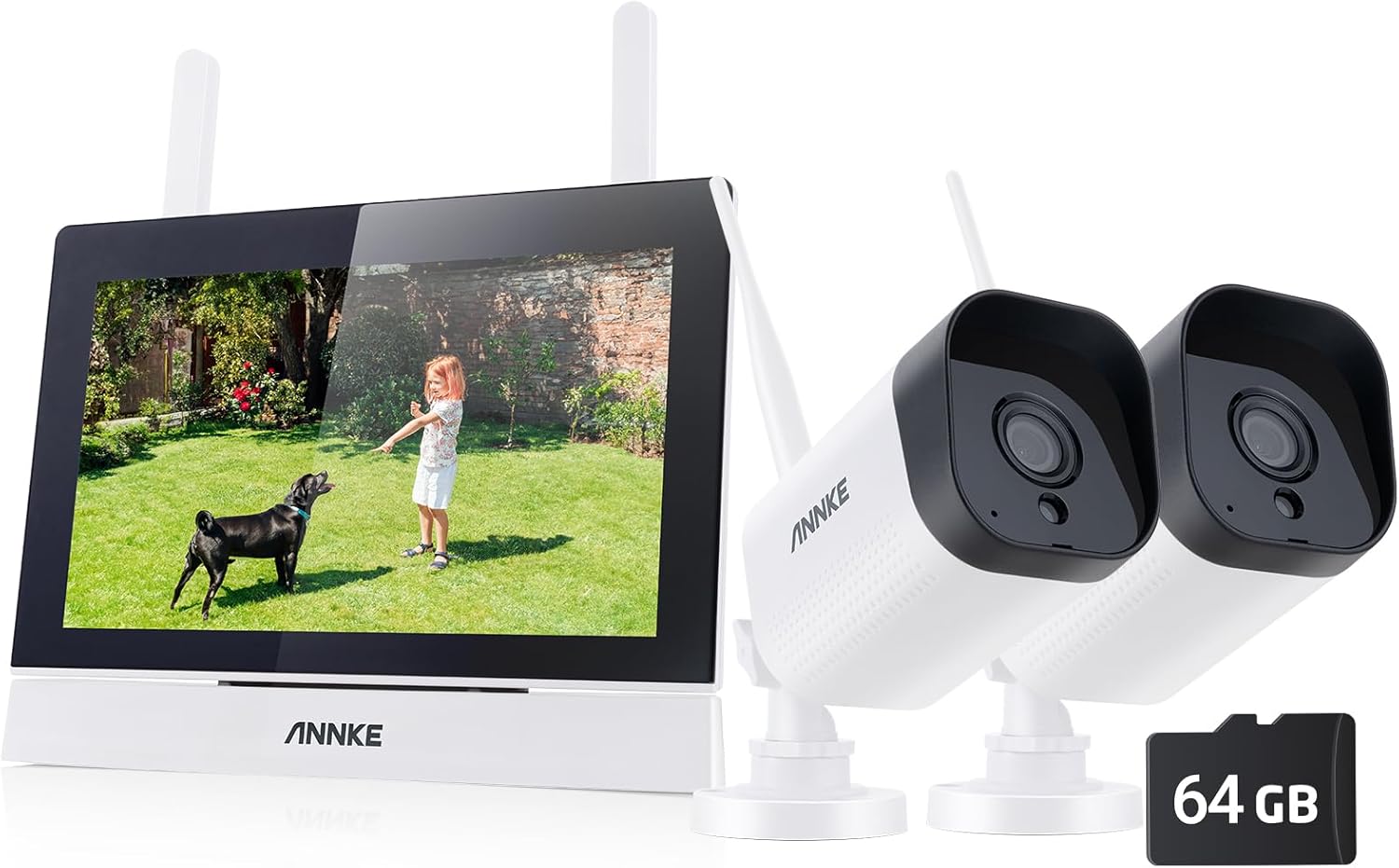
This manual provides detailed instructions for the installation, operation, and maintenance of your ANNKE Wireless Security Camera System. This system features a 7-inch LCD monitor, 4-channel WiFi surveillance capabilities, and two 3MP outdoor IP cameras with night vision and two-way audio. Please read this manual thoroughly before using the product to ensure proper setup and optimal performance.
Package Contents
Before beginning installation, verify that all components are present in the package:
- 1 x 7-inch Touch Screen NVR
- 2 x Security Cameras (3MP Outdoor IP Cameras)
- 1 x NVR Power Adapter
- 2 x IP Cameras' Power Adapters
- 1 x Quick Start Guide
- 2 x Surveillance Signs
- 1 x Screw Pack
- 1 x 64GB SD Card

Setup
1. Initial Power-Up and Connection
- Connect the NVR power adapter to the NVR and plug it into a power outlet.
- Connect the IP camera power adapters to each camera and plug them into power outlets.
- The cameras and NVR are designed for automatic pairing. Once powered on, the cameras should automatically connect to the NVR's 7-inch display.


2. SD Card Installation
The system includes a 64GB SD card for local storage. Insert the SD card into the designated slot on the NVR. The system supports up to 256GB for extended recording.

3. Camera Placement
Position the cameras in desired outdoor locations, ensuring they have a clear line of sight to the areas you wish to monitor. Mount them securely using the provided screw pack. Ensure cameras are within range of the NVR's Wi-Fi signal.
Operating Instructions
1. Using the 7-inch Touch Screen NVR
The 7-inch IPS touch screen allows for intuitive control and monitoring. Tap the screen to access menus and settings. You can view live feeds from all connected cameras simultaneously or select a single camera for a larger view.

2. Two-Way Audio
The cameras feature built-in microphones and speakers, enabling two-way audio communication. Access this feature through the NVR's touch screen to speak to visitors or deter intruders.
3. Motion Detection and Alerts
The system is equipped with smart human detection to minimize false alarms. When motion is detected, the NVR will display a zoom-in notification. You can also configure the system to send app push notifications and email alerts to your connected devices.

4. Remote Access (ANNKE Vision App)
To view camera feeds remotely, connect the NVR to your home network via an Ethernet cable. Download the ANNKE Vision app on your smartphone or tablet, create an account, and add your device by scanning the QR code found in the NVR's network settings. This allows you to monitor your property from anywhere.
5. Recording and Playback
Recordings are stored on the installed SD card. You can set the system for continuous recording or motion-activated recording. To review footage, navigate to the playback menu on the NVR's touch screen. Files can also be transferred using the convenient USB port.
6. Night Vision
The 3MP cameras provide clear infrared night vision up to 100ft, ensuring continuous surveillance even in complete darkness.

Maintenance
Cleaning: Regularly wipe the camera lenses and NVR screen with a soft, dry cloth to ensure clear image quality. Avoid abrasive cleaners.
Firmware Updates: Check the ANNKE website or the ANNKE Vision app periodically for firmware updates to ensure optimal performance and security.
Storage Management: Periodically review recorded footage and delete unnecessary files to manage storage space on the SD card. The system will automatically overwrite the oldest footage when the card is full, but manual management can prevent loss of important events.
Power Supply: Ensure all power adapters are securely connected and not damaged. Use only the provided power adapters.
Troubleshooting
| Problem | Possible Cause | Solution |
|---|---|---|
| No image on NVR screen. | NVR not powered on; camera not powered on; camera out of range; camera not paired. | Check power connections for NVR and cameras. Ensure cameras are within Wi-Fi range. If issues persist, refer to the quick start guide for manual pairing instructions. |
| No remote viewing via app. | NVR not connected to internet; incorrect app settings; firewall issues. | Ensure NVR is connected to your router via Ethernet. Verify app settings and device addition. Check router firewall settings. |
| Poor image quality. | Dirty lens; low light conditions; camera too far from subject. | Clean camera lens. Ensure adequate lighting or rely on night vision. Reposition camera closer to the area of interest. |
| Two-way audio not working. | Microphone/speaker disabled; volume too low; network interference. | Check audio settings on the NVR. Adjust volume levels. Ensure stable Wi-Fi connection. |
| SD card not recording. | SD card full; card not formatted; card faulty. | Check SD card capacity. Format the SD card via NVR settings. Replace SD card if faulty. |
Specifications
- Model: N44WET0-72GK-V2-OP
- NVR Display: 7-inch IPS Touch Screen
- Camera Resolution: 3MP (2304 x 1296)
- Night Vision Range: Up to 100ft (30m)
- Audio: Two-Way Audio (Built-in Microphone & Speaker)
- Storage: 64GB SD Card included (Supports up to 256GB)
- Connectivity: Wireless (Wi-Fi), Ethernet for NVR remote access
- Power Source: Corded Electric (12 Volts)
- Special Features: Smart Human Detection, Instant Alerts (App Push, Email), Privacy Masking, H.264+ Video Compression
- Dimensions: 10 x 20 x 5 cm (NVR)
- Weight: 1.5 kg (NVR)
Warranty and Support
ANNKE products typically come with a manufacturer's warranty. Please refer to the warranty card included in your package or visit the official ANNKE website for detailed warranty terms and conditions. For technical support, product inquiries, or assistance with troubleshooting, please contact ANNKE customer service through their official support channels. Information regarding support can usually be found on the ANNKE website or in the Quick Start Guide.
Online Resources:
Ask a question about this manual
Ask about setup, troubleshooting, compatibility, parts, safety, or missing instructions. Manuals+ will review the question and use this page’s manual context to help answer it.