
LEXGO LEXL10BLK
Contents
LEXGO L10 Electric Scooter User Manual
Model: LEXL10BLK
Brand: LEXGO
Introduction and Safety Guidelines
Welcome to the user manual for your new LEXGO L10 Electric Scooter. This manual provides essential information for the safe operation, maintenance, and troubleshooting of your scooter. Please read it thoroughly before your first ride to ensure optimal performance and safety.
General Safety Warnings
- Always wear a helmet and appropriate protective gear (knee pads, elbow pads) when riding.
- Do not ride in wet conditions, heavy rain, or on slippery surfaces.
- Observe all local traffic laws and regulations.
- Do not allow children under the age of 16 to operate the scooter.
- Maintain a safe distance from other vehicles and pedestrians.
- Avoid riding on uneven terrain, potholes, or obstacles.
- Do not perform stunts or dangerous maneuvers.
- Regularly check the scooter for any damage or loose parts before each use.
Setup
Unboxing and Initial Assembly
Your LEXGO L10 Electric Scooter comes partially assembled. Carefully remove all components from the packaging. The main assembly involves attaching the handlebar to the stem and ensuring all connections are secure.
- Remove the scooter and accessories from the box.
- Lift the steering column until it locks into place.
- Attach the handlebar to the top of the steering column, ensuring the cables are not pinched. Secure with the provided screws.
- Verify all screws and quick-release mechanisms are tightened before use.
Initial Charging
Before first use, fully charge the scooter's battery. This ensures optimal battery life and performance.
- Locate the charging port, typically near the battery compartment.
- Connect the charger to the scooter, then plug the charger into a standard wall outlet.
- The charging indicator light on the charger will change (e.g., from red to green) when charging is complete.
- Charging time is approximately 3-4 hours for a full charge.
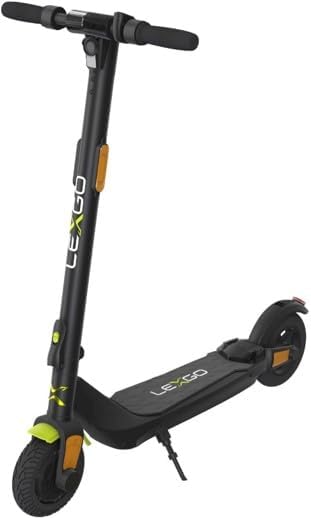
Figure 1: The LEXGO L10 Electric Scooter in its upright position, showcasing its sleek black design and overall structure. This image provides a general overview of the product.
NFC Anti-theft Setup
The LEXGO L10 features an NFC anti-theft system for enhanced security. Refer to the specific instructions provided with your NFC key or card for pairing and activation. Typically, this involves tapping the NFC key against the designated NFC reader area on the scooter to lock or unlock it.
Operating Instructions
Powering On/Off
- To power on: Press and hold the power button on the handlebar for a few seconds until the LCD screen illuminates.
- To power off: Press and hold the power button again until the LCD screen turns off.
Riding the Scooter
- Starting: Place one foot on the deck and push off with the other foot to gain initial momentum (kick-start). Once moving, gently press the accelerator lever.
- Acceleration: Use the thumb throttle on the right handlebar to control speed. The scooter can reach speeds up to 20 km/h.
- Braking: The scooter is equipped with a dual brake system. Use the brake levers on the handlebars to slow down or stop. Apply both brakes simultaneously for effective stopping.
- Turning: Lean gently in the direction you wish to turn and steer the handlebars.
LCD Display Functions
The 2.5-inch color LCD screen provides real-time information:
- Speed: Displays current riding speed.
- Battery Level: Shows remaining battery charge.
- Mode Indicator: Indicates the current riding mode (if applicable, e.g., Eco, Sport).
- Lights Indicator: Shows if headlights/taillights are on.
Folding Mechanism
The LEXGO L10 features a 3-second folding design for easy transport and storage.
- Ensure the scooter is powered off.
- Locate the folding latch or lever at the base of the steering column.
- Engage the release mechanism and fold the steering column downwards until it clicks into place, securing it to the rear fender.
- To unfold, release the latch and lift the steering column until it locks upright.

Figure 2: A view of the LEXGO L10 Electric Scooter's deck and front wheel area, highlighting the footrest and the robust construction. This image is useful for understanding foot placement and the folding mechanism.
Lights and Signals
For enhanced visibility and safety, the scooter is equipped with:
- Front Headlight: For illuminating the path ahead.
- Rear Taillight: For visibility from behind.
- Brake Light: Illuminates when brakes are applied.
- Turn Signals: For indicating turns (if equipped, check specific model features).
- Audible Buzzer: For alerting pedestrians or other riders.

Figure 3: A close-up view of the LEXGO L10 Electric Scooter's deck, showing the anti-slip surface and the LEXGO branding. This detail is important for rider stability and maintenance.
Maintenance
Cleaning
Regular cleaning helps maintain the scooter's appearance and functionality.
- Use a soft, damp cloth to wipe down the frame and deck.
- Do not use high-pressure water jets or immerse the scooter in water.
- Avoid harsh chemicals or abrasive cleaners.
Battery Care
- Charge the battery regularly, even if not in use, to prevent deep discharge.
- Store the scooter in a cool, dry place away from direct sunlight and extreme temperatures.
- Do not overcharge the battery. Disconnect the charger once charging is complete.
Tire Pressure Check
The 8-inch pneumatic tires require regular pressure checks for optimal performance and safety.
- Check tire pressure before each ride using a suitable gauge.
- Refer to the tire sidewall for recommended PSI (pounds per square inch) or Bar.
- Inflate tires as needed using a bicycle pump.
Brake Adjustment
Ensure the dual brake system is functioning correctly. If brakes feel loose or too tight, they may need adjustment. Consult a qualified technician or refer to detailed brake adjustment guides if unsure.
Storage
When storing the scooter for extended periods, ensure it is clean and the battery is charged to approximately 50-70% to preserve battery health. Store in a dry, temperate environment.
Troubleshooting
| Problem | Possible Cause | Solution |
|---|---|---|
| Scooter does not turn on. | Low battery; Loose connections; Power button malfunction. | Charge the battery; Check all cable connections; Contact support if issue persists. |
| Short battery range. | Under-inflated tires; Overloading; Cold weather; Battery degradation. | Inflate tires to recommended pressure; Do not exceed weight limit; Battery performance may decrease in cold; Consider battery replacement if old. |
| Brakes are not effective. | Brake pads worn; Brake cable loose; Incorrect adjustment. | Inspect brake pads and replace if worn; Adjust brake cable tension; Seek professional assistance for complex adjustments. |
| Unusual noises during operation. | Loose components; Debris in wheels; Motor issue. | Check all screws and bolts; Inspect wheels for foreign objects; If motor noise, contact support. |
Specifications
| Feature | Detail |
|---|---|
| Brand | LEXGO |
| Model Name | Lexgo L10 Electric Scooter |
| Model Number | LEXL10BLK |
| Motor Power | 250W (490W Peak) Brushless Motor |
| Max Speed | 20 km/h |
| Battery | 36V 5.2Ah Lithium Ion (1 required, included) |
| Max Range | Up to 20 km |
| Tire Size | 8 Inches |
| Tire Type | Pneumatic |
| Brake Style | Dual Brake System (Front Brake) |
| Weight Limit | 100 Kilograms |
| Product Dimensions | 106.5 x 49 x 110 cm |
| Product Weight | 14.8 kg |
| Special Feature | Lightweight, Foldable, NFC Anti-theft, LCD Screen |
| Country of Origin | China |
Warranty and Support
Warranty Information
The LEXGO L10 Electric Scooter comes with a Limited Warranty. Please refer to the warranty card included with your product for specific terms, conditions, and duration of coverage. This warranty typically covers manufacturing defects and material flaws under normal use.
Customer Support
For technical assistance, warranty claims, or general inquiries, please contact LEXGO customer support. Contact details can usually be found on the official LEXGO website or on the product packaging.
Please retain your proof of purchase for any warranty claims.
Documents and downloads
Ask a question about this manual
Ask about setup, troubleshooting, compatibility, parts, safety, or missing instructions. Manuals+ will review the question and use this page’s manual context to help answer it.