
1. Introduction
The DGNOG DL602 is a UHF wireless microphone system designed for various audio applications, including karaoke, public address systems, and live performances. This manual provides detailed instructions for setup, operation, and maintenance to ensure optimal performance and longevity of your device.
The system features rechargeable microphones and receiver, adjustable frequency channels, and broad compatibility with various audio equipment.
2. Package Contents
Please verify that all items listed below are included in your package:
- 2 x Handheld Microphones
- 1 x Receiver with a 6.35mm Plug
- 1 x 6.35mm to 3.5mm Adaptor
- 2 x Anti-slip Rings
- 1 x Microphone Charging Cable
- 1 x Receiver Charging Cable
- 3 x 18650 Rechargeable Batteries
- 1 x User Manual

Image: Contents of the DGNOG DL602 package, showing two microphones, one receiver, charging cables, anti-slip rings, and batteries.
3. Product Overview
3.1 Microphone Components
- Power Button: Long press to turn on/off.
- Volume Controls: Adjust microphone output level.
- Frequency Regulation (SET button): Press to change frequency channels.
- Display Screen: Shows current frequency and battery status.
- Charging Port: For recharging the internal battery.
3.2 Receiver Components
- 6.35mm (1/4") Plug: Connects to audio input devices.
- Power Switch: Turns the receiver on/off.
- Charging Port: For recharging the internal battery.
- Antenna: For stable signal reception.

Image: Diagram illustrating the power switch, charging port, 1/4" output on the receiver, and power button, volume controls, and frequency regulation on the microphone.

Image: Dimensions of the DGNOG DL602 microphone (26cm length, 6cm width) and receiver (20.5cm length, 4cm width).
4. Setup Instructions
The DGNOG DL602 system is designed for plug-and-play operation. Follow these steps for initial setup:
- Turn on the Receiver: Locate the power switch on the receiver and slide it to the 'ON' position. The indicator light will illuminate.
- Turn on the Microphone: Long press the power button on each microphone until the display screen lights up. The microphones will automatically connect to the receiver.
- Plug the Receiver into Audio Equipment: Insert the 6.35mm plug of the receiver directly into the MIC input jack of your compatible audio equipment (e.g., speaker, amplifier, mixer). If your equipment has a 3.5mm MIC input, use the provided 6.35mm to 3.5mm adaptor.
Ensure the receiver is plugged into a dedicated MIC input, not an AUX/Line In jack, for proper functionality.
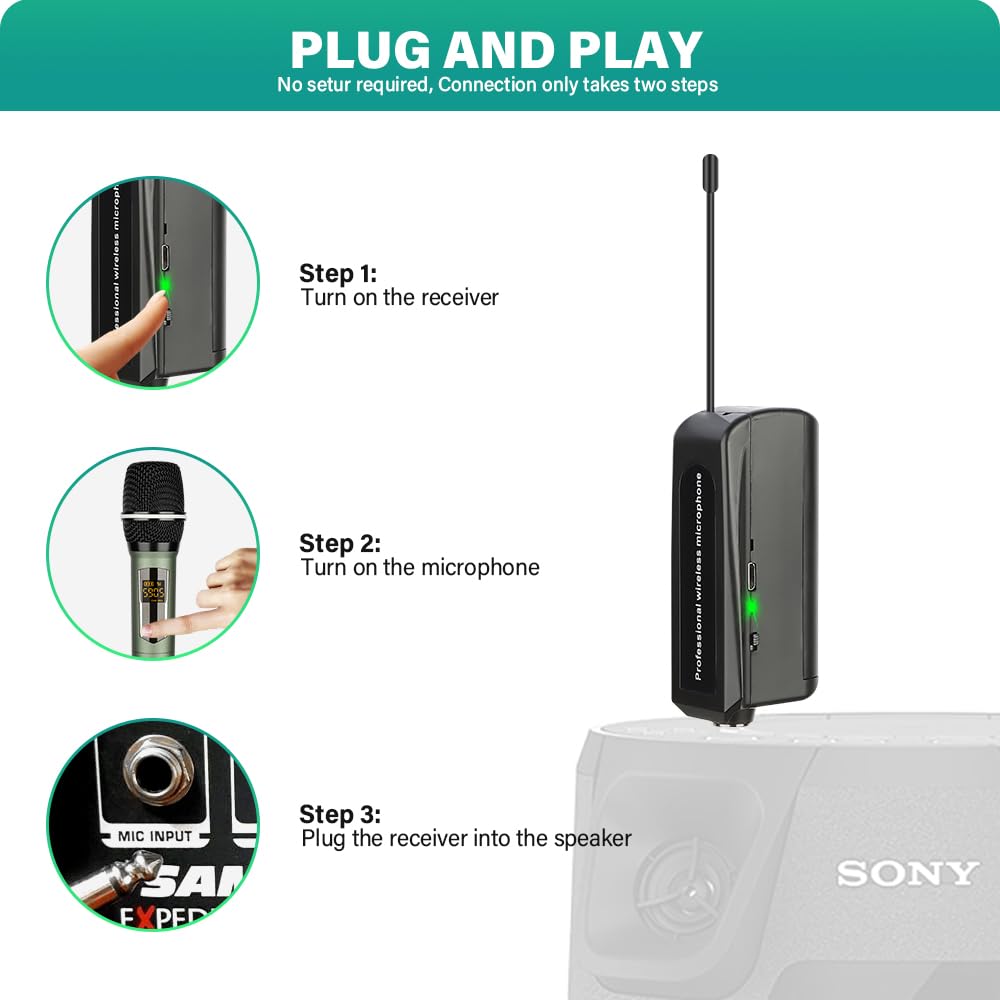
Image: Visual guide for the three-step plug-and-play setup: turn on receiver, turn on microphone, plug receiver into speaker's mic input.
5. Operating Instructions
5.1 Basic Operation
- Power On/Off: Long press the power button on the microphone to turn it on or off.
- Volume Adjustment: Use the '+' and '-' buttons on the microphone to increase or decrease the volume level.
5.2 Frequency Adjustment
The DL602 system operates on the UHF frequency band (545.5-593 Mhz) and offers 48 adjustable frequency channels per microphone. This feature is crucial for avoiding interference, especially when using multiple microphone systems simultaneously.
- To change the frequency channel, press the 'SET' button on the microphone. The display will show the new channel.
- When using multiple microphones, ensure each microphone is set to a different frequency channel to prevent signal interference.
5.3 Important Usage Tips
- Proper Microphone Holding: Avoid covering the bottom of the microphone with your hands, as this can block the signal transmission.
- Maintain Line of Sight: For optimal reception and to minimize signal dropouts, ensure a clear line of sight between the microphone and the receiver. Avoid obstructions like metal objects.
- No Bluetooth Function: This system uses UHF wireless technology for signal transmission and does not have Bluetooth connectivity. It cannot be paired with Bluetooth devices.
- Correct Input Jack: Always plug the receiver into a MIC input jack, not an AUX or Line In jack, on your audio equipment.

Image: Visual guide showing compatibility with 6.35mm and 3.5mm mic jacks, along with important usage tips: proper mic holding, line of sight, no Bluetooth, and correct input jack usage.
6. Compatibility
The DGNOG DL602 wireless microphone system is compatible with audio input devices that feature a 6.35mm (1/4") or 3.5mm (1/8") MIC interface. This includes, but is not limited to:
- Party Speakers
- Singing Machines
- Amplifiers
- PA Systems
- Audio Interfaces
- Audio Mixers
Examples of compatible brands/series include ION Speaker, JBL Partybox Series, Sony SRS-XP Series, Bose S1, PYLE PA System, Electro-Voice ELX Series, PRORECK Club Series, PARTY Series, and Rockville BPA Series.
7. Charging
The system includes three 18650 1200 mAh rechargeable lithium-ion batteries (one for each microphone and one for the receiver). The microphones and receiver are designed for extended use and convenient recharging.
- Work Time: Up to 7+ hours on a full charge.
- Charging Time: Approximately 3-4 hours for a full charge.
- Charging Cables: A dedicated mic charging cable and a receiver charging cable are included. The mic charging cable supports charging both microphones simultaneously.

Image: Illustration of the DGNOG DL602 microphones and receiver connected to a power strip for charging, indicating 7 hours of work time and 4 hours of charging time.
8. Troubleshooting
If you encounter issues with your DGNOG DL602 wireless microphone system, please refer to the following common problems and solutions:
- No Sound Output:
- Ensure both the microphones and receiver are fully charged and powered on.
- Verify that the receiver is correctly plugged into a MIC input jack on your audio equipment, not an AUX or Line In jack.
- Check that the microphone and receiver frequencies are successfully matched. If not, try adjusting the frequency on the microphone using the 'SET' button.
- Increase the volume on both the microphone and your audio equipment.
- Interference or Signal Dropouts:
- If using multiple microphones, ensure each is set to a unique frequency channel to avoid interference.
- Maintain a clear line of sight between the microphones and the receiver. Avoid placing large metal objects or other wireless devices directly in the signal path.
- Ensure you are within the effective operating range (up to 200ft/60m).
- Microphone Not Connecting:
- Ensure both the microphone and receiver are powered on and have sufficient battery.
- Try turning both the microphone and receiver off and then on again.
- Adjust the frequency channel on the microphone.
9. Specifications
| Brand | DGNOG |
| Model Number | DL602 |
| Connectivity Technology | UHF |
| Connector Type | 3.5 mm Jack, 6.35 mm Jack |
| Special Features | Adjustable frequency, Battery Indicator Light, Volume Control |
| Compatible Devices | Amplifier, Audio Mixer, Karaoke Machine, PA System, Speaker |
| Polar Pattern | Unidirectional |
| Audio Sensitivity | 90 Decibels |
| Microphone Form Factor | Handheld |
| Power Source | Battery Powered (3 x 18650 Lithium Ion batteries included) |
| Signal-to-Noise Ratio | 95 dB |
| Number of Channels | 48 |
| Frequency Response | 16 KHz |
| Frequency Range | 545.5-593.0 Mhz (CHA: 545.5-569.0 Mhz, CHB: 569.5-593.0 Mhz) |
| Maximum Frequency | 16 KHz |
| Minimum Frequency | 50 Hz |
| Material | Acrylonitrile Butadiene Styrene |
| Item Weight | 750 Grams |

Image: Diagram illustrating the cardioid pickup pattern and a Signal-to-Noise Ratio of 90dB for the DGNOG DL602 microphone.

Image: Illustration showing the DGNOG DL602 wireless microphone system's UHF transmission distance of up to 200 feet (60 meters).
10. Safety Information
Please read and adhere to the following safety guidelines to prevent damage to the device or injury to yourself:
- Do not expose the device to water, moisture, or extreme temperatures.
- Avoid dropping or subjecting the device to strong impacts.
- Use only the provided charging cables and 18650 batteries. Do not attempt to use incompatible power sources.
- Do not attempt to disassemble or modify the device. This will void the warranty and may cause damage or injury.
- Keep the device out of reach of children.
- Dispose of batteries and electronic components responsibly according to local regulations.
11. Warranty and Support
For product support, warranty information, or any questions not covered in this manual, please contact DGNOG customer service through your retailer or the official DGNOG website. Please have your model number (DL602) and purchase details ready when contacting support.


