1. Introduction
This manual provides detailed instructions for the setup, operation, maintenance, and troubleshooting of your Diesel DZ4599 Men's Baby Chief Watch. Please read this manual carefully to ensure proper use and care of your timepiece.
2. Watch Components
Familiarize yourself with the main components of your watch:
- Crown: Used for setting time and date.
- Pushers: Used for operating the chronograph functions.
- Dial: Displays time, date, and chronograph subdials.
- Strap: Secures the watch to your wrist.

Figure 2.1: Front view of the Diesel DZ4599 watch. This image shows the watch face with its blue dial, silver-tone case, and brown leather strap. The chronograph subdials and date window are visible.

Figure 2.2: Side view of the Diesel DZ4599 watch. This image highlights the watch's profile, including the main crown and the two pushers used for chronograph functions on the right side of the case.
3. Setup
3.1 Initial Inspection
Upon unboxing, inspect your watch for any visible damage. Ensure all protective films are removed from the crystal and case back.
3.2 Setting the Time
- Pull the crown out to position 2 (the outermost position). The second hand will stop.
- Turn the crown clockwise or counter-clockwise to set the hour and minute hands to the desired time. Ensure AM/PM is correctly set if your watch has a 24-hour indicator or date function.
- Push the crown back into position 0 (normal position) to start the watch.
3.3 Setting the Date
- Pull the crown out to position 1 (the first click).
- Turn the crown clockwise to adjust the date. Do not attempt to set the date between 9 PM and 3 AM, as this may damage the movement.
- Once the correct date is displayed, push the crown back into position 0.
4. Operating the Chronograph
Your Diesel DZ4599 watch features a chronograph function for measuring elapsed time.
- Start: Press the upper pusher to start the chronograph. The chronograph second hand will begin to move.
- Stop: Press the upper pusher again to stop the chronograph. The elapsed time will be indicated by the chronograph hands.
- Reset: After stopping the chronograph, press the lower pusher to reset all chronograph hands to their zero positions.
5. Maintenance
5.1 Cleaning
Regularly clean your watch with a soft, dry cloth. For water-resistant models, a slightly damp cloth can be used, followed by drying. Avoid using chemical cleaners or abrasive materials.
5.2 Battery Replacement
The watch is powered by a quartz movement requiring a battery. When the battery runs low, the watch may stop or the second hand may jump in irregular intervals. Battery replacement should be performed by a qualified watch technician to ensure proper sealing and function.
5.3 Water Resistance
Your watch is water-resistant to 10 BAR (100 meters). This rating means it is suitable for swimming and snorkeling, but not for high-impact water sports or diving. Ensure the crown is fully pushed in before any contact with water.
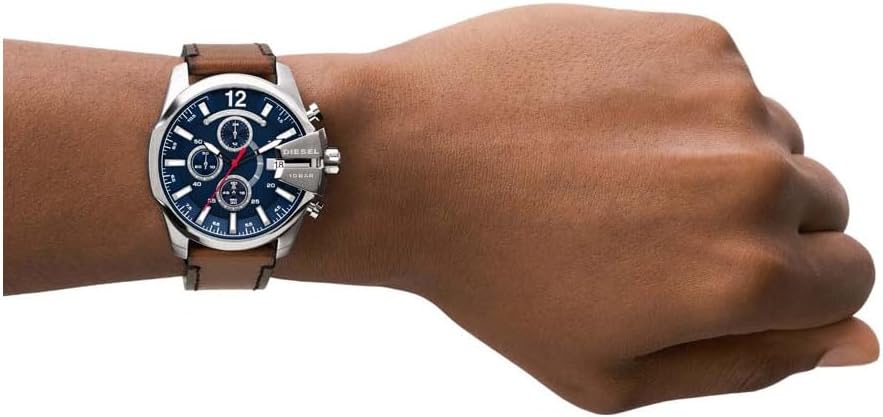
Figure 5.1: Diesel DZ4599 watch displayed on a person's wrist. This image provides a perspective of the watch's size and appearance when worn.

Figure 5.2: Back view of the Diesel DZ4599 watch. This image shows the stainless steel case back, the Diesel logo on the buckle, and the brown leather strap.
6. Troubleshooting
- Watch has stopped: Check if the crown is fully pushed in. If not, push it in and set the time. If the watch still does not operate, the battery may need replacement.
- Date changes at noon: This indicates the AM/PM setting was incorrect during time adjustment. Pull the crown to position 2 and advance the hour hand by 12 hours.
- Chronograph hands do not reset to zero: This may require a chronograph reset procedure. Consult a professional watch repair service if the issue persists after following operating instructions.
7. Specifications
| Feature | Specification |
|---|---|
| Model Number | DZ4599 |
| Movement | Quartz |
| Functions | Time (Hour, Minute, Second), Date, Chronograph |
| Water Resistance | 10 BAR (100 meters) |
| Case Dimensions | Approximately 9 x 10 x 10 cm (Product Dimensions) |
| Weight | Approximately 300 g |
| Battery | 1 Unknown battery (included) |
8. Warranty
Your Diesel DZ4599 watch comes with a manufacturer-backed warranty. Please refer to the warranty card included with your purchase for specific terms, conditions, and duration. Keep your proof of purchase for warranty claims.
9. Support
For further assistance, service, or inquiries regarding your Diesel watch, please contact Diesel customer service or visit the official Diesel website. Contact information can typically be found on the warranty card or the brand's official online presence.


