
1. Introduction and Overview
The iKF Fkids Pro headphones are specifically designed for children, integrating safety, educational features, and versatile connectivity. These over-ear headphones prioritize hearing protection while offering functionalities that support learning and entertainment.
- Hearing Protection: Volume is consistently controlled below 94dB, with a 3-speed safe volume mode to suit various age groups and environments.
- Recitation Mode: Utilizes an external microphone to capture high-definition original sound, optimizing it for real-time transmission back to the ear, enhancing memory and pronunciation during learning.
- Timed Playback Reminder: A built-in 60-minute playback duration voice reminder helps prevent excessive ear usage, customizable via the dedicated app.
- Bluetooth 5.3 Connectivity: Offers stable, lag-free wireless connection, supporting simultaneous connection to two devices for seamless switching. Compatible with mobile phones, computers, tablets, and learning machines.
- Wired Mode: Includes a 3.5mm AUX audio cable for continued use when the battery is depleted. A complimentary sharing plug allows two headphones to connect to one device.

Image: iKF Fkids Pro Over-Ear Headphones in a blue and orange color scheme, showcasing their design.
2. What's in the Box
Please check the package contents to ensure all items are present:
- iKF Fkids Pro Headphone (x1)
- Charging Cable (x1)
- User Manual (x1)
- 3.5mm AUX Audio Cable (x1)
- External Microphone (x1)

Image: A flat lay of the iKF Fkids Pro headphones and all included accessories, such as the charging cable, AUX cable, and external microphone.
3. Setup Guide
3.1 Charging the Headphones
- Connect the provided charging cable to the charging port on the headphones.
- Plug the other end of the charging cable into a compatible USB power source (e.g., computer USB port, USB wall adapter).
- The indicator light on the headphones will show charging status. Once fully charged, the light will change or turn off.
3.2 Powering On/Off
- To Power On: Press and hold the Power button for approximately 3 seconds until the indicator light illuminates.
- To Power Off: Press and hold the Power button for approximately 5 seconds until the indicator light turns off.
3.3 Bluetooth Pairing
- Ensure the headphones are powered off.
- Press and hold the Power button for about 5-7 seconds until the indicator light flashes rapidly (usually blue and red), indicating pairing mode.
- On your device (smartphone, tablet, computer), enable Bluetooth and search for available devices.
- Select "iKF Fkids Pro" from the list of found devices.
- Once connected, the indicator light on the headphones will typically show a steady blue light or flash slowly.
3.4 Wired Connection (AUX Mode)
- Locate the 3.5mm audio jack on the headphones.
- Plug one end of the provided 3.5mm AUX audio cable into the headphone jack.
- Plug the other end of the cable into the audio output jack of your device.
- The headphones will automatically switch to wired mode.
3.5 Attaching the External Microphone
- Identify the microphone port on the left earcup of the headphones.
- Gently insert the external microphone's plug into the port until it clicks into place.
- Adjust the microphone's position for optimal voice pickup.
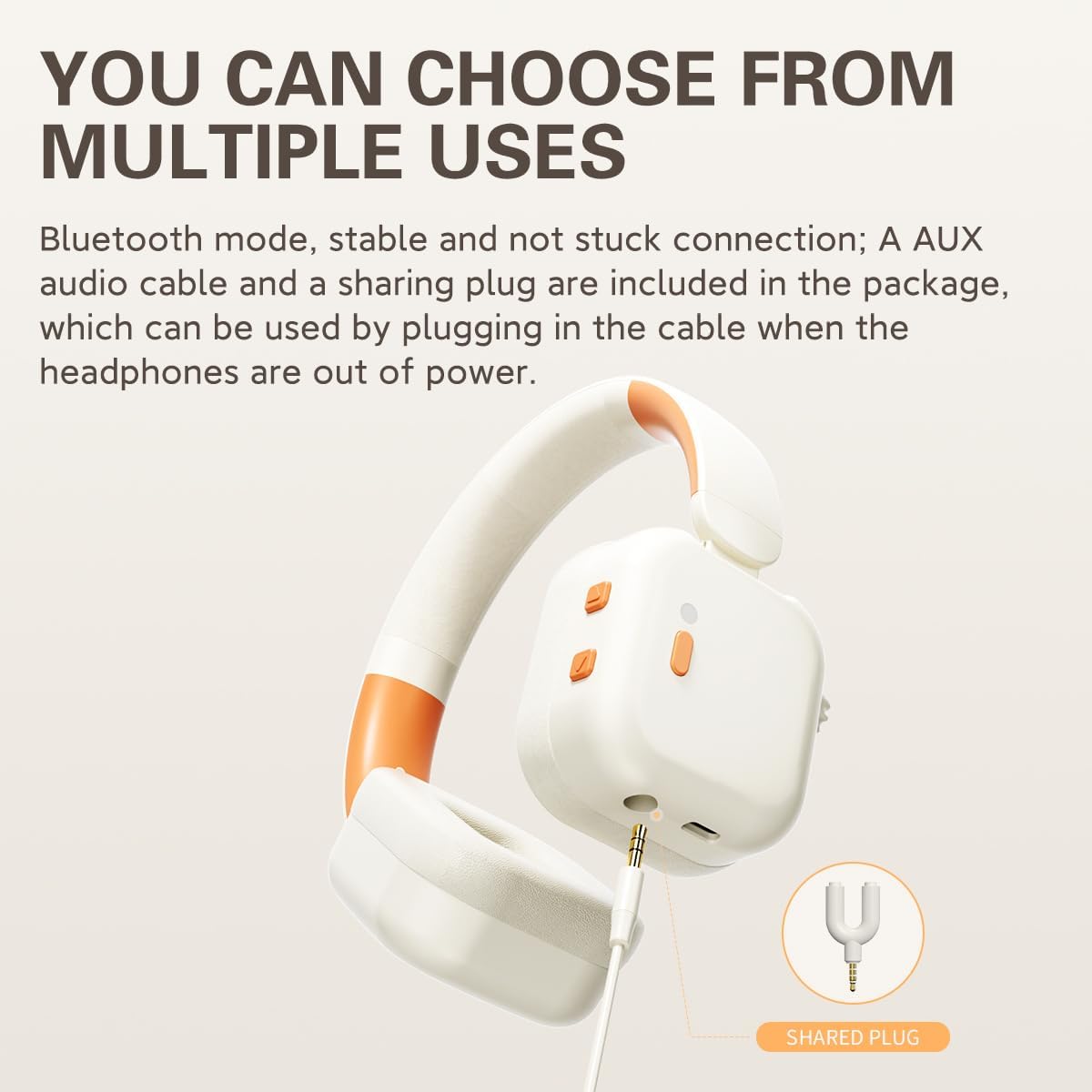
Image: A close-up of the iKF Fkids Pro headphones demonstrating the wired connection via the 3.5mm AUX cable and the included sharing plug.
4. Operating Instructions
4.1 Volume Control and Hearing Protection
The iKF Fkids Pro headphones feature a 3-speed safe volume mode, ensuring audio levels remain below 94dB to protect children's hearing. You can adjust the volume using the dedicated volume controls on the earcup or through your connected device.
4.2 Recitation Mode
When the external microphone is attached, the headphones can enter Recitation Mode. This mode picks up your voice in high-definition, processes it for clarity, and transmits it back to your ears in real-time. This synchronization helps enhance memory, correct pronunciation, and improve reading comprehension.

Image: A child wearing iKF Fkids Pro headphones with the external microphone, illustrating the use of recitation mode for learning.
4.3 Timed Playback Reminder
To promote healthy listening habits, the headphones include a built-in 60-minute playback duration voice reminder. After 60 minutes of continuous use, a voice prompt will remind the user to take a break. This feature can be customized further using the iKF companion app.

Image: A child wearing iKF Fkids Pro headphones while studying, with an overlay indicating the timed playback reminder feature.
4.4 Dual Device Connection (Bluetooth)
The upgraded Bluetooth 5.3 technology allows the iKF Fkids Pro headphones to connect to two devices simultaneously. This enables seamless switching between, for example, a tablet for learning and a smartphone for calls, without needing to re-pair.
4.5 Audio Sharing
The included sharing plug allows two pairs of iKF Fkids Pro headphones to connect to a single audio source. This is ideal for shared learning experiences or enjoying media together.
4.6 iKF Companion App
For enhanced personalization and control, download the iKF companion app. The app allows you to:
- Customize the timed playback reminder settings.
- Adjust sound profiles (EQ).
- Manage device connections.
- Access additional features and updates.
Video: This video demonstrates the key features and design of the iKF Fkids Pro headphones, including unboxing, adjustable and foldable design, microphone attachment, and app personalization.
5. Features and Design
5.1 Comfort and Fit
- Soft Headband: The headband features soft padding for comfortable wear over extended periods.
- Adjustable Headband: An easy-to-use adjustable slider ensures a perfect fit for various head sizes.
- Ultra-soft Ear Cushions: Made from soft and plush synthetic leather, the earcups provide comfort and a gentle seal.
5.2 Portable Design
The iKF Fkids Pro headphones are designed to be foldable, allowing for compact storage and easy portability, making them convenient for school, travel, or home use.

Image: A detailed view highlighting the soft headband, adjustable headband mechanism, ultra-soft ear cushions, and the foldable nature of the iKF Fkids Pro headphones.
6. Maintenance
Proper care will extend the life and performance of your iKF Fkids Pro headphones:
- Cleaning: Use a soft, dry cloth to wipe the headphones. Avoid using harsh chemicals or abrasive materials.
- Storage: When not in use, fold the headphones and store them in a clean, dry place away from direct sunlight and extreme temperatures.
- Battery Care: For optimal battery longevity, avoid fully discharging the battery frequently and try to keep it charged between 20% and 80%.
- Liquid Exposure: Do not expose the headphones to water or excessive moisture.
7. Troubleshooting
If you encounter issues with your iKF Fkids Pro headphones, refer to the following common solutions:
| Problem | Possible Cause | Solution |
|---|---|---|
| Headphones do not power on. | Low or no battery. | Charge the headphones using the provided charging cable. |
| No sound in Bluetooth mode. | Not paired, volume too low, or incorrect audio output. | Ensure headphones are paired correctly. Increase headphone and device volume. Check device's audio output settings. |
| Cannot pair via Bluetooth. | Headphones not in pairing mode, or device Bluetooth is off. | Ensure headphones are in pairing mode (flashing indicator light). Turn off and on your device's Bluetooth. Move closer to the device. |
| No sound in wired (AUX) mode. | AUX cable not fully inserted, or cable is faulty. | Ensure the AUX cable is securely plugged into both the headphones and the audio source. Try a different AUX cable if available. |
| External microphone not working. | Microphone not fully inserted, or device settings. | Ensure the microphone is securely plugged into the headphone port. Check your device's audio input settings to ensure the external microphone is selected. |
8. Specifications
| Feature | Detail |
|---|---|
| Model Name | iKF Kids Pro |
| Connectivity Technology | Wired, Wireless (Bluetooth) |
| Wireless Communication Technology | Bluetooth 5.3 |
| Included Components | 3.5mm AUX audio cable, Charging cable, External microphone, Headphone, User Manual |
| Age Range (Description) | Children (3-15 years old, as per product description in video) |
| Material | Plastic |
| Control Type | Buttons, App, Touch |
| Special Feature | Recitation mode, Hearing protection (Volume limit & 3-speed safe volume mode), Timed playback reminder, Foldable design, Dual device connection |
| Manufacturer | iKF |
| Package Dimensions | 7.87 x 4.72 x 3.15 inches |
| Item Model Number | iKF Kids |
| Batteries | 1 CR123A battery required (included) |
| Ear Placement | Over Ear |
| Form Factor | Over Ear |
| Headphones Jack | 3.5 mm Jack |
9. Warranty and Support
For warranty information, product support, or to contact customer service, please visit the official iKF store on Amazon or their official website. Keep your purchase receipt as proof of purchase.
iKF Official Store: Visit the iKF Store on Amazon


