
Introduction
This manual provides detailed instructions for the safe and effective use of your WeCool S6 Reinforced Bluetooth Selfie Stick with Tripod Stand. Please read this manual thoroughly before operating the device and retain it for future reference.
Package Contents
- Selfie stick
- Remote control
Product Overview
The WeCool S6 is a versatile accessory designed for mobile photography and videography. It functions as both an extendable selfie stick and a stable tripod stand, featuring a detachable mobile holder and a Bluetooth remote control.
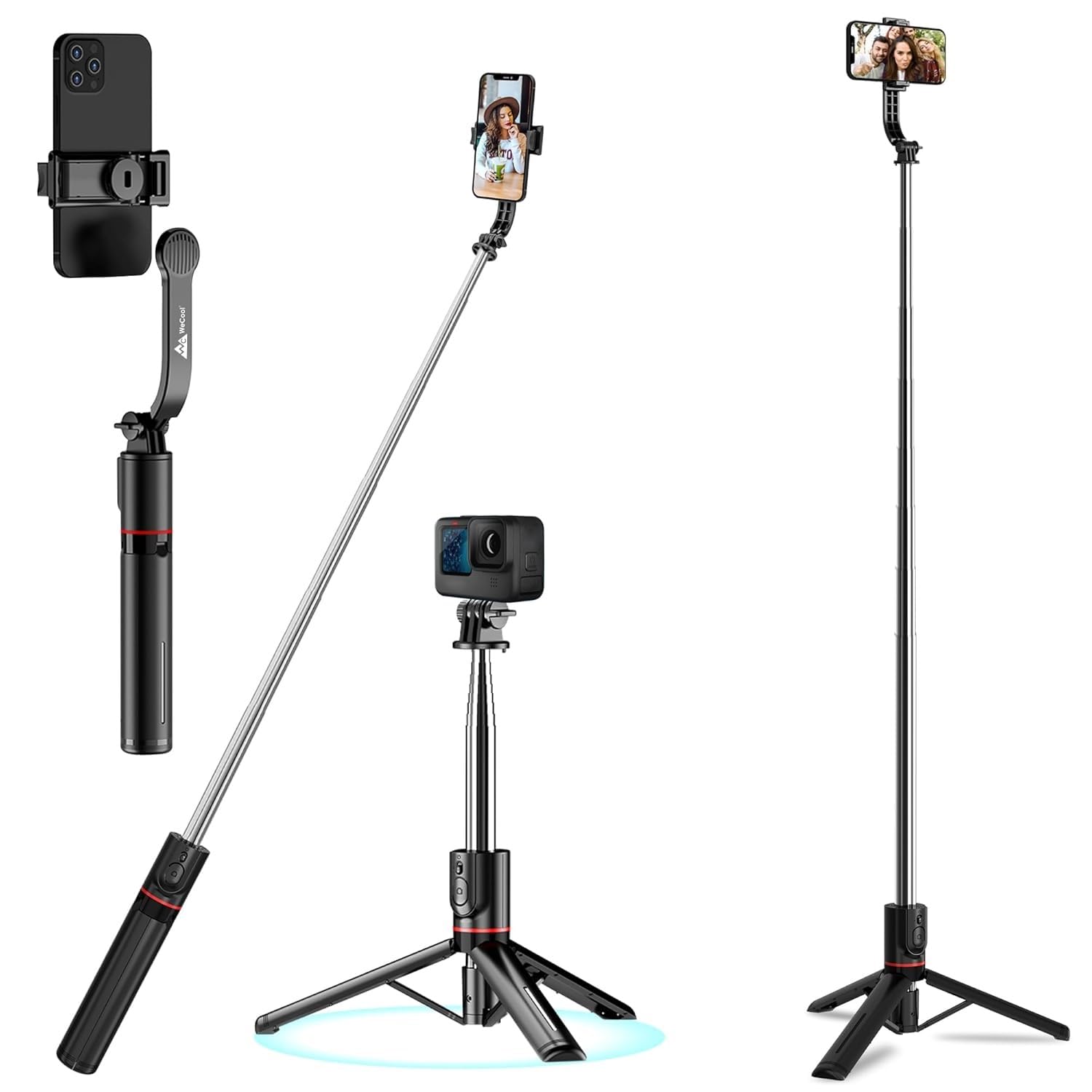
Figure 1: WeCool S6 Selfie Stick with Tripod Stand in compact form.
Video 1: Overview of the WeCool S6 Selfie Stick features, including extension, tripod deployment, and remote control use.
Setup Instructions
1. Unfolding the Selfie Stick and Tripod
- Gently pull the top section of the selfie stick upwards to extend the telescopic rod.
- To deploy the tripod, hold the handle and push the bottom part downwards. The three legs will spread out to form a stable base.
- Ensure the tripod legs are fully extended and stable on a flat surface before placing a device.

Figure 2: Selfie stick fully extended with tripod deployed.
2. Attaching Your Device
- For Smartphones: Extend the mobile holder clamps and securely place your smartphone between them. Ensure the phone is centered and stable. The holder supports phones between 4.70-9.50 cm in width.
- For GoPro/Camera/Ring Light: The selfie stick features a 1/4" interface. Remove the mobile holder if attached, and screw your GoPro, camera, or ring light onto the 1/4" screw mount.

Figure 3: Versatile use with smartphones, GoPro, and ring lights.
3. Bluetooth Remote Pairing
- Locate the detachable Bluetooth remote control on the handle of the selfie stick.
- Press and hold the dedicated ON/OFF button on the remote until the indicator light starts blinking, indicating it is in pairing mode.
- On your smartphone, go to Bluetooth settings and search for available devices.
- Select "WeCool S6" or a similar name from the list to pair. The indicator light on the remote will stop blinking and remain solid once paired.
- The remote is now ready to capture photos and start/stop video recording.

Figure 4: Detachable Bluetooth remote control for wireless operation.
Operating Instructions
1. Using as a Selfie Stick
- Extend the telescopic rod to your desired length (up to 114 cm / 45 inches).
- Hold the handle firmly and position your device for the shot.
- Use the Bluetooth remote to capture photos or start/stop video recording.

Figure 5: Capturing a selfie with the extended stick.
2. Using as a Tripod Stand
- Deploy the reinforced tripod legs on a stable, flat surface.
- Adjust the height of the telescopic rod as needed.
- Position your device for stable hands-free recording or photography.
- The non-silicone pads on the tripod feet enhance grip and stability.

Figure 6: Using the WeCool S6 as a tripod for group photos.
3. Adjusting Angles
- The mobile holder allows for 360° rotation, enabling both horizontal and vertical orientations.
- The holder also offers a 225° tilt angle for precise positioning of your device.
- Loosen the adjustment knob, set your desired angle, and tighten the knob to secure.

Figure 7: Demonstrating 360° rotation and 225° tilt for optimal angles.
4. Detachable Mobile Holder as Phone Stand
- The mobile holder can be detached from the selfie stick.
- It features a built-in kickstand, allowing it to be used independently as a desktop phone stand for watching videos or making calls.

Figure 8: Detachable mobile holder functioning as a standalone phone stand.
Maintenance
- Clean the selfie stick and remote with a soft, dry cloth. Avoid using abrasive cleaners or solvents.
- Ensure the telescopic rod is free of dust and debris for smooth extension and retraction.
- Store the device in a cool, dry place away from direct sunlight and extreme temperatures.
- When not in use, retract the stick and fold the tripod legs for compact storage.
Troubleshooting
| Problem | Possible Cause | Solution |
|---|---|---|
| Remote not pairing with phone. | Remote battery low; Bluetooth not enabled on phone; remote not in pairing mode; interference. | Ensure remote battery is charged. Turn on phone's Bluetooth. Press and hold remote button until light blinks. Move closer to phone. Restart both devices. |
| Tripod is unstable. | Legs not fully extended; uneven surface; device too heavy or off-center. | Ensure all tripod legs are fully spread. Place on a flat, stable surface. Center your device in the holder. |
| Selfie stick not extending/retracting smoothly. | Dust or debris in telescopic sections. | Clean the telescopic rod with a soft, dry cloth. Avoid forcing the rod. |
| Phone does not fit in holder. | Phone width exceeds holder's capacity. | The holder supports devices between 4.70-9.50 cm. Verify your phone's dimensions. |
Specifications
| Feature | Detail |
|---|---|
| Brand | WeCool |
| Model | WeCool S6 |
| Product Dimensions | 7 x 4 x 113 cm |
| Item Weight | 180 g |
| Material | Stainless Steel |
| Max Extension Length | 114 cm (45 inches) |
| Folded Length | 21 cm |
| Telescopic Sections | 7 |
| Rotation Angle | 360° |
| Tilt Angle | 225° |
| Compatible Devices | Smartphone, iPhone, GoPro, Cameras, Ring Lights (via 1/4" interface) |
| Remote Control | Bluetooth, Detachable |
| Battery Type (Remote) | Lithium Polymer (included) |
Warranty and Support
The WeCool S6 Reinforced Bluetooth Selfie Stick with Tripod Stand is covered by a 1-Year Brand Warranty. To avail the warranty, please register your product on the official WeCool website within 10 days of purchase.
For any queries or technical support, please contact the WeCool Technical Support Team. Contact details can be found on the official WeCool website or your purchase documentation.
Safety Information
- Do not overload the device beyond its intended capacity.
- Ensure all locking mechanisms are secure before use.
- Avoid using the device in strong winds or unstable environments when extended as a tripod.
- Keep out of reach of children.
- Do not expose the device to water or extreme moisture.