
Introduction
The MERACH Under Desk Bike Pedal Exerciser (Model S27) is a compact and efficient fitness solution designed to integrate exercise seamlessly into your daily routine. Whether you're working at your desk, reading, or recovering, this device offers a convenient way to stay active.
Key features include versatile dual-use for both upper and lower body workouts, a whisper-quiet magnetic resistance system for undisturbed use, and a compact, portable design with an integrated handle for easy movement and storage. It also boasts an intuitive LCD display and connectivity to the MERACH or Kinomap app for personalized progress tracking. Crafted with joint care in mind, it provides a low-impact exercise option beneficial for seniors, individuals in recovery, and office workers.

The MERACH S27 Under Desk Bike Pedal Exerciser, a compact and versatile fitness device.
Setup Guide
1. Unboxing and Component Check
Carefully remove all components from the packaging. Ensure all parts are present and undamaged before proceeding with assembly. The package should include the main unit, front and rear stabilizers, left and right pedals with straps, assembly tools (hex wrench, open-end wrench), and batteries.

All components of the MERACH S27 laid out for easy assembly, including the main unit, stabilizers, pedals, and tools.
2. Attaching Stabilizers
Begin by removing the pre-locked M8*24L screws from the main unit's foot with the provided hexagon wrench S6(42). Align the front stabilizer with the holes on the mainframe and secure it by re-inserting and tightening the screws. Repeat this process for the rear stabilizer.
Watch this video for a step-by-step guide on assembling the MERACH S27 Mini Bike, including attaching the front and rear stabilizers.
3. Attaching Pedals
Before attaching, distinguish between the left (L) and right (R) pedals by checking the markings. Attach the pedal straps to their respective pedals. Turn the right pedal (20R) into the right crank (17R) in the direction of the arrow by hand until snug, then use the open-end wrench 13-15(43) to lock it tightly. Repeat for the left pedal (20L) and left crank (17L).

Detailed view of how to adjust and install the pedal strap for a secure fit.
4. Battery Installation
On the left side of the electronic display, locate the small recess. Gently remove the electronic display unit. Insert two AAA batteries into the battery compartment, ensuring correct polarity. Replace the electronic display unit back into its recess until it clicks securely.
Operating Instructions
1. Dual-Use Functionality
The MERACH S27 is designed for versatile workouts, allowing you to engage both your upper and lower body. For leg exercises, place the unit on the floor under your desk or in front of a chair. For arm exercises, place the unit on a sturdy table or surface and use your hands on the pedals.

Illustrates the dual functionality for both lower limb training (pedaling with feet) and upper limb training (pedaling with hands).
2. Adjusting Resistance
The unit features a silent magnetic resistance system with 8 adjustable levels. To increase or decrease the resistance, simply turn the tension control knob located on the top of the unit. Turn towards '+' for higher resistance and towards '-' for lower resistance. This allows you to customize your workout intensity.

The internal magnetic resistance system ensures a dynamic yet silent workout experience.

The tension control knob allows for easy adjustment of the 8 resistance levels.
3. Tracking Your Progress
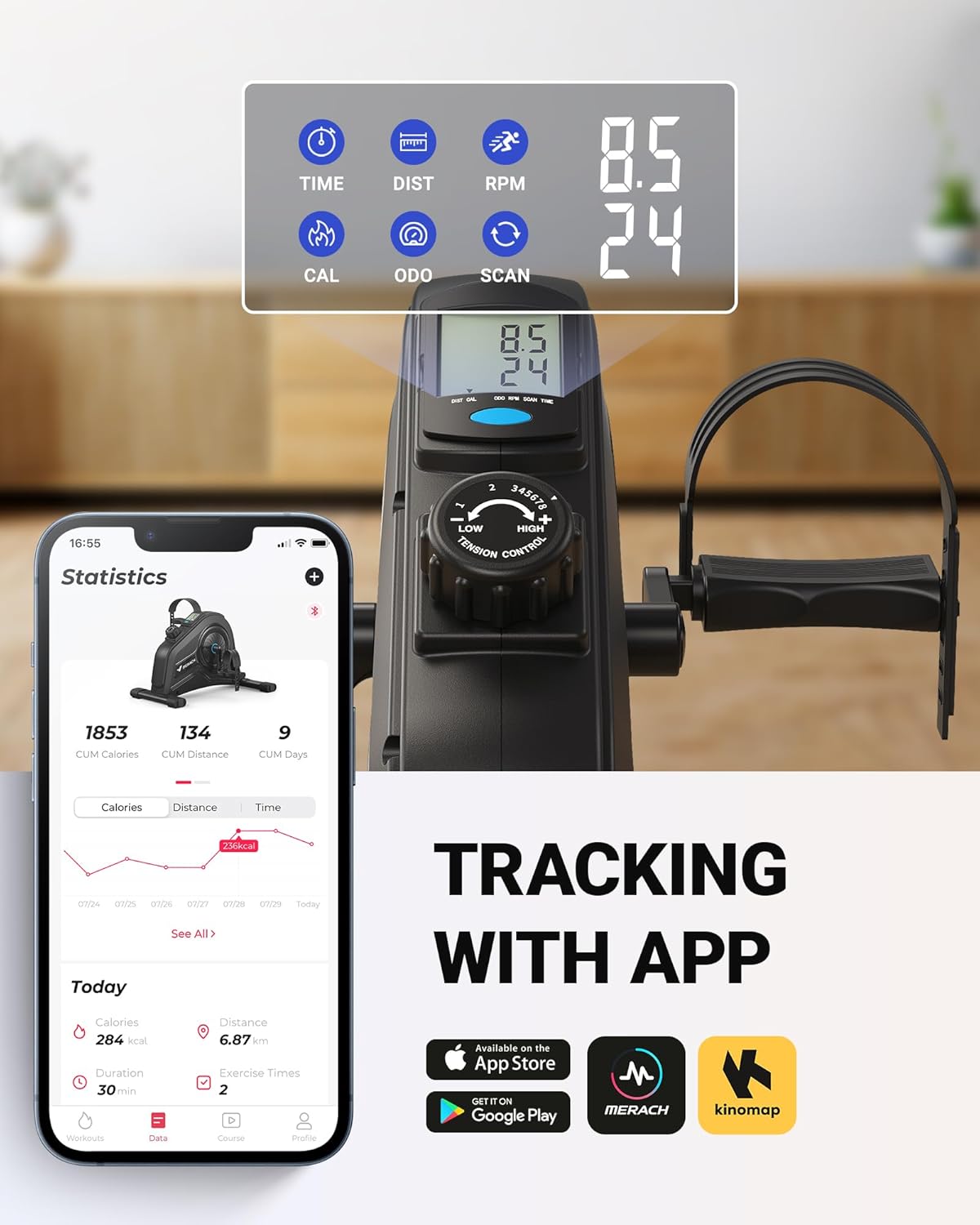
The built-in LCD screen displays essential workout data including Time, Distance, RPM (Revolutions Per Minute), Calories burned, and ODO (Odometer/Total Distance). You can cycle through these metrics using the blue button below the display. For more detailed tracking and personalized exercise plans, connect the device to the official MERACH or Kinomap app via Bluetooth.

The LCD display provides real-time workout data, and the device connects to the MERACH and Kinomap apps for advanced tracking.
4. Placement and Portability
The compact design of the MERACH S27 (21.65"L x 16.90"W x 14.73"H) allows it to fit snugly in small spaces, making it ideal for home or office use. It features a convenient handle for easy transportation, allowing you to move it between different locations effortlessly.

The integrated handle makes the unit easy to move, and its compact size allows it to fit comfortably under most desks.
The MERACH S27 can be used in various settings, including while working, reading, or for rehabilitation purposes.
This video demonstrates the ultra-stable design and ease of use for both arm and leg exercises.
Maintenance
To ensure the longevity and optimal performance of your MERACH Under Desk Bike, regular maintenance is recommended:
- Cleaning: Wipe down the unit regularly with a soft, damp cloth to remove dust and sweat. Avoid using abrasive cleaners or solvents.
- Check Connections: Periodically inspect all screws and bolts to ensure they are tight. Re-tighten if necessary to maintain stability.
- Pedal Straps: Check the pedal straps for any signs of wear or damage. Replace them if they become worn to ensure user safety.
- Battery Replacement: If the LCD display becomes dim or unresponsive, replace the AAA batteries.
Troubleshooting
If you encounter any issues with your MERACH Under Desk Bike, please refer to the following common troubleshooting tips:
- Display Not Working: Ensure batteries are correctly installed and are not depleted. Replace batteries if necessary.
- Unusual Noises: Check for any loose parts or foreign objects near the pedals or flywheel. Ensure all assembly screws are tightened.
- Pedals Feel Loose: Re-tighten the pedals to the cranks using the open-end wrench as described in the setup guide.
- Unit Slides During Use: Ensure the unit is placed on a non-slip surface. The anti-slip design should provide stability on most floor types.
If the problem persists after attempting these steps, please contact MERACH customer support for further assistance.
Specifications
| Brand | MERACH |
| Model Name | S27 |
| Product Dimensions | 21.65"D x 16.9"W x 14.73"H |
| Item Weight | 20.94 Pounds |
| Material | Silicone |
| Resistance Mechanism | Magnetic |
| Number of Resistance Levels | 8 |
| Power Source | Battery Powered |
| Special Feature | Free Exclusive MERACH APP |
Warranty and Support
MERACH stands behind the quality of its products. The MERACH Under Desk Bike Pedal Exerciser comes with a one-year quality warranty from the date of purchase. This warranty covers manufacturing defects and ensures reliable performance under normal use.
For any questions, technical support, or warranty claims, please contact MERACH customer support. You can also refer to the comprehensive user manual available in PDF format for detailed information and diagrams: