
Introduction
Welcome to your LS2 Advant X Modular Helmet, featuring an integrated Cardo 4X Bluetooth communication system. This manual provides essential information for the proper use, maintenance, and care of your helmet to ensure safety and optimal performance. Please read this manual thoroughly before using your helmet.
Safety Information
Your LS2 Advant X helmet meets or exceeds DOT FMVSS 218 and ECE 22.06 standards, certified as both an open and full-face helmet. Always ensure the helmet is properly secured before riding.
Proper Fit
A correct fit is crucial for safety. The helmet should fit snugly around your head without causing pressure points. It should not move freely when you shake your head.

This image illustrates the process of measuring head circumference to determine the correct helmet size.
Refer to the sizing chart below. Note that this helmet may run small; consider ordering one size larger than suggested for an optimal fit, especially if you are between sizes or have a round head shape.
| Brand Size | Head Circumference (in) |
|---|---|
| X-Small | 20 - 20.5 |
| Small | 20.9 - 21.3 |
| Medium | 21.6 - 22 |
| Large | 22.5 - 22.9 |
| X-Large | 23.3 - 23.6 |
| 2X-Large | 24 - 24.4 |
| 3X-Large | 24.8 - 25.3 |
The Advant X helmet is designed for an intermediate oval head shape.
Setup
Visor and Pinlock Installation
The helmet comes with an "A Class" Polycarbonate face shield, which is optically correct, scratch, and UV resistant. A Pinlock insert is included to prevent fogging.
- To remove the face shield, locate the quick-release mechanism on both sides of the helmet. Follow the instructions provided in the separate visor manual for specific steps.
- Install the Pinlock insert onto the inner side of the face shield, ensuring a tight seal around the pins.
- Reattach the face shield by aligning it with the quick-change mechanism and pressing firmly until it clicks into place.
Cardo 4X Bluetooth System Setup
The integrated Cardo 4X system utilizes Bluetooth 5.2 technology for communication.
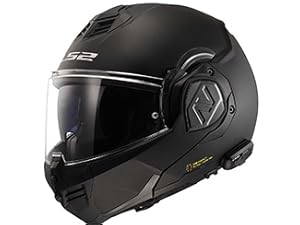
This image shows the Cardo 4X Bluetooth unit integrated into the helmet's side.
- Power On/Off: Press and hold the main button for 2 seconds.
- Pairing with Mobile Device:
- Turn on the Cardo unit.
- Enter pairing mode (refer to the Cardo 4X specific manual for button combinations, typically holding a button until LED flashes).
- On your mobile device, enable Bluetooth and select "LS2 4X" from the available devices.
- Intercom Pairing (up to 4 riders):
- Ensure all units are powered on.
- Initiate intercom pairing on your unit (refer to Cardo 4X manual).
- Other riders should also enter pairing mode.
- The units will automatically connect. The Open Bluetooth Intercom (OBI) standard allows pairing with OBI systems from other manufacturers.
- Software Updates: The Cardo 4X is prepared for wireless updates. Download the Cardo Connect app for your smartphone to manage settings and perform updates.
Operating Instructions
Modular System Operation
The Advant X features a 180-degree modular system, allowing the chin bar to rotate fully to the back of the helmet.

This image displays the LS2 Advant X helmet in its open-face configuration, with the chin bar rotated to the rear.
- To open the chin bar, locate the release mechanism (typically a button or lever) at the front base of the chin bar.
- Press the release and lift the chin bar upwards and backwards until it locks into the rear position.
- To close, press the release mechanism again and pull the chin bar forward until it securely latches in the closed position. Ensure it is fully locked before riding.
Visor and Sun Shield Operation
- Clear Visor: Lift or lower the clear face shield as needed. It has multiple detent positions.
- Internal Sun Shield: The helmet includes a built-in sun shield. Operate it using the slider mechanism located on the side of the helmet (specific location may vary, refer to visual guides).
Ventilation System
The helmet features adjustable vents for airflow.
- Chin Vent: Open or close the vent on the chin bar to control airflow to the face shield and mouth area.
- Top Vents: Slide the top vents open or closed to regulate airflow over the scalp.
- Rear Exhaust Vents: These vents are typically passive and help draw hot air out of the helmet.
Cardo 4X Communication Functions
- Intercom: Communicate with up to four riders within a 1.2 km range. Use the Cardo Connect app or voice commands for group management.
- Music Streaming: Stream music from your paired mobile device. The JBL speakers provide clear audio.
- Phone Calls: Make and receive calls hands-free. "Natural Voice" voice control is integrated for commands like "Hey Cardo, answer call."
- GPS Navigation: Receive audio directions from your paired GPS device or smartphone.
Maintenance
Helmet Exterior Cleaning
Use a soft cloth and mild soap with water. Avoid harsh chemicals or abrasive cleaners, which can damage the helmet's finish or shell material (HPFC).
Visor and Pinlock Cleaning
- Remove the face shield. Clean with warm water and a soft cloth. Do not use abrasive materials.
- Carefully remove the Pinlock insert. Clean it with warm water only and allow it to air dry. Avoid wiping the inner surface of the Pinlock to prevent damage to the anti-fog coating.
Removable Liner Cleaning
The technical fabric liner is removable for cleaning.
- Gently detach the cheek pads and comfort liner from the helmet interior.
- Hand wash with mild soap and cool water.
- Allow to air dry completely before reinserting into the helmet.
Cardo Unit Care
The Cardo 4X unit is fully waterproof. Clean with a damp cloth. Ensure charging ports are dry before connecting any cables.
Troubleshooting
- No Power to Cardo Unit: Ensure the unit is charged. Check the charging cable and port.
- Difficulty Pairing Bluetooth: Ensure the unit is in pairing mode. Try restarting both the Cardo unit and the mobile device. Clear previous pairings if necessary.
- Low Audio Volume: Check the volume settings on both the Cardo unit and the paired device. Ensure speakers are correctly positioned within the helmet.
- Intercom Disconnection: Ensure all units are within range (1.2 km). Re-initiate intercom pairing if connection is lost.
- Helmet Fit Issues: If the helmet feels too tight or loose, re-verify your head measurement against the sizing chart. Remember the Advant X may run small.
For further assistance, refer to the comprehensive Cardo 4X user manual or contact LS2 customer support.
Specifications
- Model: LS2 Advant X Modular Helmet
- Part Number: 901-5011
- Shell Material: High Performance Fiberglass Composite (HPFC)
- Weight: Approximately 1,600g (+/- 50g)
- Certifications: DOT FMVSS 218, ECE 22.06 (P and J certified)
- Visor: "A Class" Polycarbonate, scratch and UV resistant, Pinlock Max ready (insert included)
- Sun Shield: Integrated drop-down sun shield
- Liner: Removable, washable technical fabric, 3D laser-cut cheek pads
- Fit: Intermediate Oval
- Communication System: Integrated Cardo 4X Bluetooth 5.2
- Intercom Range: Up to 1.2 km (4 riders)
- Audio: JBL speakers, Natural Voice voice control
- Waterproof: Cardo 4X unit is fully waterproof
Warranty Information
LS2 Helmets are warranted to be free of defects in material and workmanship to the end consumer for a period of 5 years from the date of retail sale. This warranty applies to the original purchaser only and is non-transferrable. It does not cover normal wear and tear or crash damage.
Support
For product support, technical assistance, or warranty claims, please visit the official LS2 Helmets website or contact their customer service department. For Cardo 4X specific inquiries, refer to the Cardo Systems support resources.


