
1. Introduction
This manual provides essential information for the proper installation, operation, and maintenance of your FERMAX Duox Plus Veo-XL DDA 7-inch Monitor. Please read these instructions carefully before using the device to ensure safe and efficient operation. Keep this manual for future reference.
2. Safety Information
Observe the following safety precautions to prevent damage to the device or injury to users:
- Electrical Safety: Installation and wiring must be performed by qualified personnel in accordance with local electrical codes. Disconnect power before performing any installation or maintenance.
- Environment: Do not expose the monitor to extreme temperatures, humidity, direct sunlight, or corrosive environments. Ensure adequate ventilation.
- Handling: Handle the device with care. Avoid dropping or subjecting it to strong impacts.
- Cleaning: Use a soft, dry cloth for cleaning. Do not use abrasive cleaners or solvents.
3. Package Contents
Verify that all components are present in the package:
- FERMAX Duox Plus Veo-XL DDA 7-inch Monitor
- Mounting bracket
- Mounting screws and wall plugs
- Connection terminals/connectors
- User Manual (this document)
4. Setup and Installation
The FERMAX Duox Plus Veo-XL DDA monitor is designed for wall-mounted installation. Ensure the installation location is suitable and provides easy access for wiring.
4.1 Mounting the Monitor
- Prepare the Wall: Choose a suitable location on the wall, ensuring it is free from obstructions and has access to the necessary wiring.
- Attach Mounting Bracket: Use the provided screws and wall plugs to securely attach the mounting bracket to the wall. Ensure the bracket is level.
- Connect Wiring: Before mounting the monitor, connect the Duox Plus system wiring to the terminals on the back of the monitor. Refer to the wiring diagram for correct connections.
- Mount Monitor: Carefully align the monitor with the mounting bracket and secure it in place. Ensure it clicks or slides firmly into position.
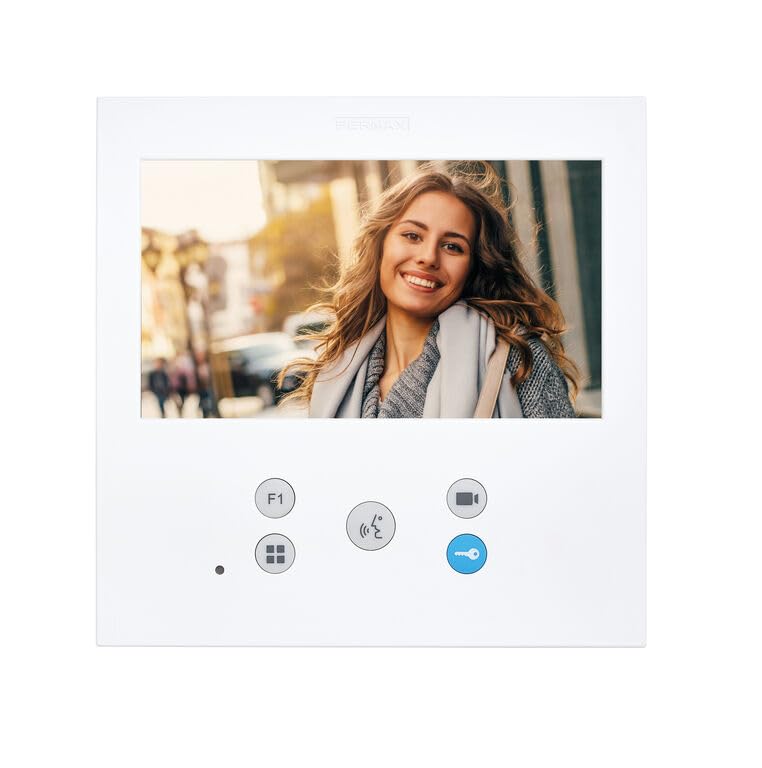
Figure 1: FERMAX Duox Plus Veo-XL DDA 7-inch Monitor. This image shows the front view of the monitor, highlighting its 7-inch screen and sleek design, ready for wall mounting.
4.2 Initial Power-On
Once the monitor is securely mounted and wired, restore power to the Duox Plus system. The monitor should power on and display the initial setup screen or standby interface. Follow any on-screen prompts for initial configuration, if applicable.
5. Operating Instructions
The FERMAX Duox Plus Veo-XL DDA monitor provides intuitive controls for managing your video intercom system.
5.1 Answering a Call
When an outdoor panel initiates a call, the monitor will ring and display the caller's video. Press the Answer button (typically indicated by a telephone icon) to establish communication.
5.2 Opening the Door
During an active call or while monitoring the outdoor panel, press the Door Open button (typically indicated by a key icon) to unlock the entrance door.
5.3 Monitoring the Outdoor Panel
To view the outdoor panel camera without an incoming call, press the Monitor button (often a camera icon). This allows you to see who is at the entrance at any time.
5.4 Adjusting Settings
Access the monitor's menu to adjust settings such as ringtone volume, display brightness, and other system preferences. Navigate the menu using the directional buttons and confirm selections with the OK or Menu button.
6. Maintenance
Regular maintenance ensures the longevity and optimal performance of your FERMAX monitor.
6.1 Cleaning the Screen and Casing
Use a soft, lint-free cloth slightly dampened with water to clean the screen and the monitor casing. Do not use harsh chemicals, abrasive cleaners, or aerosol sprays, as these can damage the surface or internal components.
6.2 General Care
- Keep the monitor free from dust and debris.
- Ensure no liquids spill onto the device.
- Avoid placing heavy objects on the monitor.
7. Troubleshooting
If you encounter issues with your monitor, refer to the following common problems and solutions:
| Problem | Possible Cause | Solution |
|---|---|---|
| Monitor does not power on. | No power supply; loose wiring. | Check power connection to the system. Verify wiring connections are secure. |
| No video from outdoor panel. | Camera issue; wiring fault; system configuration. | Check outdoor panel camera. Inspect video wiring. Consult system installer for configuration check. |
| No audio during call. | Microphone/speaker issue; volume too low; wiring fault. | Adjust monitor volume. Check audio wiring. |
| Door open function not working. | Wiring to door lock faulty; lock mechanism issue. | Verify wiring to the door strike/lock. Check the door lock mechanism. |
If the problem persists after attempting these solutions, contact qualified technical support.
8. Specifications
Technical specifications for the FERMAX Duox Plus Veo-XL DDA 7-inch Monitor:
- Brand: FERMAX
- Model: Duox Plus Veo-XL DDA
- Screen Size: 7 Inches
- Standing Screen Display Size: 7 Inches
- Display Technology: LCD
- Screen Surface Description: Glossy
- Special Feature: Wide screen
- Package Dimensions: 7.48 x 7.48 x 1.69 inches
- Manufacturer: FERMAX
- ASIN: B0C9F4CMGM
- Date First Available: June 26, 2023
9. Warranty and Support
FERMAX products are manufactured to high-quality standards. For warranty information and technical support, please refer to the documentation provided with your purchase or visit the official FERMAX website. Keep your proof of purchase for warranty claims.


