
1. Introduction
This manual provides detailed instructions for the CODi A04616 Wireless Headset. Designed for clear audio communication in various environments, this headset features advanced AI-Environmental Noise Cancellation (ENC) technology to suppress ambient noise and enhance voice clarity. Please read this manual thoroughly before using the headset to ensure proper operation and to maximize its performance and lifespan.
Package Contents:
- CODi A04616 Wireless Headset
- Headset Charging Dock
- USB-A Dongle
- USB Charging Cable
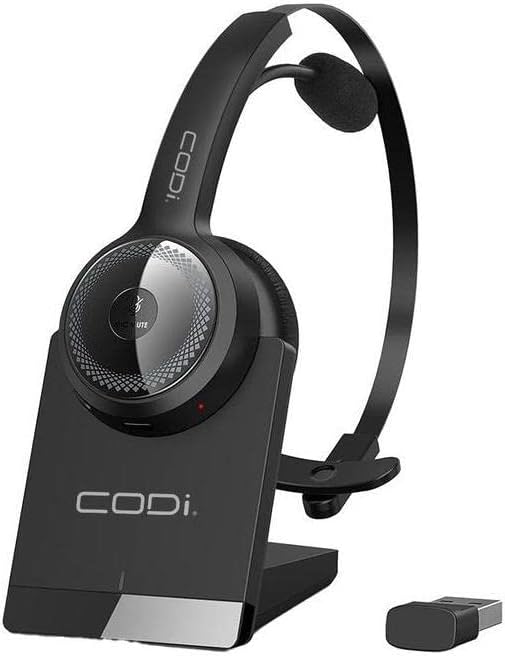
Figure 1.1: CODi A04616 Wireless Headset with its charging dock and USB-A dongle. The headset is black with a silver accent on the ear cup, resting in its black charging base. The small black USB dongle is visible next to the base.
2. Product Components
Familiarize yourself with the various parts of your CODi A04616 Wireless Headset:
- Adjustable Headband: For a comfortable and secure fit.
- Cushioned Ear Pad: Provides comfort during extended use.
- Microphone: Features AI-ENC technology for clear voice pickup. Rotates 135° for use on either ear.
- Volume Controls: Buttons located on the ear cup for adjusting audio levels.
- Multi-function Button: For power, pairing, and call management.
- Charging Port: Located on the headset for direct charging or via the dock.
- USB-A Dongle: For wireless connection to PCs and laptops.
- Charging Dock: Provides a convenient charging and storage solution.

Figure 2.1: The CODi A04616 Wireless Headset, highlighting its adjustable headband and the flexible, rotating microphone arm. The headset is black with a single ear cup and an over-the-head design.
3. Setup
3.1. Charging the Headset
- Connect the USB charging cable to the charging dock and then to a power source (e.g., computer USB port or USB wall adapter).
- Place the CODi A04616 Wireless Headset onto the charging dock, ensuring the charging contacts align.
- The headset's indicator light will show charging status. A full charge provides approximately 35 hours of working time.
- Alternatively, connect the USB charging cable directly to the headset's charging port.
3.2. Connecting via Bluetooth
- Ensure the headset is charged and powered off.
- Press and hold the multi-function button on the headset until the indicator light flashes blue and red, indicating pairing mode.
- On your device (smartphone, laptop, etc.), enable Bluetooth and search for available devices.
- Select "CODi A04616" from the list of found devices.
- Once connected, the indicator light on the headset will turn solid blue or flash blue periodically. The Bluetooth operating range is up to 300 feet (91 meters).
3.3. Connecting via USB-A Dongle
- Plug the USB-A dongle into an available USB-A port on your computer or laptop.
- Power on the CODi A04616 Wireless Headset.
- The headset and dongle should automatically pair. The indicator light on the headset will turn solid blue when connected.
- Ensure the CODi A04616 is selected as the audio input and output device in your computer's sound settings. The USB-A dongle operating range is up to 32 feet.
4. Operating Instructions
4.1. Power On/Off
- Power On: Press and hold the multi-function button for approximately 3 seconds until the indicator light flashes blue.
- Power Off: Press and hold the multi-function button for approximately 5 seconds until the indicator light flashes red and then turns off.
4.2. Call Management
- Answer/End Call: Press the multi-function button once.
- Reject Call: Press and hold the multi-function button for 2 seconds.
- Mute/Unmute Microphone: Press the dedicated mute button (if available, or refer to specific button layout for your model).
4.3. Volume Control
- Increase Volume: Press the Volume Up button.
- Decrease Volume: Press the Volume Down button.
4.4. Microphone Adjustment
The microphone arm can rotate 135 degrees, allowing you to wear the headset on either your left or right ear. Position the microphone approximately 1-2 inches from your mouth for optimal voice clarity and AI-ENC performance.
5. Maintenance
Proper care and maintenance will extend the life of your CODi A04616 Wireless Headset.
- Cleaning: Use a soft, dry, lint-free cloth to clean the headset and charging dock. Do not use abrasive cleaners, solvents, or aerosol sprays.
- Storage: When not in use, store the headset in its charging dock or a cool, dry place away from direct sunlight and extreme temperatures.
- Battery Care: To preserve battery life, avoid fully discharging the headset frequently. Charge the headset regularly, even if not in constant use.
- Water Resistance: This headset is not water-resistant. Avoid exposure to liquids.
6. Troubleshooting
If you encounter issues with your headset, refer to the following common problems and solutions:
| Problem | Solution |
|---|---|
| Headset does not power on. | Ensure the headset is fully charged. Connect it to the charging dock or directly via USB cable. |
| Cannot connect via Bluetooth. |
|
| No sound or poor audio quality. |
|
| Microphone not working. |
|
7. Specifications
| Model Name | Wireless Headset (A04616) |
| Connectivity Technology | Wireless (Bluetooth) |
| Bluetooth Operating Range | Up to 300 ft (91 meters) |
| USB-A Dongle Operating Range | Up to 32 ft |
| Battery Life | Approximately 35 hours (working time) |
| Microphone | 135° Rotating, AI-Environmental Noise Cancellation (ENC) |
| Ear Placement | Over Ear |
| Form Factor | On Ear / Over-the-head |
| Compatible Devices | PCs, Laptops, Smartphones, Desktops, Gaming Consoles, Tablets, Telephones, Smart Speaker, Television, Car Audio Systems |
| Product Dimensions | 8 x 7.5 x 3.1 inches |
| Item Weight | 13.4 ounces |
| Included Components | Wireless Headset, Headset Charging Dock |
| UPC | 633886015853 |
8. Support and Warranty
For technical assistance or warranty inquiries, please contact CODi customer support. Refer to the product packaging or the official CODi website for the most current contact information and warranty details.
Online Support: www.codi.com/support


