1. Introduction
The Weytoll WiFi Intelligent Timing Automatic Fish Feeder is designed to provide precise and controlled feeding for your aquarium fish. Featuring a 100ml large capacity food bin, this feeder ensures scientific rationing and prevents food clumping through its innovative anti-blocking mechanism. With mobile application control, you can remotely monitor feeding records and set multi-segment timing schedules, ensuring your fish are fed consistently even when you are away.
2. Product Features
- 100ml Large Capacity: Accommodates sufficient fish food for extended periods.
- Sealed and Moisture-Proof Design: Keeps fish food fresh and dry, with a transparent design for easy observation of food levels.
- Anti-Clumping Mechanism: An electric feeding bin with a built-in anti-clumping device and spring mechanism loosens food to prevent blockages.
- Precise Feeding: Ensures accurate food delivery without clogging the discharge port.
- WiFi Connectivity & Mobile App Control: Allows for remote monitoring, multi-segment timing, and viewing of feeding records via a smartphone application.

Image: The Weytoll Automatic Fish Feeder showcasing its intelligent features for clog-free and precise feeding.
3. Package Contents
Upon unpacking, please ensure all items are present:
- 1 x Automatic Fish Feeder
4. Product Diagram and Components
Familiarize yourself with the components of your automatic fish feeder:

Image: Detailed diagram of the fish feeder, illustrating its various parts and their functions.
- Infrared Detection Pair Tube: Used to detect material shortage and trigger reminders.
- Stir Fish Food Mechanism: Activates during discharge to prevent clumping.
- Button: For manual feeding control (single press for manual feed, press again to pause, double-click to return to position).
- Indicator Light: Red light indicates work instruction, blue light indicates network matching.
- Clipper: For securely fixing the fish feeder onto the fish tank.
- Input: Connects to a DC 5V external power supply.

Image: Exploded view showing the main components: top cover, fish food storage, and feeding bin.
5. Setup
5.1 Installation
The feeder offers flexible installation options:
- Tank Edge Mounting: Use the detachable thumb-screw tightening hanger to secure the feeder to the side of your aquarium.
- Surface Placement: Utilize the attached feet to place the feeder directly on top of the tank lid or a stable surface.
5.2 Power Connection
Connect the feeder to a DC 5V external power supply using the designated input port.
5.3 App Connection and Configuration
To enable smart features, connect the feeder to your home WiFi network via the dedicated mobile application. The setup process is similar to other smart home devices. Follow the in-app instructions for pairing and initial configuration. The blue indicator light will confirm network matching.
6. Operating Instructions
6.1 Filling the Feeder
Open the top cover to access the 100ml fish food storage bin. Fill it with appropriate fish pellets. The transparent design allows for easy monitoring of food levels. Note that this feeder is primarily designed for pellets and may not function optimally with flake food.

Image: The sealed food bin and various feeding bin sizes for precise food delivery.
6.2 Manual Feeding
Press the physical button on the device for a one-time manual feeding. Press again to pause the feeding cycle. Double-click the button to return the feeding mechanism to its original position after a manual feed.
6.3 Automatic Feeding via Mobile App
Use the dedicated mobile application to set up automatic feeding schedules. The app supports multi-segment timing, allowing you to schedule feedings at specific intervals (e.g., every X hours) or on a daily/multi-day schedule (up to every 5 days). You can also set multiple feeding times per day. The app provides remote monitoring of feeding records and can send reminders if food levels are low.
6.4 Adjusting Feeding Port Size
The feeder comes with different feeding bins (6x6mm, 8x8mm, 10x8mm) to accommodate various serving sizes. Select the appropriate bin based on your fish type and quantity to ensure optimal feeding.
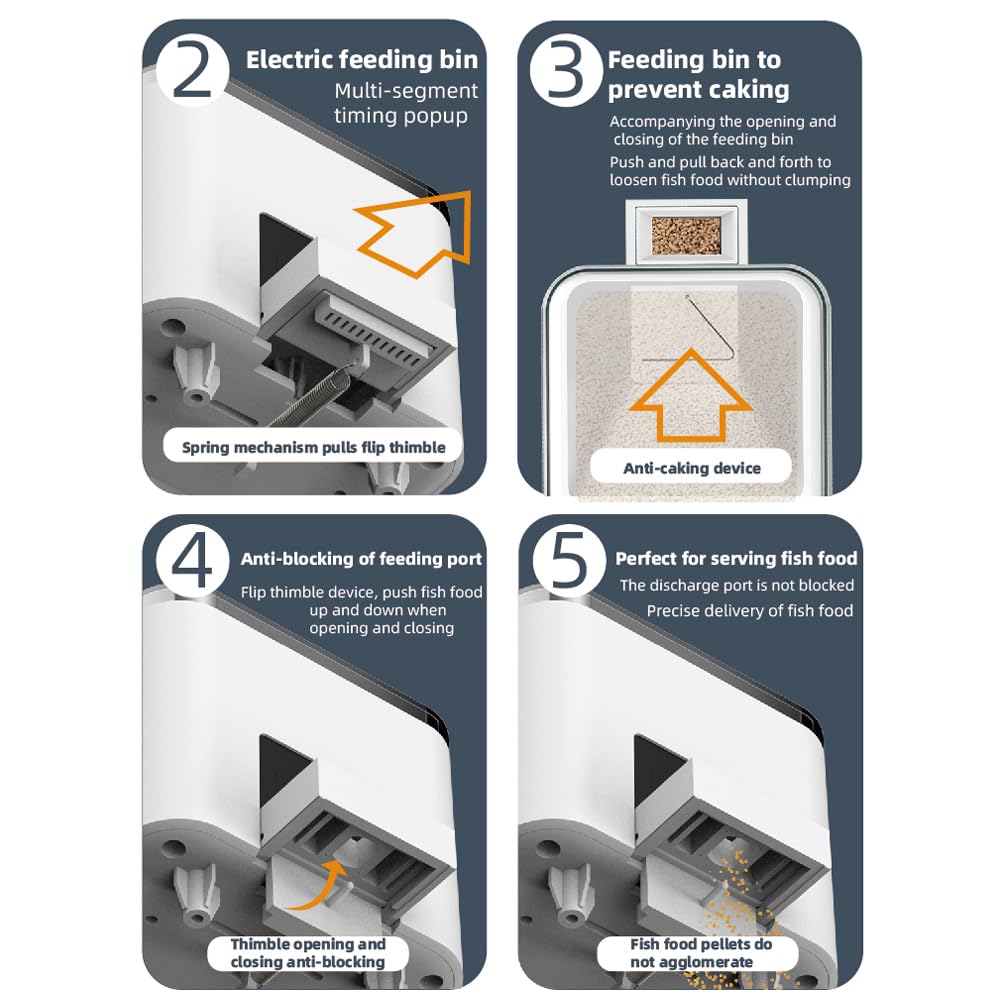
Image: Internal mechanisms demonstrating the anti-clumping and precise feeding functions.
7. Maintenance
7.1 Cleaning
To maintain hygiene and optimal performance, clean the feeder regularly. The product care instructions specify Hand Wash Only. Ensure the feeder is disconnected from power before cleaning.
7.2 Preventing Food Clumping
The feeder is equipped with an internal anti-clumping device. This mechanism, involving a spring device and flap thimble, actively loosens fish food during operation to prevent caking. Regularly check the food bin for any signs of moisture or clumping, especially in humid environments.
7.3 Food Type Recommendation
For best results and to prevent jamming, use dry fish pellets. Flake food is generally not recommended as it may lead to blockages in the feeding mechanism.
8. Troubleshooting
If you encounter issues with your Weytoll Automatic Fish Feeder, refer to the following common problems and solutions:
- Feeder Not Dispensing Food:
- Check if the food bin is empty.
- Ensure the feeder is properly powered.
- Verify that the feeding port is not blocked by clumped food. Clean the feeding mechanism if necessary.
- Confirm that the correct feeding schedule is set in the mobile app.
- Food Clumping in Bin:
- Ensure the food bin is sealed correctly to prevent moisture ingress.
- Use dry, pellet-type fish food. Avoid flake food.
- Clean the anti-clumping device if it appears to be stuck or ineffective.
- Mobile App Connectivity Issues:
- Ensure your feeder is within range of your WiFi router.
- Check your home WiFi network status.
- Restart the feeder and your mobile device.
- Verify that the app is updated to the latest version.
- If login issues persist, try reinstalling the app or contacting customer support.
- Low Food Reminder Not Working:
- Ensure the infrared detection pair tube is clean and unobstructed.
- Check app settings for notification preferences.
9. Specifications
| Parameter | Value |
|---|---|
| Model Number | LVR8413110715066NU |
| Brand | Weytoll |
| Material | Plastic |
| Target Species | Fish |
| Recommended Uses | Fish Feeding |
| Special Feature | WiFi Connectivity, Mobile App Control, Multi-Segment Timing |
| Colour | Silver |
| Style | Automatic |
| Capacity | 100 Milliliters |
| Connectivity Technology | WiFi |
| Power Source | Battery Powered (DC 5V external power supply required) |
| Product Care Instructions | Hand Wash Only |
| Operation Mode | Automatic |
| Product Dimensions | 11L x 7.5W x 7H Centimeters |
| Item Weight | 0.37 Kilograms |
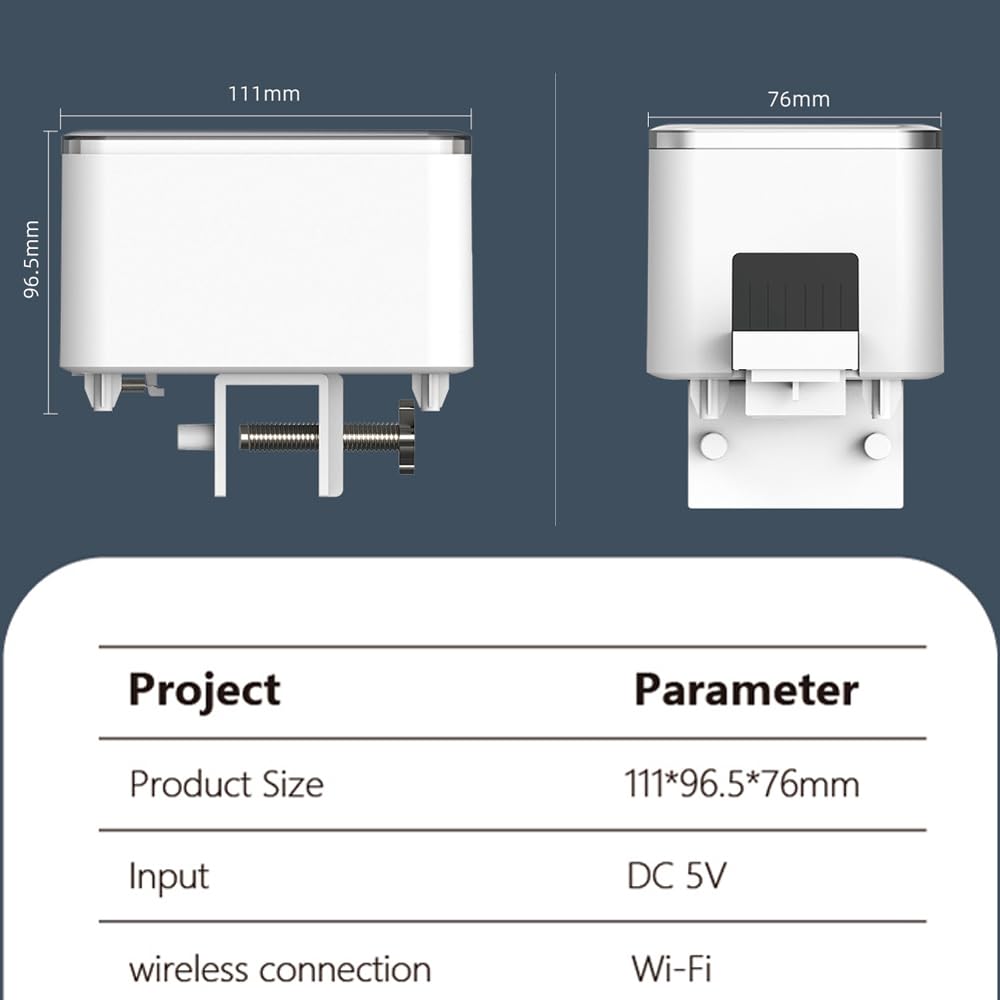
Image: Product dimensions and key parameters.
10. Warranty and Support
For warranty information or technical support, please refer to the documentation provided with your purchase or contact the retailer. Keep your purchase receipt as proof of purchase for any warranty claims.

