
1. Introduction
The LIMETA 16-Bay Rechargeable Battery Charger is designed for efficient and versatile charging of various cylindrical battery types. It features independent rapid charging for 1 to 16 AA/AAA batteries, with a maximum current of 1500mA per slot. Beyond charging, this unit supports discharge, analysis, and refresh functions to extend battery life. It is compatible with 1.2V Ni-MH/Ni-Cd, 1.5V Ni-Zn, 3.7V Li-ion, LiHV, and LiFePO4 batteries.
The charger is equipped with a color LCD display for real-time status monitoring and built-in protections against over-charge, over-voltage, over-current, overheating, short-circuit, and reverse polarity.

Image 1.1: LIMETA 16-Bay AA AAA Rechargeable Battery Charger (Model R16)
2. Product Overview
The charger features a robust design with multiple functional areas for ease of use and monitoring.
- 2.4-inch Display Screen: Provides detailed information on each battery's status.
- Menu Touch-Sensitive Buttons: For navigating settings and selecting modes.
- Battery Slots: 16 independent slots for AA/AAA batteries.
- Status Indicator Lights: Visual cues for charging status.
- Aluminum-Magnesium Alloy Shell: Enhances heat dissipation.
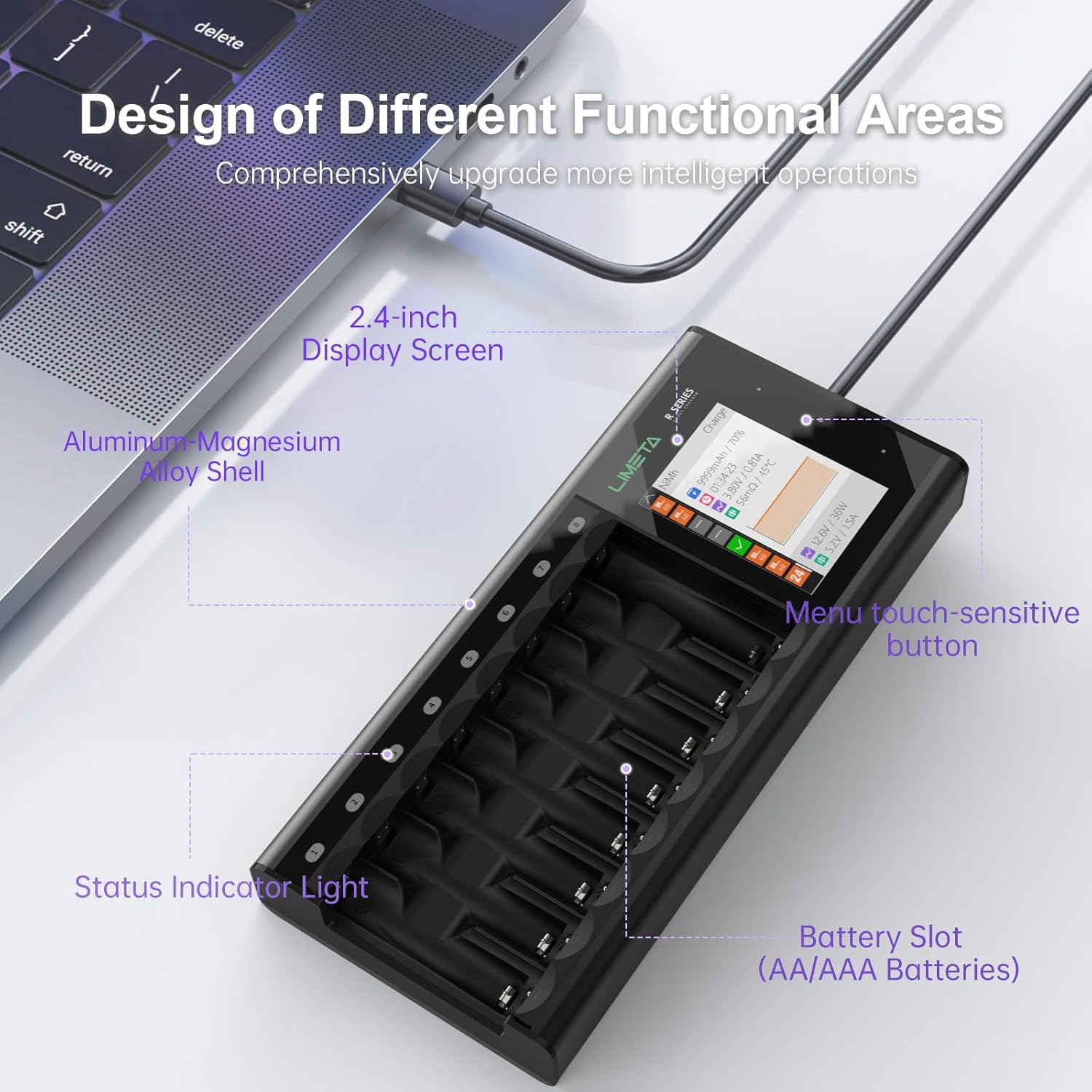
Image 2.1: Detailed view of the charger's functional areas, including the display screen, buttons, and battery slots.
3. Safety Precautions
To ensure safe operation and prevent damage, please observe the following precautions:
- Compatibility: This charger is NOT compatible with alkaline batteries or 1.5V Lithium batteries. Only use with rechargeable batteries of the specified types.
- Battery Type Selection: For NiZn and LiHv batteries, manual battery type selection is required. Do not mix different battery types in auto mode if they require specific settings.
- Overheating: Some heat generation during fast charging of AA/AAA rechargeable batteries is normal. If concerned, manually lower the current to 500mA or below (default is 1500mA).
- Built-in Protections: The charger includes over-charge, over-voltage, over-current, overheating, short-circuit, and reverse polarity protections.

Image 3.1: Visual representation of the five charging safety protections: Short Circuit, Overcurrent, Overcharge, Overheat, and Reverse Polarity Protection.
4. Setup
- Connect Power: Connect the provided DC power cable to the charger and plug the wide-voltage adapter into a suitable power outlet.
- Power On: The charger will power on automatically, displaying the main menu on the LCD screen.
5. Operating Instructions
This section details how to use the various functions of your LIMETA R16 charger.
5.1 Inserting Batteries
Carefully insert 1 to 16 AA or AAA rechargeable batteries into the designated slots. Ensure correct polarity (+/-) alignment. The charger will automatically detect the battery type if set to 'Auto' mode.
5.2 Menu Navigation
The charger features touch-sensitive buttons for navigation:
- Up/Down Arrows: Scroll through menu options.
- Select Button (middle dot): Press and hold to enter the settings menu. Tap to view an overview of all battery slots.
5.3 Selecting Task (Charge, Discharge, Analyze, Activate)
From the settings menu, you can select the desired task for your batteries:
- Charge: Standard battery charging.
- Discharge: Discharges batteries to a safe level.
- Analyze: Measures battery capacity.
- Activation: Attempts to revive deeply discharged batteries.

Image 5.1: The charger supports multiple working modes including Charging, Discharging, Analysis, and Activation.
5.4 Selecting Battery Type
The charger can auto-detect most battery types. However, for NiZn and LiHv batteries, manual selection is required.
- Auto: The charger attempts to identify the battery type automatically.
- Manual Selection: Choose from NiMH, NiCd, Eneloop, Li-ion, NiZn, LiFePO4, LiHv.

Image 5.2: The display shows options for selecting battery type, including an 'Auto' mode and specific types like NiMH, NiCd, Li-ion, etc.
5.5 Adjusting Current
You can adjust the charging current from the settings menu. The default is 1500mA per slot. Lowering the current can help manage battery temperature during charging.
5.6 Monitoring Status
The color LCD display provides real-time information for each battery:
- mAh / %: Current capacity and percentage of charge.
- Time: Duration of charging/discharging.
- Voltage / Current: Real-time voltage and current.
- Temperature: Battery temperature.
- Graph: Visual representation of charge status over time.
The status indicator lights above each slot also provide quick visual feedback:
- Orange: Battery is currently charging.
- Green: Battery is fully charged.
- Pink: Battery is discharged.
- Blue: Battery is undergoing analysis.
- Purple: Battery is in activation mode.
5.7 User Guide Video
Video 5.3: A detailed user guide demonstrating the operation and settings of the LIMETA N Series cylindrical battery charger, including menu navigation, task selection, battery type settings, and monitoring charging status. Note: This video is for the N Series, but the operational principles apply to the R16 model.
6. Advanced Features
- Activation Charge: This feature can be enabled or disabled in the settings menu.
- Input Power Limit: Adjust the input power limit between 10W and 36W to suit your power source and charging needs.
- Buzzer: The audible buzzer can be set to High, Low, or Off in the settings.
- Upgradeable Firmware: The charger's firmware can be updated via ISD Go (PC) software to enhance over-charge protection and cell-balancing algorithms, optimizing Ni-MH charging performance.
7. Maintenance
Proper maintenance ensures the longevity and optimal performance of your charger.
- Cleaning: Regularly clean the charger's exterior with a soft, dry cloth. Ensure no dust or debris accumulates in the battery slots or on the display. Do not use liquid cleaners.
- Storage: Store the charger in a cool, dry place away from direct sunlight, moisture, and extreme temperatures when not in use.
- Battery Contacts: Periodically check battery contacts for any signs of oxidation or rust, which can affect charging performance.
8. Troubleshooting (FAQ)
- Q: What should I do if a battery is difficult to remove?
- A: The product is designed with dedicated grooves for removing batteries. The correct method is to pry out the batteries in order (e.g., from left to right or from right to left).
- Q: Why is the measured contact resistance value high and inconsistent?
- A: This product uses a contact plate charging design, and the contact resistance may vary depending on the battery's placement angle and contact position. Oxidation or rust on the battery's positive or negative terminals can also lead to poor contact and thus increased resistance.
- Q: Why do some batteries get excessively hot?
- A: Fast charging requires high battery consistency. Some batteries have high internal resistance and poor consistency, which can cause overheating during fast charging. If you are unsure whether the battery has good consistency, please reduce the charging current to below 500mA. Ensure you are only charging rechargeable batteries.
- Q: What is independent operation of each channel?
- A: The independent channel operation means that the R series supports mixed charging of multiple battery types. However, this model operates in one work mode at a time across all slots. For advanced charging that runs multiple modes concurrently, consider the R4 EVO model.
- Q: What should I do if the product emits a beeping sound?
- A: This could indicate: (1) Battery malfunction: Try replacing the battery. (2) Charger malfunction: Please power off or try a different slot for testing. (3) Incorrect parameter settings: Please carefully consult the manual and check the charging parameters.
- Q: Why are the temperature or current measurement values inaccurate?
- A: Software updates can enhance accuracy. Environmental factors like ambient temperature can also cause variations. The contact plate design may lead to some measurement fluctuations. The temperature monitoring system is set within the battery's allowable maximum charging temperature. If the temperature approaches the upper limit, the charger will automatically reduce the charging current to ensure safety.
- Q: Is it normal for the battery or charger to heat up during charging?
- A: It is common for chargers that support fast charging to generate heat. This product's operating temperature strictly complies with international safety standards. If the temperature approaches the upper limit, the charger will automatically reduce the charging current to ensure safety.
- Q: Why does the battery sometimes show as fully charged but actually have insufficient capacity?
- A: This is related to the battery itself. Some batteries may have exaggerated capacity ratings or have aged. (1) It is recommended to charge batteries from reputable brands. (2) After the display shows fully charged, continue trickle charging for a period of time (e.g., 15-30 minutes) to supplement the capacity. (3) It is recommended to use the product's analysis function to check the actual capacity before charging. Avoid using batteries with exaggerated capacity ratings. Some malfunction issues may be caused by the battery itself, not the charger.

Image 8.1: Frequently Asked Questions regarding the LIMETA R-Series chargers, covering battery removal, resistance, and overheating.

Image 8.2: Additional Frequently Asked Questions for the LIMETA R-Series chargers, addressing measurement accuracy, normal heating, and perceived capacity issues.
9. Specifications
| Feature | Detail |
|---|---|
| Product Dimensions | 7.42 x 3.11 x 1.1 inches |
| Item Weight | 15.9 ounces (450 Grams) |
| Item Model Number | R16 |
| Output Voltage | 12 Volts |
| Max Current per Slot | 1500mA |
| Supported Battery Types | 1.2V Ni-MH/Ni-Cd, 1.5V Ni-Zn, 3.7V Li-ion, LiHV, LiFePO4 |
| Safety Certifications | CE, FCC, RoHS |
| Manufacturer | SHENZHEN ISD TECHNOLOGY CO.,LTD |
10. Warranty and Support
For warranty information, technical support, or to update your charger's firmware, please refer to the official LIMETA website or contact customer service through the official app. The latest firmware updates often include enhancements for over-charge protection and cell-balancing algorithms, optimizing charging performance.


