
1. Introduction
The HIWONDER HTS-35H is a high-performance serial bus servo designed for various robotic and control applications. It features a robust 35kg.cm torque, 240-degree rotation, and provides real-time feedback on position, temperature, and voltage. This manual provides essential information for the proper setup, operation, and maintenance of your HTS-35H servo.
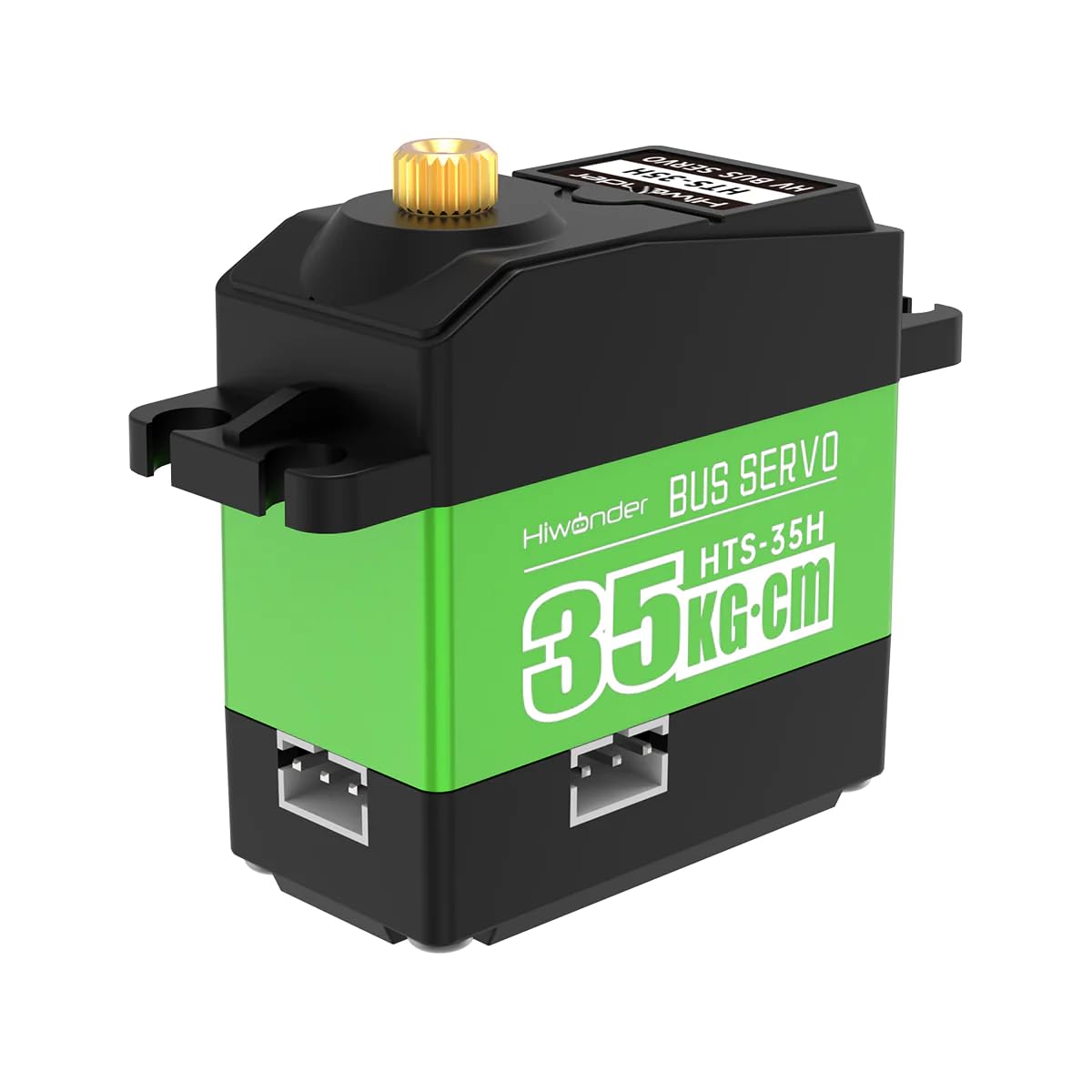
Image 1.1: The HIWONDER HTS-35H High Voltage Bus Servo, showcasing its compact design and branding.
2. Product Features
- High Torque Output: Delivers up to 35kg.cm of torque at 7.4V, suitable for demanding applications.
- Wide Rotation Angle: Offers a 240-degree operational rotation range. Supports 360-degree rotation when power is off, ideal for robot joints.
- Variable ID: The default servo ID is 1, which can be modified for multi-servo systems.
- Simplified Wiring: Features three channels on the top, left, and right sides for easy and clean wiring integration.
- Comprehensive Feedback: Provides real-time position, temperature, and voltage feedback to protect the servo from damage due to overheating or over-current.
- Compact Dimensions: Measures 54.38 x 20.14 x 45.5mm (2.14 x 0.79 x 1.79 inches) and weighs only 64g (2.22oz).

Image 2.1: Overview of the HTS-35H servo highlighting its key features including temperature, position, and voltage feedback, 35KG strong torque, servo mode, and gear motor mode.
3. Package Contents
Verify that all components are present in your package:
- HIWONDER HTS-35H High Voltage Bus Servo
- Servo Horns (various types)
- Mounting Screws and Bushings
- Connection Cable

Image 3.1: Contents of the HTS-35H servo package, including the servo unit, various servo horns, mounting hardware, and a connection cable.
4. Specifications
| Specification | Value |
|---|---|
| Stalled Rotor Torque | 35kg.cm (11.1V) |
| Rotation Speed | 0.18sec/60° (11.1V) |
| Size | 40 x 20 x 40.5mm (1.57 x 0.79 x 1.59 inches) |
| Weight | 64g (2.22oz) |
| Working Voltage | 9-12.6V |
| Rotation Range | 0-240° |
| Gear Type | Brass Gear |
| Wire Length | 200mm |
| Servo Accuracy | 0.2° |
| No-load Current | 100mA |
| Stall Current | 3A |
| Communication Baud Rate | 115200 |
| Data Feedback | Temperature, Voltage, Position |
| Control Method | UART Serial Command |
| Servo ID Range | 0-253 (Default ID is 1) |
| Protection | Avoid stalling and overheat |

Image 4.1: Detailed dimensional drawing of the HTS-35H servo in millimeters.
5. Setup
5.1 Physical Connection
Connect the HTS-35H servo to your control board or power supply using the provided cable. Ensure correct polarity for power connections (V+, GND) and proper serial communication lines (TX, RX).
5.2 Wiring for Development Boards
The HTS-35H servo is compatible with various development boards such as Raspberry Pi, Jetson Nano, and Arduino. The three-channel design (top, left, right) facilitates flexible wiring configurations. Refer to the specific wiring diagrams for your chosen development board.

Image 5.1: Wiring diagrams illustrating connections for Raspberry Pi, Jetson Nano, and Arduino development boards with the HTS-35H servo. Note the TX to RX, RX to TX, 5V to 5V, and GND to GND connections.
5.3 Setting Servo ID
Each HTS-35H servo has a unique ID, with a default value of 1. For applications requiring multiple servos on a single bus, you must assign a unique ID (0-253) to each servo using the provided debugging software. This prevents communication conflicts.
6. Operating Instructions
6.1 Control via Serial Communication
The HTS-35H servo is controlled using UART serial commands. You will need to implement the communication protocol in your microcontroller code to send commands for position, speed, and other parameters.
6.2 Using Visual Debugging Software
HIWONDER provides visual debugging software to simplify testing and parameter configuration. This software allows you to:
- Control servo rotation and position.
- Monitor real-time data such as position, voltage, and temperature.
- Set various parameters including servo ID, working mode, rotation speed, position deviation, LED light status, temperature alarm, and stalling alarm.

Image 6.1: A HIWONDER HTS-35H servo connected to a computer via a TTL/USB debugging board, demonstrating the setup for using the visual debugging software.

Image 6.2: Screenshots of the visual debugging software, showing interfaces for operating the servo and adjusting its parameters, including real-time feedback displays for voltage and temperature.
6.3 Video Demonstration
Watch this official video for a visual guide on the HTS-35H Serial Bus Servo's features and operation.
Video 6.1: An official demonstration video showcasing the HIWONDER HST-35H Serial Bus Servo, highlighting its 35KG high torque capabilities and various functionalities.
7. Maintenance
- Keep Clean: Regularly clean the servo's exterior to prevent dust and debris from entering the internal mechanisms.
- Avoid Overload: Do not exceed the specified torque limits to prevent damage to the gears and motor. The servo provides feedback to help monitor this.
- Proper Storage: Store the servo in a dry, cool environment away from direct sunlight and extreme temperatures.
- Check Connections: Periodically inspect all wiring and connections for wear or looseness to ensure reliable operation.

Image 7.1: An illustration showing the internal gear structure of a servo, emphasizing the importance of proper maintenance for these components.
8. Troubleshooting
- Servo Not Responding:
- Check power supply voltage and current. Ensure it meets the 9-12.6V requirement.
- Verify all wiring connections (power, TX, RX) are secure and correctly oriented.
- Confirm the servo ID is correctly set and unique if multiple servos are on the bus.
- Test with the visual debugging software to isolate if the issue is hardware or software related.
- Erratic Movement or Jitter:
- Ensure the power supply is stable and provides sufficient current.
- Check for electrical noise in the system; separate power and signal lines if possible.
- Verify the communication baud rate matches between the servo and the controller.
- Overheating:
- Reduce the load on the servo.
- Check for any mechanical binding that might be causing excessive strain.
- Monitor temperature feedback via software to prevent damage.
9. Warranty and Support
HIWONDER products are designed for reliability and performance. For warranty information, technical support, or service inquiries, please refer to the official HIWONDER website or contact your authorized dealer. Keep your purchase receipt as proof of purchase for any warranty claims.