Introduction
Thank you for choosing the Hobbywing Skywalker V2 50A Brushless Flight Controller (ESC). This ESC is designed for RC aircraft, offering reliable performance and advanced features. This manual provides essential information for proper installation, operation, and maintenance to ensure safe and optimal use of your product.
Safety Guidelines
Please read and understand all safety instructions before operating the ESC. Failure to do so may result in damage to the product, property, or personal injury.
- Always connect the ESC to the motor and battery correctly, observing polarity.
- Ensure all connections are secure to prevent short circuits.
- Keep the ESC away from moisture, dust, and extreme temperatures.
- Do not exceed the specified current and voltage ratings.
- Always disconnect the battery after use.
- Perform initial setup and throttle calibration with the propeller removed for safety.
Product Overview
The Hobbywing Skywalker V2 50A ESC is an advanced brushless flight controller featuring a 32-bit microprocessor for enhanced throttle response and reduced operating temperature. It supports 3-4S LiPo batteries and includes a 5V@5A SBEC. The ESC is equipped with DEO (Driving Efficiency Optimization) technology and offers various programmable braking modes and protection mechanisms.
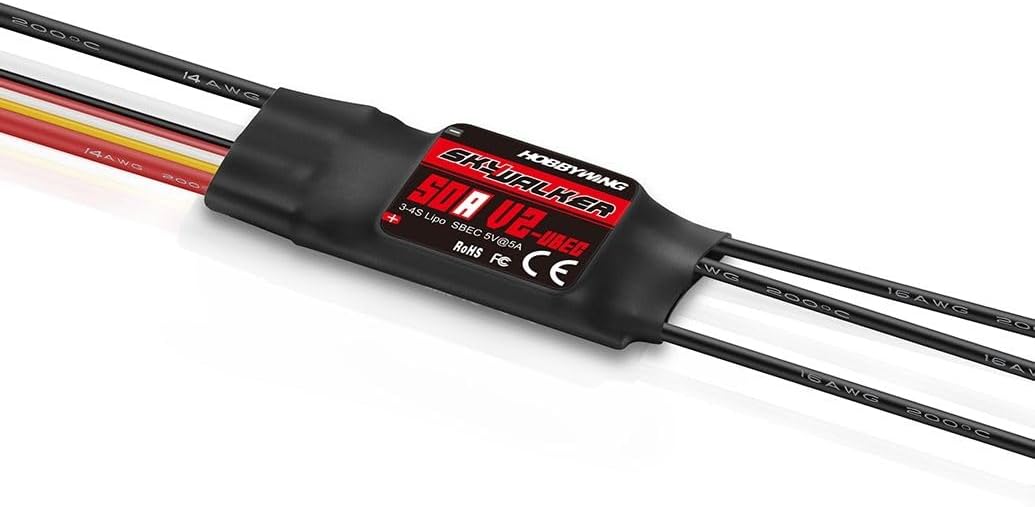
This image displays the Hobbywing Skywalker V2 50A Brushless Flight Controller. It is a compact, black-sleeved electronic speed controller with various wires extending from both ends. The label on the ESC clearly indicates 'HOBBYWING SKYWALKER 50A V2-UBEC', '3-4S Lipo SBEC 5V@5A', and regulatory marks like 'RoHS FC CE'. The wires are color-coded for different connections, including thicker black wires for motor connections and thinner red, yellow, and white wires for signal and power input.
Technical Specifications
| Feature | Value |
|---|---|
| Model | Skywalker V2 50A |
| Dimensions (L x W x H) | 6 x 2.5 x 0.8 cm |
| Weight | 36 grams |
| Continuous Current | 50A |
| Max Current (Burst) | 70A |
| LiPo Cells | 3-4S |
| SBEC Output | 5V@5A |
| Microprocessor | 32-bit (up to 96 MHz) |
| Main Material | Plastic |
| Color | Black |
| Manufacturer Reference | HW80060442 |
Package Contents
The package typically includes the following items:
- Hobbywing Skywalker V2 50A Brushless Flight Controller
- LED Program Box (H.W30501003) or compatible transmitter for programming (may be sold separately)
Setup and Installation
Wiring
Proper wiring is crucial for the safe and correct operation of your ESC. Refer to the diagram below for typical connections. Always ensure correct polarity.
- Motor Connection: Connect the three thicker black wires from the ESC to the three motor wires. The order may affect motor rotation direction; swap any two wires if the motor spins in the wrong direction.
- Battery Connection: Connect the red (+) and black (-) wires from the ESC to your LiPo battery, ensuring correct polarity.
- Receiver Connection: Connect the signal cable (usually a three-wire servo connector) from the ESC to the throttle channel of your RC receiver.
Initial Configuration
Before first flight, it is recommended to perform throttle range calibration and configure any desired programmable parameters.
Operation
Throttle Range Calibration
This procedure ensures that the ESC correctly recognizes the full throttle range from your transmitter.
- Turn on your transmitter and set the throttle stick to its maximum position.
- Connect the battery to the ESC. The motor will emit a series of beeps.
- When you hear a specific tone (usually two short beeps), move the throttle stick to its minimum position.
- The ESC will emit another series of beeps, confirming the throttle range has been learned.
- Disconnect the battery. The calibration is complete.
Programming the ESC
The Skywalker V2 50A ESC offers various programmable parameters to fine-tune its performance. These can be adjusted using a Hobbywing LED Program Box (H.W30501003) or through your transmitter.
Programmable features include:
- Brake Type and Brake Force
- Cutoff Voltage (for LiPo cell protection)
- LiPo Cell Count Setting
- Startup Mode
- Search Mode
- Timing
- Active Freewheel
Refer to the specific instructions provided with your LED Program Box or transmitter for detailed programming steps.
Maintenance
Regular maintenance helps prolong the life and ensure the reliability of your ESC.
- Keep the ESC clean and free from dirt, dust, and debris.
- Inspect all wires and connectors periodically for signs of wear, damage, or corrosion.
- Ensure adequate airflow around the ESC during operation to prevent overheating.
- Store the ESC in a dry, cool place when not in use.
Troubleshooting
If you encounter issues with your ESC, refer to the table below for common problems and solutions.
| Problem | Possible Solution |
|---|---|
| Motor does not start or stutters | Check battery connection and charge level. Verify motor wiring. Perform throttle calibration. |
| ESC overheats | Ensure adequate cooling. Check for motor overload or incorrect timing settings. |
| Motor runs in wrong direction | Swap any two of the three motor wires connected to the ESC. |
| No response from ESC | Check receiver connection and power. Ensure transmitter is on and bound. |
| Sudden power loss during flight | Battery voltage cutoff activated. Check battery health and charge. |
Warranty and Support
Hobbywing products are manufactured to high-quality standards. This product typically comes with a 1-year availability for spare parts. For warranty claims or technical support, please contact your retailer or visit the official Hobbywing website for assistance.


