
SUPERONE 1
SUPERONE MagSafe Phone Grip Instruction Manual
Model: 1
Product Overview
The SUPERONE MagSafe Phone Grip is a versatile accessory designed for iPhone 12, 13, 14, 15, and 16 series, and compatible MagSafe cases. It features a strong magnetic attachment, a comfortable finger strap, and a multi-functional kickstand, enhancing phone handling and viewing experience.
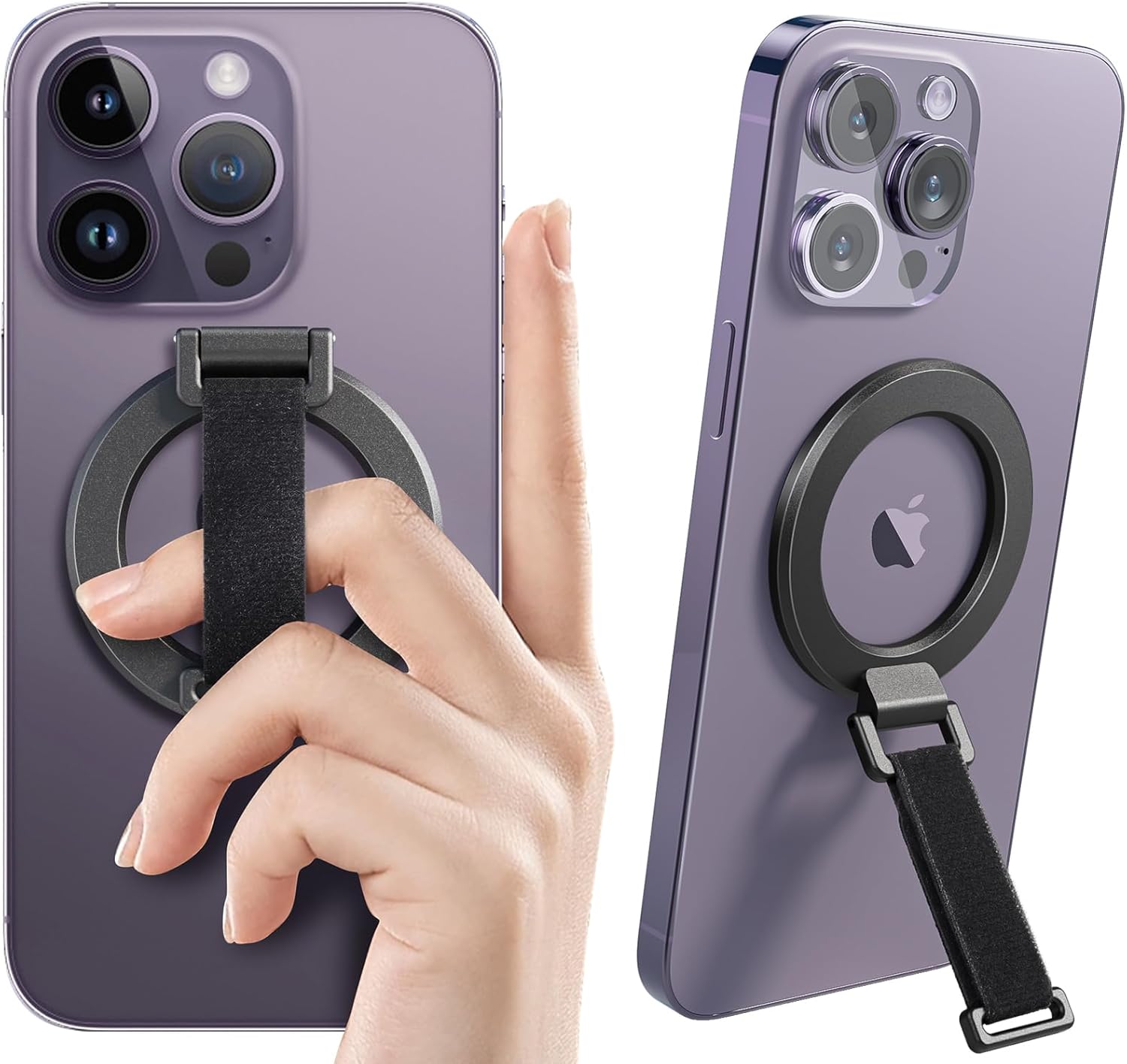
Image: The SUPERONE MagSafe Phone Grip in use, demonstrating its secure attachment and dual functionality as a finger grip and a kickstand.
Package Contents
- MagSafe Phone Grip x 1
- Spare Strap x 1
- User Manual x 1
Compatibility
This MagSafe phone grip is specifically designed for and compatible with the following devices:
- iPhone 16, 16 Plus, 16 Pro, 16 Pro Max
- iPhone 15, 15 Plus, 15 Pro, 15 Pro Max
- iPhone 14, 14 Plus, 14 Pro, 14 Pro Max
- iPhone 13, 13 Pro, 13 Pro Max, 13 Mini
- iPhone 12, 12 Pro, 12 Pro Max, 12 Mini
- Certified MagSafe cases
Note: This product is not compatible with other phone models or non-MagSafe cases. It will also not stick to phones with metal attachments on the back.

Image: Visual guide illustrating compatible iPhone models and MagSafe cases, alongside examples of incompatible devices and accessories.
Setup and Installation
- Ensure Compatibility: Verify your iPhone model is from the 12, 13, 14, 15, or 16 series, or that you are using a certified MagSafe case.
- Clean Surface: Ensure the back of your phone or MagSafe case is clean and free of dust or debris for optimal magnetic adhesion.
- Attach the Grip: Simply place the SUPERONE MagSafe Phone Grip onto the back of your compatible iPhone or MagSafe case. The magnets will automatically align and secure the grip in place.
- Detachment: To remove the grip, gently slide it off the phone. It leaves no sticky residue, allowing for easy removal when not needed, such as for wireless charging.

Image: Demonstrates the ease of attaching and detaching the MagSafe grip, highlighting its compatibility with wireless charging.
Operating Instructions
Using the Finger Grip
The integrated soft elastic finger strap provides a secure and comfortable hold for your phone. You can slip 1 to 2 fingers through the strap to prevent accidental drops and improve one-handed operation.

Image: A user comfortably holding an iPhone using the finger strap of the MagSafe grip, illustrating enhanced security and comfort.

Image: Demonstrates two distinct methods of holding the phone with the grip, suitable for various hand sizes and phone models.
Using the Kickstand
The grip features a 2-way kickstand that supports both portrait and landscape orientations. This is ideal for hands-free viewing of videos, making video calls, or browsing content.
- Landscape Mode: Open the kickstand and position your phone horizontally for watching movies or videos.
- Portrait Mode: Adjust the kickstand to support your phone vertically for video calls or browsing social media.
The kickstand is designed to be 360° rotatable, allowing you to find the perfect viewing angle, and 180° foldable for compact storage when not in use. It has been tested to withstand 35,000 folding cycles without loosening.

Image: The MagSafe grip acting as a stable kickstand, supporting the phone in both horizontal and vertical viewing positions.
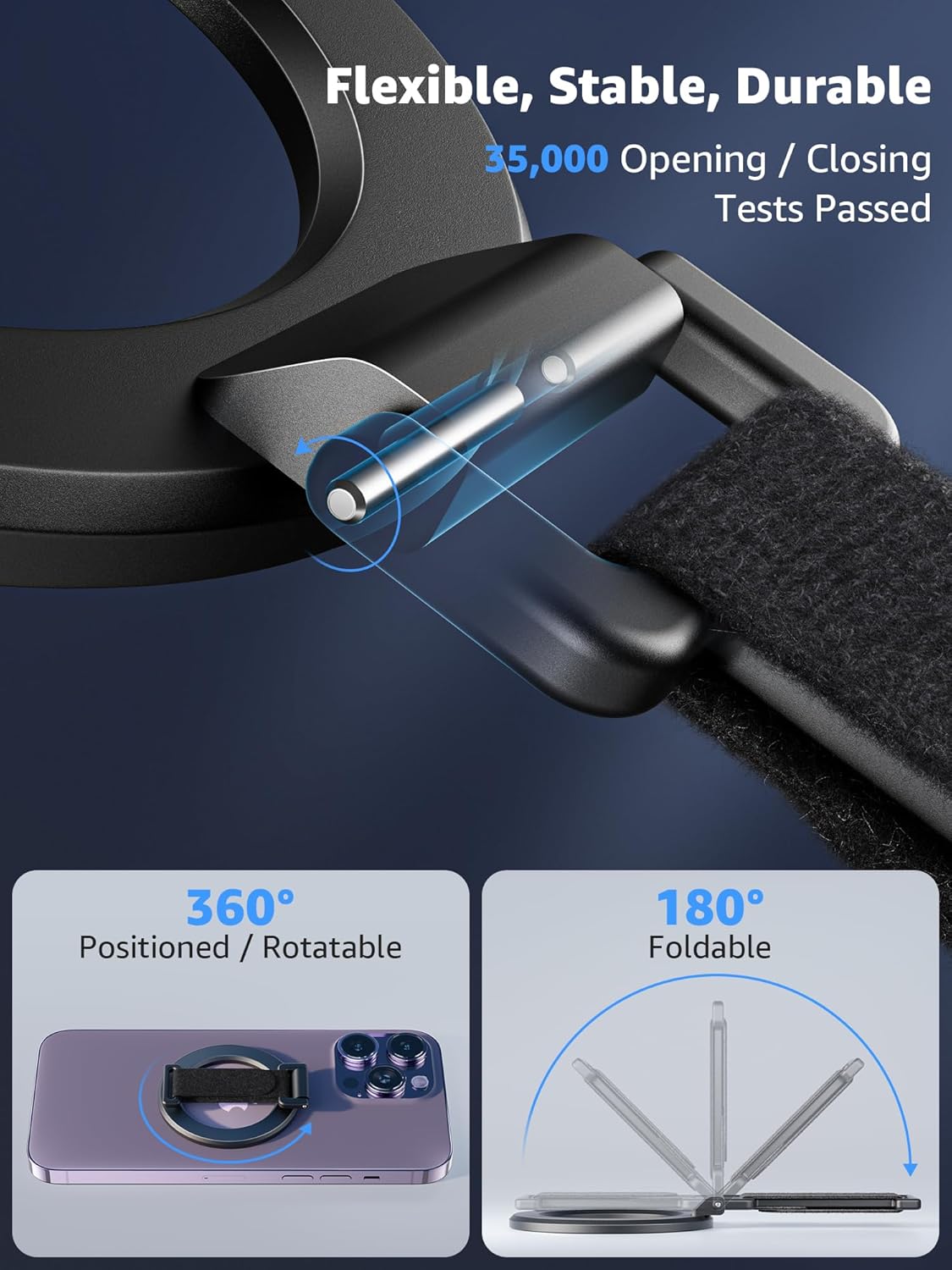
Image: Detailed view of the grip's hinge mechanism, highlighting its 360-degree rotation and 180-degree folding capabilities for versatile use.
Maintenance and Care
- Cleaning: Wipe the grip with a soft, damp cloth to remove dust or smudges. Avoid using harsh chemicals or abrasive materials.
- Storage: When not in use, store the grip in a clean, dry place away from extreme temperatures.
- Avoid Excessive Force: While durable, avoid applying excessive force or bending the kickstand beyond its intended 180-degree range to prevent damage.
Troubleshooting
| Problem | Possible Cause | Solution |
|---|---|---|
| Grip does not stick securely. |
|
|
| Difficulty with wireless charging. | Grip is still attached to the phone. | Remove the MagSafe phone grip before placing your phone on a wireless charger. The magnetic attachment allows for easy removal. |
| Kickstand feels loose over time. | Normal wear and tear, or excessive force applied. | The kickstand is tested for 35,000 cycles. If it becomes excessively loose within the warranty period, contact customer support. |
Specifications
| Feature | Detail |
|---|---|
| Magnetic Force | Up to 4.8 lbs (2.2 kg) / 2200g (20 N55 Magnets) |
| Kickstand Rotation | 360° Rotatable |
| Kickstand Foldability | 180° Foldable |
| Durability Test | 35,000 opening/closing tests passed |
| Compatibility | iPhone 12/13/14/15/16 Series & MagSafe Cases |
| Color | Black |
| Item Weight | 1.44 ounces |
| Package Dimensions | 2.52 x 2.36 x 0.59 inches |

Image: Illustrates the strong magnetic force of the grip, capable of holding significant weight, ensuring secure attachment.
Warranty and Support
SUPERONE products come with a comprehensive warranty and dedicated customer support:
- Warranty: Hassle-free 18-month warranty.
- Technical Support: Lifetime technical support.
- Customer Service: 24/7 customer service available to address any inquiries or concerns.
For any questions or assistance, please contact the SUPERONE customer service team.

Image: Overview of SUPERONE's commitment to customer satisfaction, including warranty and support details.
Related documents1


Ask a question about this manual
Ask about setup, troubleshooting, compatibility, parts, safety, or missing instructions. Manuals+ will review the question and use this page’s manual context to help answer it.