
DeepMoto D10Plus
DeepMoto D10Plus Motorcycle Dash Cam User Manual
Model: D10Plus
Product Overview
The DeepMoto D10Plus is a high-performance motorcycle dash camera system designed to enhance riding safety and provide comprehensive recording capabilities. It features dual 1080P HD cameras for front and rear views, robust IP67 waterproofing, and advanced functionalities like built-in WiFi, G-Sensor, Wide Dynamic Range (WDR), and real-time tire pressure monitoring.
This manual provides detailed instructions for the installation, operation, and maintenance of your D10Plus dash cam system.

Figure 1: DeepMoto D10Plus Main Unit and Components
The image displays the main D10Plus dash cam unit, two compact camera modules (front and rear), a GPS module, and two tire pressure monitoring sensors (front and rear).
What's in the Box
Before beginning installation, please verify that all components listed below are present in your package:
- Front and Rear Camera
- GPS Modules
- Installation Mode Selection and Tool
- Power Supply and Tire Pressure Monitor Sensor
- User Manual
- Camera Bracket
- Heat Shrink Tubing
- Metal Simple Mounting Bracket
- ACC Detection Wire
- Installation Tools
- Reflective Stickers
- Packaging Box
- Quick Installation Guide Card
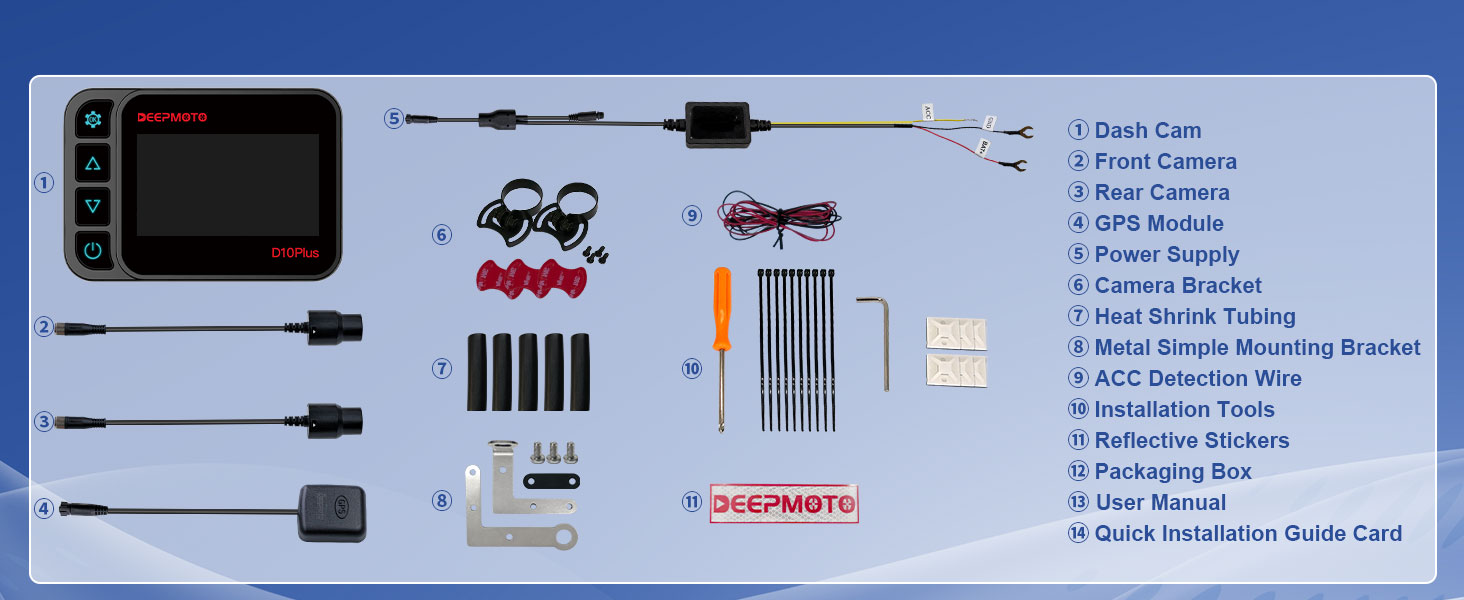
Figure 2: Package Contents Diagram
This diagram illustrates all the parts and accessories included with the DeepMoto D10Plus dash cam system, numbered for easy identification.
Setup and Installation
The D10Plus system is designed for straightforward installation. The standard L-shaped mounting bracket is suitable for rearview mirror installation. A handlebar bracket is not included and must be purchased separately if desired.
Installation Locations:
- Rearview mirror position.
- Screw fixing position that comes with the motorcycle.
The front and rear camera connection cables are relatively long. To avoid direct exposure to the elements, it is recommended to route them carefully. Connections between accessories can be secured with heat shrink tubing to enhance waterproof performance.
For optimal GPS signal reception, install the GPS module outside the car body.

Figure 3: Simple Installation Options
This image illustrates two common installation points: near the rearview mirror and using existing screw fixing points on the motorcycle, along with diagrams of the L-shaped brackets.
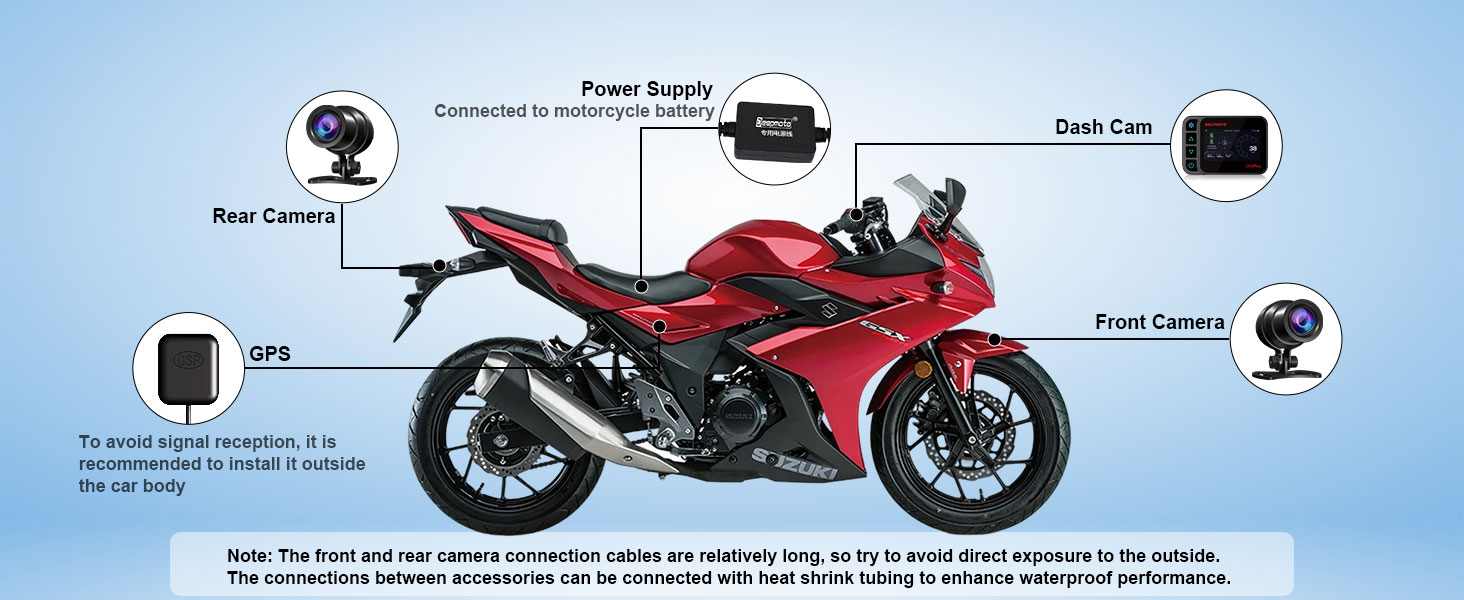
Figure 4: Component Placement Diagram
This diagram shows the recommended placement of the dash cam, front camera, rear camera, GPS module, and power supply on a motorcycle, emphasizing cable routing for protection.
Operating Instructions
Display and Camera View
The D10Plus features a 3.0-inch display. You can freely switch between the front and rear camera views on the screen. The display can also function as a rearview mirror.
Recording Functions
- Loop Recording: Videos can be recorded in 1, 2, or 3-minute segments. When the SD card reaches full capacity, new videos will automatically overwrite the oldest non-locked videos.
- G-Sensor: The built-in G-sensor detects motorcycle collisions or impacts. Upon detection, the device will automatically record an emergency video and lock it to prevent overwriting, preserving critical evidence.
- WDR & Starlight Night Vision: The Wide Dynamic Range (WDR) function ensures clear video by balancing brightness differences, providing optimal exposure day or night. Equipped with an IMX307 chip, the dash cam offers excellent image processing in low-light conditions, allowing for clear recordings even at night.

Figure 5: Loop Recording Feature
This image illustrates the loop recording functionality, where the dash cam continuously records and overwrites older files when the storage is full, ensuring continuous operation.

Figure 6: WDR Functionality
This image demonstrates the effectiveness of the WDR function, showing clear video capture in both bright daylight and low-light night conditions.
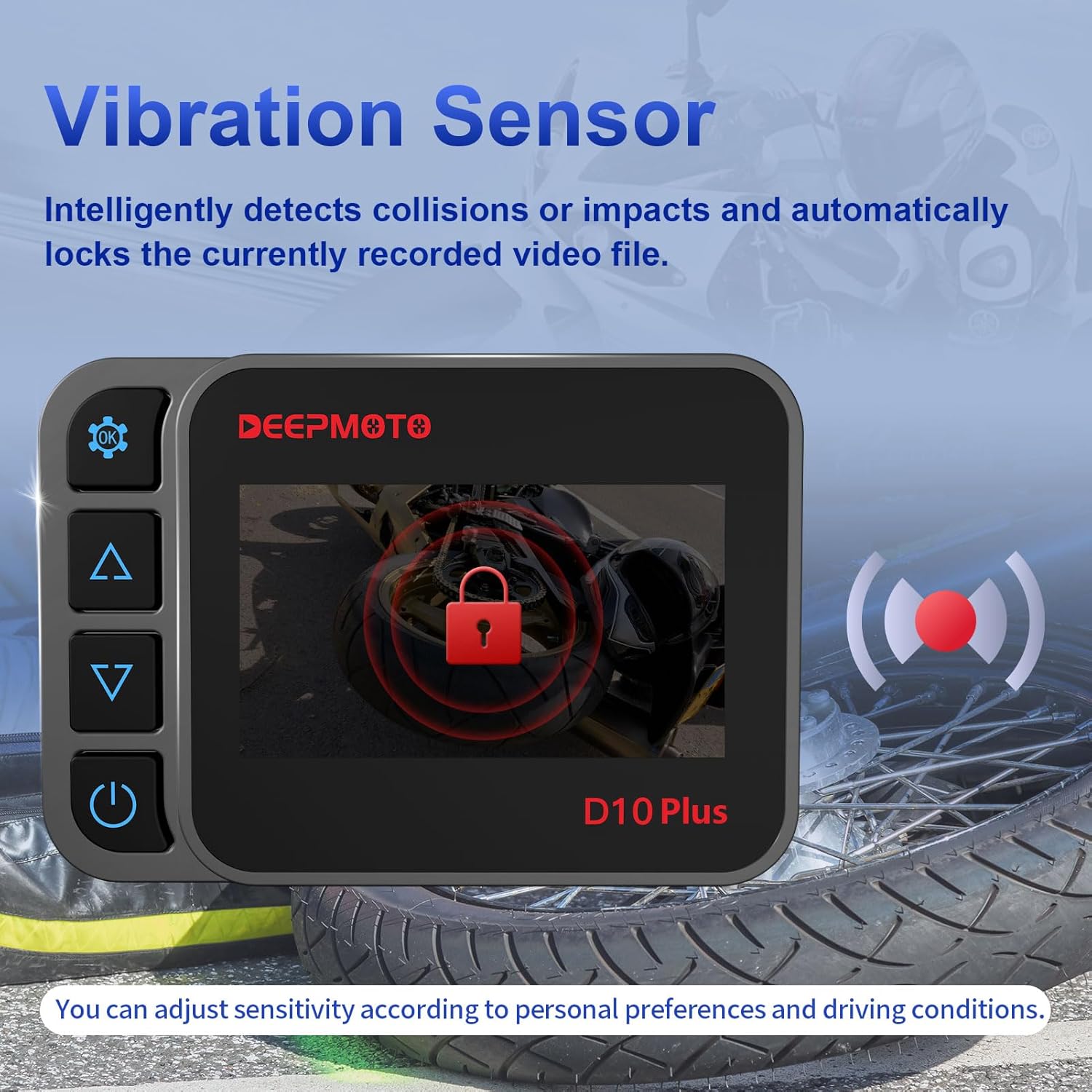
Figure 7: Vibration Sensor and Emergency Recording
The image shows the dash cam display indicating a locked video, triggered by the vibration sensor detecting an impact or collision, automatically securing important footage.
Tire Pressure Monitoring (TPMS)
The D10Plus is equipped with a tire pressure monitoring function. Tire temperature and pressure values are displayed in real-time on the recorder's screen, providing crucial safety information during your ride.

Figure 8: Tire Pressure Monitoring Display
This image highlights the real-time display of tire temperature and pressure data on the D10Plus unit's screen, ensuring riders are informed of their tire status.
Exclusive APP & WiFi Function
Connect your motorcycle driving recorder to your mobile phone via WiFi using the dedicated DeepMoto APP. This allows for convenient transfer of videos to your phone, saving important recordings, and also provides options to edit and share videos directly from your device.
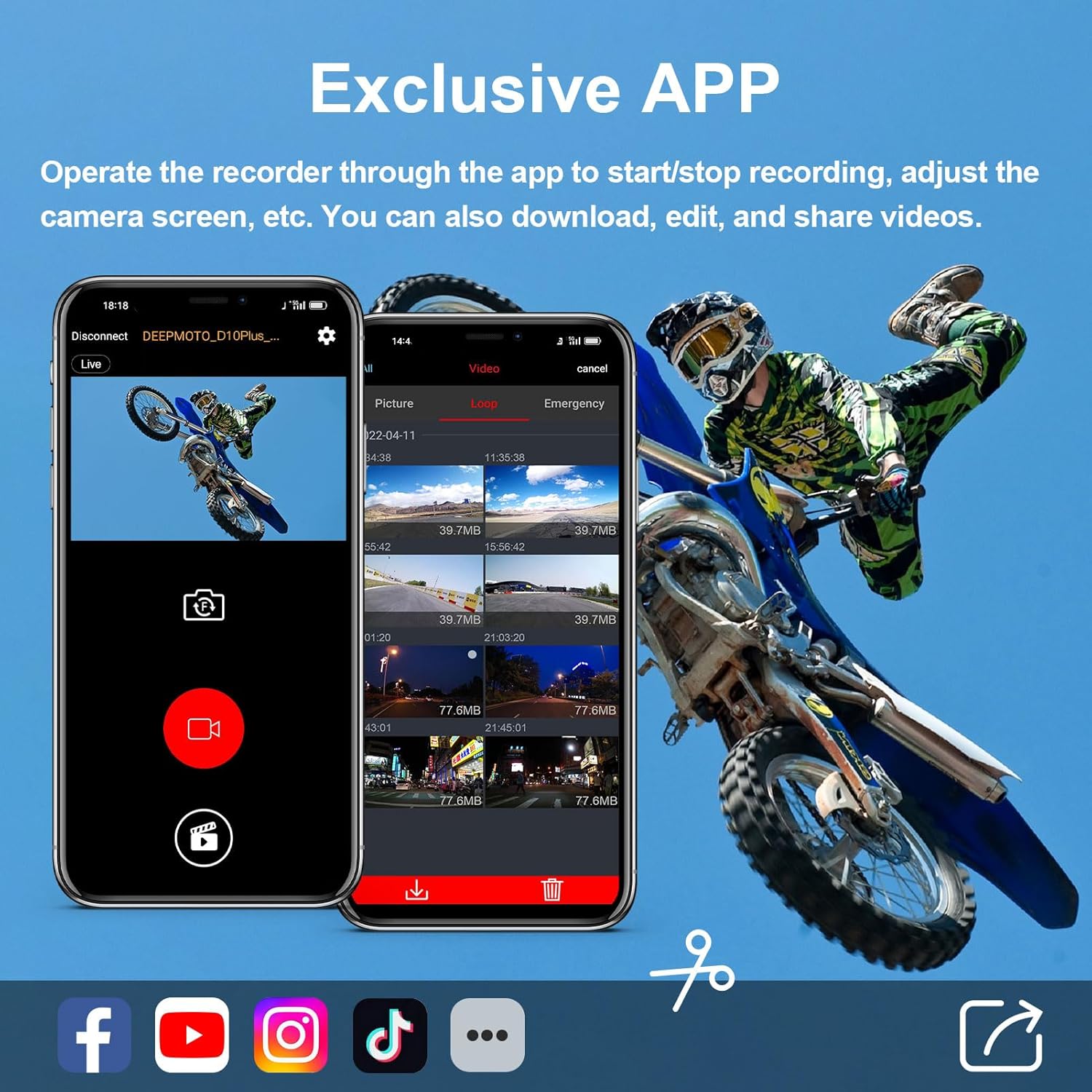
Figure 9: DeepMoto Mobile Application
The image displays the user interface of the DeepMoto mobile application, demonstrating its capabilities for live view, video playback, downloading, editing, and sharing recorded footage.
Parking Monitoring
When the Parking Guard function is enabled, the device will automatically start recording for 15 seconds if any collision or impact is detected while the motorcycle is parked. This feature also includes automatic locking of recorded files and is designed for low power consumption.

Figure 10: Parking Monitoring in Action
This image depicts a motorcycle in a parking lot with the dash cam actively monitoring, illustrating the automatic recording and file locking features upon detecting an impact.
Maintenance
The DeepMoto D10Plus is designed for durability and ease of maintenance.
- Waterproof Design: The entire unit is IP67 waterproof and dustproof. It has undergone air tightness testing before leaving the factory, allowing it to be used in various weather conditions and even flushed with a water gun for cleaning.
- SD Card Management: While loop recording manages storage, it is important to periodically review and delete unnecessary locked emergency videos. Too many locked videos can reduce the available space for ordinary loop recording.
- General Cleaning: Use a soft, damp cloth to clean the main unit and camera lenses. Avoid abrasive cleaners or solvents that could damage the surfaces.

Figure 11: IP67 Waterproofing
This image visually confirms the IP67 waterproof rating of the DeepMoto D10Plus, showing the main unit and cameras partially submerged in water.
Troubleshooting
If you encounter issues with your DeepMoto D10Plus, please refer to the following common troubleshooting steps:
- Device Not Powering On:
- Ensure the power supply is correctly connected to the motorcycle battery and the dash cam.
- Check all cable connections for looseness or damage.
- Verify the motorcycle battery has sufficient charge.
- Recording Issues (No Recording/Corrupted Files):
- Check if the SD card is properly inserted.
- Format the SD card regularly within the device settings to prevent data corruption.
- Ensure the SD card is of a compatible class and capacity (refer to specifications).
- Delete any excess locked emergency videos to free up space for continuous loop recording.
- WiFi Connection Issues with APP:
- Ensure WiFi is enabled on the dash cam and your mobile device.
- Confirm you are connecting to the correct DeepMoto WiFi network (SSID).
- Try restarting both the dash cam and your mobile device.
- Ensure the DeepMoto APP is updated to the latest version.
- Display is Dim or Unreadable:
- Adjust the brightness settings on the device if available.
- Ensure there is no direct glare on the screen.
- Tire Pressure Readings Incorrect/Not Displaying:
- Verify the tire pressure sensors are correctly installed and paired.
- Check the sensor batteries if applicable (though typically powered by tire rotation).
If problems persist after attempting these steps, please contact DeepMoto customer support for further assistance.
Specifications
| Feature | Detail |
|---|---|
| Model Name | D10Plus |
| Product Dimensions | 0.79 x 4.13 x 2.87 inches |
| Item Weight | 2.5 pounds |
| Video Capture Resolution | 1080p (Front and Rear) |
| Waterproof Rating | IP67 (Full-body) |
| Connectivity Technology | Wi-Fi |
| Special Features | App Control, Built-In Display, G-Sensor, Parking Monitor, Tire Pressure Monitoring, WDR, Starlight Night Vision |
| Display Size | 3.0-inch |
| Mounting Type | Dashboard Mount (Standard L-shaped bracket for rearview mirror) |
| Front Camera Line Length | 59.06 inches |
| Rear Camera Line Length | 110.24 inches |
| GPS Line Length | 39.37 inches |
| Power Supply Line Length | 74.8 inches |
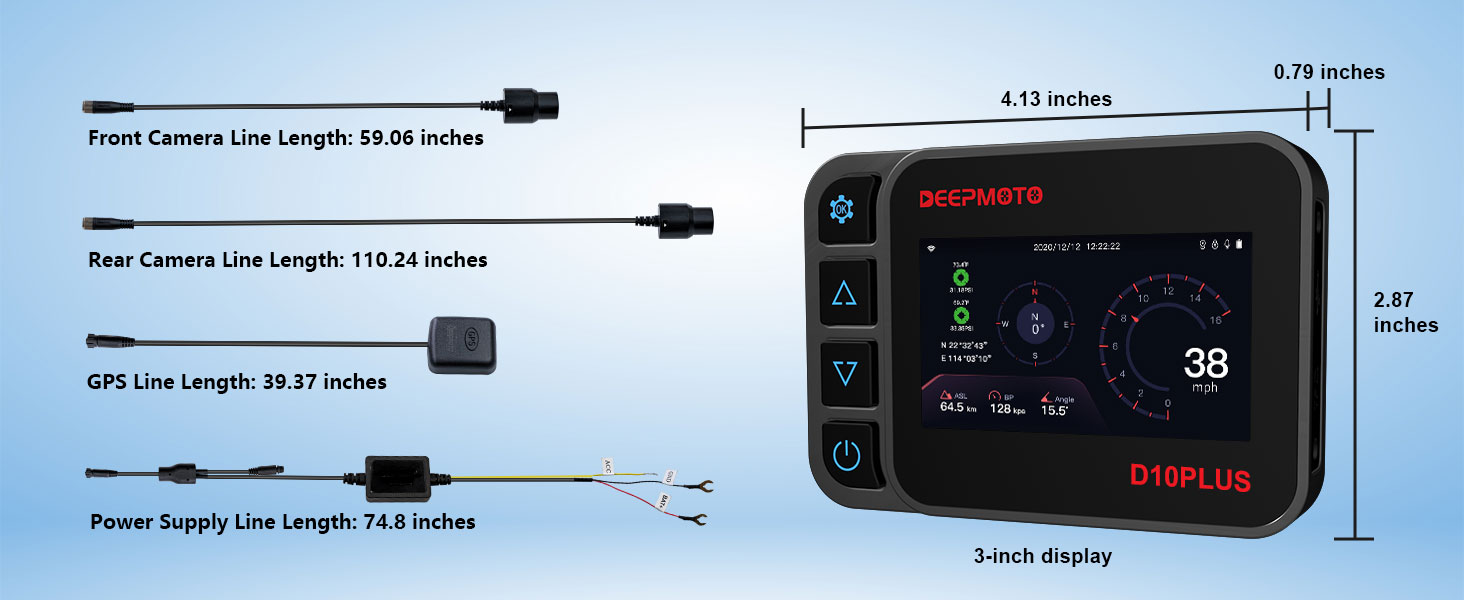
Figure 12: Product Dimensions and Cable Lengths
This image provides detailed measurements for the main dash cam unit and the lengths of the various connecting cables, aiding in installation planning.
Warranty and Support
DeepMoto is committed to providing quality products. While specific warranty details are not provided in this manual, please refer to the product packaging or the official DeepMoto website for the most up-to-date warranty information.
For technical support, troubleshooting assistance beyond what is covered in this manual, or warranty claims, please contact DeepMoto customer service. You can often find contact information on the manufacturer's official website or through the retailer where you purchased the product.
Manufacturer: DeepMoto
User Manual (PDF): Download User Manual
Installation Manual (PDF): Download Installation Manual
Related documentsD10Plus


Ask a question about this manual
Ask about setup, troubleshooting, compatibility, parts, safety, or missing instructions. Manuals+ will review the question and use this page’s manual context to help answer it.