
Introduction
The Mantis Laser Academy Smart Targets (Model MT-4102) are designed to enhance dry fire training using a laser training system in conjunction with the Mantis Laser Academy application. This system provides automatic shot detection and scoring, offering a realistic and interactive training experience. It enables users to practice shooting skills in various environments without the need for live ammunition, thereby accelerating skill development and reducing training costs.
This set includes 15 heavy-duty 8.5" x 11" card stock targets, featuring various designs such as Bullseye, Hostage, and B-27. The targets are equipped with unique QR codes for precise tracking and scoring. A hands-free start/stop feature is also integrated for seamless training sessions.

Image: Overview of the Mantis Laser Academy Smart Targets, highlighting features like automatic detection, 15 dry fire targets, variety of target types, and app compatibility.
Setup
- Unpack Targets: Carefully remove all 15 smart targets from their packaging.
- Download App: Download and install the Mantis Laser Academy application on your smartphone or tablet from your device's app store.
- Place Targets: Position the targets in your chosen training area. Ensure they are flat, securely mounted (e.g., taped to a wall), and clearly visible. Avoid placing them on highly reflective surfaces.
- Position Device: Place your smartphone or tablet on a stable mount (such as a tripod) so that its camera can clearly view all targets you intend to use for the drill. The entire target area should be within the camera's frame.
- Ensure Lighting: Verify that the training area has adequate, even lighting. Avoid direct glare on the targets or shadows that might obscure them, as this can affect the app's detection capabilities.

Image: Multiple Mantis Laser Academy targets arranged for a training session, with a smartphone positioned to capture the targets, demonstrating a typical setup.
Operating Instructions
- Launch App: Open the Mantis Laser Academy application on your configured device.
- Select Drill: Choose your desired training drill or scenario from the app's menu. The app will guide you through the setup for the selected drill.
- Target Detection: The app will utilize your device's camera to detect the unique QR codes on the smart targets and register laser "shots" from your laser training module.
- Hands-Free Start/Stop: To begin or end a training session without touching your device, aim your laser at the designated "START/STOP" control target on one of the target sheets. This feature allows you to maintain focus on your training.
- Review Feedback: After each shot or drill, review the real-time feedback and scoring provided by the app. This data helps monitor your performance and identify areas for improvement.
- Explore Features: Take advantage of the various features within the app, such as quizzes, multiplayer challenges, and different target types, to diversify your training.
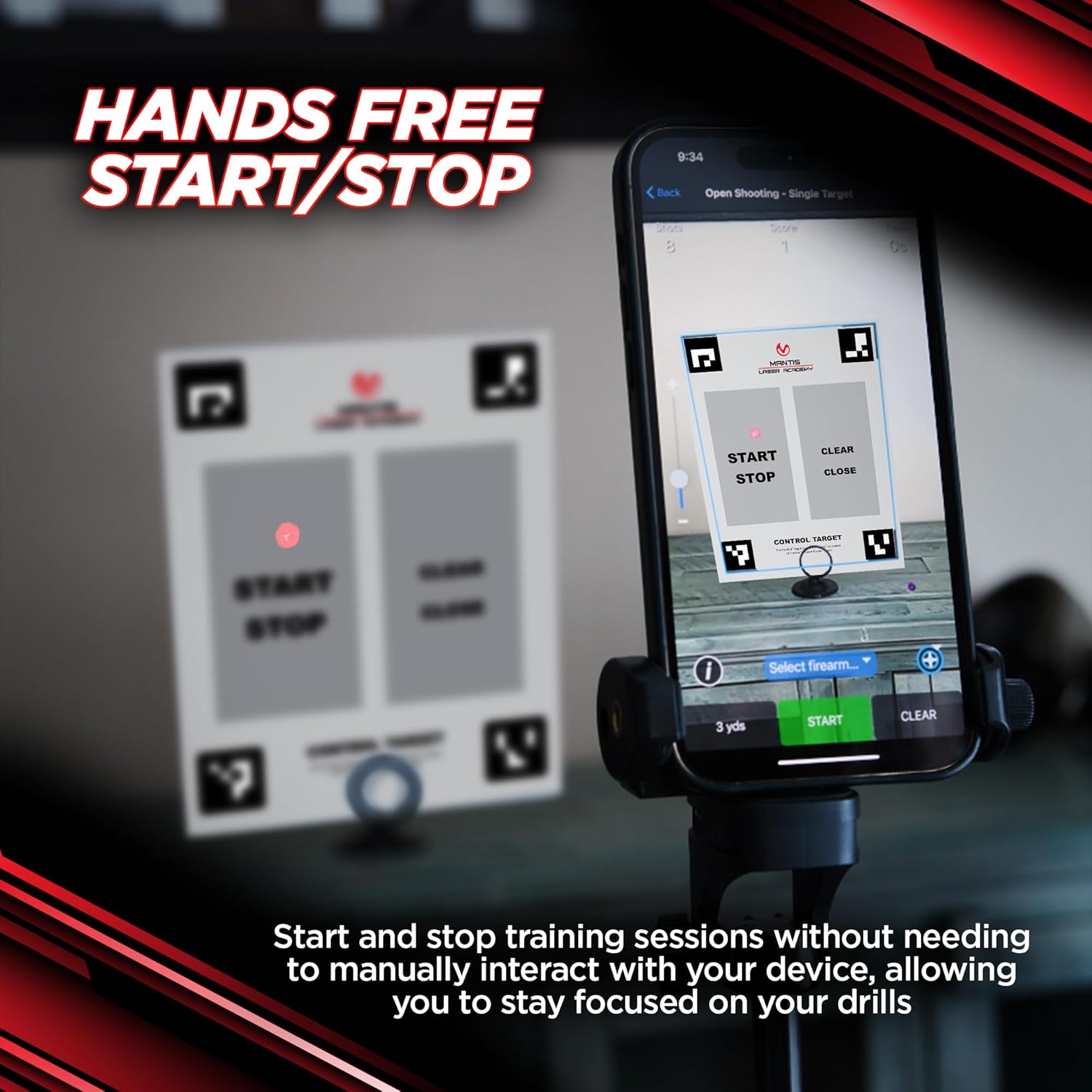
Image: A smartphone displaying the Mantis Laser Academy app, illustrating the hands-free start/stop control target for initiating and concluding training sessions.

Image: Two users practicing dry fire shooting with Mantis Laser Academy Smart Targets, demonstrating the potential for multi-person training.
Maintenance
- Keep Dry and Clean: As the targets are made of card stock, keep them dry and away from liquids. Gently wipe any dust or smudges with a dry, soft cloth. Avoid abrasive cleaners or excessive moisture, which can damage the paper and affect detection.
- Proper Storage: Store the targets flat in a cool, dry place when not in use. Avoid folding, bending, or creasing the targets, as this can distort the QR codes and target areas, leading to inaccurate detection.
- Handle Carefully: Handle the targets by their edges to prevent fingerprints or damage to the printed surfaces.
Troubleshooting
- Issue: App Not Detecting Shots or Targets
- Solution: Ensure all targets are flat, securely placed, and clearly visible within your device's camera frame. Check for adequate and even lighting; avoid direct glare or deep shadows. Verify that the Mantis Laser Academy app is updated to the latest version.
- Issue: Inaccurate Scoring
- Solution: Confirm that your smartphone or tablet is stable and not moving during training. Ensure your laser training module is properly calibrated and functioning correctly. Check for any obstructions between the camera and the targets.
- Issue: App Performance Issues (Lagging, Crashing)
- Solution: Close any other applications running in the background on your device. Restart the Mantis Laser Academy app or your entire device. Ensure your device meets the minimum system requirements for the app.
Specifications
| Model Number | MT-4102 |
| Dimensions (each target) | 8.5 inches x 11 inches |
| Material | 14pt Card Stock Paper |
| Color | Black and White (target designs) |
| Item Weight (total package) | 0.26 Kilograms |
| Quantity | 15 Smart Targets per set |
| Compatibility | Mantis Laser Academy App |
| UPC | 850018617451 |

Image: The full set of 15 Mantis Laser Academy Smart Targets, showcasing the variety of designs included in the package.
Warranty Information
Specific warranty details for Mantis Laser Academy Smart Targets are typically provided with the product packaging or available on the official Mantis website. Users are advised to consult these resources for comprehensive warranty coverage, terms, and conditions.
Support Information
For technical assistance, product inquiries, or further support regarding your Mantis Laser Academy Smart Targets, please visit the official Mantis website. The website provides access to frequently asked questions (FAQs), detailed user guides, and contact information for customer service representatives who can assist with any issues or questions you may have.
Official Mantis Website: www.mantisx.com
