
Azwok E10 Replacement Remote Control User Manual
For Epson Home Projector Models: EB-X51, EX5280, EB-W52, EB-W51
Introduction
This manual provides instructions for the Azwok E10 replacement remote control, designed for use with various Epson Home Projector models including EB-X51, EX5280, EB-W52, and EB-W51. This remote control offers all major buttons and functions found on the original remote, ensuring seamless operation of your projector.
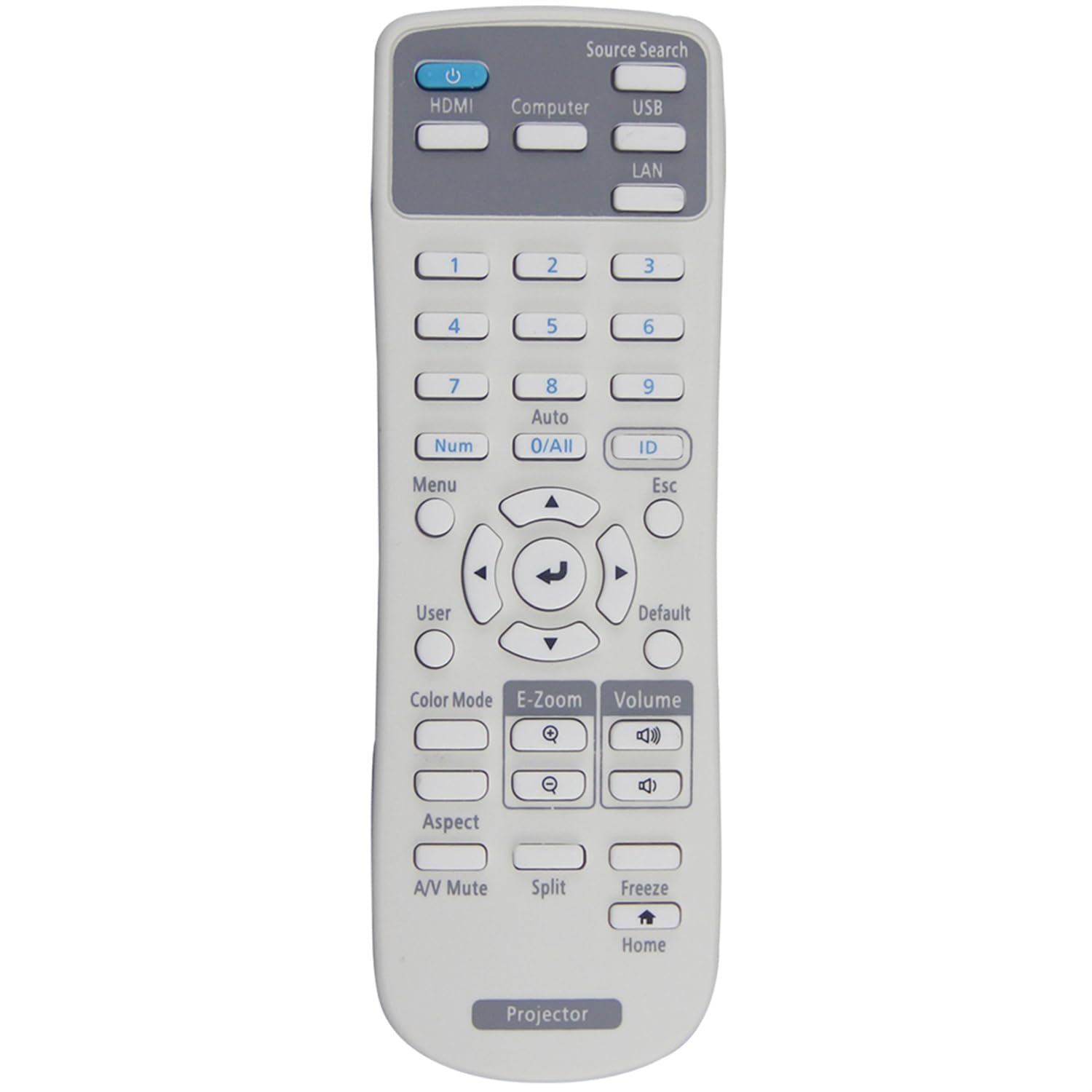
An image showing the Azwok E10 replacement remote control. It is a black, rectangular remote with various buttons for power, navigation, volume, and source selection, similar to a standard projector remote.
Setup
The Azwok E10 replacement remote control is designed for immediate use without any complex programming. Follow these simple steps to begin operation:
- Obtain Batteries: You will need two (2) AAA batteries (not included).
- Insert Batteries: Open the battery compartment cover on the back of the remote control. Insert the two AAA batteries, ensuring correct polarity (+ and - terminals match the indicators inside the compartment).
- Close Compartment: Securely close the battery compartment cover.
- Ready for Use: The remote control is now ready to operate your compatible Epson projector. No additional programming or pairing is required.
Operating Instructions
This replacement remote control functions identically to your original Epson projector remote. Point the remote control directly at the projector's infrared receiver for optimal performance. Common functions include:
- Power On/Off: Use the dedicated power button to turn the projector on or off.
- Source Selection: Cycle through input sources (HDMI, VGA, etc.) using the source button.
- Navigation: Use the directional arrow buttons and the 'Enter' or 'OK' button to navigate menus.
- Volume Control: Adjust audio output if your projector supports it.
- Menu Access: Open and close the projector's on-screen display (OSD) menu.
- Other Functions: Access specific features such as aspect ratio, picture mode, or keystone correction, depending on your projector model and the remote's button layout.
Maintenance
To ensure the longevity and optimal performance of your remote control, please observe the following maintenance guidelines:
- Cleaning: Wipe the remote control with a soft, dry cloth. Avoid using liquid cleaners, solvents, or abrasive materials, as these can damage the surface or internal components.
- Battery Replacement: Replace batteries when the remote's response becomes sluggish or stops working. Always replace both batteries at the same time with new ones of the same type (AAA).
- Battery Storage: If the remote control will not be used for an extended period, remove the batteries to prevent leakage and potential damage.
- Environmental Conditions: Avoid exposing the remote control to extreme temperatures, direct sunlight, high humidity, or dusty environments.
- Physical Care: Do not drop the remote control or subject it to strong impacts, as this can damage internal circuitry.
Troubleshooting
If you encounter issues with your Azwok E10 replacement remote control, please try the following troubleshooting steps:
- Remote Not Responding:
- Ensure batteries are inserted correctly with the proper polarity.
- Replace old batteries with new AAA batteries.
- Check for any obstructions between the remote control and the projector's infrared receiver.
- Confirm you are within the effective operating range (up to 10 meters) and pointing the remote directly at the projector.
- Specific Buttons Not Working:
- Clean the remote control surface, especially around the unresponsive buttons, to remove any dirt or debris.
- If only certain functions are not working, verify that your projector model supports those specific functions.
- Remote Does Not Work with Your Projector Model:
This remote is compatible with Epson models EB-X51, EX5280, EB-W52, and EB-W51. If your projector model is not listed or if your original remote control looks significantly different, please contact customer support for assistance in confirming suitability or finding the correct remote.
Specifications
| Feature | Detail |
|---|---|
| Brand | Azwok |
| Model Number | RM-E10-EP001 |
| Compatible Devices | Epson Home Projectors (EB-X51, EX5280, EB-W52, EB-W51) |
| Connectivity Technology | Infrared (IR) |
| Special Feature | No Programming Required |
| Max Number of Supported Devices | 1 |
| Maximum Range | 10 Meters |
| Battery Type | 2 x AAA Alkaline Batteries (not included) |
| Item Weight | 80 Grams |
| Product Dimensions | 20 x 4.5 x 2 cm |
| Country of Origin | China |
Warranty and Support
This Azwok E10 replacement remote control comes with a 12-month warranty from the date of purchase. This warranty covers manufacturing defects and ensures the product functions as described.
If you experience any issues with your remote control, or if you are unsure about its compatibility with your specific projector model, please do not hesitate to contact our customer support team. We are available to assist you in choosing the correct remote or resolving any operational concerns.
For support, please refer to the contact information provided with your purchase or visit the official Azwok website.