
iLuv TP100
iLuv Bubble Gum True Wireless Earbuds User Manual
Model: TP100
1. Introduction
Thank you for choosing the iLuv Bubble Gum True Wireless Earbuds. These earbuds are designed to provide a seamless audio experience with true wireless technology, intuitive controls, and a durable water-resistant design. This manual will guide you through the setup, operation, and maintenance of your new earbuds.

Image 1.1: iLuv Bubble Gum True Wireless Earbuds in their open charging case, showcasing the earbuds and the charging contacts.
2. Setup
2.1. What's in the Box
- iLuv Bubble Gum True Wireless Earbuds (Left & Right)
- Charging Case
- USB Charging Cable
- Multiple Sizes of Ear Tips (Small, Medium, Large)
2.2. Charging Your Earbuds and Case
Before first use, fully charge both the earbuds and the charging case. The charging case has a 300 mAh lithium-ion battery.
- Place the earbuds into their respective slots in the charging case. Ensure the charging contacts align.
- Connect the USB charging cable to the charging port on the case and the other end to a USB power source (e.g., wall adapter, computer USB port).
- The LED indicators on the case will show charging status. Once fully charged, the indicators will change or turn off.

Image 2.1: The closed charging case with LED indicators visible, indicating charging status.
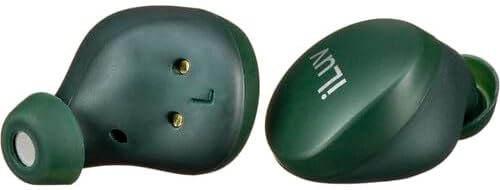
Image 2.2: A close-up view of the earbuds' charging contacts, essential for proper charging within the case.
2.3. Pairing with Your Device
The earbuds feature one-step pairing for convenience.
- Open the charging case and remove both earbuds. They will automatically power on and enter pairing mode.
- On your device (smartphone, tablet, etc.), go to the Bluetooth settings.
- Select "iLuv Bubble Gum" from the list of available devices.
- Once connected, you will hear an audio prompt confirming successful pairing.
- For future use, simply remove the earbuds from the case, and they will automatically connect to the last paired device.
3. Operating Your Earbuds
3.1. Basic Controls
The earbuds feature easy-to-use touch controls:
- Play/Pause Music: Double-tap either earbud.
- Answer/End Call: Double-tap either earbud during an incoming call or an active call.
Voice prompts and LED indicators provide easy status signals for power, pairing, and connection.
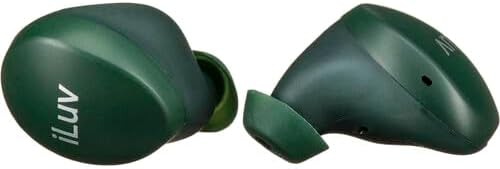
Image 3.1: Side view of the iLuv Bubble Gum True Wireless Earbuds, highlighting their ergonomic design for a comfortable fit.
3.2. Playtime
The earbuds provide up to 6 hours of playtime on a single charge, with the charging case extending total playtime to up to 20 hours.
4. Maintenance
4.1. Water Resistance (IPX6)
Both the earbuds and the charging case are IPX6 rated, meaning they are protected against high-pressure water jets from any direction. This makes them suitable for use during heavy rain, intense workouts (sweat), and accidental spills. However, they are not designed for submersion in water.
- Do not intentionally submerge the earbuds or case in water.
- Ensure the charging port is dry before connecting the charging cable.
- After exposure to water or sweat, wipe the earbuds and case dry with a soft, clean cloth before placing them back in the charging case or charging.
4.2. Cleaning
Regular cleaning helps maintain optimal performance and hygiene.
- Use a soft, dry, lint-free cloth to wipe the earbuds and charging case.
- For stubborn dirt, slightly dampen the cloth with water. Avoid using harsh chemicals or abrasive materials.
- Gently remove ear tips and clean them separately with mild soap and water if necessary. Ensure they are completely dry before reattaching.
- Clean the charging contacts on both the earbuds and the case periodically with a dry cotton swab to ensure good connection.
5. Troubleshooting
If you encounter issues with your iLuv Bubble Gum True Wireless Earbuds, try the following troubleshooting steps:
- Earbuds not pairing with device:
- Ensure Bluetooth is enabled on your device.
- Make sure the earbuds are fully charged.
- Turn off Bluetooth on your device, then turn it back on.
- Forget the earbuds from your device's Bluetooth list and attempt to pair again.
- Place both earbuds back in the charging case, close the lid, wait a few seconds, then open and remove them to re-enter pairing mode.
- Only one earbud playing sound:
- Ensure both earbuds are charged.
- Place both earbuds back in the charging case, close the lid, then open and remove them simultaneously.
- Try re-pairing the earbuds with your device.
- Earbuds not charging:
- Ensure the charging cable is securely connected to both the case and the power source.
- Check if the power source is active.
- Clean the charging contacts on both the earbuds and the case to ensure proper connection.
- Try a different charging cable or power adapter.
- Poor sound quality:
- Ensure the earbuds are securely seated in your ears. Try different sized ear tips for a better seal.
- Clean the ear tips and speaker mesh to remove any debris.
- Ensure your device is within the Bluetooth range (typically 10 meters/33 feet) and there are no significant obstructions.
6. Specifications
| Feature | Detail |
|---|---|
| Model Number | TP100 |
| Connectivity Technology | Wireless (Bluetooth 5.1) |
| Playtime | Up to 6 hours (earbuds), up to 20 hours (with charging case) |
| Charging Case Battery | 300 mAh Lithium-ion |
| Water Resistance Rating | IPX6 |
| Form Factor | In-Ear |
| Noise Control | Active Noise Cancellation |
| Included Components | Cable, Charging Station |
| Item Weight | 250 grams |
7. Warranty and Support
For warranty information or technical support, please refer to the warranty card included with your product or visit the official iLuv website. You may also contact the retailer where you purchased the product for assistance.
Please retain your proof of purchase for warranty claims.
Related documentsTP100


Ask a question about this manual
Ask about setup, troubleshooting, compatibility, parts, safety, or missing instructions. Manuals+ will review the question and use this page’s manual context to help answer it.