
Product Overview
The Dyson Pure Hot + Cool Air Purifier, Heater + Fan (Model HP04) is an advanced home appliance designed to improve indoor air quality and maintain comfortable temperatures year-round. It combines a powerful air purifier with both heating and cooling functionalities, making it a versatile addition to any living space. Equipped with a HEPA filter, it captures ultrafine particles, allergens, and pollutants, while its intelligent sensors monitor and report air quality in real-time.

Image: The Dyson Pure Hot + Cool unit, a sleek, bladeless design in white and silver, with a Wi-Fi symbol indicating connectivity.
Key Features
- Air Purification: Features a sealed HEPA and activated carbon filter system that captures 99.97% of microscopic allergens and pollutants as small as 0.3 microns.
- Heating Function: Projects purified, heated air to warm the room quickly and evenly.
- Cooling Fan: Delivers a powerful stream of purified, cool air for personal cooling.
- Real-time Reporting: Automatically detects airborne particles and gases, then diagnoses and reports them on the LCD screen.
- 350° Oscillation: Distributes purified air throughout the room.
- Remote Control: Magnetic remote control for convenient operation.

Image: Close-up of the Dyson unit's display showing air quality metrics and temperature.

Image: An exploded view illustrating the multi-layer HEPA and activated carbon filter system, with arrows showing air intake and purification.

Image: An illustration showing the Dyson unit in a room, with red and blue arrows indicating the distribution of both heated and cooled purified air.
Setup
- Unboxing: Carefully remove the unit and all accessories from the packaging. Retain packaging for future transport or storage.
- Filter Installation: The HEPA and activated carbon filters are typically pre-installed. If not, align the filters with the base of the unit and twist clockwise until they click into place. Ensure the outer shroud is securely attached.
- Placement: Place the unit on a stable, level surface, ensuring adequate clearance around the air intake and outlet for optimal performance. Avoid placing it directly against walls or in corners that restrict airflow.
- Power Connection: Plug the power cord into a suitable electrical outlet. The unit will enter standby mode.
Operating Instructions
Operate your Dyson Pure Hot + Cool using the included remote control or the power button on the unit. The remote control offers full functionality, including power, mode selection (heating/cooling), fan speed, oscillation, and air quality information display.
- Power On/Off: Press the red power button on the remote or the unit's base.
- Mode Selection: Use the blue (cool) or red (heat) buttons on the remote to switch between cooling and heating modes.
- Temperature Adjustment (Heat Mode): In heating mode, use the '+' and '-' buttons to set your desired target temperature.
- Fan Speed Adjustment: Use the fan speed button (indicated by fan blades) to increase or decrease the airflow intensity.
- Oscillation Control: Press the oscillation button to activate or deactivate the 350° rotation feature.
- Air Quality Information: Press the 'i' button to cycle through various air quality metrics displayed on the LCD screen.
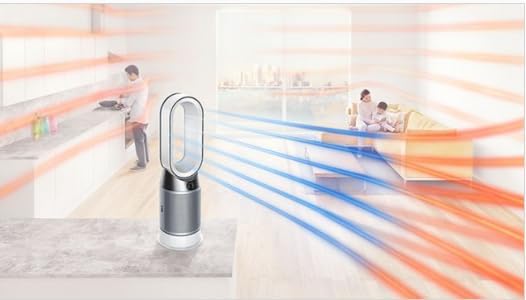
Image: The Dyson unit projecting a stream of warm, purified air towards a person sitting on a sofa.

Image: The Dyson unit projecting a stream of cool, purified air towards a person sitting on a sofa.
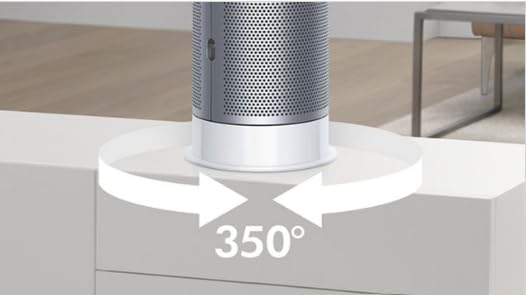
Image: The base of the Dyson unit with arrows indicating its 350-degree oscillation capability.
Maintenance
Regular maintenance ensures optimal performance and longevity of your Dyson Pure Hot + Cool unit.
- Filter Replacement: The unit will indicate when the filter needs replacement. Typically, filters should be replaced every 12 months, or sooner if used heavily. Refer to the display for filter life status. To replace, twist off the outer shroud, remove the old filters, and install new ones by aligning and twisting clockwise until they click.
- Cleaning: Wipe the exterior of the unit with a soft, dry cloth. Do not use detergents or polishes. For the air intake holes, use a soft brush to remove dust. Ensure the unit is unplugged before cleaning.
Troubleshooting
| Issue | Possible Cause | Solution |
|---|---|---|
| Unit not turning on | No power; remote battery low | Check power connection; replace remote battery. |
| Poor airflow/purification | Clogged filter; obstructed air intake | Replace filter; clear obstructions. |
| Unusual noise | Unit not level; internal obstruction | Ensure unit is on a flat surface; check for foreign objects. |
| Inaccurate air quality readings | Sensor obstruction/dust | Clean sensor area with a soft brush. |
Specifications
| Feature | Detail |
|---|---|
| Brand | Dyson |
| Model Number | 385933-02 (HP04) |
| Product Dimensions | 8.07"D x 9.76"W x 30.08"H |
| Weight | 17 Pounds |
| Filter Type | HEPA |
| Controller Type | Button Control, Remote Control |
| Batteries Required | 1 Lithium Metal (included for remote) |
Warranty & Support
This Dyson Pure Hot + Cool unit is a renewed product. Renewed products typically come with a limited warranty from the seller or refurbisher, which may differ from the original manufacturer's warranty. Please refer to your purchase documentation for specific warranty details, including duration and coverage. For technical support or service inquiries, please contact the seller or the Dyson customer support line if applicable to renewed products.
Note: Some renewed products may have a shorter warranty period, such as 6 months, as indicated by customer experiences. Always verify warranty terms at the time of purchase.