
JVC XS-N4112PB
JVC Speaker XS-N4112PB User Manual
Model: XS-N4112PB
1. Introduction
Thank you for purchasing the JVC Speaker XS-N4112PB. This portable speaker is designed to deliver high-quality audio with versatile connectivity options. Please read this manual carefully before using the product to ensure proper operation and to maximize its lifespan.
2. Safety Information
To ensure safe operation and prevent damage, please observe the following precautions:
- Do not expose the speaker to water or excessive moisture. This product is not water resistant.
- Keep the speaker away from heat sources such as radiators, heat registers, stoves, or other apparatus (including amplifiers) that produce heat.
- Use only attachments/accessories specified by the manufacturer.
- Unplug the speaker during lightning storms or when unused for long periods.
- Do not block any ventilation openings. Install in accordance with the manufacturer's instructions.
- Refer all servicing to qualified service personnel. Servicing is required when the apparatus has been damaged in any way.
3. Package Contents
Please check that all items listed below are included in your package:
- JVC Speaker XS-N4112PB Unit
- Power Adapter/Charging Cable
- User Manual (this document)
- Microphone
4. Product Overview
4.1 Front View
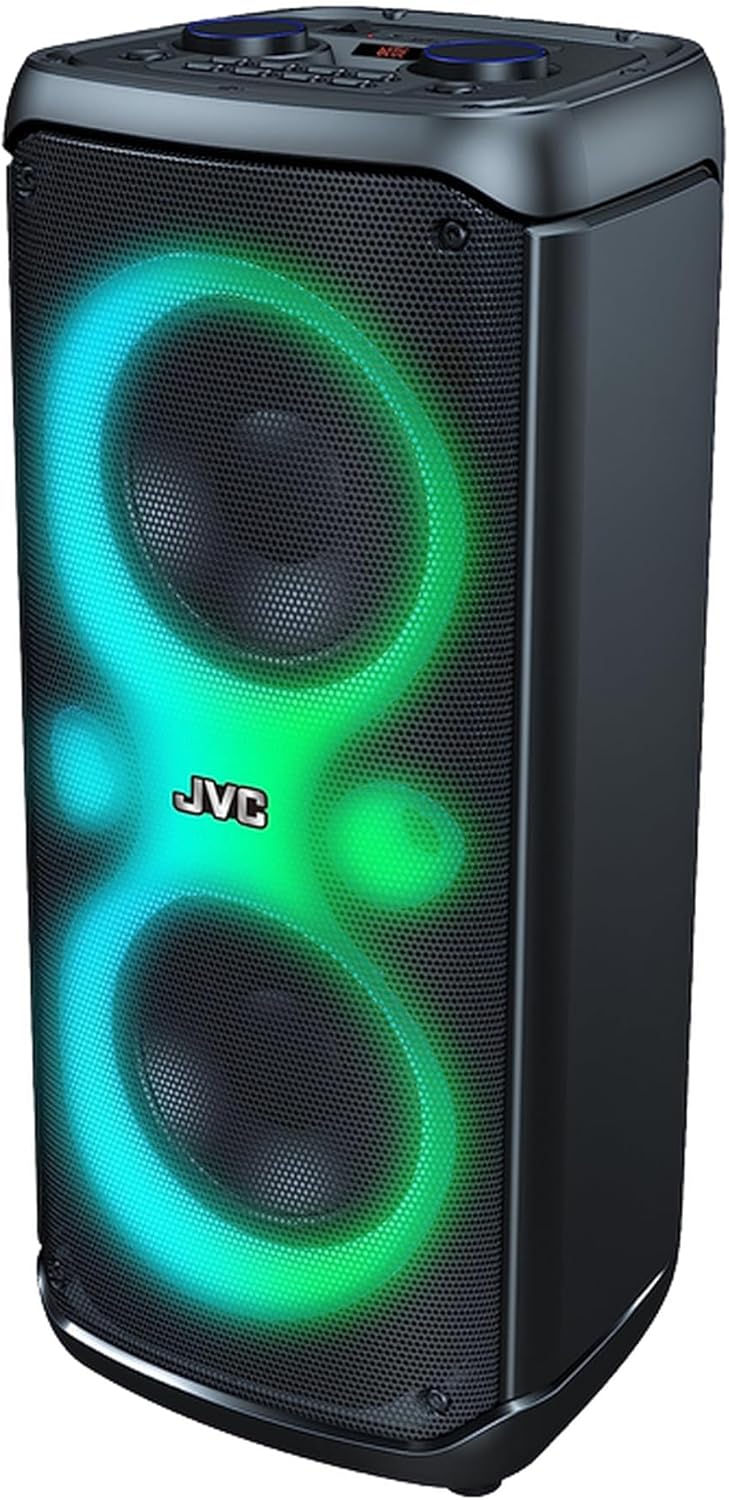
Figure 1: Front view of the JVC Speaker XS-N4112PB, showcasing the dual speaker grilles and dynamic LED lighting in blue and green hues. The JVC logo is centrally located.
4.2 Top Panel Controls

Figure 2: Top panel of the JVC Speaker XS-N4112PB, displaying various input ports and control buttons. From left to right, top row: Power switch, DC 9V input, USB port, AUX In, TF Card slot, Mic In. Below these are a digital display, large rotary knobs for MIC VOL and VOLUME, and buttons for TWS, ECHO-, ECHO+, EQ, REC/DEL, Play/Pause, Previous/Scan, Next/Shift, and Mode.
4.3 LED Lighting

Figure 3: Front view of the JVC Speaker XS-N4112PB, illustrating the vibrant multi-color LED lighting effects around the speaker cones and central JVC logo.
5. Setup
5.1 Charging the Speaker
- Locate the DC 9V input port on the top panel (refer to Figure 2).
- Connect the provided power adapter to the DC 9V input port and plug the other end into a power outlet.
- The charging indicator (if available) will illuminate. Charge the speaker fully before first use.
- A full charge provides extended battery life for portable use.
6. Operating Instructions
6.1 Power On/Off
- To power on, slide the POWER switch on the top panel to the "ON" position.
- To power off, slide the POWER switch to the "OFF" position.
6.2 Bluetooth Mode
- Turn on the speaker. It will automatically enter Bluetooth pairing mode, indicated by a flashing Bluetooth icon or sound.
- On your smartphone, tablet, or other Bluetooth-enabled device, enable Bluetooth and search for available devices.
- Select "JVC XS-N4112PB" from the list of devices.
- Once paired, the speaker will confirm with an audible tone or steady Bluetooth indicator.
- You can now play audio from your device through the speaker.
6.3 AUX Input Mode
- Connect one end of a 3.5mm audio cable (not included) to the AUX In port on the speaker's top panel.
- Connect the other end to the audio output jack of your external device (e.g., MP3 player, laptop).
- Press the "MODE/SHIFT" button on the speaker until "AUX" mode is selected.
- Audio will now play through the speaker from your connected device.
6.4 USB and TF Card Playback
- Insert a USB flash drive or TF (microSD) card containing MP3 audio files into the respective port on the top panel.
- The speaker will automatically detect the storage device and begin playback. If not, press the "MODE/SHIFT" button to switch to USB/TF mode.
- Use the Play/Pause, Previous/Scan, and Next/Shift buttons to control playback.
6.5 Microphone Input
- Connect a microphone (included) to the "MIC In" port on the top panel.
- Adjust the microphone volume using the "MIC VOL" rotary knob.
- Use the "ECHO-" and "ECHO+" buttons to adjust the echo effect for the microphone.
6.6 TWS (True Wireless Stereo) Function
The TWS function allows you to pair two JVC XS-N4112PB speakers together for a true stereo sound experience.
- Ensure both speakers are powered on and in Bluetooth mode, but not connected to any device.
- On one of the speakers, press and hold the "TWS" button. You will hear a pairing tone.
- The two speakers will automatically connect to each other. Once connected, you will hear a confirmation tone.
- Now, connect your Bluetooth device to one of the paired speakers (the master speaker). Audio will play in stereo through both speakers.
6.7 Equalizer (EQ) and Recording
- Press the "EQ" button to cycle through different equalizer presets (e.g., Pop, Rock, Jazz, Classic, Bass).
- The "REC/DEL" button is used for recording audio from the microphone to a USB drive or TF card, or for deleting recorded files. Refer to the display for recording status.
7. Maintenance
- Cleaning: Use a soft, dry cloth to clean the exterior of the speaker. Do not use liquid cleaners or aerosol sprays.
- Storage: When not in use for extended periods, store the speaker in a cool, dry place, away from direct sunlight and extreme temperatures.
- Battery Care: To prolong battery life, avoid fully discharging the battery frequently. Charge the speaker regularly, even if not in use.
8. Troubleshooting
| Problem | Possible Cause | Solution |
|---|---|---|
| No power | Battery is depleted; Power switch is off. | Charge the speaker; Ensure the POWER switch is in the "ON" position. |
| No sound | Volume is too low; Incorrect mode selected; Device not connected properly. | Increase the VOLUME knob; Press MODE/SHIFT to select the correct input (Bluetooth, AUX, USB/TF); Reconnect your device. |
| Bluetooth pairing failed | Speaker is too far from device; Speaker is connected to another device; Bluetooth on device is off. | Move speaker closer to device; Disconnect from other devices; Ensure Bluetooth is enabled on your device. |
| Microphone not working | Microphone not plugged in; MIC VOL is too low. | Ensure microphone is securely plugged into "MIC In" port; Increase MIC VOL. |
9. Specifications
| Feature | Detail |
|---|---|
| Model Number | XS-N4112PB |
| Brand | JVC |
| Connectivity Technology | Bluetooth |
| Compatible Devices | Smartphone, Laptop, Tablet |
| Power Source Type | Battery Powered |
| Water Resistance Level | Not water resistant |
| Product Dimensions (L x W x H) | 20 x 24 x 59 cm |
| Item Weight | 5 kg |
| Color | Black |
10. Warranty and Support
JVC products are manufactured to the highest quality standards. For warranty information and technical support, please refer to the warranty card included with your purchase or visit the official JVC website.
For further assistance, you may contact JVC customer service through their official channels.
Related documentsXS-N4112PB


Ask a question about this manual
Ask about setup, troubleshooting, compatibility, parts, safety, or missing instructions. Manuals+ will review the question and use this page’s manual context to help answer it.