Introduction
This manual provides detailed instructions for the operation and maintenance of your Oilsky V08 64GB Digital Voice Recorder. Please read this manual thoroughly before using the device to ensure proper functionality and to maximize its features.
Product Overview
The Oilsky V08 is a compact digital voice recorder designed for clear audio capture. It features a built-in 64GB memory, noise reduction technology, and various recording and playback options.

Image: The Oilsky V08 digital voice recorder displaying its screen and key features such as 1536kbps recording, noise cancellation chip, 7 levels recording gain, omni-directional microphone, and built-in speaker. It also lists supported WAV and MP3 recording bitrates.
Key Features:
- High-Quality Recording: Up to 1536kbps WAV format for clear audio.
- Noise Reduction: Integrated noise cancellation chip for improved sound clarity.
- Large Storage: Built-in 64GB memory.
- Long Battery Life: Up to 20 hours of continuous recording or 35 hours of continuous playback.
- Versatile Recording: Supports external microphone and line-in recording.
- Multiple Functions: Voice Activated Recording, Password Protection, Variable Speed Playback, A-B Repeat, Equalizer, MP3 Player, File Transfer.
Setup
Charging the Device:
The device comes with a built-in rechargeable Lithium Polymer battery. Before first use, fully charge the recorder.
- Connect the recorder to a computer's USB port or a USB wall adapter (not included) using the provided USB cable.
- The battery indicator on the LCD screen will show charging status.
- A full charge typically takes approximately 2 hours.
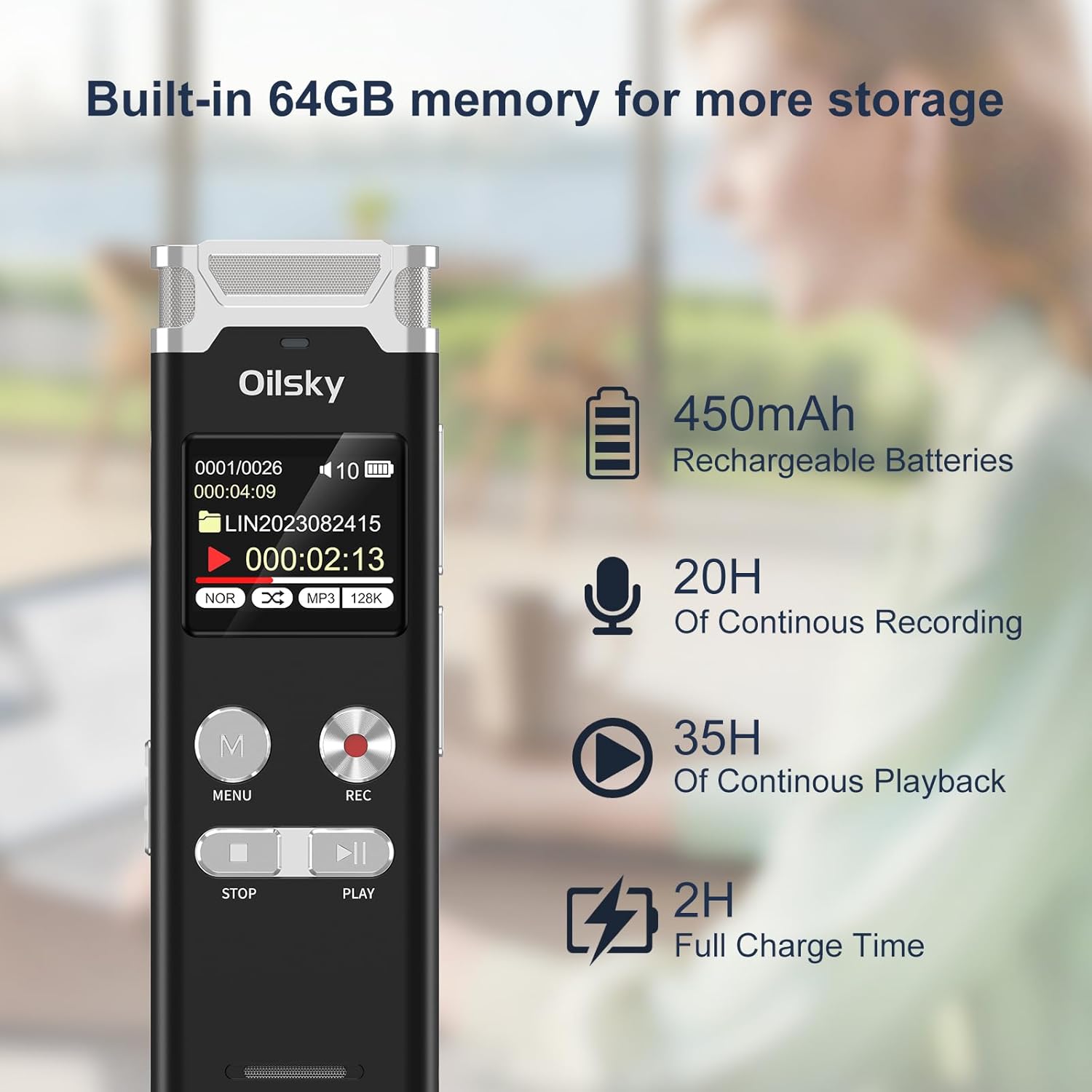
Image: The Oilsky V08 digital voice recorder displaying its screen with battery icon and text indicating 64GB memory, 450mAh rechargeable batteries, 20 hours of continuous recording, 35 hours of continuous playback, and 2 hours full charge time.
Powering On/Off:
To power on the device, slide the power switch to the ON position. To power off, slide it to the OFF position.
Operating Instructions
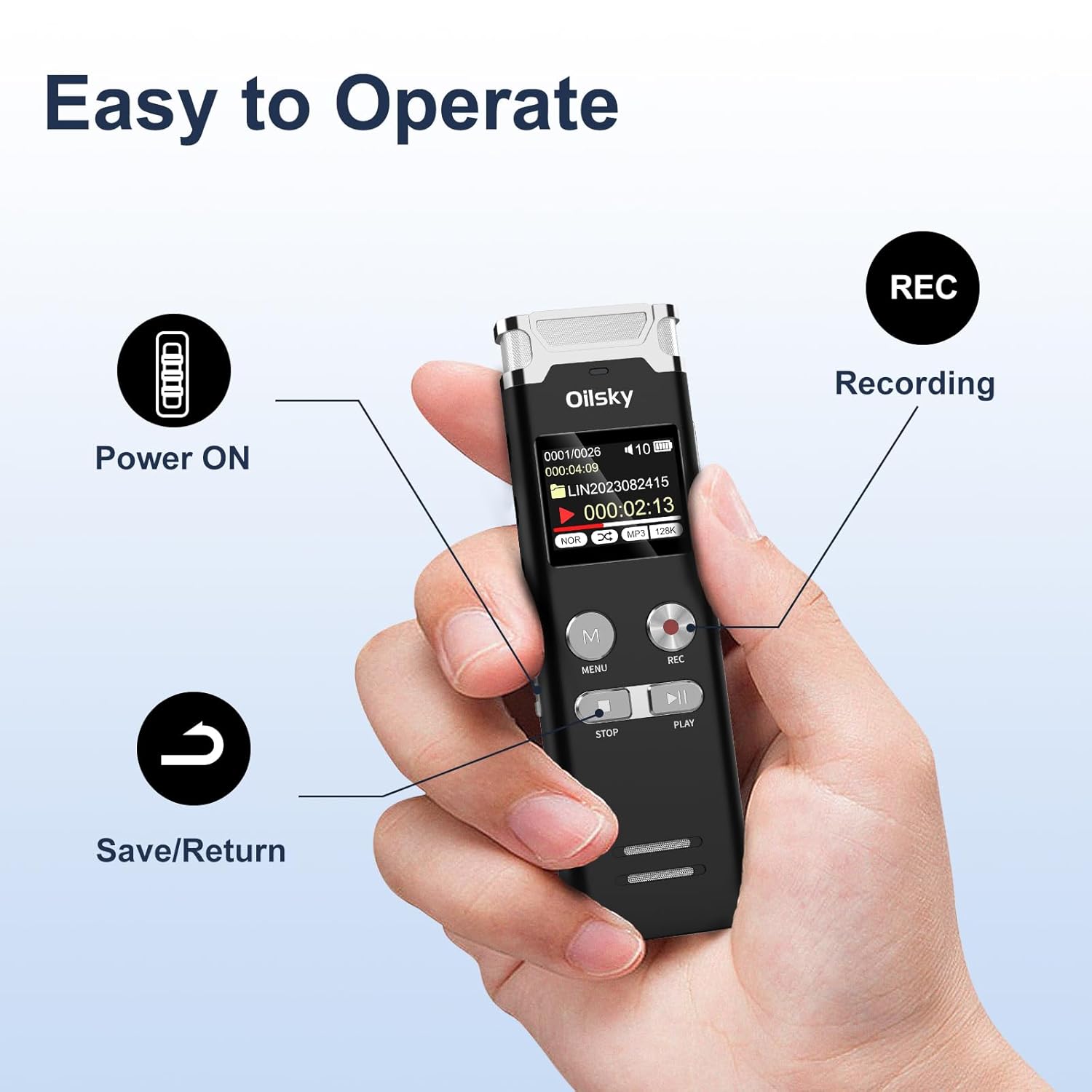
Image: A hand holding the Oilsky V08 digital voice recorder, with arrows pointing to the Power ON switch, REC button for recording, and the Save/Return button (likely the STOP button).
Basic Recording:
- Ensure the device is powered on.
- Press the REC button to start recording. The screen will display recording status.
- To pause recording, press the REC button again. Press it once more to resume.
- To stop and save the recording, press the STOP button.
Playback:
- From the main menu or file list, select the desired audio file.
- Press the PLAY button to start playback.
- Use the PREVIOUS/NEXT buttons (often integrated with volume or fast-forward/rewind) to navigate through files or within a file.
- Press the STOP button to end playback.
Menu Navigation:
Press the MENU button to access the device settings and options. Use the navigation buttons (usually PREVIOUS/NEXT) to scroll through options and the PLAY button to confirm selections. Press STOP to exit menus.
Advanced Features:

Image: The Oilsky V08 digital voice recorder placed on a keyboard, with an overlay highlighting its multifunction capabilities: Voice Activated Recording, Password Protection, Variable Speed Playback (±8X), Line in Recording, A-B Repeat, Equalizer, MP3 Player, and File Transfer.
- Voice Activated Recording (VOR): Enable this feature in the settings. The recorder will automatically start recording when sound is detected and pause when silence occurs, saving memory and battery.
- Password Protection: Set a password through the menu to protect your recordings from unauthorized access.
- Variable Speed Playback (±8X): Adjust the playback speed of your recordings without altering the pitch. Access this option during playback via the menu.
- A-B Repeat: During playback, mark a start point (A) and an end point (B) to repeatedly play a specific section of an audio file.
- Equalizer: Adjust audio playback settings (e.g., bass, treble) for different sound profiles.
- MP3 Player: The device can also play MP3 audio files stored on its internal memory.
- File Transfer: Connect the recorder to a computer via USB to transfer recorded files or other audio files to and from the device. It will appear as a removable disk.
External Recording Options:

Image: The Oilsky V08 digital voice recorder demonstrating two recording methods: one with an external microphone connected, and another showing a line-in connection to a smartphone for recording audio directly from the phone.
- External Microphone: Connect a compatible external microphone to the designated port for enhanced recording flexibility.
- Line-in Recording: Use a 3.5mm audio cable to connect the recorder to other audio sources like phones, computers, or MP3 players to record audio directly.
Maintenance
- Cleaning: Use a soft, dry cloth to clean the device. Do not use liquid cleaners or solvents.
- Storage: Store the recorder in a cool, dry place away from direct sunlight and extreme temperatures.
- Battery Care: To prolong battery life, avoid fully discharging the battery frequently. Charge the device regularly, even if not in use for extended periods.
- Data Management: Regularly back up important recordings to a computer to prevent data loss.
Troubleshooting
| Problem | Possible Solution |
|---|---|
| Device does not power on. | Ensure the battery is charged. Connect to a power source and try again. Check the power switch position. |
| Cannot record. | Check if the memory is full. Delete unnecessary files or transfer them to a computer. Ensure the device is not in playback mode. |
| Poor recording quality. | Ensure the microphone is not obstructed. Record in a quieter environment. Adjust recording gain settings if available. Check recording format settings. |
| "Disk Error" message. | This indicates a potential issue with the internal memory. Try connecting the device to a computer to see if it's recognized. If not, a factory reset might be necessary (this will erase all data). If the problem persists, contact customer support. |
| Computer does not recognize the device. | Ensure the USB cable is securely connected. Try a different USB port or cable. Restart your computer. The device should appear as a removable storage drive. |
Specifications
| Feature | Detail |
|---|---|
| Brand | Oilsky |
| Model | V08 |
| Memory Storage Capacity | 64 GB |
| Recording Formats | WAV (up to 1536kbps), MP3 (up to 128kbps) |
| Battery Type | 1 Lithium Polymer (included) |
| Battery Capacity | 450mAh |
| Continuous Recording Time | Up to 20 hours |
| Continuous Playback Time | Up to 35 hours |
| Full Charge Time | Approximately 2 hours |
| Product Dimensions | 10.15 x 3.2 x 1.25 cm |
| Item Weight | 204 g |
| Hardware Interface | USB |
| Compatible Devices | Personal Computer |
| Display Technology | LCD |
| Standing Screen Display Size | 1 Inch |
Warranty and Support
Specific warranty information is typically provided with your purchase documentation or on the manufacturer's official website. For technical support, troubleshooting assistance, or warranty claims, please refer to the contact information provided by Oilsky at the time of purchase or visit their official support channels.
Keep your purchase receipt as proof of purchase for warranty purposes.