
1. Product Overview
The Skazeke Mini UPS UP150 is a compact and reliable uninterruptible power supply designed to provide emergency power to your low-voltage electronic devices during power outages. With a built-in 20000mAh rechargeable lithium polymer battery, it ensures continuous operation for essential equipment such as routers, modems, IP cameras, and LED lights.
This Mini UPS features dual DC outputs, supporting devices with 9V/1A and 12V/1.5A power specifications. It comes with a comprehensive set of 9 different DC connectors to ensure compatibility with a wide range of devices. The intelligent control circuit automatically detects low voltage and seamlessly switches to battery power, preventing interruptions and data loss.
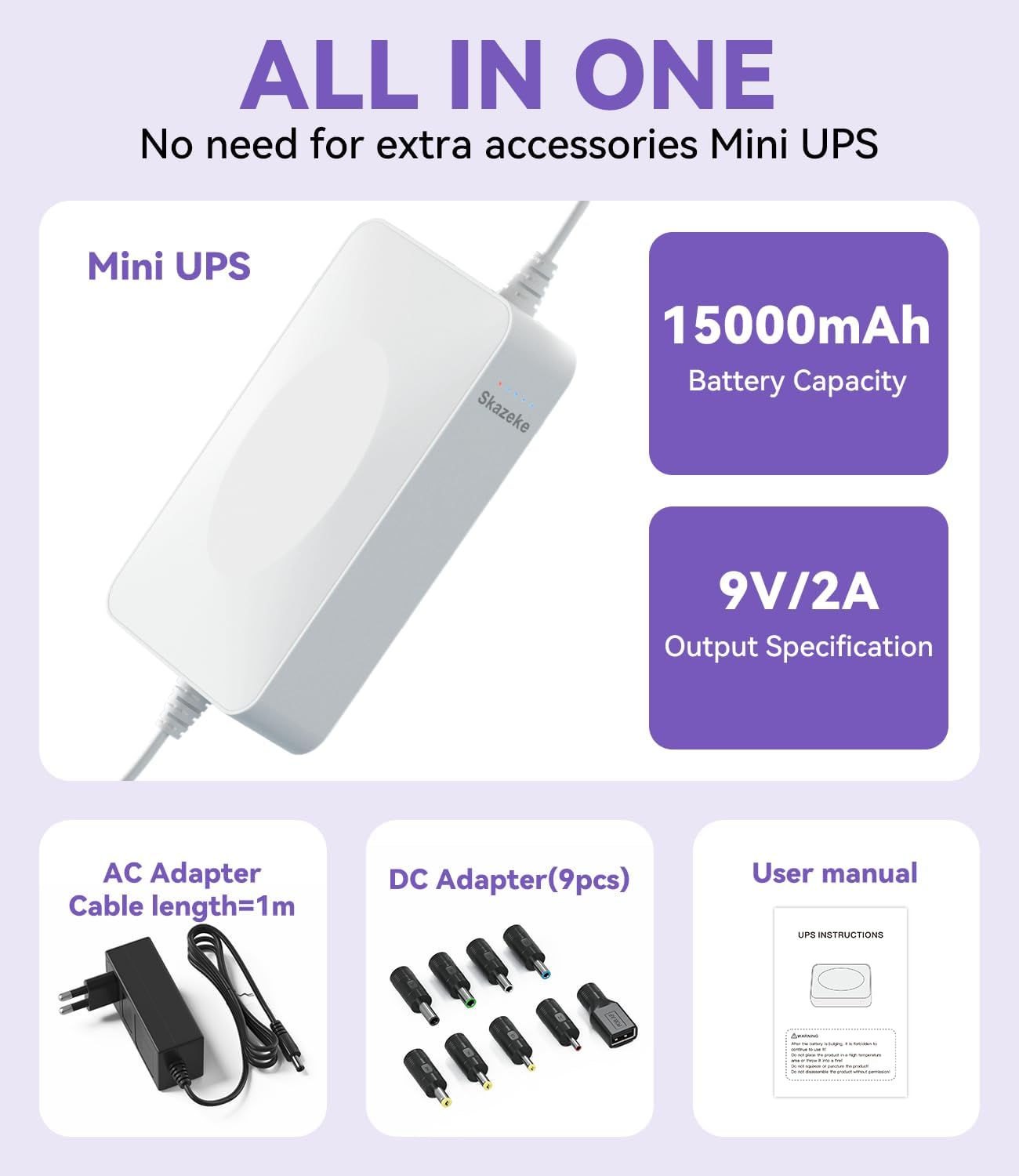
Image: The Skazeke Mini UPS UP150 with its included accessories, including the AC adapter and 9 DC connectors, highlighting its all-in-one design.

Image: The Skazeke Mini UPS UP150 connected to various compatible devices such as a mobile router, IP camera, mobile hard disk, and telephone base, demonstrating its versatility.
2. Package Contents
- 1 x Skazeke Mini UPS UP150 (20000mAh)
- 1 x AC Power Adapter (EU plug, with EU to UK adapter if applicable)
- 9 x DC Connectors (various sizes)
- 1 x User Manual (this document)
3. Setup Instructions
Follow these steps to properly set up your Skazeke Mini UPS UP150:
- Verify Device Compatibility: Before connecting, ensure your device's power specification matches one of the UPS outputs: 9V/1A or 12V/1.5A. Using the UPS with incompatible voltage or current requirements may damage your device or the UPS.
- Select the Correct DC Connector: Identify the appropriate DC connector from the provided set that fits your device's power input port. The UPS output port is typically DC 5.5*2.1mm, and the included adapters convert this to various sizes.
- Connect the UPS to Your Device: Plug the selected DC connector into your device's power input. Then, connect the other end of the DC cable to the corresponding output port on the Mini UPS.
- Connect the UPS to Mains Power: Plug the provided AC power adapter into a wall outlet. Connect the adapter's output cable to the input port on the Mini UPS. The UPS will begin charging and simultaneously power your connected device.

Image: Step-by-step guide illustrating how to install the Skazeke Mini UPS, including verifying device power specifications, selecting the correct DC adapter, and connecting to the mains.
Note: For optimal performance, fully charge the Mini UPS before its first use. The UPS will automatically detect low voltage and switch to battery power when the mains supply is interrupted.
4. Operating Instructions
The Skazeke Mini UPS UP150 is designed for simple, automatic operation:
- Automatic Power Switching: When connected to both mains power and your device, the UPS acts as a pass-through, powering your device directly while charging its internal battery. In the event of a power outage, the UPS will automatically switch to battery power within milliseconds, ensuring your connected device remains operational without interruption.
- Battery Level Indicators: The UPS features 5 LED indicators that display the current battery charge level. Monitor these indicators to understand the remaining backup power.
- Seamless Operation: There is no need to manually restart your connected device after a power interruption, as the UPS provides continuous power.

Image: A comparison showing a router losing internet connection during a power outage without a UPS, versus a router maintaining connection with the Skazeke Mini UPS.
5. Maintenance
To ensure the longevity and optimal performance of your Skazeke Mini UPS UP150, follow these maintenance guidelines:
- Storage: Store the UPS in a cool, dry, and well-ventilated environment, away from direct sunlight, high temperatures, and humidity.
- Charging: If the UPS is not used for an extended period, charge it fully at least once every three months to maintain battery health.
- Cleaning: Use a soft, dry cloth to clean the exterior of the UPS. Do not use liquid cleaners or solvents.
- Avoid Overload: Do not connect devices that exceed the specified output current or power rating of the UPS.
6. Troubleshooting
If you encounter issues with your Skazeke Mini UPS UP150, refer to the following troubleshooting steps:
| Problem | Possible Cause | Solution |
|---|---|---|
| UPS not powering device during outage. | Battery is depleted or not charged. | Ensure the UPS is connected to mains power and fully charged. Check LED indicators. |
| Device not receiving power from UPS. | Incorrect DC connector or incompatible voltage/current. | Verify the device's power requirements match the UPS output (9V/1A or 12V/1.5A). Select the correct DC connector. |
| UPS not charging. | AC adapter or mains connection issue. | Check if the AC adapter is securely plugged into both the wall outlet and the UPS. Try a different outlet. |
| Short backup time. | High power consumption of connected device or aging battery. | Ensure the connected device's power consumption is within the UPS's capacity. Battery life naturally decreases over time. |
If the problem persists after following these steps, please contact Skazeke customer support for further assistance.
7. Specifications

Image: An internal view of the Skazeke Mini UPS UP150, highlighting its high-density lithium polymer battery for superior safety and performance compared to traditional 18650 batteries.
- Model: UP150
- Brand: Skazeke
- Battery Capacity: 20000mAh (Lithium Polymer)
- Output Voltage/Current:
- DC 9V/1A
- DC 12V/1.5A
- Max Power Output: 18 Watt
- Charging Time: Approximately 8 hours
- Compatible Devices: Modems, IP Cameras, LED Lights, Mobile Routers, Mobile Hard Disks, Telephone/DECT Bases, etc.
- Form Factor: Compact
- Weight: 400 Grams
- Safety Features: Overload protection, Temperature protection, Overshoot protection, Overvoltage protection (for Li-polymer battery)
Note: Some product images may show 15000mAh capacity or 9V/2A output. This manual refers to the 20000mAh model with 9V/1A and 12V/1.5A dual outputs as specified in the product description.
8. Warranty and Support
The Skazeke Mini UPS UP150 comes with a 1-year manufacturer warranty from the date of purchase.
For warranty claims, technical support, or any questions regarding the product, please contact your retailer or Skazeke customer service. Please have your purchase receipt and product model number (UP150) ready when contacting support.