
Cinnado B6
Contents
Cinnado B6 2K Wireless Solar Security Camera
User Manual
Introduction
Thank you for choosing the Cinnado B6 2K Wireless Solar Security Camera. This manual provides essential information for setting up, operating, and maintaining your security camera system. The Cinnado B6 offers crystal clear 2K resolution, color night vision, and is powered by both solar and battery, ensuring continuous monitoring. It features 360° pan-tilt-zoom (PTZ) functionality, PIR human detection, two-way audio, and supports both local (SD card) and cloud storage. Designed for outdoor use, it boasts an IP65 waterproof rating to withstand various weather conditions.
Package Contents
- Solar camera (quantity as per pack, e.g., 4 for 4-pack)
- Solar panel (quantity as per pack, e.g., 4 for 4-pack)
- Installation guide
- Screw pack
- Type-C power cord
Product Overview
The Cinnado B6 camera system is designed for comprehensive outdoor surveillance, offering advanced features for enhanced security.

Four Cinnado B6 security cameras with attached solar panels, ready for installation.

A single Cinnado B6 camera mounted on a wall with its solar panel, highlighting features like 2K resolution, 2-way audio, motion alert, and cloud/SD storage.

A Cinnado B6 camera with solar panel, emphasizing its 365-day solar power capability and features like true wireless operation and a 5000 mAh rechargeable battery.

A split image demonstrating the 2K resolution of the camera, showing clear day vision and a comparison between night vision without LED light and full color night vision.

An image depicting the two-way audio feature, with a person delivering a package at a door and the camera mounted above, suggesting real-time interaction.

An illustration of the camera's multi-alarm modes, including light warning, siren, and real-time app notifications for human detection.

A close-up of the camera's micro SD card slot and a phone screen showing the Wansview Cloud app interface for cloud and local storage playback.

The Cinnado B6 camera and solar panel mounted on a tree during rainfall, illustrating its IP65 weather resistance.

An overhead view of a house and driveway, showing the camera's 345° pan and 60° tilt capabilities for multi-angle viewing and wider surveillance coverage.
Setup
Physical Installation
For optimal performance, choose a location with consistent sunlight exposure for the solar panel and a strong 2.4G Wi-Fi signal. Use the provided hole positioning stickers to mark and drill holes. Secure the base with screws, then attach the camera and solar panel. Ensure the solar panel cable is securely connected to the camera's Type-C port. Do not drill into the camera itself.

Diagram illustrating the steps for mounting the camera base to a wall.
App Setup and Connection
The Cinnado B6 camera uses the Wansview Cloud app for setup and control. Follow these steps to connect your camera:
- Download the Wansview Cloud app from the App Store (iOS) or Google Play (Android).
- Create an account and log in.
- Press the Power and Reset buttons on the camera in sequence for 5 seconds until the indicator light flashes red and blue alternately.
- Place the camera near your Wi-Fi router (within 1 meter) when connecting.
- Follow the in-app instructions to connect the camera to a 2.4Ghz Wi-Fi network. 5G Wi-Fi is not supported.
- After connecting, you can move the camera to its desired outdoor location, ensuring it still has a good Wi-Fi signal.

Visual guide for quick installation using the Wansview Cloud App.
Installation Video
This video demonstrates the physical installation process of the Cinnado B6 solar camera. It shows how to mount the camera and solar panel.
Operating Instructions
Live View and PTZ Control
Access the live feed of your camera through the Wansview Cloud app. Use the on-screen controls to pan (345° horizontally) and tilt (60° vertically) the camera lens, allowing you to monitor a wide area. The 2K resolution provides clear images both day and night.

Control the camera's pan and tilt functions directly from your smartphone app.
Night Vision Modes
The camera offers multiple night vision modes:
- Full Color Night: Provides full-color video even in low-light conditions.
- Intelligent Light: Automatically adjusts lighting for optimal night vision.
- Auto Infrared Mode: Standard black and white infrared night vision.
PIR Human Detection and Alerts
The advanced PIR and AI detection technology accurately identifies human motion, reducing false alarms. You can adjust the PIR detection sensitivity in three levels, with a range of 16-29 feet. When motion is detected, the camera can trigger light warnings, sirens, and send real-time notifications to your mobile device.
Two-Way Audio
Engage in real-time two-way audio communication through the camera using your mobile device. This allows you to speak to visitors or deter potential intruders directly from the app.

Communicate with people near your camera using the two-way audio feature in the app.
Storage Options
The Cinnado B6 supports both Micro SD card storage (up to 128GB, not included) and cloud storage. Local storage allows you to access recordings without an internet connection. Cloud storage provides secure online backup of your footage, typically lasting up to 30 days (free trial available).
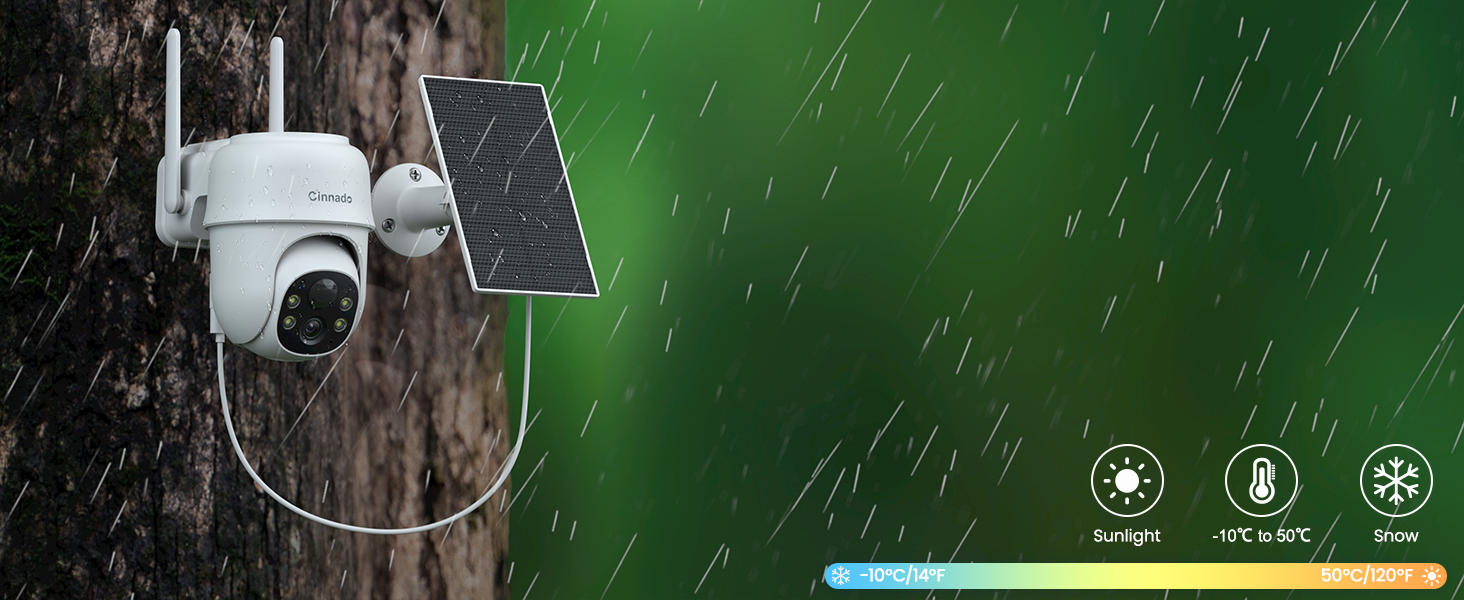
Illustration of cloud and local storage options for your camera footage.
Motion Alert Setting Video
This video provides instructions on how to configure motion alert settings within the camera's application, detailing sensitivity adjustments and notification options.
Maintenance
- Solar Panel Care: Ensure the solar panel is clean and free from dust, dirt, or debris to maximize charging efficiency. Periodically wipe it with a soft, damp cloth.
- Battery Life: The 5000 mAh rechargeable battery provides backup power. In areas with limited sunlight or during prolonged bad weather, the camera may require manual charging via the Type-C power cord.
- Weather Resistance: The IP65 waterproof rating protects the camera from rain and snow. However, avoid submerging the camera in water or exposing it to extreme temperatures outside its operating range (-10°C/14°F to 50°C/120°F).
- Firmware Updates: Check the Wansview Cloud app regularly for any available firmware updates to ensure optimal performance and security.
Troubleshooting
| Issue | Possible Cause / Solution |
|---|---|
| Camera offline | Check Wi-Fi signal strength at camera location. Ensure router is working. Restart camera and router. Reconnect camera via app if necessary. |
| Poor video quality | Ensure strong Wi-Fi signal. Clean camera lens. Check app settings for resolution (2K/SD). |
| Battery not charging | Ensure solar panel is clean and receiving direct sunlight. Check solar panel cable connection. Charge manually with Type-C cable if needed. |
| No motion alerts | Check PIR detection sensitivity settings in the app. Ensure motion detection is enabled. Verify app notification settings on your phone. |
| Two-way audio not working | Check microphone and speaker permissions for the app on your phone. Ensure camera's microphone/speaker are not obstructed. |
| Cannot connect to 5G Wi-Fi | The Cinnado B6 only supports 2.4G Wi-Fi. Ensure you are connecting to a 2.4G network. |
Specifications
| Feature | Detail |
|---|---|
| Model Name | B6 |
| Indoor/Outdoor Usage | Outdoor |
| Video Capture Resolution | 2K (2304x1296p max) |
| Connectivity Technology | Wireless (2.4G Wi-Fi only) |
| Power Source | Battery Powered, Solar Powered |
| Battery Capacity | 5000 Milliamp Hours (Lithium Ion) |
| Viewing Angle | 345° Pan, 60° Tilt |
| Night Vision Range | 29 Feet |
| Water Resistance Level | IP65 Waterproof |
| Storage | Micro SD (up to 128GB), Cloud Storage |
| Compatible Devices | Alexa, Google Home, Smartphone (Android/iOS) |
| Operating Temperature | -10°C/14°F to 50°C/120°F |
| Dimensions (L x W x H) | 5.09 x 3.8 x 5.8 inches |
| Item Weight | 4.1 Pounds |
Warranty and Support
For warranty information, please refer to the product packaging or contact Cinnado customer support directly. For technical assistance, troubleshooting, or general inquiries, please utilize the support features within the Wansview Cloud app or visit the official Cinnado website.
Ask a question about this manual
Ask about setup, troubleshooting, compatibility, parts, safety, or missing instructions. Manuals+ will review the question and use this page’s manual context to help answer it.