
1. Introduction
This manual provides detailed instructions for the installation, operation, and maintenance of the EVURU DDS668 Single Phase LCD Digital Energy Meter. This device is designed to accurately measure electrical energy consumption (kWh), voltage, current, and power in single-phase 220V electrical systems. Please read this manual thoroughly before installation and use to ensure proper function and safety.

Figure 1: Front view of the EVURU DDS668 Single Phase LCD Digital Energy Meter, showing the LCD display with energy readings and control button.
2. Safety Information
- Installation should only be performed by qualified personnel.
- Ensure power is disconnected before any installation or wiring work.
- Do not operate the meter in environments exceeding its specified temperature and humidity ranges.
- Do not attempt to open or repair the meter; refer to qualified service personnel.
3. Product Features
- LCD display with backlight for clear readings.
- Measures total energy (kWh), temporary energy (kWh), real-time voltage, current, and power.
- Pulse LED indicator for active energy measurement.
- 35mm DIN rail installation.
- Manual button for cycling through display parameters and resetting temporary kWh.
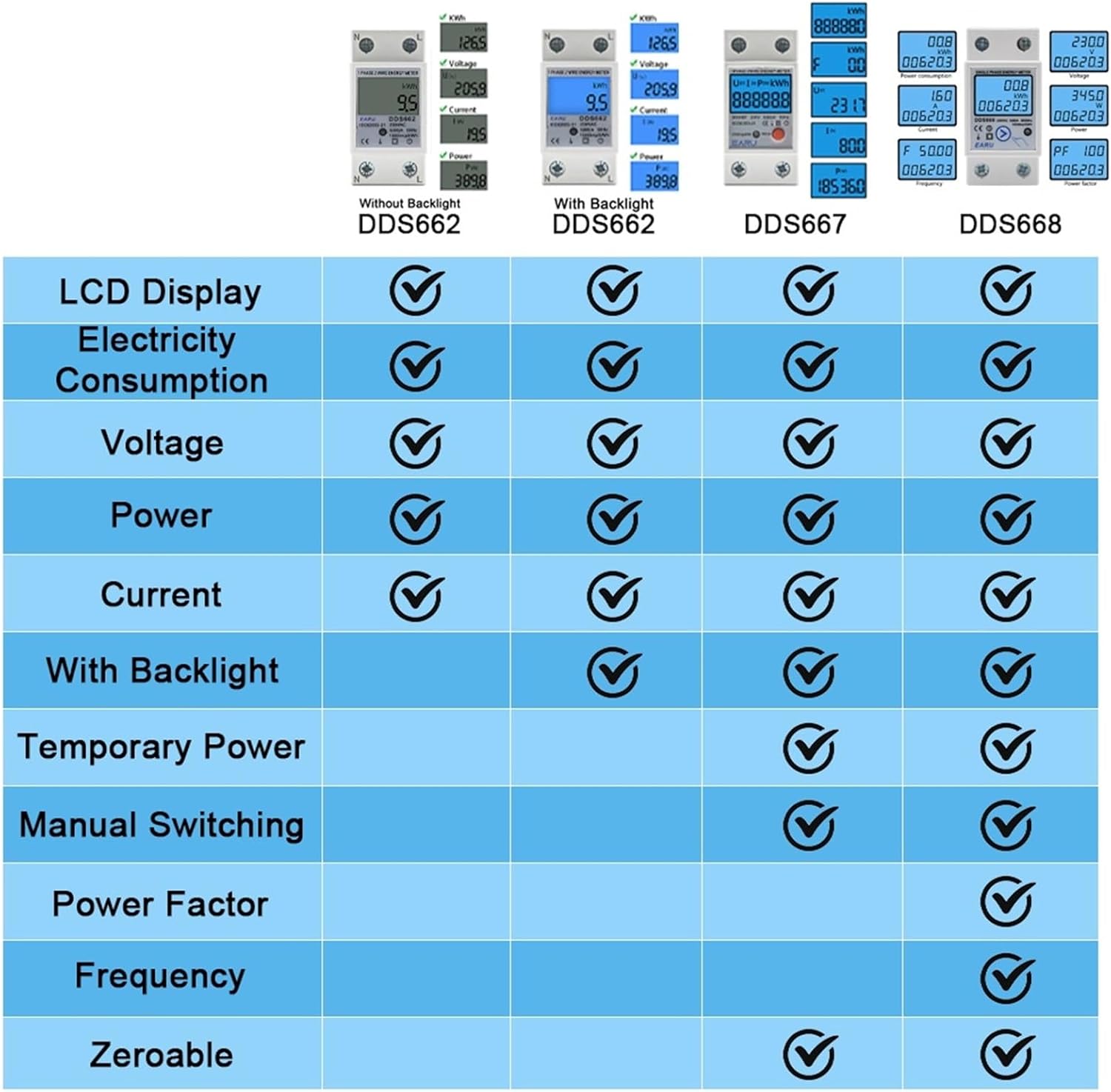
Figure 2: A comparison table highlighting features such as electricity consumption, voltage, power, current, backlight, temporary power, manual switching, power factor, frequency, and zeroable functions across different EVURU meter models (DDS662, DDS667, DDS668).
4. Installation
4.1 DIN Rail Mounting
The EVURU DDS668 energy meter is designed for standard 35mm DIN rail installation. Ensure the DIN rail is securely mounted in a suitable electrical enclosure.

Figure 3: An EVURU energy meter shown mounted on a standard 35mm DIN rail, illustrating the ease of installation.
4.2 Wiring Instructions
The DDS668 model supports two wiring configurations. Always ensure the power supply is disconnected before performing any wiring. Connect the Neutral (N) and Live (L) wires according to the chosen method.
- Upper Input, Lower Output: Input wires connect to the top terminals, and output wires connect to the bottom terminals.
- Lower Input, Upper Output: Input wires connect to the bottom terminals, and output wires connect to the top terminals.

Figure 4: Wiring diagrams for DDS667 and DDS668 models, illustrating both the "Upper Input, Lower Output" and "Lower Input, Upper Output" connection methods for Neutral (N) and Live (L) terminals.
5. Operation
5.1 Power On
Once correctly wired and mounted, restore power to the circuit. The LCD display will illuminate, showing the current energy readings.
5.2 Display Navigation
The meter's display cycles through various parameters. Press the button located on the front panel to manually switch between the following readings:
- Total Energy (kWh)
- Temporary Energy (kWh)
- Real-time Voltage (V)
- Real-time Current (A)
- Real-time Power (W)
The pulse LED will flash to indicate active energy measurement.
5.3 Resetting Temporary Energy (kWh)
To reset the temporary energy (kWh) reading to zero, press and hold the button on the front panel for approximately 6 seconds. Note that the total energy (kWh) reading cannot be reset.
6. Specifications

Figure 5: Detailed instrument parameters and physical dimensions for the DDS667 and DDS668 energy meters, including voltage, current, pulse frequency, temperature, humidity, and wiring modes.
| Parameter | Value (DDS668) |
|---|---|
| Instrument Name | DDS668 Single Phase Energy Meter |
| AC Voltage | 220V (Nominal) |
| Maximum Current | 80A |
| Load Range | 0.05Ib-Imax |
| Pulse Frequency | 1000imp / kWh |
| Ambient Temperature | -35°C to +65°C |
| Relative Humidity | No more than 95% |
| Installation | 35mm DIN Rail |
| Measuring Range | Functional Loss at 50Hz or 60Hz Rated Frequency |
| Dimensions (H x W x D) | 78.5mm x 36mm x 65.8mm (approx.) |
7. Maintenance
The EVURU DDS668 energy meter requires minimal maintenance. To ensure optimal performance and longevity:
- Keep the meter clean and free from dust and debris. Use a soft, dry cloth for cleaning.
- Avoid exposing the meter to direct sunlight, extreme temperatures, or high humidity for extended periods.
- Regularly inspect wiring connections to ensure they are secure and free from corrosion.
8. Troubleshooting
If you encounter issues with your EVURU DDS668 energy meter, consider the following basic troubleshooting steps:
- No Display: Check the power supply to the meter. Ensure all wiring connections are secure and correct.
- Incorrect Readings: Verify that the wiring is correct according to the installation diagrams. Ensure the meter is rated for your specific voltage and current requirements.
- Pulse LED Not Flashing: This may indicate no current flow or a wiring issue. Check the load and connections.
- If problems persist after performing these checks, contact customer support. Do not attempt to repair the device yourself.
9. Warranty and Support
Information regarding specific warranty terms and customer support contact details for the EVURU DDS668 Single Phase LCD Digital Energy Meter was not provided in the product description. Please refer to the product packaging or the seller's website for this information.