
1. Product Overview
The EVURU D52-2066 is a Din Rail mounted AC Smart Meter designed to monitor various electrical parameters. It features a clear display and offers good stability, standard size, high precision, and ease of installation. This meter is suitable for measuring AC voltage, AC current, frequency, power factor, active electric power, and electric energy (KWH).

Figure 1: EVURU D52-2066 Smart Meter with its external current transformer (CT) and a basic wiring diagram. The display shows various electrical readings.
2. Specifications
This section details the technical specifications of the D52-2066 Smart Meter.
- Accuracy: 1% ± 2 words
- AC Voltage Range: AC 40.0-300.0V (for this specific model)
- AC Current Range: AC 0-100.0A (Current resolution: 0.01A)
- Frequency Range: 45.0Hz-65.0Hz
- Power Factor: 0.00-1.00PF
- Electric Power: 0-450000W (Resolution: 0.1W for 0-9999.9W; 1W otherwise)
- Electric Energy (KWH): 0-99999kwh (Resolution: 0.01kwh for 0-999.99kwh; 0.1kwh for 1000.0-9999.9kwh; 1kwh for >9999.9kwh)
- Measurement Speed: 2 times per second
- Dimensions: 54mm (width) × 80mm (height) × 64mm (depth)
- Installation: Din-Rail
- Item Weight: Approximately 0.035 ounces

Figure 2: Detailed dimensions of the D52-2066 meter and a summary of its key electrical specifications.
3. Installation
Follow these steps for proper installation of your D52-2066 Smart Meter. Ensure power is disconnected before beginning installation.
- Connect Current Transformer (CT): According to the connection diagram, connect the green wire of the secondary current transformer to the blue terminal of the meter. Pass the wire of the measurement circuit through the hole in the current transformer.
- Mounting: The meter is designed for Din-Rail installation. Secure it firmly onto a standard Din-Rail.
- Power Connection: Connect the main AC voltage supply to the input terminals (typically marked 1 and 2) of the meter.
Wiring Diagrams
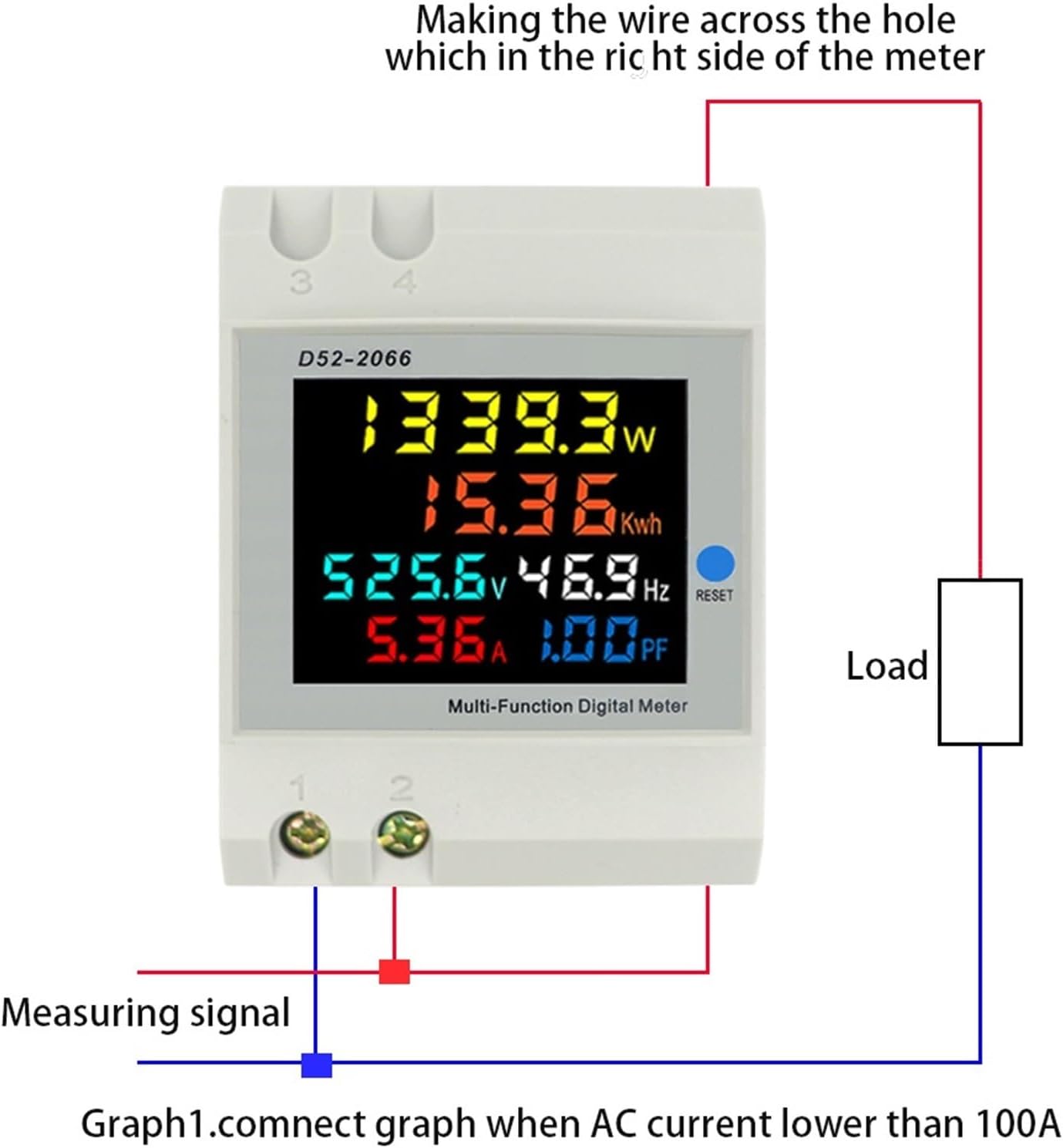
Figure 3: Connection diagram for AC current lower than 100A, showing the measuring signal connected to the meter and the load, with the current transformer integrated into the circuit.

Figure 4: Installation diagram showing how to connect the external current transformer (CT) to the meter and integrate it into the main circuit for current measurement.
Important Attentions During Installation:
- Ensure correct wiring. Incorrect voltage connections (input green terminal and secondary current transformer blue terminal) will damage the meter.
- This meter is designed exclusively for measuring 50Hz AC city electricity. Do not use it to measure square wave, inverter output, or corrected sine wave signals, as this will destroy the device.
4. Operating Instructions
Once properly installed and powered, the D52-2066 meter will automatically begin measuring and displaying the electrical parameters.
- Power On: Supply power to the meter. The display will illuminate and show real-time measurements for voltage, current, power, frequency, power factor, and accumulated electric energy.
- Reading Display: The multi-function digital display cycles through or simultaneously shows the various measured values.
- Reset Electric Energy (KWH): To reset the accumulated electric energy (KWH) reading to zero, press and hold the 'RESET' button on the front panel for approximately 5 seconds.

Figure 5: A close-up view of the D52-2066 meter's digital display, showing various electrical parameters such as wattage, KWH, voltage, frequency, amperage, and power factor.
5. Maintenance
The EVURU D52-2066 Smart Meter requires minimal maintenance.
- Keep the meter clean and free from dust. Use a soft, dry cloth for cleaning.
- Ensure the operating environment is within specified temperature and humidity ranges to prevent damage.
- Avoid exposing the device to direct sunlight or extreme temperatures.
6. Troubleshooting
If you encounter issues with your D52-2066 Smart Meter, consider the following:
- No Display/Incorrect Readings:
- Verify that the power supply is connected correctly and is within the specified voltage range (AC 40-300V).
- Check all wiring connections, especially the current transformer (CT) and voltage input terminals, for secure and correct placement.
- Ensure the measurement circuit wire passes correctly through the CT hole.
- Meter Damage:
- The meter can be destroyed by incorrect voltage connections. Always double-check wiring before applying power.
- This meter is designed for 50Hz AC city electricity only. Using it with square wave, inverter output, or corrected sine wave power sources will cause irreversible damage.
7. Warranty and Support
Warranty information for the EVURU D52-2066 Smart Meter is not provided within this manual. For details regarding warranty coverage, technical support, or service, please refer to the product packaging or contact your retailer or the manufacturer directly.