
1. Introduction
This manual provides detailed instructions for the assembly, operation, and maintenance of your Bellemave Queen Size Murphy Bed with Rotatable Desk. Please read all instructions carefully before beginning assembly or use to ensure safe and proper functionality. Keep this manual for future reference.

Figure 1.1: Bellemave Queen Size Murphy Bed in its compact, closed cabinet form with the desk surface visible.
2. Safety Information
WARNING: Failure to follow these safety instructions may result in injury or product damage.
- Always use caution when folding and unfolding the bed to prevent injury.
- Do not exceed the weight capacity of 600 lbs.
- Carefully follow the assembly instructions to ensure the bed is stable and secure.
- Ensure all fasteners are tightened securely before use. Periodically check and re-tighten as necessary.
- Keep children and pets away from the unit during assembly and operation.
3. Setup and Assembly
The Bellemave Murphy Bed is designed for straightforward assembly. All necessary tools and a comprehensive instruction manual are included with your purchase. It is recommended that two adults perform the assembly.
3.1 Unpacking and Component Check
- Carefully unpack all components from the packaging.
- Verify that all parts listed in the included component list are present and undamaged. If any parts are missing or damaged, do not proceed with assembly and contact customer support.
3.2 Assembly Steps
Follow the step-by-step instructions provided in the separate assembly manual. The general sequence involves:
- Assembling the main cabinet frame.
- Attaching the bed frame mechanism.
- Installing the rotatable desk components.
- Securing the unit to a wall for stability (highly recommended).
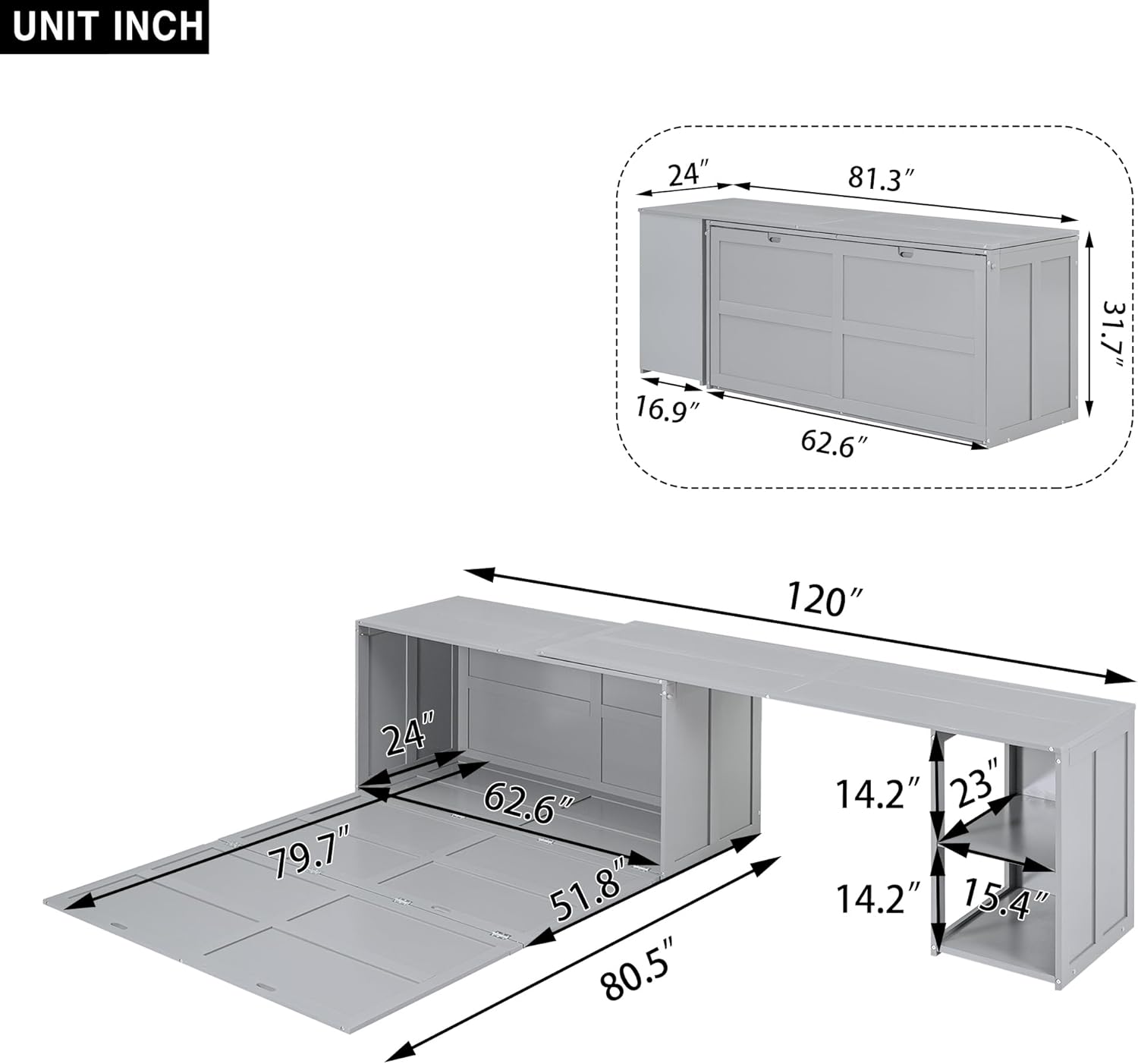
Figure 3.1: Visual guide illustrating the transformation sequence of the Murphy bed and desk.
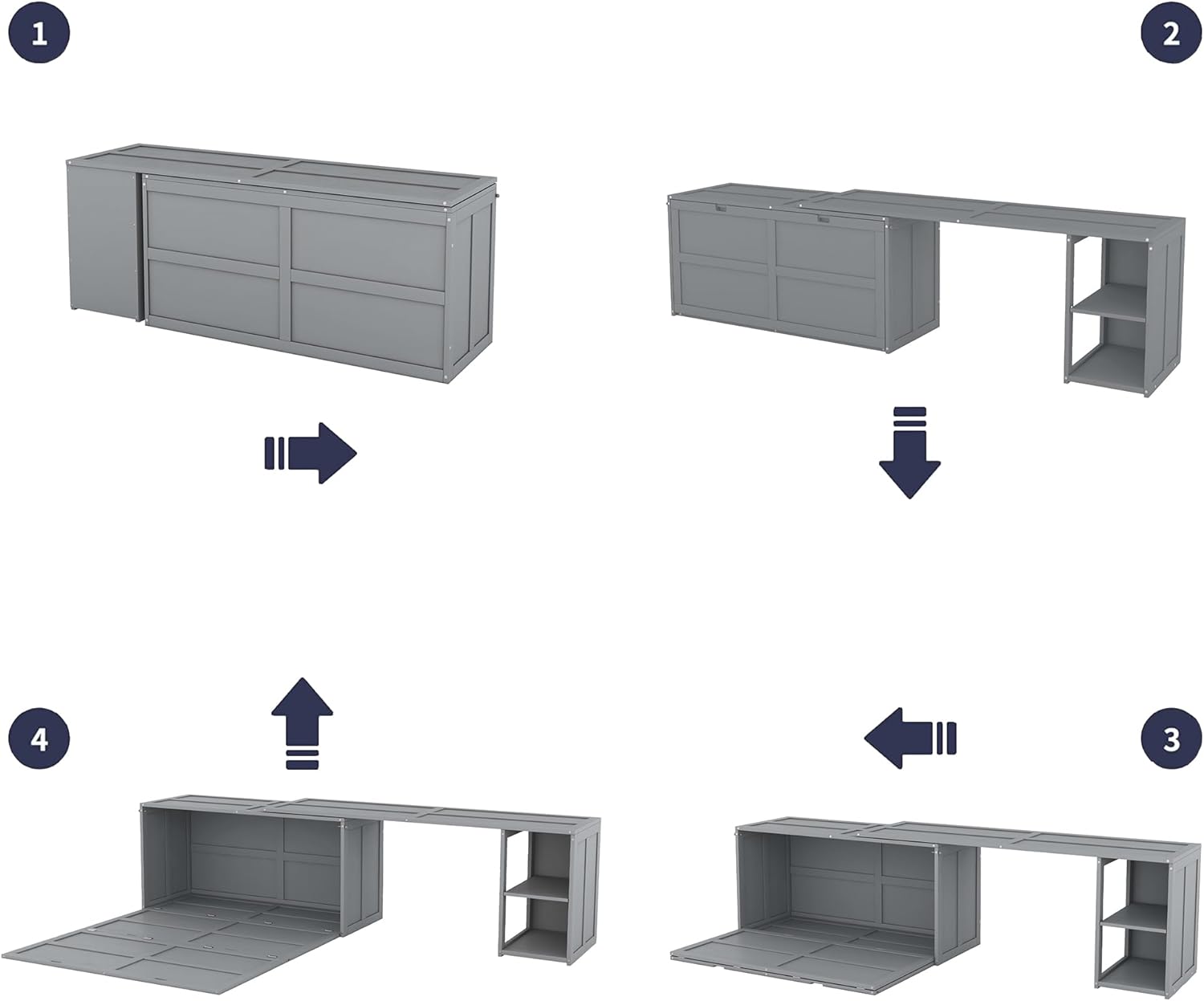
Figure 3.2: Interior view of the bed cabinet, showing the folded bed mechanism.
4. Operating Instructions
4.1 Transforming from Cabinet to Bed
- Ensure the area in front of the cabinet is clear of obstructions.
- Gently pull the handles on the front panel of the cabinet. The bed frame will begin to lower.
- Continue to guide the bed frame down until it rests fully on the floor.
- Adjust bedding as needed.

Figure 4.1: The Murphy bed in its fully open position, ready for use.
4.2 Transforming from Bed to Cabinet
- Remove all bedding and pillows from the bed surface.
- Lift the bed frame from the foot end, guiding it upwards.
- Push the bed frame back into the cabinet until it locks securely in place.

Figure 4.2: The Murphy bed in its closed cabinet configuration.
4.3 Using the Rotatable Desk
The integrated desk can be rotated out for use when the bed is in the closed cabinet position.
- With the bed folded into the cabinet, locate the desk section.
- Gently pull and rotate the desk surface outwards until it is fully extended and stable.
- To retract, push and rotate the desk back into its stored position.

Figure 4.3: The Murphy bed cabinet with the rotatable desk extended for use.

Figure 4.4: The Murphy bed open with the rotatable desk extended, demonstrating its versatility.
5. Maintenance
5.1 Cleaning
- Wipe surfaces with a soft, damp cloth.
- Avoid using harsh chemicals or abrasive cleaners, as these can damage the finish.
- Promptly clean up spills to prevent staining.
5.2 Inspection
- Periodically inspect all bolts and fasteners to ensure they remain tight. Re-tighten as needed.
- Check the bed mechanism for smooth operation. If any resistance or unusual noises are detected, inspect for obstructions or damage.
6. Troubleshooting
| Problem | Possible Cause | Solution |
|---|---|---|
| Bed does not lower or raise smoothly. | Obstruction, loose hardware, or mechanism issue. | Check for items blocking the mechanism. Ensure all assembly hardware is tight. If issues persist, contact customer support. |
| Unit feels unstable. | Not properly secured to the wall, loose fasteners. | Ensure the unit is securely anchored to a wall stud. Re-tighten all assembly bolts. |
| Desk does not rotate freely. | Obstruction or misaligned components. | Check for any items blocking the desk's rotation path. Verify desk components were assembled correctly. |
7. Specifications
| Feature | Detail |
|---|---|
| Brand | Bellemave |
| Model Number | bed-frames |
| Size | Queen |
| Product Dimensions (L x W x H) | 120" x 80.5" x 31.7" |
| Material | Engineered Wood, Pine Wood |
| Headboard Material | Pine Wood, MDF |
| Style | Modern |
| Form Factor | Wall Bed (Murphy Bed) |
| Compatible Mattress Size | Queen |
| Maximum Weight Capacity | 600 lbs |
| Storage Options | Cabinet/Storage Bed |
| Assembly Required | Yes |

Figure 7.1: Dimensional overview of the Murphy bed and desk unit.
8. Warranty Information
Specific warranty details are not provided in the product information. Please refer to your purchase documentation or contact the retailer/manufacturer directly for warranty terms and conditions.
9. Customer Support
If you have any questions, require assistance with assembly, or need to report missing/damaged parts, please contact Bellemave customer support through the retailer's platform or the contact information provided with your purchase.