
1. Product Overview
The Anman G25 Full Motion Racing Simulator Cockpit is designed to provide an immersive racing experience. This cockpit features a sturdy frame, an adjustable racing seat, and platforms for a steering wheel, pedals, and gear shifter. It also includes an integrated display stand for an optimal visual setup.

Figure 1: Anman G25 Full Motion Racing Simulator Cockpit with display stand (peripherals not included).
Key Features:
- Enhanced Racing Simulator Cockpit: The steering wheel platform offers dual-angle and height adjustments, along with forward/backward shifting. Pedals are adjustable for angle, and both the seat and dual shift lever provide front-to-back adjustments for comfort.
- Sturdy Monitor Support: Accommodates screens ranging from 24 to 55 inches with an easy-to-adjust height mechanism.
- Comfortable Racing Seat: Features a high-density sponge interior for durability and an adjustable backrest (60° to 180°).
- Broad Compatibility: Compatible with Logitech G25, G27, G29, G920, G923, and Thrustmaster T300RS, as well as most Logitech, Fanatec, and Thrustmaster Series wheels, pedals, and gear shifts.

Figure 2: Compatibility with various racing peripherals and consoles.
2. Setup and Assembly
Follow these steps to assemble your Anman Racing Simulator Cockpit. It is recommended to have a second person assist with assembly due to the size and weight of some components. Ensure all parts are present before beginning.
2.1 Unpacking and Part Identification
Carefully unpack all components and verify against the parts list provided in your packaging. Lay out all parts on a clean, flat surface.
Video 1: General racing cockpit installation guide. This video demonstrates the assembly process for the main frame and various platforms.
2.2 Main Frame Assembly
- Attach the main frame sections using the provided bolts and nuts. Ensure all connections are secure but do not fully tighten until all sections are aligned.
- Install the foot pads onto the base of the frame.
2.3 Seat Installation
The racing seat is designed for easy integration with the cockpit frame.
- Remove the seat slides from the seat using an Allen wrench.
- Align the seat slide/bracket mounting holes with the corresponding holes on the cockpit frame.
- Secure the seat to the frame using the provided bolts and nuts. Ensure the seat is firmly attached.
Video 2: Installation guide for the Anman red racing seat. This video details the steps for attaching the seat to the cockpit frame.
2.4 Steering Wheel, Pedal, and Shifter Platform Installation
- Attach the steering wheel platform to the main uprights using the U-bolts and nuts.
- Mount the pedal platform to the base frame.
- Install the shifter platform to the side of the seat frame.

Figure 3: Steering wheel platform attachment points.
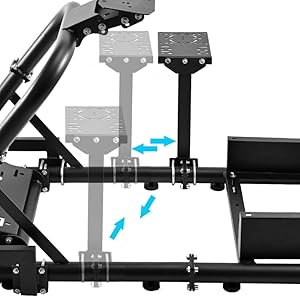
Figure 4: Pedal platform attachment points.

Figure 5: Shifter platform attachment points.
2.5 Display Stand Assembly
- Assemble the vertical posts of the display stand.
- Attach the horizontal mounting brackets to the vertical posts.
- Secure the display stand to the main cockpit frame using the provided hardware.

Figure 6: Components and dimensions of the display stand.
2.6 Final Tightening
Once all components are in place and aligned, fully tighten all bolts and nuts using the provided tools. Ensure the cockpit is stable and all connections are secure.
3. Adjustments
The Anman Racing Simulator Cockpit offers multiple adjustment points to customize your racing position for comfort and performance.
- Steering Wheel Platform: Adjust the height and angle of the steering wheel platform using the adjustment knobs. It can also be shifted forward or backward.
- Pedal Platform: The angle of the pedal platform can be adjusted to suit your preference.
- Racing Seat: The seat can be moved forward and backward on its slides. The backrest angle is adjustable from 60° to 180°.
- Shifter Platform: The dual shift lever platform can be adjusted front-to-back.
- Display Stand: The height of the monitor mounting brackets can be adjusted to align with your eye level.

Figure 7: Adjustable features of the racing seat, including recline and forward/backward movement.
4. Operating Instructions
Once assembled and adjusted, connect your preferred racing wheel, pedals, and shifter to their respective platforms. Mount your display to the display stand. Ensure all cables are neatly routed and secured to prevent interference during use. Power on your gaming system and peripherals to begin your racing simulation experience.

Figure 8: The Anman Racing Simulator Cockpit ready for use with connected peripherals and a display.
5. Care and Maintenance
Regular care and maintenance will ensure the longevity and optimal performance of your racing simulator cockpit.
- Cleaning: Wipe down the metal frame and plastic components with a soft, damp cloth. For the seat, use a mild upholstery cleaner if necessary, following the cleaner's instructions. Avoid abrasive cleaners or solvents.
- Inspection: Periodically check all bolts, nuts, and connections to ensure they are tight and secure. Re-tighten any loose fasteners.
- Lubrication: If any moving parts (e.g., seat slides, adjustment mechanisms) become stiff, apply a small amount of silicone-based lubricant.
- Storage: If storing the cockpit for an extended period, ensure it is clean and dry. Store in a cool, dry place away from direct sunlight.
6. Troubleshooting
This section addresses common issues you might encounter with your racing simulator cockpit.
- Cockpit Instability: Ensure all bolts and nuts are fully tightened. Verify that the floor is level and the foot pads are making full contact.
- Difficulty Adjusting Components: Check for any obstructions or debris in the adjustment mechanisms. Apply lubricant if parts are stiff. Ensure adjustment knobs are fully loosened before attempting to move components.
- Peripheral Mounting Issues: Confirm that your racing wheel, pedals, and shifter are compatible with the cockpit's mounting plates. Refer to the peripheral manufacturer's instructions for specific mounting requirements.
- Monitor Stand Wobble: Ensure the display stand is securely attached to the main frame and all monitor mounting screws are tight. Verify the monitor's weight does not exceed the stand's capacity.
7. Specifications
| Feature | Detail |
|---|---|
| ASIN | B0C8MTZCXT |
| Product Dimensions | 32.5 x 22.8 x 11.4 inches |
| Item Model Number | Racing Simulator Cockpit 7554 |
| Item Weight | 32.5 pounds |
| Manufacturer | Anman |
| Date First Available | June 20, 2023 |
| Material | Alloy Steel (Steel Tube Size: 50MM×50MM) |
| Seat Material | Artificial simulation PU leather, high-density sponge |
| Monitor Stand Compatibility | 24 to 55 inches, Max load-bearing 50lbs |

Figure 9: Key dimensions of the Anman Racing Simulator Cockpit.
8. Warranty and Support
For warranty information and customer support, please refer to the documentation included with your product or contact Anman customer service directly. Anman is committed to providing assistance and answering any questions you may have regarding your racing simulator cockpit.